EDI2XML
  • About
    • The Company
    • EDI2XML
    • Advantages
    • Partnership with EDI2XML
    • Testimonials
  • Services
    • Enterprise AI
    • Fully Managed Integration
    • Fully Managed EDI Services
    • EDI Web Portal
    • EDI Web Service
    • EDI On Premises
    • Managed Cloud Services
    • Amazon Integration
    • Shopify Integration
    • BigCommerce Integration
    • NetSuite Integration
    • JD Edwards Integration
    • Dynamics 365 Integration
    • SAP B1 Integration
    • Salesforce Integration
    • Industry 4.0 Integration
  • Pricing
    • EDI Managed Services
    • EDI Web Service
    • EDI On-Premises
    • Managed Cloud Services
    • Shopify Integration
    • JD Edwards Integration
    • E-commerce Integration
    • All other Integrations
  • Blog
  • Resources
    • Resource Center
    • List of EDI Codes
    • List of EDIFACT Messages
    • EDI Documents Library
    • Trading Partners
  • Contact us
  • Book a Consultation
  • Click to open the search input field Click to open the search input field Search
  • Menu Menu
  • Link to Facebook
  • Link to LinkedIn
  • Link to X
  • Link to Youtube

Optimize your business with Business Central integration by edi2xml. Achieve seamless data flow, automate processes, and boost efficiency across your operations

Tag Archive for: Business Central

Integrating EDI and Microsoft Business Central using Magic XPI

Blog

This article discusses how to integrate EDI with Microsoft Business Central using Magic xpi to extend the software’s functionalities.

Streamlining Business Processes with EDI2XML

In the realm of Electronic Data Interchange (EDI), EDI2XML stands as a beacon of expertise and reliability. With over 20 years of experience in the field, EDI2XML has been at the forefront of simplifying EDI communications and transforming them into a more user-friendly format. This blog post will delve into the integration of EDI with Microsoft Business Central using Magic xpi, leveraging the extensive knowledge and proven methodologies that EDI2XML has honed over two decades.

Without an effective EDI system, your business may be hampered by inaccuracies and communication gaps, which, of course, will affect your business performance overall. Fortunately, this drawback can be addressed by using Magic xpi—a platform that allows businesses to integrate EDI into Dynamics 365 Business Central.

EDI and Microsoft Business Central at a Glance

What is EDI?

EDI is an electronic exchange of business documents, typically in a standardized format. It is more structured than mail or email and follows a standard, which helps avoid inaccuracies and human errors. EDI works completely electronically, so it’s fast.

Understanding Microsoft Business Central

Microsoft Dynamics 365 Business Central is a business management solution for small and medium-sized businesses (SMBs). It is a cloud-based software that offers a range of features for managing different business aspects, such as resource planning, budgeting, operations, and sales. It works seamlessly with other Microsoft products like Teams, Outlook, Sheets, and Co-Pilot.

 

Why Integrate EDI with Business Central?

Microsoft Business Central (formerly called Dynamics Navision) is an all-inclusive business management solution that lacks EDI capabilities. However, using a reliable platform, EDI can be integrated.

If you run a business that caters to other businesses, there’s a chance there’s frequent document exchange. For instance, if you’re a vendor selling and shipping goods all over the world, you send invoices and advanced shipping notices (ASNs) to your clients.

Wouldn’t it be more efficient to create those from scratch rather than do it right there within your Business Central platform? That’s where EDI integration comes in. Once integrated with your existing system, in this case, Business Central, EDI exchange will use the data in business central to automate the creation of documents such as ASNs.

EDI integration offers business convenience and efficiency, as workers don’t have to spend a lot of time creating documents and sending them through email. And the system also works in favor of your partners or clients (if they have EDI on their end), as they, too, save time and receive the documents right in their system.


More insights about Business Central integration: Microsoft Dynamics 365 Integration


How to Integrate EDI with Microsoft Business Central?

To integrate EDI into Business Central, you’ll need an out-of-the-box connector that essentially connects the software with the EDI platform. That EDI platform, in turn, communicates with the systems used by your business partners.

Magic xpi is a reliable integration platform that enables the connection between Dynamics Business Central and the EDI Service Platform. The latter is the platform that connects with outside systems and establishes connections per business process.

How Does Integration Work?

Magic xpi coordinates with your system, like Business Central, and sends the data to the EDI platform, which then creates a standardized document. For this process to work correctly, EDI mapping is used, which takes data from one system and translates it into a format that can be understood by another system.

Also, the EDI connector collects data from the application automatically, as per the requirement for the EDI standardized document. For instance, the EDI platform will need data from your inventory or sales management systems if you’re sending out an ASN.

Magic xpi boasts hundreds of connectors, meaning the technology is endorsed by the software company it is integrating with. More importantly, it offers a no-code integration, so there’s little to no coding required on your end. That said, setting up the integration with Magic xpi requires some technical expertise. You can create up to 10,000 business partner profiles to exchange documents.
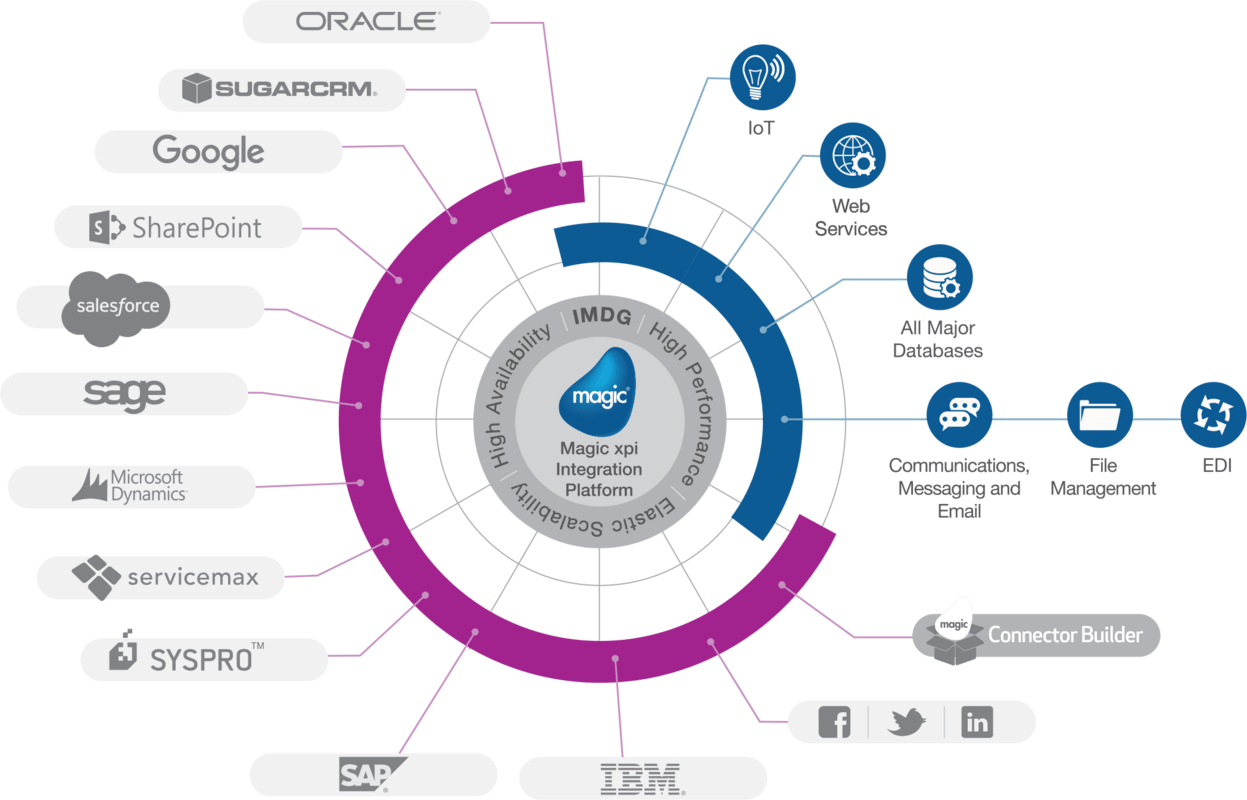
 
EDI2XML-Magic-xpi-integration-platform
 

Magic xpi Benefits

Although there are many EDI integration solutions in the market, Magic easily stands out. 

The main reason is that we at Edi2Xml extended Magic xpi power and capability to be able to process EDI documents, from different several standards such as (EDIFACT, TRADACOMS, EDIA, etc.).

Magic xpi uses a one-to-many approach, where a single connection is created for a business process that can connect with many partners. For instance, it will create a connection for invoicing that can be used to create invoices for different partners/clients who may be using a different document standard/language.

Consider Fully Managed EDI Integration for Business Success

If you want to optimize EDI integration with Microsoft Business Central, go with a fully managed EDI integration service with EDI2XML. At EDI2XML, we utilize Magic xpi to integrate Magic’s EDI platform with your system, setting up connectors and communication channels with your business partners. 

Learn more about how EDI2XML can benefit your business. Get your free consultation today with our experts to help you get started!


 
EDI2XML-Book-a-free-consultation
May 29, 2024/0 Comments
https://www.edi2xml.com/wp-content/uploads/2024/05/EDI2XML-Integrating-EDI-and-Microsoft-Business-Central-using-Magic-XPI.png 675 1200 Tatyana Vandich https://www.edi2xml.com/wp-content/uploads/2024/08/edi2xml.com-EDI2XML-company-logo.png Tatyana Vandich2024-05-29 15:25:182025-03-07 15:34:39Integrating EDI and Microsoft Business Central using Magic XPI

From CRM to ERP: Understanding Microsoft Dynamics 365 and Business Central

Blog

Microsoft Dynamics 365 and Dynamics 365 Business Central are both business management solutions offered by Microsoft, designed to help companies manage their operations more efficiently. In this blog series, we continue our exploration of Microsoft Dynamics 365, focusing today on the specifics of Dynamics 365 Business Central.

What is Microsoft Dynamics 365 Business Central

Dynamics 365 Business Central is a cloud-based ERP solution specifically designed for small and medium-sized businesses (SMBs). The original name of the product before it was renamed Business Central was Dynamics NAV. The key difference is that Dynamics NAV operates directly on-site and is installed on local servers. Dynamics 365 Business Central is built on top of Dynamics NAV, it provides improved usability, cloud accessibility, and a more comprehensive feature set.

It offers comprehensive functionalities to manage finances, sales, purchasing, inventory, projects, and more, all within a single platform.

Business Central could be seamless integrated with other Microsoft applications like Office 365, Power BI, and Microsoft 365.

Advantages of Business Central

Dynamics 365 Business Central continues to gain popularity, especially among small and medium-sized businesses seeking streamlined ERP capabilities.

Affordability: Cost-effective solution tailored for the budget and needs of SMBs.

Ease of Use: Intuitive user interface designed for non-technical users, with minimal training required.

Rapid Implementation: Quick deployment and setup compared to traditional on-premises ERP systems.

Scalability: Can grow with the business, accommodating increasing data volumes and users.

Cloud-based: Offers the flexibility of accessing data and applications from anywhere, anytime.

Integration EDI2XML
 

Differences Between Microsoft Dynamics 365 and Business Central

The most frequently asked question is what is the difference between Dynamics 365 and Business Central?

Above we have already talked about the basic characteristics of Business Central. Let’s compare the main differences between these two business systems.

What is Microsoft Dynamics 365?

Microsoft Dynamics 365 is a suite of cloud-based business applications that integrate customer relationship management (CRM) and enterprise resource planning (ERP) capabilities. It encompasses various solutions to address the diverse needs of organizations.

Target Audience

Dynamics 365 is suitable for businesses of all sizes, while Business Central is specifically targeted at SMBs.

Scope

Dynamics 365 offers a broader range of functionalities and modules, including CRM capabilities, while Business Central focuses primarily on ERP functionalities.

Complexity

Dynamics 365 may be more complex due to its extensive feature set and customization options, whereas Business Central is simpler and easier to implement, especially for smaller organizations.

Cost

Dynamics 365 may involve higher licensing and implementation costs, whereas Business Central is typically more affordable, with subscription-based pricing tailored for SMBs.

Both Microsoft Dynamics 365 and Business Central are powerful business solutions, the choice between them depends on the size, complexity, and specific needs of the business. Large enterprises with complex requirements may opt for Dynamics 365, while SMBs looking for a more streamlined and cost-effective solution may prefer Business Central.

Dynamics 365 Business Central Integration

Organizations that use Dynamics 365 Business Central often integrate it with various systems and applications to enhance their business processes.

Integrating Dynamics 365 Business Central with other business applications instead of relying solely on the broader Dynamics 365 suite can be influenced by several factors.

Let’s explore some common integration scenarios and reasons why companies make this choice:

Dynamics 365 Business Central and E-Commerce Integration

Integration Purpose: Connecting Business Central with e-commerce platforms (such as Shopify, BigCommerce, Magento or Amazon) allows seamless synchronization of product catalogs, inventory levels, orders, and customer data.

Why?: By integrating e-commerce systems, businesses can automate order processing, maintain accurate stock levels, and provide real-time information to customers.

Business Central and Electronic Data Interchange (EDI) Integration

Integration Purpose: EDI integration enables the exchange of business documents (such as purchase orders, invoices, and shipping notices) electronically between Business Central and trading partners.

Why?: EDI streamlines communication, reduces manual data entry, and ensures data accuracy in business transactions.

Business Central and Customer Relationship Management (CRM) Software Integration

Many companies have existing systems, such as CRM platforms like Salesforce, or other specialized tools. These systems may already be deeply integrated into their processes. Migrating everything to a new system can be disruptive and costly.

Integration Purpose: Linking Business Central with CRM systems (like Microsoft Dynamics 365 Sales or Salesforce) ensures a unified view of customer interactions, sales opportunities, and order history.

Why?: Seamless CRM integration enhances customer service, sales forecasting, and personalized marketing efforts.

Book your Free Consultation with Integration expert
 

Business Central Integration with Business Intelligence and Analytics Tools

Integration Purpose: Integrating with tools like Power BI or Tableau allows organizations to analyze data from Business Central, create dashboards, and gain insights into financial performance, inventory trends, and operational efficiency.

Why?: Data-driven decision-making becomes more effective when integrated with robust analytics platforms.

Business Central Integration with Financial Services

Integration Purpose: Connecting Business Central with financial services (such as payment gateways, credit card processors, or banking systems) streamlines payment processing, reconciliation, and financial reporting.

Why?: Efficient financial operations are critical for any business, and fintech integrations enhance accuracy and speed.

While Dynamics 365 offers a comprehensive suite, licensing costs can add up. Integrating Business Central with existing systems and applications allows companies to optimize costs by paying only for necessary features.

Outsourcing Integration Services

Many companies realize the importance of integrating their systems and applications. However, not every company can afford to maintain its own team of specialists exclusively for integration projects. This is why we, at EDI2XML offer our integration services.

Our Expertise, Your Advantage

Turnkey Solutions:

We offer end-to-end integration services—from planning to post-implementation support. You don’t need to worry about assembling a team or managing the intricacies of integration projects. We handle it all.

Customized Approach

Every business is unique. Our experienced professionals tailor integration solutions to your specific needs. Whether it’s connecting Dynamics 365 Business Central with your existing CRM, e-commerce platform, or financial system, we’ve got you covered.

Cost-Effective Strategy

Outsourcing integration eliminates the need for full-time specialists. You invest in the expertise required, ensuring you’re only paying for the specific knowledge and skills essential for your current objectives and challenges. No overhead costs, no idle resources.

Seamless Transition

Worried about disruptions during implementation? Don’t be. Our seamless transition ensures minimal impact on your daily operations. We work behind the scenes, so you can focus on what matters most.

Scalability and Flexibility

As your business grows, so do your integration needs. We scale our services accordingly. Plus, with cloud-based solutions like Business Central, you’re ready for future expansion.

Your Success, Our Mission By partnering with us, you gain access to a dedicated team of integration experts who understand the intricacies of Dynamics 365 Business Central and beyond. Let us handle the technical details while you stay focused on driving your business forward. Book a free consultation with our integration expert!

Free IT Consultation - Dynamics 365
May 9, 2024/0 Comments
https://www.edi2xml.com/wp-content/uploads/2024/05/EDI2XML-Dynamics-365-and-Business-Central.png 675 1200 Tatyana Vandich https://www.edi2xml.com/wp-content/uploads/2024/08/edi2xml.com-EDI2XML-company-logo.png Tatyana Vandich2024-05-09 17:00:092025-04-22 11:31:06From CRM to ERP: Understanding Microsoft Dynamics 365 and Business Central

The Main Reasons Why You Need Microsoft Dynamics Integration with your Business Systems

Blog

This post was updated to reflect current trends and information


Microsoft Dynamics is an enterprise resource Planning (ERP) and Customer Relationship Management (CRM) software applications. Microsoft has several product lines within Dynamics:

  • Microsoft Dynamics GP – Great Plains
  • Microsoft Dynamics SL – Solomon
  • Microsoft Dynamics AX – Axapta
  • Microsoft Dynamics NAV – Navision (Dynamics 365 Business Central now) 

Today I want to talk about the most popular of the Dynamics product line – Microsoft Dynamics NAV (Navision)

What is Microsoft Dynamics NAV?

Microsoft Dynamics NAV is an Integrated Business Management Solution (ERP) for midsize and small businesses, delivered by Microsoft in the Microsoft Dynamics product line. Microsoft Navision combines ERP and CRM business solutions.

Besides being known as Microsoft Dynamics Navision, this robust Enterprise Resource Planning (ERP) solution has also been referred to by a few other names over the years. Here are some of the alternative names for Dynamics Navision:

1. Navision: This is the most common and concise way to refer to the ERP system. Many users and professionals in the field simply use “Navision” to discuss it.

2. Microsoft Dynamics 365 Business Central: In recent years, Microsoft has integrated Navision into its broader suite of business applications under the umbrella of Dynamics 365. As a result, Dynamics Navision is now often called Dynamics 365 Business Central. This name emphasizes its central role in managing various business processes.

3. Microsoft Business Central: Some users shorten the name even further and refer to it as Business Central. This streamlined version highlights its core purpose as a central hub for business operations.

Regardless of the name, Dynamics Navision (or its modern counterpart, Dynamics 365 Business Central) remains a powerful tool for managing finances, supply chain, inventory, and customer relationships. If you’re exploring ERP options, it’s worth diving deeper into its capabilities!

Book your Free Consultation with Integration expert

Microsoft Dynamics NAV is designed to manage customer relationships, finances, production supply chains, analytics, and e-commerce. Microsoft Dynamics NAV — the development of the Danish company Navision Software A/S, which Microsoft acquired in 2002.

Microsoft Dynamics NAV Technology

The Microsoft Dynamics NAV is a three-tier client-server application. It consists of three main components:

  • The Database Server
  • The application server
  • The Client(s) who connects using Windows or the web interface.

As a database management system, Microsoft SQL Server is used. SQL Server Analysis Services and Reporting Services are used to analyze and process operational data. Microsoft Dynamics NAV’s adaptability is provided by the object-oriented development environment of C/SIDE (Client/Server Integrated Development Environment). This allows to freely change the application code: modify the standard functionality, create individual reporting, etc.

According to Statista  22 percent of respondents said that they used Microsoft Dynamics for the purpose of CRM.

Microsoft Dynamics NAV Modules

Microsoft Dynamics NAV, has several modules delivering multiple functions for an enterprise. The main modules of Navision from Microsoft are:

  • Financial Management
  • Distribution Management
  • Customer Relationship Management
  • Products management
  • Projects management
  • Human resources management

There are more of the core modules by now, but I wanted to give an idea about Dynamics ERP.

Microsoft Dynamics NAV Integration

Companies using Microsoft Dynamics NAV, often need to integrate it with third-party systems. It is a rare exception to find a company that uses only Navision without any other system on-premises (or in the cloud). For example, lots of companies doing eCommerce use either Shopify or Magento (or any other eCom platform), and they use Microsoft Navision as their ERP backbone. Another example, is a company might be using some point of sale (POS) software, exchanging data with a 3PL, or even exchanging EDI with its partners; To avoid redundant data entry and data processing, companies decide mainly to go with full integration and automation of their flows and processes.

Integrating Microsoft NAV with other business systems is a big challenge and it’s possible to realize in-house, considering a company has enough qualified IT personnel and resources. Most companies outsource such a job in order to optimize the time of their internal IT staff, already stretched thin…

The Main Signs that You Need Microsoft Dynamics NAV Integration

There are many common factors that indicate the necessity of Dynamics NAV integration. But I would like to draw your attention to the following three main points:

You and your staff spend a lot of time on manual data entry in different systems

Entering the same information into different business systems takes a lot of time. If employees spend aт hours to moving data manually, this is a sure sign that you need to think about automation and integration. You can free up your employee’s time to perform more important tasks.

Mismatch information in your business systems

You can’t avoid the human mistakes when you manually enter information into the system. Typo errors such as invalid addresses or inaccurate numbers can be transferred from one software business system to another and lead to a wrong delivery address or inaccurate inventory (for example). As a result, such errors can create a great loss for any enterprise if it is happening frequently.

Unproductive Processes

Can you quickly get new items up on your eCommerce store? How much time does it take to update your inventory? When these processes are not smoothly running and it takes a lot of human intervention and time it negatively influences your business performance.

So, Integrating Microsoft Dynamics NAV permits to automatically synchronize information between your ERP and other software business systems.

Third-Party Integration Platform

You don’t need to have the capabilities in-house, for realizing an integration Dynamics NAV with the other systems. You can use a third-party integration provider that has a platform for integrating NAV with other business systems, from the cloud and without any installation on your premises. The best solution in the integration market is Magic xpi Integration Platform. Magic xpi delivers code-free, enterprise-grade integration, business process automation, and data synchronization solutions. This integration Platform uses pre-built certified connectors for automatic, real-time integration of CRM and ERP data with other enterprise applications such as email, calendar, and database systems.

Seamless integration with EDI2XML and Magic xpi

Find the Right Partner for your integration project. Contact us if you want to improve and change the way you do your Business. Click the image below to get a Free consultation about automating your processes.

Free IT Consultation
July 3, 2018/0 Comments
https://www.edi2xml.com/wp-content/uploads/2018/07/MS-Dynamics-integration.png 350 1024 Tatyana Vandich https://www.edi2xml.com/wp-content/uploads/2024/08/edi2xml.com-EDI2XML-company-logo.png Tatyana Vandich2018-07-03 10:48:552024-05-02 13:22:09The Main Reasons Why You Need Microsoft Dynamics Integration with your Business Systems
Recent
  • The Infrastructure Behind Modern Commerce: Why EDI Still Matters
    EDI in E-Commerce and Retail: Why Modern Commerce Still...May 1, 2026 - 4:54 pm
  • Key Statistics on AI Use in the Workplace
    The Risks of Using Public AI Tools in Business: Data Privacy,...March 11, 2026 - 5:51 pm
  • Enterprise AI
    How to Securely Access Enterprise AI: GPT, DeepSeek &...February 20, 2026 - 3:09 pm
  • EDI 754 Guide
    EDI 754 Routing Instructions: Complete Guide to Purpose,...February 18, 2026 - 4:54 pm
  • All you need to know about EDI 753 Transaction
    What Is EDI 753? Purpose, Structure & Routing Rule...February 12, 2026 - 3:59 pm
Popular
  • How to Quickly Connect to a Large Retailer's EDI Requirements
    How to Get EDI-Compliant Quickly For A Large RetailerNovember 21, 2025 - 4:29 pm
  • EDI-as-a-services
    EDI Translation Software “On-premises” or “As...January 21, 2014 - 1:28 pm
  • order-automation in e-commerce
    Why Is It Crucial to Automate the E-Commerce Order Fulfillment...May 10, 2022 - 1:58 pm
  • EDI for Logistics and transportation
    EDI Integration for Efficient Transportation ManagementOctober 6, 2023 - 1:33 pm
  • information technology definitions
    Business Tech Terms DefinitionsMay 24, 2018 - 1:32 pm

Subscribe to our Blog

Please verify that you are human.

Browse by tag

Amazon Amazon Integration ANSI ASC x12 ASC X12 EDI B2B EDI integration e-commerce e-commerce business e-commerce integration eCommerce eCommerce integration EDI EDI2XML EDI as a Service EDI Communication EDIFACT EDI for supply chain EDI for Third-Party Logistics EDI for transportation EDI implementation EDI Integration EDI Integration Project EDI project EDI to XML converter EDI Translation EDI Web Service EDI x12 ERP Fully managed EDI Integration integration platform integration project JDE Logistics EDI Transactions Magic xpi NetSuite online store Shopify Shopify eCommerce integration Shopify integration soa integration Supply Chain Supply Chain Management Translation Software X12 EDI XML

Menu

  • Home
  • About the EDI2XML Company
  • About EDI2XML EDI Converter
  • Blog
  • Book A Free Consultation
  • Privacy Policy EDI2XML Company

Our Services

Fully Managed Integration

E-Commerce Integration

Business Systems Integration

Fully Managed EDI

EDI Web Service 

On Premises EDI 

Managed Cloud Service


Latest Blog Posts

  • The Infrastructure Behind Modern Commerce: Why EDI Still Matters
    EDI in E-Commerce and Retail: Why Modern Commerce Still Depends on EDIMay 1, 2026 - 4:54 pm
  • Key Statistics on AI Use in the Workplace
    The Risks of Using Public AI Tools in Business: Data Privacy, Compliance, and Shadow AIMarch 11, 2026 - 5:51 pm
  • Enterprise AI
    How to Securely Access Enterprise AI: GPT, DeepSeek & LLaMAFebruary 20, 2026 - 3:09 pm

Contact Us

400 Blvd Curé-Labelle, #304 Laval QC H7V 2S7 Canada

Contact EDI2XML Team
Phone: +1 450-681-3009
Website: https://www.edi2xml.com/

© 2000-2026 EDI2XML (by Namtek Consulting Services). All rights reserved.
  • Link to Facebook
  • Link to LinkedIn
  • Link to X
  • Link to Youtube
  • Blog
Scroll to top Scroll to top Scroll to top