EDI2XML
  • About
    • The Company
    • EDI2XML
    • Advantages
    • Partnership with EDI2XML
    • Testimonials
  • Services
    • Enterprise AI
    • Fully Managed Integration
    • Fully Managed EDI Services
    • EDI Web Portal
    • EDI Web Service
    • EDI On Premises
    • Managed Cloud Services
    • Amazon Integration
    • Shopify Integration
    • BigCommerce Integration
    • NetSuite Integration
    • JD Edwards Integration
    • Dynamics 365 Integration
    • SAP B1 Integration
    • Salesforce Integration
    • Industry 4.0 Integration
  • Pricing
    • EDI Managed Services
    • EDI Web Service
    • EDI On-Premises
    • Managed Cloud Services
    • Shopify Integration
    • JD Edwards Integration
    • E-commerce Integration
    • All other Integrations
  • Blog
  • Resources
    • Resource Center
    • List of EDI Codes
    • List of EDIFACT Messages
    • EDI Documents Library
    • Trading Partners
  • Contact us
  • Book a Consultation
  • Click to open the search input field Click to open the search input field Search
  • Menu Menu
  • Link to Facebook
  • Link to LinkedIn
  • Link to X
  • Link to Youtube

Magic xpi a No-Code integration platform by Magic Software. Visual Mapping of data from source to destination, with certified connectors to branded ERP/CRM.

Tag Archive for: Magic xpi

Integrating EDI and Microsoft Business Central using Magic XPI

Blog

This article discusses how to integrate EDI with Microsoft Business Central using Magic xpi to extend the software’s functionalities.

Streamlining Business Processes with EDI2XML

In the realm of Electronic Data Interchange (EDI), EDI2XML stands as a beacon of expertise and reliability. With over 20 years of experience in the field, EDI2XML has been at the forefront of simplifying EDI communications and transforming them into a more user-friendly format. This blog post will delve into the integration of EDI with Microsoft Business Central using Magic xpi, leveraging the extensive knowledge and proven methodologies that EDI2XML has honed over two decades.

Without an effective EDI system, your business may be hampered by inaccuracies and communication gaps, which, of course, will affect your business performance overall. Fortunately, this drawback can be addressed by using Magic xpi—a platform that allows businesses to integrate EDI into Dynamics 365 Business Central.

EDI and Microsoft Business Central at a Glance

What is EDI?

EDI is an electronic exchange of business documents, typically in a standardized format. It is more structured than mail or email and follows a standard, which helps avoid inaccuracies and human errors. EDI works completely electronically, so it’s fast.

Understanding Microsoft Business Central

Microsoft Dynamics 365 Business Central is a business management solution for small and medium-sized businesses (SMBs). It is a cloud-based software that offers a range of features for managing different business aspects, such as resource planning, budgeting, operations, and sales. It works seamlessly with other Microsoft products like Teams, Outlook, Sheets, and Co-Pilot.

 

Why Integrate EDI with Business Central?

Microsoft Business Central (formerly called Dynamics Navision) is an all-inclusive business management solution that lacks EDI capabilities. However, using a reliable platform, EDI can be integrated.

If you run a business that caters to other businesses, there’s a chance there’s frequent document exchange. For instance, if you’re a vendor selling and shipping goods all over the world, you send invoices and advanced shipping notices (ASNs) to your clients.

Wouldn’t it be more efficient to create those from scratch rather than do it right there within your Business Central platform? That’s where EDI integration comes in. Once integrated with your existing system, in this case, Business Central, EDI exchange will use the data in business central to automate the creation of documents such as ASNs.

EDI integration offers business convenience and efficiency, as workers don’t have to spend a lot of time creating documents and sending them through email. And the system also works in favor of your partners or clients (if they have EDI on their end), as they, too, save time and receive the documents right in their system.


More insights about Business Central integration: Microsoft Dynamics 365 Integration


How to Integrate EDI with Microsoft Business Central?

To integrate EDI into Business Central, you’ll need an out-of-the-box connector that essentially connects the software with the EDI platform. That EDI platform, in turn, communicates with the systems used by your business partners.

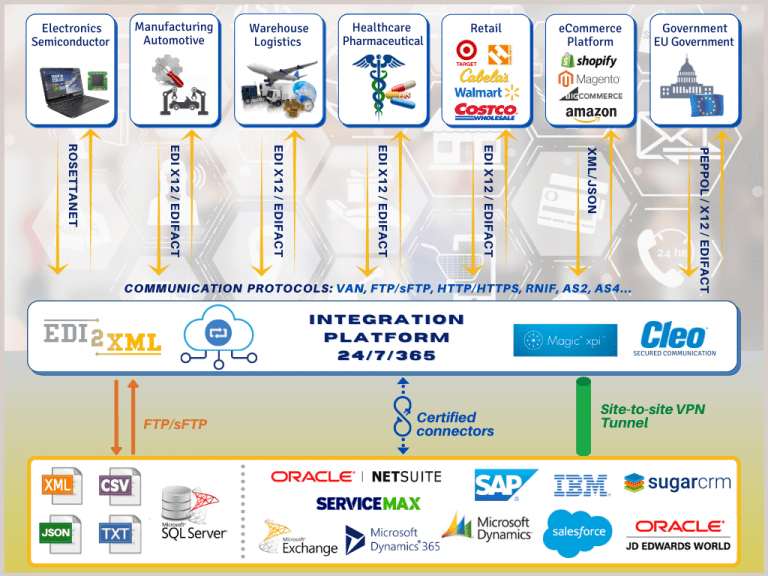
Magic xpi is a reliable integration platform that enables the connection between Dynamics Business Central and the EDI Service Platform. The latter is the platform that connects with outside systems and establishes connections per business process.

How Does Integration Work?

Magic xpi coordinates with your system, like Business Central, and sends the data to the EDI platform, which then creates a standardized document. For this process to work correctly, EDI mapping is used, which takes data from one system and translates it into a format that can be understood by another system.

Also, the EDI connector collects data from the application automatically, as per the requirement for the EDI standardized document. For instance, the EDI platform will need data from your inventory or sales management systems if you’re sending out an ASN.

Magic xpi boasts hundreds of connectors, meaning the technology is endorsed by the software company it is integrating with. More importantly, it offers a no-code integration, so there’s little to no coding required on your end. That said, setting up the integration with Magic xpi requires some technical expertise. You can create up to 10,000 business partner profiles to exchange documents.
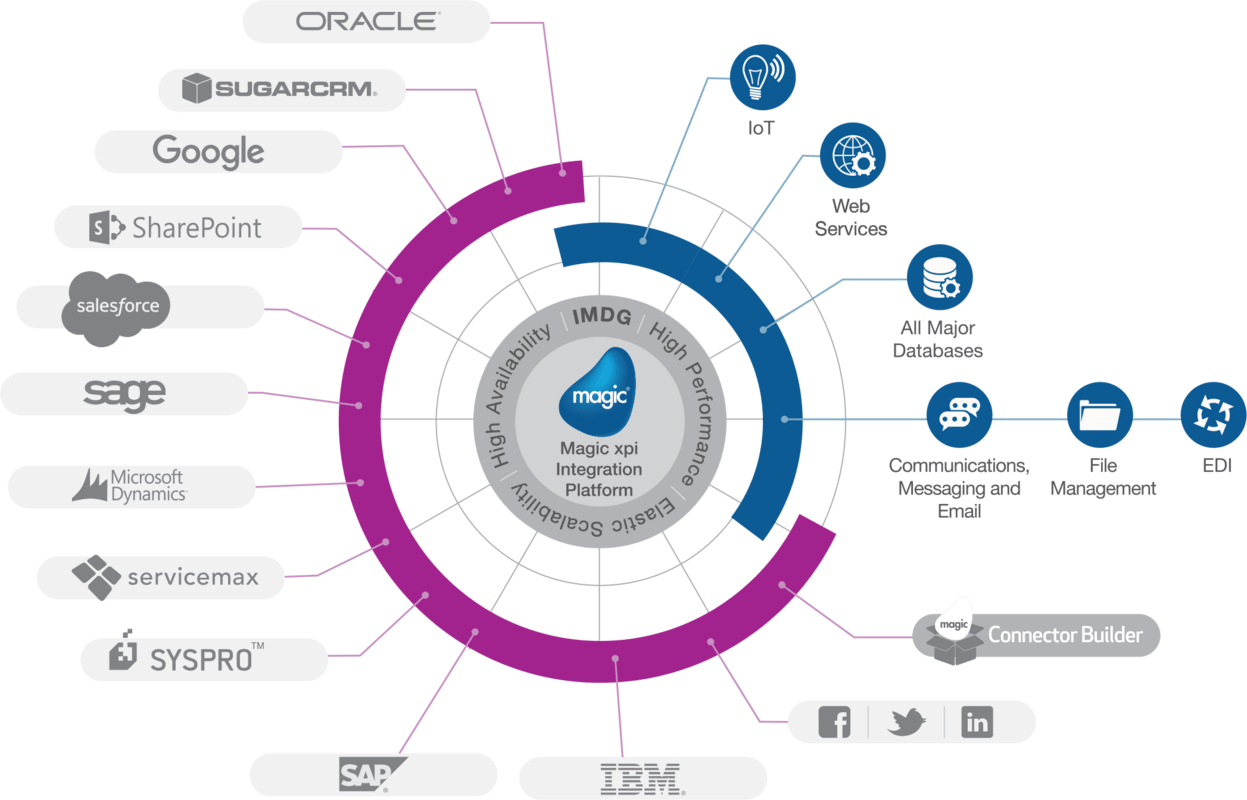
 
EDI2XML-Magic-xpi-integration-platform
 

Magic xpi Benefits

Although there are many EDI integration solutions in the market, Magic easily stands out. 

The main reason is that we at Edi2Xml extended Magic xpi power and capability to be able to process EDI documents, from different several standards such as (EDIFACT, TRADACOMS, EDIA, etc.).

Magic xpi uses a one-to-many approach, where a single connection is created for a business process that can connect with many partners. For instance, it will create a connection for invoicing that can be used to create invoices for different partners/clients who may be using a different document standard/language.

Consider Fully Managed EDI Integration for Business Success

If you want to optimize EDI integration with Microsoft Business Central, go with a fully managed EDI integration service with EDI2XML. At EDI2XML, we utilize Magic xpi to integrate Magic’s EDI platform with your system, setting up connectors and communication channels with your business partners. 

Learn more about how EDI2XML can benefit your business. Get your free consultation today with our experts to help you get started!


 
EDI2XML-Book-a-free-consultation
May 29, 2024/0 Comments
https://www.edi2xml.com/wp-content/uploads/2024/05/EDI2XML-Integrating-EDI-and-Microsoft-Business-Central-using-Magic-XPI.png 675 1200 Tatyana Vandich https://www.edi2xml.com/wp-content/uploads/2024/08/edi2xml.com-EDI2XML-company-logo.png Tatyana Vandich2024-05-29 15:25:182025-03-07 15:34:39Integrating EDI and Microsoft Business Central using Magic XPI

Shopify Integration with EDI using Magic xpi

Blog

Explore the seamless integration of Shopify with Electronic Data Interchange (EDI) using Magic XPI for efficient business operations.

Why EDI2XML?

With more than twenty years of experience in EDI integration, EDI2XML offers a wealth of specialized knowledge that enriches the functionalities of Magic xpi, enabling comprehensive integration and streamlined operations. Explore the transformative potential of combining EDI2XML‘s expertise with Magic xpi to optimize your business procedures, promoting efficiency and success in today’s ever-evolving market environment.

Understanding EDI and Its Benefits for E-commerce

What is EDI?

Electronic Data Interchange (EDI) is a digital communication method that allows businesses to exchange data via electronic means.

Why use it in E-commerce?

In the context of e-commerce, EDI is particularly beneficial for several reasons:

  • Efficiency: By automating data exchange, EDI reduces the need for manual entry, thereby saving time and resources.
  • Speed: EDI enables real-time processing of transactions, which can significantly speed up business cycles.
  • Cost Savings: EDI can lead to substantial cost savings by reducing the use of paper, storage space, and administrative effort.
  • Accuracy: The automation of data transfer through EDI minimizes the risk of errors, leading to improved data quality.
  • Competitive Advantage: The ability to process transactions faster and more accurately can enhance customer satisfaction and boost a business’s reputation.

EDI offers a range of benefits that can enhance the operations of an e-commerce business, making it a valuable tool in today’s digital marketplace.

Introduction to Shopify and Its Integration Capabilities

Shopify is a leading e-commerce platform that allows businesses to create online stores and sell products. It’s known for its user-friendly interface, making it accessible even to those without technical expertise. But what sets Shopify apart is its robust integration capabilities.

 It can seamlessly connect with various third-party applications, such as:

  • Inventory management systems
  • Customer relationship management tools
  • Marketing automation software.
 
EDI2XML-Shopify-Integration-with-EDI-using-Magic-xpi
 

This means business owners can manage different aspects of their operations from a single platform. These integrations not only simplify the management of an online store but also enhance its functionality, providing a better shopping experience for customers. Therefore, Shopify is a powerful tool for business owners looking to establish or expand their online presence.

The Role of Magic XPI in Streamlining Shopify-EDI Integration

Magic xpi is a powerful and versatile integration platform designed to facilitate the seamless connection of various software systems and data sources within an organization. In the context of e-commerce, Magic xpi stands out by streamlining business operations, automating data exchange, and enhancing customer experiences, thereby unlocking the full potential of e-commerce.

Magic xpi is a versatile integration platform that allows you to connect Shopify with various EDI systems smoothly. It acts as a bridge, facilitating the smooth exchange of data between the two platforms. With Magic XPI, business owners can automate the transfer of data such as orders, inventory updates, and shipping details from Shopify to their EDI system and vice versa.

This automation reduces manual data entry, minimizes errors, and speeds up business processes. As a result, businesses can operate more efficiently, fulfill orders faster, and provide a better customer experience.


Useful readings: Fully Managed Shopify Integration with EDI2XML


Drop shipping and EDI integration (Why Do You Need EDI if You Have a Shopify Store?)

If you’re running a Shopify store, you might wonder why you need EDI integration for drop shipping. Here’s the deal: EDI, or Electronic Data Interchange, is a system that allows different software to talk to each other. In the context of drop shipping, it means your Shopify store can communicate directly with your suppliers’ systems. When a customer places an order, the details are automatically sent to the supplier who then ships the product to the customer.

This automation eliminates the need for manual data entry, reducing errors and speeding up the order fulfillment process. So, even though Shopify is a powerful platform, integrating EDI can take your drop shipping business to the next level by enhancing efficiency and accuracy.

Apps vs Managed EDI Service

When it comes to electronic data interchange (EDI), you have two main options: apps or managed services. Apps, like those you can add to your Shopify store, can handle basic EDI tasks. They’re user-friendly and often affordable, making them a good choice for small businesses or those new to EDI. However, they may lack advanced features and scalability.

On the other hand, a managed EDI service takes care of all your EDI needs for you. This includes not just the technology, but also handling setup, maintenance, updates, and troubleshooting. While this option might cost more, it provides a comprehensive solution that can be adapted as your business grows.

 
EDI2XML-Shopify-Integration-with-EDI-using-Magic-xpi
 

Enhancing Business Efficiency and Growth through Shopify-EDI Integration

In conclusion, integrating Shopify with EDI can significantly enhance business efficiency and growth by streamlining operations, improving data accuracy, and fostering stronger business relationships. 

EDI2XML plays a pivotal role in this integration, offering a robust, flexible, and cost-effective solution that can be tailored to your specific business needs. By leveraging our services, businesses can establish and boost their performance, thereby gaining a competitive edge in the market.

If you’re interested in exploring how EDI2XML can transform your business operations, we invite you to book a free consultation with our experts.

Let us help you unlock your business’s full potential.

Retail automation, Shopify Integration using Magic xpi


April 16, 2024/0 Comments
https://www.edi2xml.com/wp-content/uploads/2024/04/EDI2XML-shopify-integration-with-EDI-using-Magic-xpi.jpg 675 1200 Tatyana Vandich https://www.edi2xml.com/wp-content/uploads/2024/08/edi2xml.com-EDI2XML-company-logo.png Tatyana Vandich2024-04-16 12:15:332025-09-12 14:28:08Shopify Integration with EDI using Magic xpi

Oracle eBusiness Suite Integration with EDI using Magic xpi.

Blog

Oracle eBusiness Suite, or EBS, is a powerful collection of products, businesses use to facilitate their business operations. It includes essential tools for finance, logistics, and human capital management. With over two decades of expertise in EDI integration, EDI2XML brings specialized knowledge to the table, enhancing the capabilities of Magic xpi for all-in-one integration and more efficient operations.

EDI helps businesses exchange documents electronically using standardized formats. For instance, your company can use EDI to share invoices of purchased goods with clients. Doing so streamlines the process and eliminates the need to share documents manually. 

Thankfully, with the help of Magic xpi, you can integrate EDI into Oracle eBusiness Suite. This article will provide insights about EDI integration with EBS. 

Oracle eBusiness Suite Overview

Oracle, one of the leading enterprise software makers in the world, offers the eBusiness Suite to help businesses manage different parts of their operations. There are a wide range of products under the suite categorized as follows:

  • Order management
  • Logistics
  • Procurement
  • Projects
  • Manufacturing
  • Asset lifecycle management
  • Services
  • Financials 
  • Human capital management

EBS offers applications such as enterprise resource planning, customer relationship management, project resource management, and more through modules. Unlike the Oracle Cloud ERP solution, the eBusiness Suite is not based on the cloud, so it’s deployed on-premises or on a private cloud.  

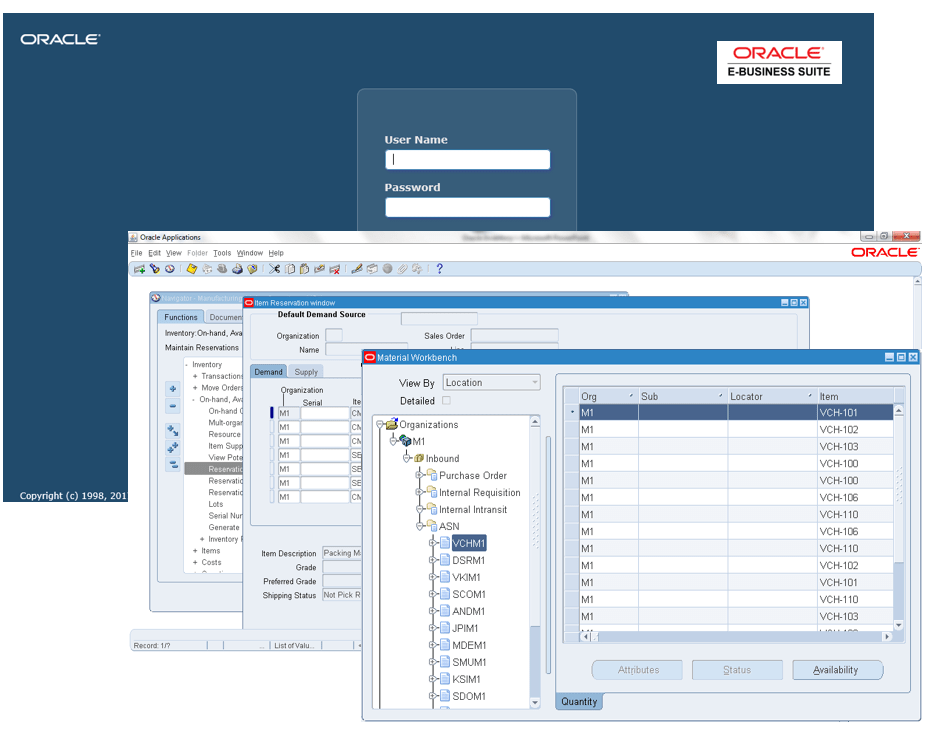
EDI2XML-Oracle-ebusiness-Suite-Magic-xpi-EDI-Integration
 

EBS is the company’s most widely used product lineup, powering medium to large businesses worldwide. Companies can find niche solutions that meet their requirements within the many modules. 

The Need for EDI with Oracle eBusiness Suite

Knowing that Oracle EBS is a versatile suite of enterprise software catering to businesses in different industries, hence the need for fast and accurate document sharing between different systems.

For instance, if you use the Oracle Order Management product, you may be unable to share an order invoice with a client, especially if they use a different system. Things can get even more complicated if the business partner or client is in another country/region. That’s why an EDI solution becomes necessary to facilitate the sharing of standardized business documents. 

Magic xpi for EDI Integration with Oracle EBS

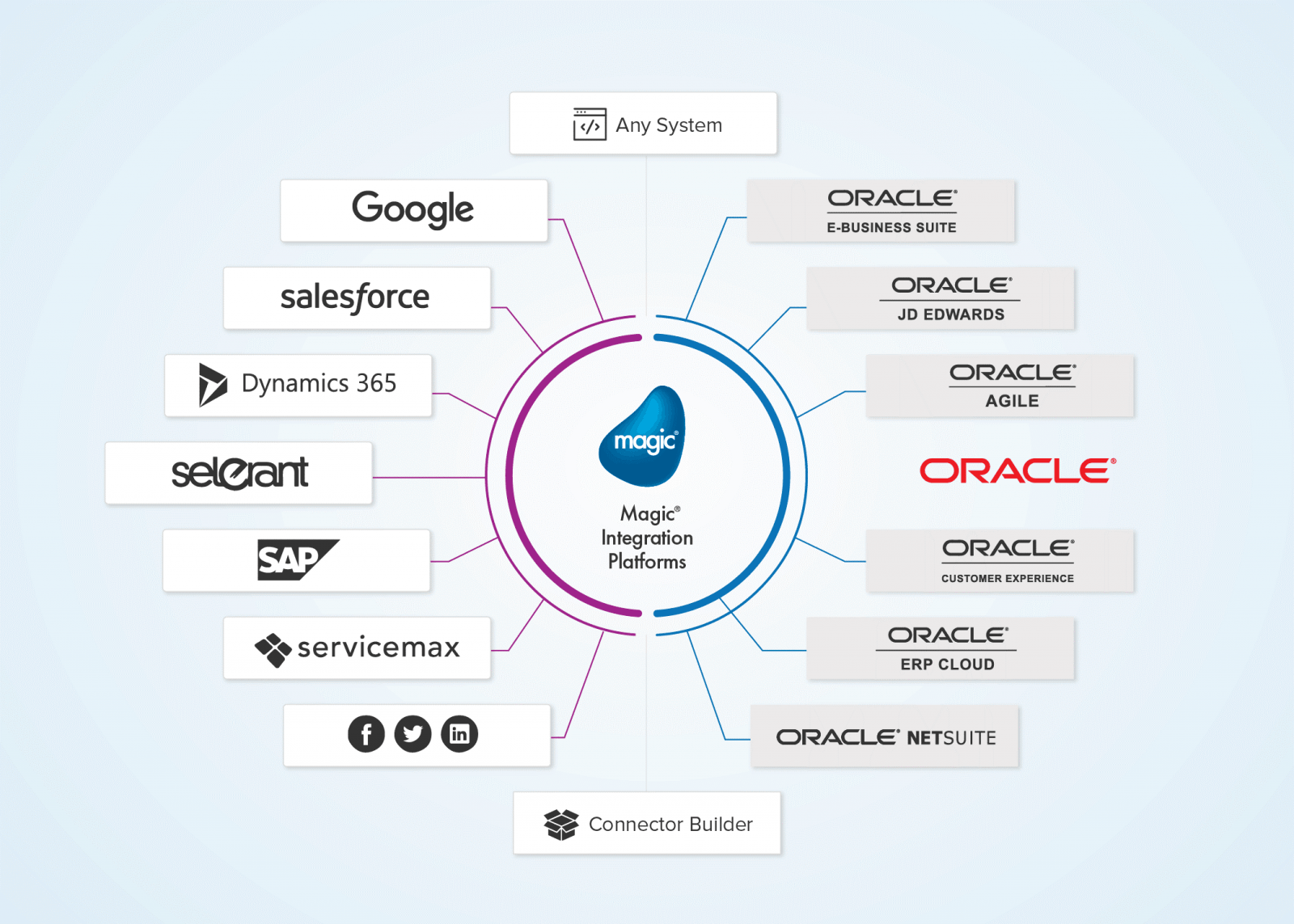
Magic xpi, a smart integration platform tool designed to connect different heterogenous systems and make business tasks easier. It comes with ready-made connectors and adaptors made specifically for popular branded ERP and CRM systems, including Oracle’s verified connector.

While Oracle EBS is a versatile suite of enterprise software for various industries, sharing documents with business partners, vendors, and clients can still be challenging. However, it partners with companies like EDI2XML to make sharing documents between EBS and any other ERP and CRM system easy and smooth.

EDI2XML-Magic xpi-Oracle E-Business-integration
 

Why Magic xpi?

Compared to other integration platforms, Magic xpi is the most simplified. It’s designed to support B2B operations and work with different systems seamlessly. Here are some of the other benefits it offers:

  • Wide range of formats: For businesses with an international presence, Magic xpi can be used to integrate EDI with ERP and CRM systems whether it be a branded-on home grown system.
  • Automated conversion: Besides the initial setup, the process of sharing documents electronically is automated. This may save businesses considerable time and money. 
  • Easy-to-use interface: Magic xpi provides a unified gateway to automate and process documents of different types and formats, including EDI, when using EDI2XML add-on connector.

Useful readings: Synchronizing EDI Orders 850 with NetSuite using Magic xpi


Benefits of Integrating EDI with Oracle EBS

Without Magic xpi and EDI2XML’s combined solution for Oracle eBusiness Suite products, you may spend time and resources manually translating and sharing documents, such as order forms or invoices. An EDI integration solution is necessary for EBS to optimize the document-sharing process, regardless of which application you’re using. 

Here’s how EDI will help you grow your business:

  • Fast document delivery: No need to wait for days just to send an invoice. You can do it in minutes using your existing Oracle EBS application. It eliminates the need to create and share documents manually. 
  • Reliability and accuracy: Information is highly accurate with automated conversion between standards. Doing it manually may result in errors that can cause financial or reputational damage. 
  • One system for all: The same EDI solution can be used to share documentation with all your clients, regardless of the system they use, what type of business they run, and where they operate. 

Extend the Power of Oracle EBS with EDI2XML

Oracle eBusiness Suite can accommodate EDI with the help of Magic xpi. You need the right technical expertise to set up the connection, choose the applicable standards, and connect with partner systems. Without it, deployment can be delayed, and misconfigurations can occur. 

EDI2XML’s managed EDI services can handle all the Oracle eBusiness Suite EDI integration using Magic xpi. This service ensures that your EDI connection is always on and that any technical issues are resolved swiftly. It can empower you and your business partners by speeding up the document-sharing process. 

Learn more about EDI2XML’s managed EDI services today!

 
EDI2XML-Oracle-e-business-suite-magic-xpi-EDI-Consulation


April 3, 2024/0 Comments
https://www.edi2xml.com/wp-content/uploads/2024/04/EDI2XML-Oracle-eBusiness-Suite-Integration-with-EDI.png 625 1200 Tatyana Vandich https://www.edi2xml.com/wp-content/uploads/2024/08/edi2xml.com-EDI2XML-company-logo.png Tatyana Vandich2024-04-03 16:41:082025-09-12 15:24:41Oracle eBusiness Suite Integration with EDI using Magic xpi.

JDE Integration Using Magic xpi Certified Oracle JD Edwards Connector

Blog

The smooth flow of data between business systems and applications is an important element in the day-to-day business operations of any enterprise. This cannot be achieved without integrating business systems with each other.

Integration & Automation

As an integration service provider with more than 24 years of experience, we help companies find the best integration solution that not only works but also improves their business processes.

Continuing our series of articles about various integration methods of Oracle JD Edwards, today we will look at the integration of JD Edwards using Magic xpi Certified Connector.

Oracle JD Edwards – Overview

Oracle JD Edwards EnterpriseOne, often abbreviated as JDE, is an enterprise resource planning (ERP) software system. JD Edwards helps organizations manage their business processes and streamline operations. It covers areas such as financial management, supply chain, manufacturing, human capital management, and more.

The Oracle JD Edwards EnterpriseOne solution can be installed either on-premises or through a cloud-based service. Business owners can choose the deployment model that best suits their needs thanks to this flexibility.

Oracle Cloud Infrastructure (OCI): You can provision JD Edwards EnterpriseOne on Oracle Cloud Infrastructure. This allows you to create a multi-host, secure, high-availability topology. Benefits include elastic expansion, lower costs, and risk reduction.

A hybrid cloud approach is widely adopted by many organizations. For example:

  • Deploy development and test environments on the cloud while keeping production on-premises.
  • Run JD Edwards instances on the cloud while integrating with on-premises systems.
  • Extend JD Edwards functionality using cloud-based services like Oracle Mobile Cloud or Business Intelligence Cloud.

Content and Collaboration: JD Edwards integrates with Oracle Content and Experience Cloud, enabling real-time enterprise conversations and access to content in the cloud.

Magic xpi Integration Platform and its Certified Oracle JD Edwards Connector

Magic xpi is an integration platform that connects different software applications, systems, and databases. It acts as a bridge, allowing them to communicate and share data seamlessly.

The Magic xpi Oracle certified JDE Connector acts as a bridge, connecting your JD Edwards ERP system with other applications, databases, and systems. Its goal is to enable smooth data exchange, automate processes, and enhance business agility.

JDE Integration using Magic xpi
 

JDE Connector – Certified and Validated by Oracle

Magic xpi is the only solution that comes with a built-in, certified JD Edwards connector. Magic xpi’s JDE connector has undergone rigorous testing and evaluation by Oracle. Thus, Oracle has independently verified that Magic xpi’s JDE connector meets specific criteria and confirms that the connector works harmoniously with Oracle products.

Why it matters:

  • Reliability: Certification ensures that the connector functions as intended, minimizing errors and issues.
  • Compatibility: It seamlessly integrates with JD Edwards, adhering to JDE’s standards and protocols.
  • Peace of Mind: Organizations can trust that the connector won’t disrupt their JDE environment.

Out-of-the-Box Integration with JDE Connector

When a solution offers out-of-the-box integration, it means that you can use it immediately without requiring extensive custom development or additional coding.

Magic xpi JDE Connector is specifically designed to work seamlessly with JD Edwards’ business functions right out of the box. So, you don’t have to spend weeks writing custom code or configuring intricate settings. Instead, you can start integrating JDE with other systems quickly, leveraging the connector’s built-in capabilities.


USEFUL: Download Free Whitepaper – Magic xpi Integration Platform

Magic xpi – Loosely Coupled Integration

Often organizations face difficulties in the process of upgrading their customized JD Edwards environment. When businesses have tailored their JDE system to meet specific needs (custom fields, workflows, etc.), upgrading to a new version can be complex.

Challenges may include:

  • Ensuring that customizations remain compatible with the upgraded JDE version.
  • Migrating custom data and business logic seamlessly.
  • Testing and validating the entire environment post-upgrade.

Magic xpi’s certified connector addresses these challenges by providing a reliable integration solution that bridges the gap between customized JDE environments and other systems.

Magic xpi Integration Platform and Business Logic Enhancement

Business logic refers to the rules, processes, and calculations that govern how an application or system behaves based on business requirements.

Business logic resides in the core functionality of software applications. It defines how data is processed, validated, transformed, and acted upon.

Examples:

  • Order Processing: When an order is placed online, business logic determines how it’s validated, whether inventory is available, and how payment is processed.
  • Pricing Calculations: Business logic calculates prices based on discounts, taxes, and other factors.
  • Workflow Approval: Logic defines who approves a purchase request and under what conditions.

In the context of integration flows, business logic plays a crucial role:

Data Transformation: Logic ensures that data from one system is correctly mapped and transformed to fit the requirements of another system.

Decision Making: Logic determines when certain actions should occur. For example, if an order exceeds a certain amount, additional approval steps might be needed.

Error Handling: Logic defines how errors are handled—whether to retry, notify, or take alternative actions.

Data Enrichment: Logic can enhance data by adding context (e.g., customer segmentation, product categorization).

Event Triggers: Logic decides when an integration flow should be triggered (e.g., when a new customer is added to the CRM system).

Magic xpi’s Role in Business Logic Enhancement

Oracle Orchestrator connects to JD Edwards (JDE) and handles basic integration tasks. Magic xpi complements this by providing additional layers of intelligence:

  • Custom Logic: Magic xpi allows you to add custom business rules specific to your organization.
  • Complex Workflows: You can create intricate workflows involving multiple systems, approvals, and notifications.
  • Conditional Logic: Magic xpi lets you define conditions for data routing (e.g., if the order value is high, send it for manager approval).
  • Data Enrichment: Enhance data during integration by adding relevant information.
  • Error Handling Strategies: Magic xpi provides options for handling errors gracefully.

By enhancing business logic, Magic xpi ensures that integration flows align with your organization’s unique processes and requirements. Therefore, business logic is the brain behind how systems behave, and Magic xpi enriches this logic to create powerful, customized integration flows.

Free Consultation with an Integration expert
 

Business Functions in JD Edwards

Business functions are modular units of code within JD Edwards. They encapsulate specific tasks, operations, or business logic.

These functions serve as building blocks for various processes within JDE. They handle data validation, security, and data integrity. For example:

  • An order processing function that validates customer orders.
  • An inventory adjustment function that updates stock levels.
  • A financial calculation function that computes tax amounts.

Magic xpi and Business Functions

As previously stated, JDE Business Functions are specific actions or operations performed within the JD Edwards framework, that encompass a wide range of tasks to facilitate data transformation, validation and manipulation.

JDE Contexts in Magic xpi
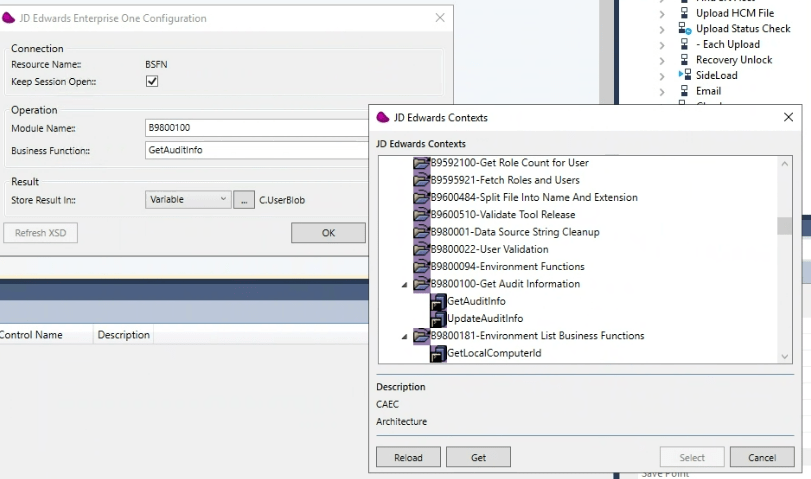
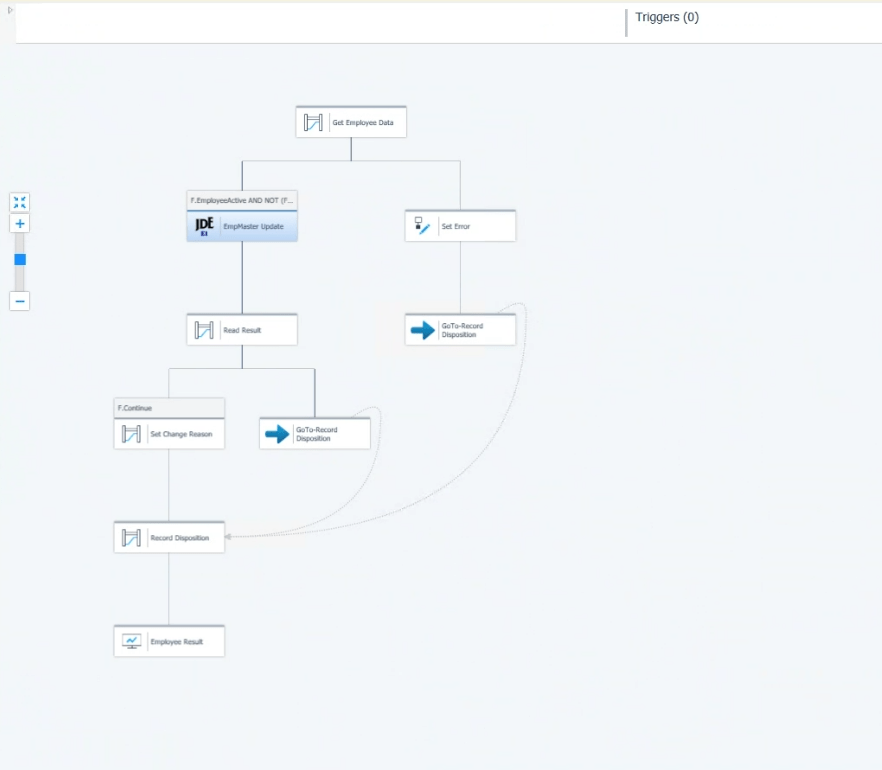
Magic xpi JD Edwards Contexts

Invoking Business Functions from within Magic xpi:

Magic xpi allows you to invoke JD Edwards business functions directly similar to triggering functions and procedures of other applications, databases, or APIs. For example, an e-commerce platform can trigger an HTTP request (or webhook) running on top of Magic xpi, at the same time, Magic xpi, will issue a call to a JDE business function to create the new order in JDE, as soon as a consumer places the order online.

Triggering Business Functions:

Magic xpi can trigger JDE business functions based on specific events. Events might include:

  • New orders received.
  • Inventory updates (e.g., stock replenishment).
  • Changes in customer data (e.g., address updates).

When an event occurs, Magic xpi initiates the execution of the corresponding JDE business function.

Magic xpi and Data Flow:

When integrating JDE with external systems, data needs to flow smoothly between these components.

As mentioned above, the data flow involves both sending data to JDE (e.g., invoking a business function) and retrieving data from JDE (e.g., querying for information).

Magic xpi ensures that data can move between the source and JDE through business functions.

Magic xpi JDE flow
Magic xpi – JDE Flow
 

Why Integrate Oracle JD Edwards with Third-Party Software and Applications?

Integrating other business systems and applications with Oracle JD Edwards (JDE) is essential for businesses:

Centralized Data Management: JDE serves as a comprehensive enterprise resource planning (ERP) solution, consolidating core business functions such as finance, inventory, and manufacturing. Integrating with JDE enables businesses to centralize their data, providing a single source of truth for critical operational information.

Optimized Workflows: Integration with JDE streamlines business processes by automating data exchange between disparate systems. This automation reduces manual intervention, minimizes errors, and accelerates workflows such as order fulfillment, procurement, and supply chain management.

Real-Time Analytics: JDE integration facilitates access to real-time data insights, empowering decision-makers with up-to-date information for strategic planning and operational optimization. By leveraging timely analytics, businesses can identify trends, anticipate customer needs, and respond swiftly to market dynamics.

Competitive Differentiation: Integration with JDE confers competitive advantages by enhancing operational efficiency, customer service, and agility. Businesses can achieve faster order processing, improved inventory management, and superior customer experiences, positioning themselves ahead of competitors in the market.

JD Edwards Integration – Your Next Steps

Evaluate Your Needs: Assess your integration requirements. What systems need to communicate with JDE (e.g., EDI, CRM, HR, logistics)? Visualize your end-to-end business processes. How does information flow within your organization?

Reach Out: Connect with EDI2XML, the integration experts with over 24 years of experience. We’ll guide you through the process, tailor solutions to your unique needs, and ensure a successful implementation.

Free consultation
March 22, 2024/0 Comments
https://www.edi2xml.com/wp-content/uploads/2024/03/EDI2XML-JDE-Magic-xpi-integration.png 675 1200 Tatyana Vandich https://www.edi2xml.com/wp-content/uploads/2024/08/edi2xml.com-EDI2XML-company-logo.png Tatyana Vandich2024-03-22 15:16:212026-05-28 14:59:34JDE Integration Using Magic xpi Certified Oracle JD Edwards Connector

Synchronizing Accounts in Salesforce with Customers in NetSuite using Magic xpi

Blog

This article sheds light on syncing Salesforce and NetSuite, using Magic xpi and how it opens doors to streamlined operations and enhanced customer experiences.


Enhancing Efficiency: EDI2XML’s Magic xpi Solution

If your organization uses Salesforce and NetSuite, synchronizing data between the two software can help optimize your business processes. With the proper integration tool, you can easily sync Salesforce accounts with NetSuite customers.

Salesforce and NetSuite are two popular systems that EDI2XML excels at integrating using Magic xpi. With over 24 years of industry experience, your business will be in expert hands with EDI2XML.

In this blog, we’ll show you how to optimize Salesforce CRM integration with Oracle NetSuite, using Magic xpi, enabling you to connect sales and customer service teams for enhanced productivity and superior customer experience.

Insights on Salesforce

Salesforce is a top CRM platform helping businesses manage sales, marketing, and support functions through cloud-based tools that enhance productivity and growth. It centralizes customer information, tracks sales, automates marketing, and provides excellent service, making it crucial for collaboration, real-time business insights, and maintaining competitive advantages in the modern marketplace.

It’s typically used by medium to large enterprises that need all-encompassing solutions for running their business operations alongside other ERP systems like J.D. Edwards known as Oracle JDE and/or Oracle NetSuite. It’s highly scalable and integrates with other software and platforms with the help of APIs.


Check out this blog for more in depth information about Salesforce Integration: Salesforce integration and Magic xpi: Things you should know


Understanding NetSuite

Oracle NetSuite on the other hand is an all-encompassing cloud ERP software supporting financial, inventory, order management, and HR functions. Its integrated applications are built to manage operations and provide real-time business visibility, centralizing processes and enhancing decision-making.

It allows organizations to unify different operations and use the various systems within its ecosystem to manage their business.

Netsuite-edi2xml
 

Integrating Salesforce and Oracle NetSuite

In Salesforce, accounts store information about customers. These may be business or individual accounts. On the other hand, NetSuite customers represent business customers accessed by different modules, such as customer service management. 

Synchronizing Salesforce accounts and NetSuite customers has several benefits. It helps maintain a cohesive and efficient business ecosystem. Salesforce and NetSuite are integral components of an organization’s tech stack, handling different customer and business management aspects. 

By synchronizing accounts and customers between these platforms, businesses ensure an easier flow of information across departments, guarantee a better data quality and human errors free process.

Salesforce is typically used by sales and marketing teams to capture data on leads, opportunities, and customer interactions. NetSuite, on the other hand, focuses more on business operations, for instance, finance or inventory management. Connecting Salesforce accounts with NetSuite customers provides a unified view through the customer lifecycle.

The Benefits of Synchronizing Salesforce and NetSuite Accounts

Integrating Salesforce and NetSuite through Magic xpi offers many benefits.

Some of these benefits are:

– Real-time synchronization boosts collaboration between sales and customer service teams.

– Improved communication and coordination lead to better customer experiences.

– Combined data enables comprehensive reports and informed decision-making.

– CRM integration cuts down on manual data entry, reducing errors and saving time for employees.

These benefits underscore the value and efficiency that integrating Salesforce and NetSuite through Magic xpi can bring to businesses of all sizes.

Configuring Magic xpi for Integration

Magic xpi at a Glance

Magic xpi is a user-friendly integration solution that connects Salesforce and NetSuite accounts through built-in connectors. It enables efficient data synchronization without requiring coding expertise, hence simplifying the integration process for businesses. These certified connectors, including “Salesforce Connector” and “NetSuite Connector”, are pre-built and rigorously tested to ensure compatibility and reliability, offering businesses a trusted solution for their integration needs.

Configuration Process

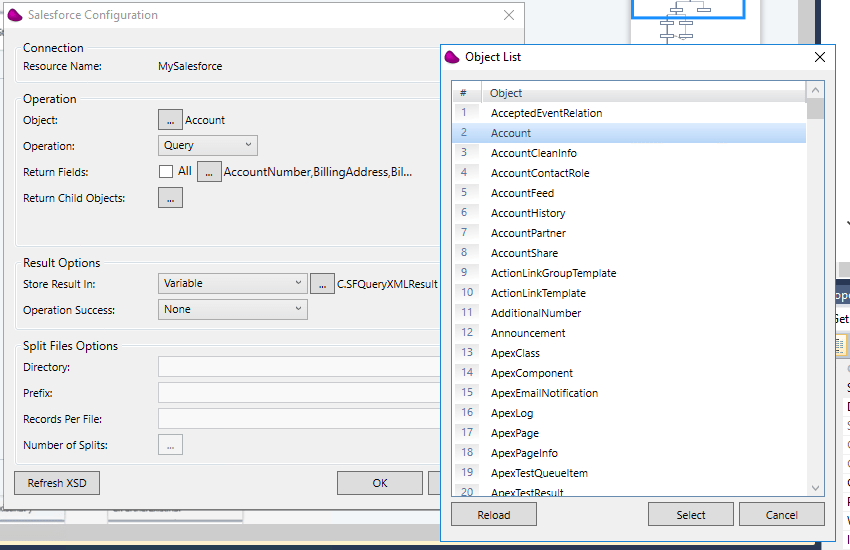
Configuring Magic xpi for Integration is a straightforward process. First, you create the link to your Salesforce and NetSuite accounts using the built-in connectors in Magic xpi. These connectors serve as bridges between the two platforms, allowing seamless communication and data exchange.

The configuration process is very straight forward: get the username and password of a user on the system with sufficient access rights, and from there the connector will do the rest in discovering the objects, and building the schemas of each one, for an easy visual mapping. The power of the connector relies on the fact it can detect standard and custom objects of salesforce.

Magic-xpi-configuration-process
 

By leveraging Magic xpi’s certified connectors, businesses can accelerate their integration projects, minimize the risk of errors, and unlock the full potential of their CRM systems.


Get to know more about Magic xpi: Free Magic xpi product overview and How to Optimize Your Business Processes with Magic xpi Integration Platform


Data mapping with Magic xpi

Magic xpi makes data mapping between two systems intuitive. It uses a visual mapper, where you can click on fields to connect them, making it easy to integrate Salesforce and NetSuite. Users can simply define mappings between Salesforce objects (like accounts and opportunities) and NetSuite entities (such as customers and orders).

To synchronize Salesforce accounts with NetSuite customers in Magic xpi, you must map the correct fields from each object. For instance, the name field in the Salesforce account record must be mapped to the name field in the NetSuite customer object. This ensures accurate data transfer without complex coding.

Magic xpi’s visual data mapping also handles complex transformations and business rules, allowing customization to suit unique workflows. With support for real-time synchronization and event-based triggers, businesses can create dynamic integrations that respond to changes instantly.

Testing and Troubleshooting

Testing is crucial for a successful integration project with Magic xpi, ensuring smooth synchronization between Salesforce and NetSuite accounts. It helps identify and fix any issues or bugs that could disrupt operations.

Once you’ve mapped the data objects in Salesforce to those in NetSuite, it’s time to test if the integration works.

First, add a new account to Salesforce. If the integration is successful, the API on the backend will check if the same record exists in NetSuite Customers objects. If it doesn’t, it will create one in NetSuite as a Salesforce account.

If the integration was unsuccessful, troubleshoot the problem using Magic xpi. It’s possible that the data wasn’t mapped properly, or the field types mapped to one another are of different types.

Common problems like data mapping errors or connectivity issues need to be addressed promptly. Understanding the integration system and having a troubleshooting plan in place can help resolve these issues swiftly, ensuring a seamless integration process.

Monitoring and Maintenance

Monitoring integration processes is essential in maintaining data consistency and system stability. Regular monitoring allows for the detection of any errors or discrepancies, enabling prompt corrective action to be taken.

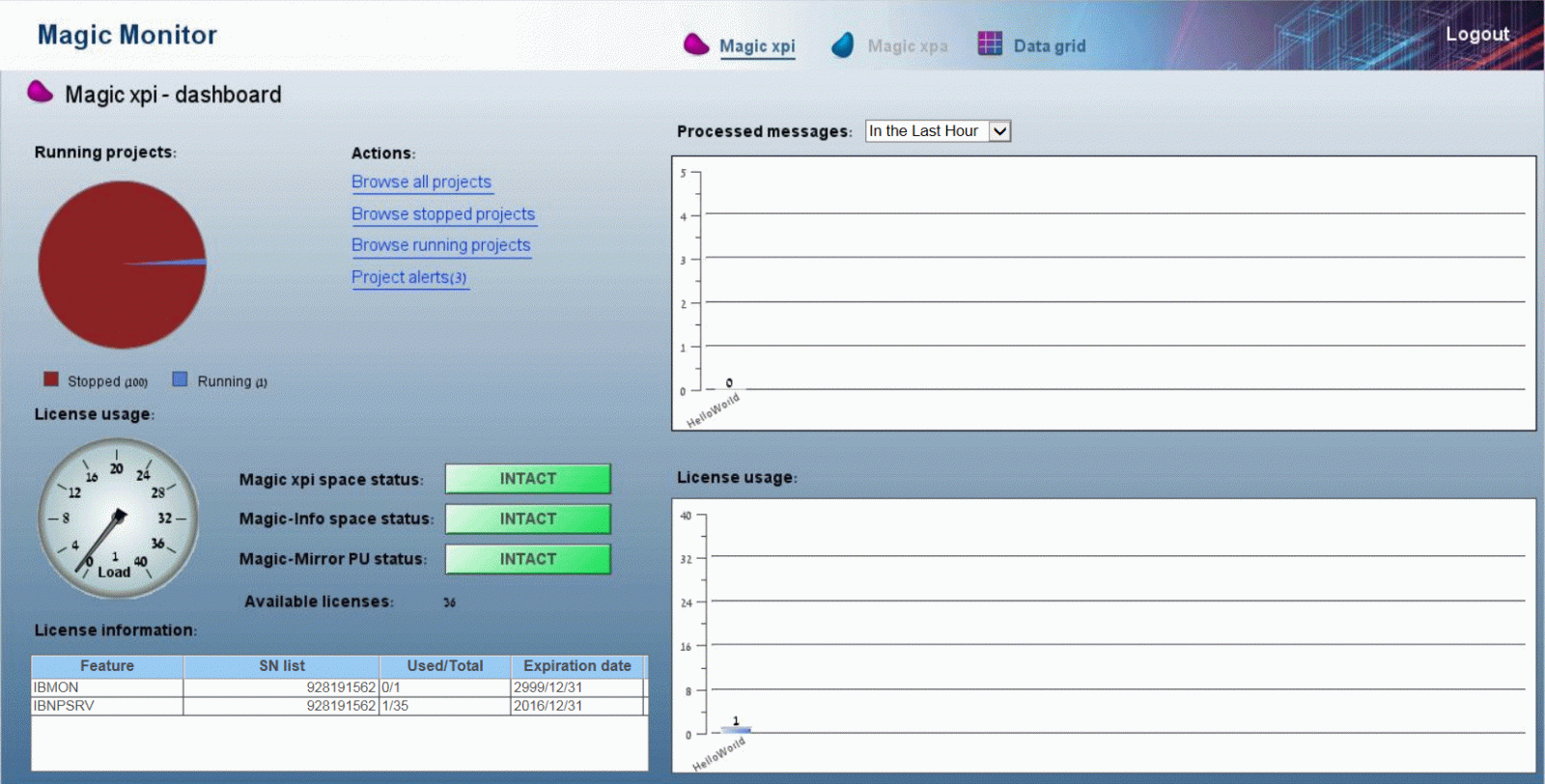
Magic xpi’s easy-to-use dashboard lets you monitor your integrations between platforms. It can give you an overview of performance with real-time graphs and charts. You can also set up alerts to issues with data synchronization, so you’re informed immediately.

magic-xpi-monitoring-and-maintenance
 

Periodically run tests to check if the Salesforce accounts and NetSuite customers are fully synched. This can be checked by adding new ones or changing existing records.

By maintaining a proactive approach to monitoring, any potential issues can be identified and addressed before they escalate, minimizing downtime and maximizing efficiency.

Conclusion

In summary, integrating Salesforce and NetSuite through Magic xpi presents a powerful solution for businesses seeking to optimize their operations and elevate customer experiences. With user-friendly configuration processes and certified connectors, Magic xpi streamlines data synchronization, empowering businesses to drive growth and efficiency in today’s competitive market.

Optimize Business Operations with EDI2XML

In a world where data is very crucial, seamless integration between key business systems is the key to unlocking new opportunities and driving growth. By embracing innovative integration solutions like Magic xpi with the help of EDI2XML experts, businesses can not only sync accounts and customers between Salesforce and NetSuite but also pave the way for greater success and competitive advantage.

 Let EDI2XML transform your business and propel you towards a brighter, more connected future. Interested? Get your free consultation today!

EDI2XML-Netsuite-Salesforce-Magic-xpi


March 19, 2024/0 Comments
https://www.edi2xml.com/wp-content/uploads/2024/03/EDI2XML-Netsuite-Magic-xpi-Salesforce.jpg 675 1200 Tatyana Vandich https://www.edi2xml.com/wp-content/uploads/2024/08/edi2xml.com-EDI2XML-company-logo.png Tatyana Vandich2024-03-19 12:31:042025-09-12 16:11:08Synchronizing Accounts in Salesforce with Customers in NetSuite using Magic xpi

The Power of E-commerce Integration: Unlocking Success with Magic xpi

Blog

For over 20 years, our company, EDI2XML, has been helping all sorts of businesses connect their systems and data. We’ve learned a lot along the way, and we’re excited to share our knowledge with companies that have online stores, or are thinking about opening one using an e-commerce platform like Shopify or other marketplaces.

Retailers, manufacturers, and service providers are constantly seeking new opportunities to tap into the growing e-commerce market. However, success in the e-commerce arena isn’t just about having a great product or service; it’s also about seamless integration.

In this article, we’ll show you how e-commerce integration can make a big difference in your business. We’ll also introduce you to Magic xpi integration platform, which can make e-commerce success more achievable.

E-commerce Integration: A Necessity, Not an Option

E-commerce integration refers to the seamless connection of an organization’s e-commerce platform like Shopify with various other business systems, including Customer Relationship Management (CRM) or Enterprise Resource Planning (ERP). This integration is crucial for several reasons:

Efficiency: Integration streamlines business operations by automating data exchange. Orders, inventory, and customer information can flow seamlessly between systems, reducing manual data entry and minimizing errors.

Real-time Information: Integration provides real-time access to critical data. This enables businesses to make informed decisions, respond to customer inquiries faster, and maintain up-to-date inventory information.

Enhanced Customer Experience: Integrating e-commerce with CRM systems allows for a holistic view of customer interactions. You can offer personalized shopping experiences, targeted promotions, and exceptional customer service.

Inventory Management: E-commerce integration with ERP systems ensures accurate inventory management. You can prevent overselling and “stockouts”, improving overall customer satisfaction.

Magic xpi
 

Multi-Channel Selling: With integration, you can efficiently manage and synchronize product listings, pricing, and inventory across multiple online marketplaces. This is particularly crucial for companies that operate across several sales channels, such as online stores on e-commerce platforms like Shopify, BigCommerce and marketplaces like Amazon, or Walmart. Integration ensures that your product information is consistent and up to date across all these platforms, making it easier to reach a wider audience and maximize your sales potential.

The Magic xpi Solution

When it comes to e-commerce integration, Magic xpi stands out as a powerful and versatile platform.

Magic xpi is an integration platform designed to facilitate the seamless connection of various software systems and data sources within an organization. It enables businesses to automate and streamline data exchange between disparate systems, such as e-commerce platforms, Customer Relationship Management (CRM) software, Enterprise Resource Planning (ERP) systems, databases, and more.

Magic xpi offers a user-friendly visual interface and pre-built connectors, simplifying the integration process and reducing development time. It ensures real-time data synchronization, enhances operational efficiency, and empowers businesses to optimize their processes, ultimately leading to improved productivity and a better customer experience.

Here’s how Magic xpi can help:

Seamless Integration: Magic xpi provides pre-built connectors and a visual integration designer, simplifying the process of connecting e-commerce platforms with CRM, ERP, and other systems. This results in faster implementation and reduced development time.

Flexibility: Magic xpi is highly adaptable and can handle complex integrations. Whether you’re dealing with custom APIs, data transformations, or multi-system orchestration, Magic xpi can accommodate your specific needs.

Real-time Data Sync: The platform ensures that data flows in real-time, allowing businesses to maintain accurate inventory levels, provide timely order updates, and deliver a superior customer experience.

Magic xpi

Scalability: Magic xpi grows with your business. As your e-commerce operations expand, the platform can scale to accommodate increasing data volumes and system complexity.

Cost-Efficiency: Magic xpi helps businesses cut operational costs and maximize ROI by automating processes and reducing manual data entry.

Unlock Success with Magic xpi

In the world of e-commerce, integration is not a luxury; it’s a necessity. Businesses that effectively integrate their e-commerce with CRM, and ERP gain a competitive edge by providing exceptional customer experiences, improving operational efficiency, and unlocking new growth opportunities.

Magic xpi’s comprehensive integration capabilities empower businesses to harness the full potential of e-commerce. With its user-friendly design and robust features, it’s the key to seamless, efficient, and profitable e-commerce operations.

Conclusion: Trusting Our Proven Expertise with Magic xpi

Our extensive experience in seamlessly integrating diverse business systems like Oracle JDE, NetSuite, Salesforce, SAP, etc., combined with the power of Magic xpi, makes us the reliable choice for companies seeking integration solutions. Over the years, we’ve successfully executed numerous e-commerce integration projects of varying complexity, helping businesses harness the benefits of unified data and streamlined operations.

When it comes to integration, you can trust in our track record and the capabilities of Magic xpi to deliver efficient and effective solutions. We stand ready to empower your business with the magic of integration, no matter the scope or scale of your project.

Contact us for your free consultation with one of our integration experts.

Free IT Consultation
November 15, 2023/0 Comments
https://www.edi2xml.com/wp-content/uploads/2023/11/EDI2XML-e-commerce-integration-Magic-xpi.png 675 1200 Tatyana Vandich https://www.edi2xml.com/wp-content/uploads/2024/08/edi2xml.com-EDI2XML-company-logo.png Tatyana Vandich2023-11-15 16:37:292024-10-28 12:10:17The Power of E-commerce Integration: Unlocking Success with Magic xpi

Intégration Oracle JD Edwards: la clé de la transformation numérique

Blog

La qualité et la réputation d’Oracle dans l’industrie ont fait d’Oracle l’un des fournisseurs de logiciels ERP d’entreprise, les plus populaires du marché. Selon Statista, c’est l’une des plus grandes entreprises au monde en termes de valeur marchande et l’un des principaux fournisseurs mondiaux de logiciels de planification des ressources d’entreprise (ERP).

C’est quoi Oracle JD Edwards?

JD Edwards EnterpriseOne est une suite d’applications intégrées de logiciels ERP pour planification des ressources d’entreprise, qui est développé et vendu par Oracle.

Intégration avec Oracle JD Edwards

EnterpriseOne est la première solution ERP à exécuter toutes les applications sur l’iPad d’Apple. JD Edwards EnterpriseOne fournit également des applications mobiles.

JD Edwards World est une solution de plate-forme unique qui permet une meilleure collaboration à l’intérieur et à l’extérieur de votre réseau d’entreprise. Le système ERP Oracle JD Edwards est une solution populaire pour la gestion des moyennes et grandes entreprises.


Pour en savoir plus sur le JDE Edwards World et l’intégration EDI, vous pouvez lire cet article « Ce que vous devez savoir sur l’intégration EDI dans JD Edwards World » (en anglais seulement)


L’intégration est le moteur de la «transformation numérique»

Au cours des dernières années, en raison du rôle important de l’intégration, la technologie de l’information s’est modernisée, en particulier dans les domaines du big data, de l’analyse, du « cloud computing » et de l’informatique mobile.

Les entreprises utilisant Oracle JD Edwards ne font pas exception. Les entreprises doivent souvent intégrer d’autres applications et systèmes tels que l’EDI, le CRM, le SCM, le PLM et le commerce électronique.

EDI2XML offre une solution-service qui permet une intégration complète pour JD Edwards EnterpriseOne et JD Edwards World en utilisant des connecteurs certifiés d’Oracle lui-même. Merci à la plateforme d’intégration Magic xpi et au partenariat Oracle avec Magic Software pour la certification des connecteurs!

Quand l’intégration avec JDE est-elle essentielle?

Il existe plusieurs scénarios dans lesquels une entreprise envisagerait l’automatisation et l’intégration, et cela est bénéfique:

a) Amélioration des processus

Les entreprises sont constamment à la recherche de meilleures façons de faire les affaires; l’intégration des systèmes et des processus de l’entreprise bénéficiera à l’entreprise des éléments suivants:

  • Amélioration de l’efficacité des employés et de leurs performances
  • Réduction des erreurs humaines
  • Augmentation de la vitesse de collecte des données
  • Amélioration de la qualité des informations dans le système de l’entreprise.
  • Évidemment, en fin de compte, tout ce qui précède aura un impact positif sur les résultats de l’entreprise.

b) Tendances externes

Le développement et la nécessité pour l’entreprise de s’adapter aux « tendances externes » est un autre facteur d’intégration:

  • Systèmes et technologies basés sur le cloud
  • Applications mobiles
  • Projets IoT (Internet des objets)

c) Répondre aux exigences et aux attentes des clients ou des fournisseurs

Souvent, les entreprises qui font des affaires avec plusieurs clients importants, ne peuvent pas rejeter une demande d’un client pour échanger des informations et intégrer des données par voie électronique.

d) Fusion, acquisition et croissance des entreprises

Dans la réalité des affaires d’aujourd’hui, il y a très souvent de nombreuses fusions et acquisitions d’entreprises.

Ce type de transaction commerciale créera un besoin urgent de consolider les données et éventuellement de centraliser les données provenant de différentes sources.

Le même besoin peut survenir en raison de la croissance et de l’expansion de l’entreprise, où les données doivent être centralisées, les activités doivent être orchestrées au niveau du système.

e) Systèmes hétérogènes

Un autre scénario typique où l’intégration devient cruciale pour une entreprise est lorsqu’elle est envahie par divers systèmes et applications qui ne sont pas interconnectés. (par exemple, CRM, ERP, e-Comm, PLM, WMS, etc.)

La plate-forme d’intégration Magic xpi fonctionne comme un middleware permettant un échange de données transparent entre tous les systèmes de l’entreprise tels que le commerce électronique, le CRM, l’ERP, y compris les systèmes financiers et de production internes, pour aider les entreprises dans leur parcours de transformation numérique.

Votre partenaire en transformation numérique

La plate-forme d’intégration Magic xpi est une solution d’intégration, d’automatisation des processus et de synchronisation de données sans code et de calibre entreprise. 

Magic xpi pour JDE, étend les capacités et l’utilisation du système ERP, Oracle JD Edwards EnterpriseOne et JD Edwards World en les intégrant à l’ensemble des processus d’affaire de votre entreprise.

Intégration avec Oracle JD Edwards

Magic xpi connecte les composants dispersés de votre entreprise à travers plusieurs systèmes et applications, vous permettant de mieux gérer les flux financiers, les employés, les produits et les informations de votre entreprise.

Magic xpi dispose d’un studio de conception visuelle sans code, avec plus de 50 adaptateurs, assistants, services et méthodes, qui permettent de créer et d’orchestrer des processus d’affaire et de s’intégrer nativement à JD Edwards, en utilisant ses connecteurs certifiés Oracle.

Fonctionnalités Magic XPI

Les connecteurs JD Edwards EnterpriseOne et JD Edwards World de Magic xpi ajoutent de la valeur à votre ERP en connectant les données et les processus d’affaire à travers le CRM et d’autres systèmes d’entreprise.

Voici quelques-unes des principales fonctionnalités de Magic xpi:

  • Adaptateur Oracle JDE certifié prêt à l’emploi
  • Une large bibliothèque de composants préconstruits
  • Fonctionnalité glisser-déposer pour une configuration facile
  • Visual Data Mapper transforme les informations, quel que soit le format
  • Des assistants pas à pas simplifient l’intégration complexe
  • Interface utilisateur graphique intuitive
  • Capacités de surveillance en ligne

Fonctionnalités du connecteur Oracle JD Edwards

  • Découverte automatique de tous les « business functions » Oracle
  • Gère les exceptions et les erreurs de manière fiable et transparente.
  • Intègre les données financières en temps réel, quasiment en temps réel et à des intervalles optimaux.
  • Intègre les applications non-JDE avec votre grand livre.
  • S’intègre aux sites Web de commerce électronique nouveaux et existants.
  • Intègre le suivi des commandes et la gestion de la logistique en ligne.
  • Intègre le CRM et la gestion des ventes.
  • Gère les appels de soutien et suit les commandes en ligne.
  • Fonctionne nativement sur les systèmes IBM I.
  • Combine vos plans de comptes avec d’autres systèmes et entreprises.

Participer à la transformation numérique

Si vous n’avez pas votre propre expérience pour diriger l’intégration JD Edwards, contactez-nous.

Nous fournissons des services d’intégration et des conseils d’experts pour Oracle, notamment JD Edwards EnterpriseOne et JD Edwards World.

Nous comprenons les défis d’intégration complexes – c’est ce sur quoi nous avons bâti notre entreprise!

April 30, 2021
https://www.edi2xml.com/wp-content/uploads/2021/04/JDE_Integration.png 350 1024 Tatyana Vandich https://www.edi2xml.com/wp-content/uploads/2024/08/edi2xml.com-EDI2XML-company-logo.png Tatyana Vandich2021-04-30 15:23:382023-09-13 10:23:02Intégration Oracle JD Edwards: la clé de la transformation numérique

How Integration Can Improve Your Supply Chain Management

Blog

The efficient management of logistics processes involving multiple business partners is one of the main challenges faced by companies in the supply chain vertical.

There are many systems involved in the supply chain such as warehouse management systems (WMS), transportation management systems (TMS), enterprise resource planning (ERP), and much more.

However, the use of multiples of business systems and applications does not yet guarantee success.

The most important thing in the supply chain is the flow of information between the different systems, in a timely and efficient manner; this is called “data integration” which is necessary so different heterogenous systems can “communicate” with each other in a close to “real-time” fashion.

What is Supply Chain Management (SCM)?

Wikipedia gives the most accurate definition: “In commerce, supply chain management (SCM), the management of the flow of goods and services, money and information, involves the movement and storage of raw materials, of work-in-process inventory, and of finished goods as well as end to end order fulfilment from point of origin to point of consumption”.

In other words, the supply chain is the delivery of a product to a consumer. Which includes all stages from the transformation of raw materials into a finished product to delivery to the final consumer.

The main goal of the supply chain management is to coordinate all stages of the process to minimize overall costs and obtain the greatest efficiency.

What is “Integration” in the Supply Chain?

In information technology, integration is the connection of data, systems, applications, or devices to improve efficiency, productivity, and flexibility.

The purpose of integration in supply chain management is to combine different business systems responsible for different functions (warehouse, resource planning, accounting, electronic data interchange, etc.) that belong to different business partners to create a single efficient logistics system.

Internal and External Supply Chain Integration

There are two concepts in supply chain integration. Internal and external integration.

Internal integration is the interconnection of various business systems within one company.

External integration is the interaction between business partners through the interconnection of their numerous business systems responsible for various functions in logistics.

Typical examples of companies involved in the supply chain that require integration:

  • suppliers of raw materials and supplies
  • manufacturers of finished products
  • warehouses, 3 pl warehouses
  • transport companies and carriers
  • buyers (retailers, various companies, and organizations)
  • various intermediaries

Platform for full data integration across the entire supply chain

To improve efficiency, all companies involved in the supply chain need to simultaneously exchange data from different business systems. In other words, as previously mentioned, they need external integration.

Why is external integration so important? Integration in the supply chain is important because usually, any transaction goes through multiple systems such as ERP, CRM, financial, or warehouse systems. Normally, data for the same transaction must be transferred to the business partner (customer, supplier, 3pl warehouse, etc.). After receiving the data, the business partner must enter it into their business systems.

If companies have no integrated systems, data is transferred and processed manually or by downloading spreadsheets or files. Those processes are not efficient, they require a lot of resources and time, and there is a high risk of errors and data loss.

With the integration platform, companies can quickly and easily automate the exchange of information.


Useful reading: How to Choose the Right Integration Platform?


Integration platform for automating data entry

The goal of systems integration is to reduce costs and efforts for all participants in the supply chain process.

Manually entering duplicate information into several business systems takes a lot of time. Sometimes it requires hiring additional employees just to perform some of these mechanical functions. Furthermore, multiple manual entries into various systems are prone to human errors and less quality of information.

With the help of an integration platform like Magic xpi, you can quickly automate the data entry process, by reducing the time for entering data and ensuring their accuracy.

Besides, the use of modern gadgets, such as tablets and smartphones, allows data entry directly in the field (for example, when receiving goods at a warehouse), which speeds up information flows and improves customer service.

Magic xpi integration platform for efficient supply chain demand forecasting

Demand forecasting is the process of estimating future consumer demand over a given period using historical sales data and other information.

It is no secret that demand forecasting is very important for effective Supply Chain Management. Demand forecasting affects important business operations such as financial planning, raw material planning, production planning, marketing, and sales plans, as well as risk assessment.


Download Magic xpi product overview


Magic xpi can help you achieve more accurate forecasts by ensuring perfect coordination between your enterprise resource planning (ERP) and Customer relationship management (CRM) systems.

This will lead to increased profits and higher competitive advantage.

Magic xpi integration platform to improve transportation process

ERP integration with EDI, warehouse management system, and yard management software will help to improve transportation processes.

Magic xpi B2B Integration

The integration of these business systems provides instant information exchange and can significantly reduce downtime.

Thus, you or your transport companies will have more time to deliver the goods.

The best integration solution for Supply chain management

Supply chain management is a broad topic in which the integration of business systems plays a key role. Data integration can help manage all the necessary processes to ensure a smooth flow at all stages of the supply chain. It can significantly improve all the processes in the supply chain, ensure fast order fulfillment, reduce cost, and improve customer service.

Being a business partner with Magic Software Enterprises for over 20 years now, we provide powerful integration solutions. We have been helping our clients make their business profitable by integrating systems.

Contact us for a free consultation.


You may also be interested in reading about:

  • DELFOR, DELJIT, DESADV – key EDI messages in supply chain management for manufacturing
  • ORDERS and ORDRSP: The main EDIFACT messages in the supply chain management
  • Electronic Data Interchange (EDI) in the Supply Chain

March 29, 2021
https://www.edi2xml.com/wp-content/uploads/2021/03/EDI2XML-_integration-supply-chain.png 350 1024 Tatyana Vandich https://www.edi2xml.com/wp-content/uploads/2024/08/edi2xml.com-EDI2XML-company-logo.png Tatyana Vandich2021-03-29 10:20:162024-03-14 16:13:03How Integration Can Improve Your Supply Chain Management

Magento E-commerce Integration: Boost Your Online Sales with ERP, CRM, and AI-Driven Solutions

Blog

Intro: E-Commerce Integration

The integration of e-commerce with third-party systems such as ERP, CRM, accounting software, or EDI is a very hot topic and challenging for many companies.  While the COVID-19 pandemic accelerated the digital transformation of many businesses, today, businesses are more focused on sustainable omnichannel strategies.

Today, we focus on one of the most popular e-commerce platforms – Magento. We will explore the most important aspects of Magento integration, which have a significant impact on the performance and efficiency of your Magento store.

What is Magento?

Magento is one of the most popular e-commerce platforms in the world.

One of the reasons of Magento’s popularity is its flexibility and extensibility. You can integrate almost any functionality into your online store – which is why so many companies choose Magento.

There are two distinct platforms of Magento:

Magento Open Source

Magento Open Source (formerly under the name Community Edition) is an open-source e-commerce platform, that is, available to anyone for free. Magento Open Source provides basic e-commerce capabilities that enables to create an online store from scratch. However, for full functionality, Adobe Commerce is recommended.

It should be remembered that if you choose to use Magento Open Source, this does not mean that you can get your online store free of charge. You need to consider hosting costs, themes, domain name, SSL certificate, fees for processing payments, etc. Besides, to create and customize a full-fledged online store, you will need a developer with PHP experience because this task can be a little daunting for beginners without much programming knowledge.

Adobe Commerce (formerly Magento Commerce)

Adobe Commerce (platform as a service) includes cloud-optimized architecture and hosting, unlimited customization, third-party integrations, and AI-powered merchandising and analytics. Over 250,000 merchants worldwide use Adobe Commerce.

Adobe Commerce is a very reliable and powerful e-commerce platform used by many popular online stores with high traffic. This means that Adobe Commerce fit for large companies. However, if you plan to expand your online store (increase the catalog product, etc.) we would recommend starting with Adobe Commerce as it is a performance-proven platform for supporting large stores. Adobe Commerce is worth installing in the first place instead of switching from Magento Open Source to Adobe Commerce at a later stage. Even if there are data transfer tools, such as the Magento Mass Importer (MAGMI) for migration of Shopify to Magento this process will not be easy and demands time and effort.

Nevertheless, it should be kept in mind that Magento is aimed at three levels of companies: small businesses, medium-sized and large businesses.

Thus, Adobe Commerce delivers:

  • Cloud-Optimized Architecture & Hosting: Ensures high performance and scalability.
  • Unlimited Customization: Tailor your store with advanced third-party integrations.
  • AI-Powered Merchandising & Analytics: Leverage data for smarter business decisions.

Adobe Commerce is designed for large businesses that require robust, scalable e-commerce solutions, while the open-source version continues to be available as Magento Open Source.

According to recent market research, Magento-powered platforms are a key driver in global e-commerce, which reached over US$6.3 trillion in sales in 2023 and is projected to grow significantly in the coming years.

Magento History and Future Trends

The development of Magento started in 2007 by Varien Inc. and was officially launched on March 31, 2008.

In 2011, eBay, which already owns 49% of Magento, acquired the remaining 51%. In May 2018, Magento Inc. became the property of Adobe Inc. 

Adobe acquired Magento and rebranded Magento Commerce as Adobe Commerce in April 2021. The open-source version remains Magento Open Source, while the enterprise solution is now called Adobe Commerce.

This change reflects Adobe’s strategy to integrate Magento’s robust e-commerce capabilities into its broader Adobe Experience Cloud, offering enhanced features such as cloud hosting, AI-powered personalization, and seamless integration with other Adobe tools.

Magento Market Share: Adobe Commerce (Magento) now powers 15% of the top 100k e-commerce sites globally, with a 22% surge in enterprise adoption since 2023 (BuiltWith).

Useful Reading: In our EDI2XML Blog, we have covered a lot of e-commerce integration topics including Shopify, BigCommerce, or Amazon integration. Thus, if you are interested in learning more about these integration topics, please check out our articles:

  • What Is Amazon Integration & How Does It Work?
  • Must-Have BigCommerce Integrations
  • Secrets and rules of Shopify integration with your ERP or CRM

Why Integrate Magento with ERP and CRM?

Companies that have linked their ERP system with their Magento online store, succeed by optimizing work processes, which positively affects the shopping experience, reduces order-processing time, and minimizes errors.

ERP stands for Enterprise Resource Planning. It is a business process management software that can be on-premises or cloud-based. ERP system helps to manage an enterprise in the following main areas:

– Financial Management
– Manufacturing Management
(product data management)
– Distribution Management
with three key areas of distribution management: sales order, inventory, and warehouse management.

Synchronizing data between Magento store and ERP system, eliminates the need for sales managers to enter sales order information manually into a business software system. This significantly increases the speed of order execution and eliminates possible errors, as well as improves the quality of customer service.

Due to Magento ERP integration, you can achieve efficient Inventory management that allows you to have complete control over your Magento online store. With automatic inventory management, you will always be aware of the goods received and sold, and most importantly, your customers will not place orders for goods that are out of stock. You do not have to bear the costs and waste time to contact the client to offer him a substituted item or to issue a refund.

A recent report by Forrester Research shows that companies using integrated ERP systems can reduce order processing time by 15–20% and experience overall operational efficiency gains.

The Role of Integration Platforms – Magic xpi 

One of the most important decisions when integrating your Magento online store with your business systems is choosing a reliable and scalable integration platform.

Adobe Commerce is API ready; the API capability, gives the flexibility to connect integration platforms such as Magic xpi and other systems.

Magic xpi integration platform is a leading solution for integration, enterprise-grade data synchronization, and complete automation of business processes.

Magento ERP integration

Magic xpi leverages code-free technologies to streamline business processes and manage communications between on-premises and/or cloud-based enterprise systems, automatically integrating data from multiple sources on a many-to-one basis.

Magic xpi implements comprehensive ready-made certified and optimized connectors and adapters, to synchronize leading ERP, CRM, Finance, and other busyness systems with e-commerce platforms and marketplaces.

Thus, besides Magento ERP/CRM integration, you can expand your sales channels and synchronize your Magento store with marketplaces like Amazon or eBay.

Magento Inventory Management

Inventory management is one of the important points in e-commerce integration with ERP. Up-to-date information about product availability is a key issue in online sales. This is an especially pertinent issue for companies with a multi-channel approach, i.e. offline (physical store) and online sales, such as sales via Magento online store, Amazon, eBay, or social media like Facebook or Instagram.

With Magic xpi integration platform, you can update your inventory in near real-time, giving you a unique competitive edge.

The Common Magento Business Process Integration

As mentioned above, Magic xpi is a proven integration platform that seamlessly connects the front office and back office IT systems for two-way communication. The most common examples of business process integration between Magento and business systems are:

  • Integration of e-commerce catalog data with ERP
  • E-commerce data integration with (PLM) Product Lifecycle Management
  • Inventory data pushed to Magento online store
  • Bi-directional Pricing updates – ERP with e-commerce
  • Real time inventory checks
  • Order information from e-commerce to ERP
  • Real-time credit card processing
  • Bi-directional address book updates
  • Shipment confirmation
  • Package tracking
  • Delivery notifications
  • Inventory notification/alarm for e-commerce managers
  • Call center integration
  • CRM integration

Choose the Right Integration Provider and Technology

Aside from using cutting-edge and well-established technology, the most important part of any integration project is having the right people to integrate quickly and efficiently without any disruption and within your budget.

Our team has implemented integration projects of different types and complexities. Many years of integration experience, as well as the use of new technologies, allow us to carry out projects quickly and efficiently allowing clients to see quickly the benefits of e-commerce integration with business systems.

Contact us for a free consultation with one of our integration experts.


December 30, 2020
https://www.edi2xml.com/wp-content/uploads/2020/12/Magento-ERP-Integration_.png 675 1200 Tatyana Vandich https://www.edi2xml.com/wp-content/uploads/2024/08/edi2xml.com-EDI2XML-company-logo.png Tatyana Vandich2020-12-30 09:00:002025-03-19 16:01:16Magento E-commerce Integration: Boost Your Online Sales with ERP, CRM, and AI-Driven Solutions

Role of SOA, ESB, and BPM in Integration Projects

Blog
This post was updated to reflect current trends and information.

Role of SOA, ESB, and BPM in Integration Projects

Today, in order to increase efficiency and be competitive, companies must quickly respond to any internal or external changes in business processes. The company’s IT infrastructure, plays a critical role in responding to such changes considering it is built based on a flexible and agile architecture.

The complexity of the IT infrastructure leads to increased costs, resources, and integration time.

The infrastructure flexibility and agility of an enterprise, can be achieved by building an IT environment based on Service Oriented Architecture – SOA.

Key Components of a SOA:

– Enterprise Service Bus (ESB)
– Business Process Execution Language (BPEL)
– Business Rules
– Complex Event Processing (CEP)
– SOA Governance
– B2B Integration
– Business Activity Monitoring (BAM)
– Unified Management & Monitoring

Enterprise Service Bus (ESB) – is a communication system between mutually interacting software applications in the service-oriented architecture (SOA). ESB provides a cost-effective way to centrally configure, deploy, and manage services across a large enterprise.

The SOA’s goal is to set up an IT infrastructure in which all the necessary IT resources of the company are provided in a flexible, efficient and fast way.

Accelerating Business through Business Process Management and SOA

Business Process Management

BPM (Business Process Management) is a common attribute of Service Oriented Architecture (SOA), and an instrument through which a company can apply SOA to high-value business challenges. Both SOA and BPM can be applied individually, but the two agreed approaches offer mutual benefits for business.

The combination of BPM and SOA provides companies with a new generation of tools for the rapid development of composite business applications. This allows to maximize the use of all available resources of the company, as well as quickly connect new ones.

Getting Help with SOA

When implementing integration projects on the principles of SOA, we use mature products from Magic Software Enterprises – a global enterprise software company, delivering Magic xpi, a fully reliable SOA, API-driven integration platform. We take into account the specifics of each project and customer preferences. Contact us today to get a FREE-It consultation with one of our integration experts!


Integration using Magic xpi

March 26, 2019
https://www.edi2xml.com/wp-content/uploads/2019/03/Role-of-SOA-ESB-and-BPM-in-Integration-Projects-e1553716879683.png 341 1024 Tatyana Vandich https://www.edi2xml.com/wp-content/uploads/2024/08/edi2xml.com-EDI2XML-company-logo.png Tatyana Vandich2019-03-26 15:56:302021-05-26 11:46:19Role of SOA, ESB, and BPM in Integration Projects
Page 1 of 3123
Recent
  • EDI compliance with Loblaw
    How to Meet Loblaw EDI Requirements as a Small BusinessJune 4, 2026 - 2:05 pm
  • The Infrastructure Behind Modern Commerce: Why EDI Still Matters
    EDI in E-Commerce and Retail: Why Modern Commerce Still...May 1, 2026 - 4:54 pm
  • Key Statistics on AI Use in the Workplace
    The Risks of Using Public AI Tools in Business: Data Privacy,...March 11, 2026 - 5:51 pm
  • Enterprise AI
    How to Securely Access Enterprise AI: GPT, DeepSeek &...February 20, 2026 - 3:09 pm
  • EDI 754 Guide
    EDI 754 Routing Instructions: Complete Guide to Purpose,...February 18, 2026 - 4:54 pm
Popular
  • How to Quickly Connect to a Large Retailer's EDI Requirements
    How to Get EDI-Compliant Quickly For A Large RetailerNovember 21, 2025 - 4:29 pm
  • EDI-as-a-services
    EDI Translation Software “On-premises” or “As...January 21, 2014 - 1:28 pm
  • order-automation in e-commerce
    Why Is It Crucial to Automate the E-Commerce Order Fulfillment...May 10, 2022 - 1:58 pm
  • EDI for Logistics and transportation
    EDI Integration for Efficient Transportation ManagementOctober 6, 2023 - 1:33 pm
  • information technology definitions
    Business Tech Terms DefinitionsMay 24, 2018 - 1:32 pm

Browse by tag

Amazon Amazon Integration ANSI ASC x12 ASC X12 EDI B2B EDI integration e-commerce e-commerce business e-commerce integration eCommerce eCommerce integration EDI EDI2XML EDI 850 EDI as a Service EDI Communication EDI converter EDIFACT EDI for supply chain EDI for Third-Party Logistics EDI for transportation EDI implementation EDI Integration EDI Integration Project EDI project EDI Translation EDI Web Service EDI x12 ERP Integration integration platform integration project JDE Magic xpi Magic xpi Integration platform NetSuite online store Salesforce Shopify Shopify eCommerce integration Shopify integration Supply Chain Supply Chain Management Translation Software X12 EDI XML

Subscribe to our Blog

Menu

  • Home
  • About the EDI2XML Company
  • About EDI2XML EDI Converter
  • Blog
  • Book A Free Consultation
  • Privacy Policy EDI2XML Company

Our Services

Fully Managed Integration

E-Commerce Integration

Business Systems Integration

Fully Managed EDI

EDI Web Service 

On Premises EDI 

Managed Cloud Service


Latest Blog Posts

  • EDI compliance with Loblaw
    How to Meet Loblaw EDI Requirements as a Small BusinessJune 4, 2026 - 2:05 pm
  • The Infrastructure Behind Modern Commerce: Why EDI Still Matters
    EDI in E-Commerce and Retail: Why Modern Commerce Still Depends on EDIMay 1, 2026 - 4:54 pm
  • Key Statistics on AI Use in the Workplace
    The Risks of Using Public AI Tools in Business: Data Privacy, Compliance, and Shadow AIMarch 11, 2026 - 5:51 pm

Contact Us

400 Blvd Curé-Labelle, #304 Laval QC H7V 2S7 Canada

Contact EDI2XML Team
Phone: +1 450-681-3009
Website: https://www.edi2xml.com/

© 2000-2026 EDI2XML (by Namtek Consulting Services). All rights reserved.
  • Link to Facebook
  • Link to LinkedIn
  • Link to X
  • Link to Youtube
  • Blog
Scroll to top Scroll to top Scroll to top