EDI2XML
  • About
    • The Company
    • EDI2XML
    • Advantages
    • Partnership with EDI2XML
    • Testimonials
  • Services
    • Enterprise AI
    • Fully Managed Integration
    • Fully Managed EDI Services
    • EDI Web Portal
    • EDI Web Service
    • EDI On Premises
    • Managed Cloud Services
    • Amazon Integration
    • Shopify Integration
    • BigCommerce Integration
    • NetSuite Integration
    • JD Edwards Integration
    • Dynamics 365 Integration
    • SAP B1 Integration
    • Salesforce Integration
    • Industry 4.0 Integration
  • Pricing
    • EDI Managed Services
    • EDI Web Service
    • EDI On-Premises
    • Managed Cloud Services
    • Shopify Integration
    • JD Edwards Integration
    • E-commerce Integration
    • All other Integrations
  • Blog
  • Resources
    • Resource Center
    • List of EDI Codes
    • List of EDIFACT Messages
    • EDI Documents Library
    • Trading Partners
  • Contact us
  • Book a Consultation
  • Click to open the search input field Click to open the search input field Search
  • Menu Menu
  • Link to Facebook
  • Link to LinkedIn
  • Link to X
  • Link to Youtube

CRM integration, including syncing customer data, orders, and communications between CRM systems and business applications.

Tag Archive for: CRM integration

Salesforce, EDI, ERP, and WMS Integration: From Chaos to Control

Blog

The Challenges of Siloed Systems: Salesforce, EDI, ERP, and WMS

Let’s be real—running a business means juggling a lot of systems, each doing its own thing. Salesforce keeps track of your customers. EDI is all about exchanging documents with trading partners. ERP (like SAP, NetSuite, or Microsoft Dynamics 365) manages your inventory, finances, and other internal operations. And then there’s the WMS (like Manhattan Associates or Fishbowl), making sure your warehouse knows what’s in stock and what’s shipping out.

The problem? None of these systems talk to each other unless you make them. And if you don’t, you’re left with endless manual updates, duplicate entries, and a constant feeling that something might’ve been missed. Sound familiar?

The truth is, these systems were designed to solve specific problems—just not together. They’ve evolved separately, and connecting them doesn’t happen by accident. That’s where integration comes in.

What is a Unified Ecosystem? A unified ecosystem connects various business tools and systems, enabling smooth data flow and real-time communication between them. Instead of operating in silos, your CRM (like Salesforce), EDI (Electronic Data Interchange), ERP (Enterprise Resource Planning), and WMS (Warehouse Management System) work together to optimize operations.

How Do These Systems Work Together?

Here’s a breakdown of how Salesforce, EDI, ERP, and WMS fit into the puzzle:

  • Salesforce is your CRM, the front-end tool for managing customer relationships, leads, and sales data. It’s the “face” of your business in terms of interacting with clients.
  • EDI handles external communications, like sending purchase orders (EDI 850) or invoices (EDI 810) to your trading partners. It’s all about ensuring compliance and automating repetitive tasks.
  • ERP keeps track of internal operations—inventory, finances, production schedules, and more. Think of it as the backbone of your business.
  • WMS focuses on your warehouse operations: what’s in stock, what’s shipping out, and what needs to be reordered.

When these systems are integrated, Salesforce becomes much more than a CRM. It’s where sales teams can see if inventory is available (thanks to the ERP), check order statuses (pulled from the WMS), and get real-time updates from trading partners (via EDI).

The Magic xpi Integration Platform

Let’s talk about Magic xpi for a second. If integration feels overwhelming, this platform can make it a lot easier. Think of Magic xpi as the glue that holds all your systems together.

Useful reading: How to Optimize Your Business Processes with Magic xpi Integration Platform

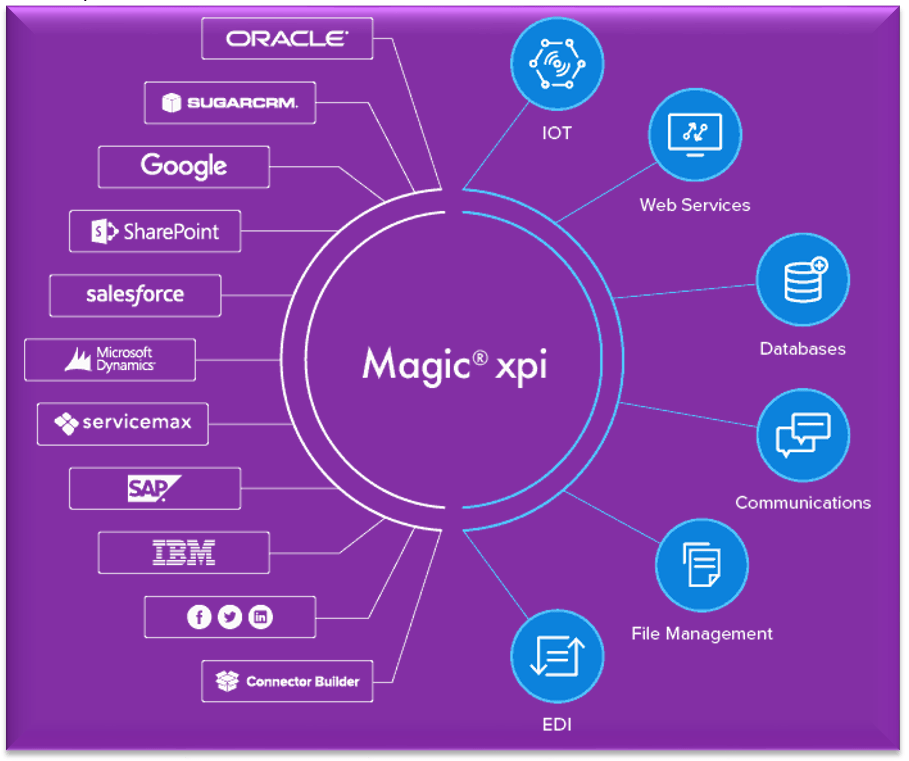
It’s got pre-built connectors for Salesforce, SAP, Oracle NetSuite, Dynamics —you name it. Instead of writing custom code, you use a drag-and-drop interface to map out how data flows between systems. Real-time sync means no more waiting for updates, and it’s scalable enough to handle growing businesses without falling apart.

EDI2XML-Magic-xpi-integration-platform

Why Integration Really Matters

Integration isn’t just a tech upgrade; it’s a sanity-saver. When your systems are connected:

  • Your sales team always knows what’s in stock.
  • Your warehouse team gets orders instantly.
  • Your trading partners are updated automatically.

No more miscommunication or wasting time tracking down information. Integration isn’t just about making things faster; it’s about making them work the way they should have from the start.

At EDI2XML, we’ve seen what happens when businesses take the leap to unify their systems. Processes become smoother, teams work better together, and customers are happier. It’s not magic—but with platforms like Magic xpi, it’s pretty close.

What Are the Integration Benefits?

Here’s the honest truth: integration takes work. It’s not magic—you can’t snap your fingers and expect everything to connect seamlessly overnight. But when done right, the payoff is enormous:

  • Accurate Data, Everywhere: No more duplicate entries or mismatched information.
  • Faster Processes: Orders move through your pipeline automatically, saving hours of manual effort.
  • Better Visibility: Sales, operations, and warehouse teams have access to the same data.
  • Happier Customers: Faster, more reliable service because your systems are aligned.Integration price

Business Systems Integration Challenges You Might Face


Every business is unique, which means integration isn’t one-size-fits-all. You’ll need to consider:

  • Compatibility: Do your current systems support APIs or connectors?
  • Scalability: Will your solution grow as your business expands?
  • Implementation Costs: While integration saves money in the long run, there’s an upfront investment in tools and expertise.

While compatibility and scalability are significant hurdles, the technical intricacies of system integration can be even more daunting.

For instance, ensuring seamless data exchange between systems with different data formats and structures can be a complex task. Moreover, integrating legacy systems with modern technologies often requires careful planning and technical expertise.

To overcome these challenges, businesses should invest in robust integration platforms, leverage API-based integrations, and consider data mapping and transformation techniques to bridge the gaps between disparate systems.

Where Do You Start?

The best place to begin is by mapping your current processes. Which systems need to communicate, and what data do they need to share? Once you have that figured out, look for integration solutions that fit your needs—whether it’s custom development, middleware, or managed services.

We’ve been helping businesses with system integration for over 20 years, and one thing we see time and again is hesitation. Many companies are afraid to change their processes, often thinking integration will be too complex or expensive to take on. But here’s the good news: with today’s technologies, integrating business systems has become far more accessible and cost-effective than ever before.

If you’re unsure where to start or worried about the investment, we encourage you to reach out to us. We offer free consultations where we can discuss your specific needs and provide a clear estimate, so you’ll know exactly what to expect.

Synchronizing Accounts in Salesforce with Customers in NetSuite using Magic xpi

November 15, 2024/0 Comments
https://www.edi2xml.com/wp-content/uploads/2024/11/edi2xmlcom-integration-selesforce-edi-erp.webp 628 1200 Tatyana Vandich https://www.edi2xml.com/wp-content/uploads/2024/08/edi2xml.com-EDI2XML-company-logo.png Tatyana Vandich2024-11-15 15:58:352024-11-15 15:58:35Salesforce, EDI, ERP, and WMS Integration: From Chaos to Control

What is CRM and ERP integration and why it is essential?

Blog

This post was updated to reflect current trends and information.


Integration of CRM and ERP systems: Definition

CRM and ERP integration is the synchronization of data from ERP and CRM systems. The purpose of CRM and ERP integration is to provide automatic exchange of information between the enterprise systems.


Nowadays, many enterprises use numerous different business systems and applications for enterprise management, in other words, a combination of ERP, CRM, home grown applications, and many other applications for different business needs.

All these business systems have the same goal – to optimize business processes. However, their tasks are different. So how is CRM different from ERP? Do you need to integrate data from these different systems? How to perform such integration at its best? Let’s take a look at these questions in this article.


What is CRM?

CRM Customer relationship management – the name speaks for itself. It is a business software designed to automate interactions with customers (clients), to increase sales, optimize marketing and improve customer service.


What does a CRM software do?

CRM allows you to store and organize data about clients (prospects) as well as all their orders and transactions.

Information about customers can be built according to convenient parameters: names, contacts, purchases, contracts, invoices, and payments.

In most CRM systems you can follow in chronological order the entire history of communication with the client, emails, orders, and call records.

Most importantly, the CRM system automates processes and helps at every stage of the sale: automatically generates documents (according to a template), reminds of calls, issues invoices, and creates analytical reports, sends SMS notifications, and many more.

What are the Top 10 CRM Software Vendors?

According to the leading technology market-research company APPS RUN THE WORLD, Salesforce is the leader in the CRM software market. The other biggest providers of standalone or embedded CRM systems are:

  • Salesforce.com
  • Adobe
  • Oracle
  • SAP
  • Microsoft
  • Genesys Telecommunications Laboratories
  • Zendesk
  • Pegasystems
  • HubSpot
  • Nice Systems

What Is ERP?

ERP stands for Enterprise Resource Planning. The ERP software is designed for storing, processing, and maintaining a single database for all divisions of the company: orders, production, warehouses, logistics department, accounting, etc. ERP creates a single information space for all employees of the company.

The main goal of an ERP system is to unite the disparate processes of the company into a single well-functioning mechanism.

What is the main component of an ERP system?

Typically, ERP systems are designed based on a modular principle to cover all the key processes of the company’s activities.

The main modules in the ERP system are:

  • Planning
  • Budgeting / Financial Management.
  • Logistics/ Supply Chain Management
  • Human Resources
  • Production Management / Manufacturing
  • Order Management
  • Warehouse / Inventory Management

The ERP allows the management to get a comprehensive picture of the company’s activities, which makes the ERP system an indispensable tool for making current and strategic management decisions.

ERP software examples

According to Statista, the global enterprise resource planning (ERP) software market is forecast to grow to around 97 billion U.S. dollars by 2024. SAP and Oracle are two of the leading ERP vendors in this market.

The most popular ERP systems on the market are:

SAP Business One
It is an ERP solution for small businesses designed to automate key business functions. Can be deployed On-premises or cloud.

SAP S/4HANA
It is an ERP solution for large enterprises. SAP S/4HANA has built-in intelligent technologies, machine learning, and advanced analytics. Could be deployed in public/private cloud, hybrid, and on-premises.

SAP Business ByDesign
It is a Cloud ERP for small and medium-sized enterprises. SAP Business ByDesign is sold and operated by software as a service model.

NetSuite
It is Oracle’s Cloud ERP solution for Small and Mid-sized Enterprises. NetSuite offers modular systems ranging from finance to supply chain management, invoicing, and more.

Sage Intacct
This cloud-based ERP software solution with high ROI was designed by an American provider of cloud-based Financial management Sage Intacct, Inc. Sage Intacct includes core financial modules with possibility to add additional modules.

Acumatica
It is a complete Cloud ERP solution for all your business management needs, created for flexible workplace such as mobile, and remote work.

Tally
It is an enterprise ERP software provided by an Indian multinational company Tally Solutions Pvt. Ltd.

Is CRM and ERP integration possible?

As you might have noticed, CRM and ERP systems are not competing systems, but one complements the other. In fact, some big ERP systems, they offer their own CRM modules, to keep the whole process under one umbrella. Both software systems help for efficient and cost-effective enterprise management.

An ERP system helps control production, planning, and logistic processes; a CRM helps track and follow up and increase sales and customer loyalty. However, to get the most out of these two important business systems, it is necessary that the ERP and CRM “communicate” with each other.

“Is it possible to do an integration between two heterogenous systems from two different vendors?” – This is one of the most frequent questions that companies care about. Of course, it is possible! With Magic xpi integration platform, the integration between CRM and ERP can be done easily, quickly, and reliably.

What is Magic XPI integration platform?

Magic xpi is an integration platform, offering a complete solution to automate the flow of data between business systems and applications such as (ERP) enterprise resource planning, (CRM) customer relationship management, (HRM) human resources management, (SCM) supply chain management, EDI, database, and e-commerce.

Why Magic xpi is the best choice for CRM and ERP Integration?

Out of the box, Magic xpi includes over 100 ready-to-use connectors to all popular IT systems, in addition there is a considerable number of certified connectors to connect to branded ERP/CRM systems such as JDE, SAP, Dynamics AX, Oracle, SharePoint, IBM, Google, and more.

These connectors allow to perform integration of applications, databases, APIs, platforms quickly and reliably.

Having an intuitive and easy-to-use drag-and-drop interface, it is suitable for both professional integrators and ordinary business users.

Magic xpi fits any IT infrastructure and can integrate all your business systems on-premises, on the cloud, or in a hybrid environment.

Magic xpi provides a stable front-end platform and the ability to integrate data and deliver the most relevant information to your employees, management, or customers.


Key benefits of data integration between CRM and ERP systems

The main benefits of CRM and ERP integration include but are not limited to:

1. No need to re-enter the same data and keep duplicates.

ERP and CRM systems have contact and accounting information used in both systems for different purposes. For example, in an ERP system, addresses are used for invoicing and product delivery, while in CRM, customer and prospect addresses are used to support sales / marketing.

Integration of CRM and ERP systems eliminates the need for double data entry. Thus, any change made in the CRM database will affect the ERP system and vice versa.

2. Easier and faster data exchange.

Integration of CRM and ERP data increases sales, since sales managers have full access to data from ERP having complete information on the product, they can place an order faster and more accurately.

3. Efficient order management

By integrating data between CRM and ERP, quotations created in CRM can be automatically converted into actual orders in the ERP system. This significantly reduces order processing times and increases the efficiency of the company.

Thus, the main advantages that companies receive from the integration of CRM and ERP are increased information availability, reduced order processing time, and improved interaction processes within the organization.


Suggested Readings: The main reasons why you need Microsoft Dynamics Integration with your business Systems


Integrate your CRM and ERP – quickly and efficiently

Optimize your company’s business processes and increase productivity by connecting CRM and ERP systems.

Benefit from our over 21 years of experience in integrations and cutting-edge technology.

Contact us for a free consultation and a Free Live Demo of the Magic xpi Integration Platform. In a screen-sharing format, we’ll show you how Magic xpi can solve your business needs.

April 26, 2021
https://www.edi2xml.com/wp-content/uploads/2021/04/CRM-ERP-Integration.png 350 1024 Tatyana Vandich https://www.edi2xml.com/wp-content/uploads/2024/08/edi2xml.com-EDI2XML-company-logo.png Tatyana Vandich2021-04-26 15:15:312024-10-11 13:39:25What is CRM and ERP integration and why it is essential?
Recent
  • The Infrastructure Behind Modern Commerce: Why EDI Still Matters
    EDI in E-Commerce and Retail: Why Modern Commerce Still...May 1, 2026 - 4:54 pm
  • Key Statistics on AI Use in the Workplace
    The Risks of Using Public AI Tools in Business: Data Privacy,...March 11, 2026 - 5:51 pm
  • Enterprise AI
    How to Securely Access Enterprise AI: GPT, DeepSeek &...February 20, 2026 - 3:09 pm
  • EDI 754 Guide
    EDI 754 Routing Instructions: Complete Guide to Purpose,...February 18, 2026 - 4:54 pm
  • All you need to know about EDI 753 Transaction
    What Is EDI 753? Purpose, Structure & Routing Rule...February 12, 2026 - 3:59 pm
Popular
  • How to Quickly Connect to a Large Retailer's EDI Requirements
    How to Get EDI-Compliant Quickly For A Large RetailerNovember 21, 2025 - 4:29 pm
  • EDI-as-a-services
    EDI Translation Software “On-premises” or “As...January 21, 2014 - 1:28 pm
  • order-automation in e-commerce
    Why Is It Crucial to Automate the E-Commerce Order Fulfillment...May 10, 2022 - 1:58 pm
  • EDI for Logistics and transportation
    EDI Integration for Efficient Transportation ManagementOctober 6, 2023 - 1:33 pm
  • information technology definitions
    Business Tech Terms DefinitionsMay 24, 2018 - 1:32 pm

Browse by tag

Amazon Amazon Integration ANSI ASC x12 ASC X12 EDI B2B EDI integration e-commerce e-commerce business e-commerce integration eCommerce eCommerce integration EDI EDI2XML EDI as a Service EDI Communication EDIFACT EDI for supply chain EDI for Third-Party Logistics EDI for transportation EDI implementation EDI Integration EDI Integration Project EDI project EDI to XML converter EDI Translation EDI Web Service EDI x12 ERP Fully managed EDI Integration integration platform integration project JDE Logistics EDI Transactions Magic xpi NetSuite online store Shopify Shopify eCommerce integration Shopify integration soa integration Supply Chain Supply Chain Management Translation Software X12 EDI XML

Subscribe to our Blog

Menu

  • Home
  • About the EDI2XML Company
  • About EDI2XML EDI Converter
  • Blog
  • Book A Free Consultation
  • Privacy Policy EDI2XML Company

Our Services

Fully Managed Integration

E-Commerce Integration

Business Systems Integration

Fully Managed EDI

EDI Web Service 

On Premises EDI 

Managed Cloud Service


Latest Blog Posts

  • The Infrastructure Behind Modern Commerce: Why EDI Still Matters
    EDI in E-Commerce and Retail: Why Modern Commerce Still Depends on EDIMay 1, 2026 - 4:54 pm
  • Key Statistics on AI Use in the Workplace
    The Risks of Using Public AI Tools in Business: Data Privacy, Compliance, and Shadow AIMarch 11, 2026 - 5:51 pm
  • Enterprise AI
    How to Securely Access Enterprise AI: GPT, DeepSeek & LLaMAFebruary 20, 2026 - 3:09 pm

Contact Us

400 Blvd Curé-Labelle, #304 Laval QC H7V 2S7 Canada

Contact EDI2XML Team
Phone: +1 450-681-3009
Website: https://www.edi2xml.com/

© 2000-2026 EDI2XML (by Namtek Consulting Services). All rights reserved.
  • Link to Facebook
  • Link to LinkedIn
  • Link to X
  • Link to Youtube
  • Blog
Scroll to top Scroll to top Scroll to top