
EDI2XML
  • POINT
    • POINT Overview
    • EDI & Business Connectivity
  • SOLUTIONS
    • EDI Integration
      • Fully Managed EDI Services
      • HTTP EDI Web Service (API)
      • EDI2XML Service โ€œOn Premisesโ€
    • E-Commerce Integration
      • Amazon Integration
      • Shopify Integration
      • BigCommerce Integration
    • Systems Integration
      • Fully Managed Integration
      • NetSuite Integration
      • JD Edwards Integration
      • Dynamics 365 Integration
      • SAP Business One Integration
      • Salesforce Integration
      • Industry 4.0 Integration
    • Managed Cloud Services
      • Shared Hosting
      • Dedicated Hosting
      • Colocation Service
    • AI Solutions
      • AskElixir.ai
  • PRICING
    • EDI Price
      • EDI Managed Services
      • EDI Web Service (API)
      • EDI On-Premises
    • Managed Cloud Services
    • E-commerce Integration
    • Integration Services
  • BLOG
  • RESOURCES
    • Downloadable Guides
    • EDI Resources
      • List of EDI Codes
      • List of EDIFACT Messages
      • EDI2XML Documents Library
    • Trading Partners
    • Customer Case Studies
  • ABOUT
    • About the EDI2XML Company
    • Partner with Us
    • Testimonials
  • CONTACT US
  • BOOK A CONSULTATION
  • Click to open the search input field Click to open the search input field Search
  • Menu Menu
  • Link to Facebook
  • Link to LinkedIn
  • Link to X
  • Link to Youtube

EDI solutions for 3PL providers, covering integration, automated document exchange, and streamlined logistics operations.

Tag Archive for: EDI for 3PL provider

EDI 990 โ€“ Response to a Load Tender: A Definitive Guide for Supply Chain and Transportation Professionals

Blog

Key Takeaways

  • The EDI 990is the ANSI X12 transaction set used by motor carriers to accept, decline, or conditionally accept a shipper’s load tender (EDI 204).
  • It is a direct response document – it does not initiate a process but replies to one already started by the shipper or broker.
  • The EDI 990 is primarily used in truckload (TL) and less-than-truckload (LTL) transportation, though specific usage depends on trading partner agreements.
  • Implementing the EDI 990 eliminates phone calls, faxes, and emails for load acceptance, significantly reducing response times and manual errors.
  • The transaction set is defined by the ANSI Accredited Standards Committee X12(ASC X12), and its specific implementation details (which segments are required, what codes are used) are governed by individual trading partner implementation guides.
  • Companies without ERP systems or large IT departments can still implement EDI 990 through solutions like EDI web portalsor fully managed EDI services.

What Is EDI 990?

The EDI 990, formally known as the Response to a Load Tender, is an electronic transaction set defined within the ANSI X12 standard. It is the standardized message a motor carrier sends back to a shipper (or broker, or 3PL) to communicate whether the carrier accepts, declines, or conditionally responds to a previously received load tender.

In simpler terms: when a shipper electronically asks a carrier to haul a load using an EDI 204 (Motor Carrier Load Tender), the carrier replies with an EDI 990 to say “yes,” “no,” or “yes, but with changes.”

The EDI 990 belongs to the Transportation functional group within the ANSI X12 standard family. It is not a standalone document, it only exists as a response to an EDI 204 and references the original tender.

Important distinction: The ANSI X12 standard defines the structure and allowable content of the EDI 990. However, the specific segments used, required data elements, and business rules vary based on each trading partner’s implementation guide. Two companies may both use EDI 990, but their implementations can differ substantially.

What Is the Purpose of EDI 990?

The purpose of the EDI 990 is to provide a fast, standardized, and machine-readable response to a load tender. Before EDI, this process was handled through phone calls, faxes, or emails – all of which were slow, error-prone, and difficult to track.

The EDI 990 serves these specific functions:

  • Accepting a load tender – The carrier confirms it will handle the shipment as specified in the EDI 204.
  • Declining a load tender– The carrier indicates it cannot or will not accept the shipment, allowing the shipper to quickly tender the load to another carrier.
  • Providing a conditional response – In some trading partner implementations, the carrier may accept with modifications or provide a counter-offer (though the specifics of conditional responses depend on individual implementation guides).

By standardizing this response, the EDI 990 removes ambiguity. The shipper’s system can automatically process the response and take the next appropriate action, whether that’s confirming the shipment in a Transportation Management System (TMS) or re-tendering to an alternate carrier.

Who Uses EDI 990?

The EDI 990 is used by multiple parties in the transportation and logistics ecosystem. The roles involved include:

Motor Carriers

Motor carriers are the primary senders of the EDI 990. When a carrier receives an EDI 204 load tender, the carrier’s system (or EDI coordinator) generates and transmits a 990 to indicate acceptance or decline. This applies to both truckload (TL) and less-than-truckload (LTL) carriers, depending on trading partner requirements.

Shippers

Shippers are the primary receivers of the EDI 990. They originate the load tender (EDI 204) and wait for the carrier’s EDI 990 response. Shippers use this response to confirm transportation plans or trigger re-tendering logic if the load is declined.

Third-Party Logistics Providers (3PLs)

3PLs often act as intermediaries managing freight on behalf of shippers. A 3PL may send an EDI 204 to a carrier on the shipper’s behalf and receive the EDI 990 response. In this role, the 3PL functions similarly to a shipper from an EDI standpoint.

Freight Brokers

Freight brokers match shippers with carriers. In EDI-enabled brokerage operations, the broker may send the EDI 204 to the carrier and receive the EDI 990 response. The broker then communicates the result back to the shipper, often through their own systems.

Logistics Service Providers and Transportation Companies

Any organization that arranges or manages freight transportation and uses EDI may be involved in the 990 exchange. The specific role (sender or receiver) depends on whether the organization is tendering loads or carrying them.

Consignees

Consignees (the parties receiving the goods) are generally not direct participants in the EDI 990 exchange. However, they may be referenced within the transaction data, and in supply chains with high visibility requirements, consignees may have downstream systems that are updated based on 990 responses.

Which Industries Commonly Use EDI 990?

The EDI 990 is commonly used by businesses across industries that rely on motor carrier transportation and use EDI for freight tendering. It enables carriers to electronically accept or decline a load tender received through an EDI 204 transaction, helping shippers and carriers confirm transportation capacity and respond quickly to load offers.

Industry Typical Use Case
Retail High-volume shipments and store replenishment requiring timely carrier confirmation
Consumer Packaged Goods (CPG) Frequent shipments to retailers and distributors
Manufacturing Inbound raw materials and outbound finished goods transportation
Automotive Time-sensitive and just-in-time (JIT) transportation requiring rapid load confirmation
Food & Beverage Time-sensitive shipments and temperature-controlled transportation
Grocery & Distribution High-frequency shipments between distribution centers, suppliers, and retail locations
Chemical & Industrial Specialized freight transportation requiring confirmed carrier capacity
Paper & Forest Products Heavy or bulk freight transportation managed through carrier load tendering


The common factor is volume and time sensitivity. Organizations that tender large numbers of loads and need rapid, reliable carrier responses are the most likely users of the EDI 990.

Note: The specific industries listed above reflect common industry practice. Whether a particular company within these industries uses EDI 990 depends on their trading partner agreements and technology adoption.

Free consultation with EDI expert

When Should EDI 990 Be Used?

The EDI 990 should be used every time a carrier needs to respond to an electronically transmitted load tender (EDI 204). The key scenarios include:

  • A carrier receives an EDI 204 and wants to accept the load.The carrier sends an EDI 990 with an acceptance response code.
  • A carrier receives an EDI 204 and cannot accept the load.The carrier sends an EDI 990 with a decline response code, allowing the shipper to immediately re-tender.
  • A carrier needs to respond within a required time window.Many shippers define a tender response deadline in their routing guides or trading partner agreements. If the carrier does not respond with an EDI 990 within that window, the shipper may automatically re-tender to the next carrier. The specific time windows depend on individual trading partner agreements.

The EDI 990 is not used for:

  • Initiating a shipment request (that is the EDI 204)
  • Providing shipment status updates (that is the EDI 214 – Transportation Carrier Shipment Status Message)
  • Invoicing for freight charges (that is the EDI 210 – Motor Carrier Freight Details and Invoice)

How Does the EDI 990 Business Process Work?

The EDI 990 fits into a well-defined sequence of EDI transactions in the transportation lifecycle. Below is the typical business workflow:

Step-by-Step Workflow:

  1. Shipper creates a shipment order in their Transportation Management System (TMS) or ERP system. The system determines the appropriate carrier based on routing guides, contracts, rates, or other business rules.
  2. Shipper transmits an EDI 204 (Motor Carrier Load Tender) to the selected carrier. The 204 contains shipment details such as origin, destination, pickup and delivery dates/times, equipment requirements, commodity information, and weight.
  3. Carrier receives the EDI 204 and evaluates whether it can fulfill the shipment. The carrier may check equipment availability, driver capacity, lane coverage, scheduling, and other operational factors.
  4. Carrier transmits an EDI 990 (Response to a Load Tender) back to the shipper. The 990 references the original load tender and indicates whether the carrier accepts or declines the load.
  5. Shipper’s system processes the EDI 990:
    • If accepted: The shipment is confirmed, and the carrier proceeds with the transportation. During the shipment, additional EDI transactions may be exchanged, including the EDI 214 (Transportation Carrier Shipment Status Message) to provide tracking and status updates.
    • If declined: The shipper’s TMS may automatically tender the load to the next carrier in the routing guide, restarting the 204/990 cycle with another carrier.
  6. After the transportation service is completed, the carrier sends an EDI 210 (Motor Carrier Freight Details and Invoice) to submit the freight invoice and billing details.

Where EDI 990 Fits Among Related Transportation Documents

Transaction Set Name Purpose Relationship to EDI 990
EDI 204 Motor Carrier Load Tender Shipper sends a shipment request to a carrier Triggers the EDI 990
EDI 990 Response to a Load Tender Carrier accepts or declines the tender Responds to the EDI 204
EDI 214 Transportation Carrier Shipment Status Message Carrier provides shipment status and tracking updates Typically follows an accepted 990 during transportation
EDI 210 Motor Carrier Freight Details and Invoice Carrier submits freight billing information Typically follows completion of transportation services
EDI 211 Motor Carrier Bill of Lading Communicates bill of lading and shipment details May be used as part of the shipment documentation process; timing varies by trading partner
EDI 997 Functional Acknowledgment Confirms receipt and syntactic processing of an EDI transaction May acknowledge receipt of the 990; it does not indicate acceptance of the load

The easiest way to understand the EDI 990 is to look at its position in the transportation workflow:

EDI 204 โ†’ EDI 990 โ†’ EDI 214 โ†’ EDI 210

Load Tender โ†’ Accept/Decline โ†’ Shipment Status โ†’ Freight Invoice

The EDI 211 may also be exchanged as part of the shipment documentation process, depending on the specific trading partner relationship and implementation requirements. The EDI 997 is different because it provides a technical acknowledgment rather than a business-level response.

Technical Overview of EDI 990

This section explains the structure and key components of the EDI 990 transaction set at a high level. It is intended to help technical and business readers understand what the document contains without reproducing copyrighted standard specifications.

Disclaimer: The ANSI X12 standard is copyrighted by the Accredited Standards Committee X12. The information below describes the general purpose of common segments based on publicly available knowledge and common industry practice. For the complete and authoritative specification, refer to the official ASC X12 documentation. Trading partner implementation guides define which segments and elements are actually required for a specific exchange.

Your EDI partner - EDI2XML

EDI 990 Transaction Set Structure

Like all ANSI X12 transaction sets, EDI 990 follows a hierarchical structure:

  • Interchange Envelope (ISA/IEA): Wraps all content exchanged between two trading partners in a single transmission.
  • Functional Group (GS/GE): Groups one or more transaction sets of the same type. For EDI 990, the functional group identifier is typically “GF”(as defined by X12 for Response to a Load Tender).
  • Transaction Set (ST/SE): Contains a single EDI 990 document.

Common Segments and Their Purpose

The following table describes segments commonly found in EDI 990 implementations. The specific segments required for any given exchange are defined by the trading partner implementation guide.

Segment Name Purpose
ST Transaction Set Header Identifies the start of the transaction set and the transaction set type (990)
B1 Beginning Segment for Booking or Pick-up/Delivery Contains the response code (accept/decline), the carrier’s standard carrier alpha code (SCAC), and the shipment identification number referencing the original EDI 204
N9 Reference Identification Provides additional reference numbers such as the shipper’s tender number, bill of lading number, or other identifiers that link the response to the original tender
SE Transaction Set Trailer Marks the end of the transaction set and includes a count of segments

Important Data Elements

Key data elements commonly found in the EDI 990 include:

  • Standard Carrier Alpha Code (SCAC): A unique 2-to-4 letter code identifying the motor carrier. SCACs are assigned by the National Motor Freight Traffic Association (NMFTA).
  • Shipment Identification Number: References the original load tender so the shipper can match the response to the correct shipment.
  • Response Code: Indicates whether the carrier is accepting, declining, or conditionally responding to the tender. The specific code values used are defined by the X12 standard and further refined by trading partner implementation guides.

Sample EDI 990 (Simplified Conceptual Example)

The following is a simplified, conceptual representation intended only to illustrate the general structure of an EDI 990. It is not drawn from copyrighted X12 specifications and should not be used as an implementation reference. Always consult your trading partner’s implementation guide and the official X12 standard for actual implementation.

ISA*00*          *00*          *ZZ*CARRIER        *ZZ*SHIPPER        *230615*1200*U*00401*000000123*0*P*>~

GS*GF*CARRIER*SHIPPER*20230615*1200*123*X*004010~

ST*990*0001~

B1*SCAC*SHIPMENT123*A~

SE*2*0001~

GE*1*123~

IEA*1*000000123~

In this conceptual example:

  • ST*990*0001 โ€” Identifies this as a 990 transaction set.
  • B1*SCAC*SHIPMENT123*A – The carrier (identified by SCAC) responds to shipment “SHIPMENT123” with a code that represents acceptance.
  • The actual response codes, segment requirements, and additional data elements vary by trading partner.

Note: This is a simplified illustration. Real-world EDI 990 documents may include additional segments such as N9 for reference numbers, and the specific element positions and qualifiers are governed by the X12 standard version and the trading partner implementation guide.

Benefits of Implementing EDI 990

Implementing the EDI 990 as part of an automated load tendering process provides measurable operational improvements:

  • Faster carrier response times – Automated EDI processing enables carriers to respond to tenders in minutes rather than hours, reducing the risk of missed pickup windows.
  • Reduced manual effort – Eliminates the need for phone calls, faxes, and email exchanges to confirm or decline load tenders. Staff can focus on exception handling rather than routine communication.
  • Improved shipment planning accuracy – Shippers receive definitive accept/decline responses that their TMS can process automatically, enabling faster re-tendering and better planning.
  • Fewer errors – Standardized electronic data eliminates misunderstandings, transcription errors, and lost communications that occur with manual processes.
  • Better carrier performance tracking – Every 990 response creates a digital record. Shippers can analyze tender acceptance rates by carrier, lane, and time period to inform routing guide decisions.
  • Automated re-tendering – When a carrier declines via EDI 990, the shipper’s TMS can automatically tender to the next carrier in the routing guide without human intervention, significantly reducing cycle time.
  • Audit trail and compliance – EDI transactions are logged, creating a verifiable record of when tenders were sent and when responses were received โ€” useful for contract compliance and dispute resolution.

Truck-Transportation EDI

Common Challenges with EDI 990

Despite its benefits, implementing and maintaining the EDI 990 process presents challenges:

  • Trading partner variability – Different shippers and carriers may use different versions of the X12 standard and different implementation guides. A carrier working with 50 shippers may need to support 50 slightly different 990 configurations.
  • Mapping and translation complexity – Translating data between internal systems (TMS, ERP) and the EDI 990 format requires accurate mapping. Incorrect mapping can lead to rejected transactions or mismatched shipment references.
  • Response time requirements – Shippers often require carriers to respond within a specific time window (e.g., 15 minutes, 30 minutes, 2 hours – varies by trading partner). Carriers without automated systems may struggle to meet these deadlines.
  • System integration – The EDI 990 must be integrated with the carrier’s dispatch or TMS system to be truly effective. Without integration, the response may still require manual intervention.
  • Error handling and exception management – When an EDI 990 fails validation (e.g., the referenced shipment ID doesn’t match a known tender), the error must be identified and resolved quickly to avoid delays.
  • Onboarding new trading partners – Each new shipper-carrier EDI relationship requires testing, validation, and agreement on implementation details, which can take weeks or months.
  • Maintaining compliance across standard versions – The X12 standard is updated periodically. Trading partners may use different versions (e.g., 4010, 5010), requiring the ability to support multiple versions simultaneously.

Best Practices for EDI 990 Implementation

With more than 25 years of experience in EDI integration and transaction management, we know that a successful EDI 990 implementation involves more than simply generating a valid X12 message. It requires careful attention to trading partner requirements, business workflows, transaction timing, validation, error handling, and ongoing monitoring.

Based on our experience working with EDI integrations, the following best practices can help carriers and logistics providers build a reliable EDI 990 process:

  1. Obtain and follow the trading partner’s implementation guide. Never assume the standard defaults. Each trading partner specifies which segments, elements, and code values they require.
  2. Automate the response wherever possible. Integrate the EDI 990 generation with your TMS or dispatch system so responses are triggered by business logic (capacity checks, lane acceptance rules) rather than manual review.
  3. Respond quickly. Whether you accept or decline, send the EDI 990 as fast as possible. A timely decline is more valuable to a shipper than a delayed acceptance because it allows faster re-tendering.
  4. Validate inbound EDI 204 data before generating the 990. Ensure the tender data is complete and correctly formatted before generating a response. This prevents downstream errors.
  5. Implement proper error handling and alerting. Set up notifications for failed transactions, validation errors, and tenders that have not received a response within the required time window.
  6. Test thoroughly before going live. Conduct end-to-end testing with each trading partner, including acceptance scenarios, decline scenarios, and error scenarios.
  7. Maintain a clear audit trail. Log all EDI 204 and 990 transactions with timestamps. This data is essential for performance analysis, dispute resolution, and compliance reporting.
  8. Monitor tender acceptance rates. Track your acceptance and decline rates by lane, shipper, and time period. This operational data supports better capacity planning and relationship management.
  9. Keep your SCAC code and trading partner information current. Outdated identifiers cause transaction failures. Ensure your SCAC (assigned by NMFTA) is active and correctly referenced.
  10. Plan for scalability. As you add trading partners, your EDI volume will grow. Ensure your EDI platform, communication methods (AS2, SFTP, VAN), and internal systems can handle increased volume.

Typical EDI 990 Implementation

Implementing EDI 990 typically follows a structured process. The specific steps and timeline vary depending on the organization’s size, existing technology, and the trading partner’s requirements.

Step 1: Gather Requirements

Obtain the trading partner’s EDI implementation guide for the 990 transaction set. This document specifies:

  • Which X12 version to use
  • Required and optional segments
  • Expected code values
  • Communication protocol (AS2, SFTP, VAN, etc.)
  • Response time expectations
  • Test procedures

Step 2: Choose an EDI Solution

The right EDI approach depends on your existing systems, internal IT resources, transaction volume, and how much of the EDI process you want to manage internally.

EDI Approach Best For What It Involves
In-house EDI Large organizations with dedicated EDI/IT resources The company manages EDI software, partner mappings, connectivity, monitoring, and ongoing maintenance internally.
Managed EDI Service Companies that want to outsource EDI operations An EDI provider manages mapping, translation, connectivity, monitoring, and trading partner onboarding on the company’s behalf.
EDI Web Portal Smaller companies without direct system integration Users access a browser-based portal to receive tenders and submit EDI 990 responses manually. The portal converts the information into the required EDI format.
API-Based EDI Integration Companies with modern applications or custom systems An API connects internal applications to an EDI platform, allowing business systems to exchange data with trading partners without requiring direct EDI processing in those applications.

Step 3: Map and Configure

Map the data elements between your internal system and the EDI 990 format according to the trading partner’s implementation guide. This includes:

  • Mapping your internal shipment identifiers to the tender reference numbers
  • Configuring response codes
  • Setting up communication endpoints

Step 4: Test with the Trading Partner

Conduct testing (often called “pilot testing” or “certification testing”) with the trading partner. This typically involves:

  • Sending sample EDI 990 documents for the partner to validate
  • Receiving sample EDI 204 documents and responding with 990s
  • Verifying that documents are correctly parsed and processed on both sides

Step 5: Go Live and Monitor

After successful testing, move to production. Monitor the first several weeks of live transactions closely for errors, timing issues, or data mismatches.

How EDI2XML Can Help with EDI 990 Implementation

For organizations that need to implement EDI 990 but lack in-house EDI expertise or infrastructure, service providers like EDI2XML offer implementation support and managed EDI services.

EDI2XML provides several implementation approaches depending on the organization’s needs and technical environment:

  • Fully managed EDI services – EDI2XML handles the mapping, translation, and transmission of EDI 990 and related transaction sets on behalf of the organization. This approach is suitable for companies that prefer to outsource EDI operations rather than build internal capabilities.
  • Integration with existing ERP or TMS systems – For organizations that use enterprise systems but need EDI connectivity, EDI2XML can integrate EDI processing with the existing system, automating the flow of data between the business application and trading partners.

EDI Web Portal for Small and Mid-Size Businesses

Companies that do not have an ERP system, TMS, or dedicated EDI infrastructure may benefit from a browser-based EDI web portal. EDI2XML offers an EDI web portal solution designed for small to mid-size businesses.

With a web portal approach:

  • Users log into a web-based interface to view incoming EDI 204 load tenders.
  • Users respond to tenders through the portal, and the system generates the EDI 990 in the correct format and transmits it to the trading partner.
  • No EDI software installation or in-house EDI expertise is required.
  • The portal handles the translation between the human-readable web interface and the EDI standard format.

This approach is particularly useful for smaller carriers or brokers that receive EDI tenders from large shippers but do not have the volume or budget to justify a full EDI software implementation.

EDI Web Portal integration flow from trading partner to client, showing EDI 204/990/214/210 exchanges and QuickBooks Cloud access.

Common Misconceptions About EDI 990

  • “EDI 990 is the same as a Functional Acknowledgment (997).”This is incorrect. The EDI 997 confirms that an EDI file was received and is syntactically valid. The EDI 990 is a business-level response that communicates a decision about a load tender. They serve entirely different purposes, and both may be exchanged during a single transaction flow.
  • “If I don’t send an EDI 990, the shipper will assume I accepted the load.”This depends entirely on the trading partner’s business rules. Some shippers treat the absence of a 990 as a decline and will automatically re-tender. Others may attempt to follow up. Never assume โ€” always check the trading partner’s implementation guide and contractual terms.
  • “EDI 990 is only for truckload carriers.”While truckload is the most common context, LTL carriers and other transportation providers may also use EDI 990 depending on trading partner requirements. The X12 standard does not restrict the 990 to a single mode.
  • “All EDI 990 implementations are the same.”The ANSI X12 standard provides the framework, but individual trading partners define which segments, elements, and codes they require. Two shippers can have significantly different 990 requirements.

Frequently Asked Questions (FAQ)

What does EDI 990 stand for?

EDI 990 is the ANSI X12 transaction set number for the “Response to a Load Tender.” It is the standardized electronic document a motor carrier uses to accept or decline a shipper’s load tender (EDI 204).

What is the difference between EDI 990 and EDI 997?

The EDI 997 is a Functional Acknowledgment – a technical confirmation that an EDI file was received and could be parsed. The EDI 990 is a business response that communicates the carrier’s decision to accept or decline a specific load tender. They serve different purposes and are both commonly exchanged during the load tendering process.

Who sends the EDI 990?

The motor carrier (or their EDI service provider) sends the EDI 990 in response to an EDI 204 received from a shipper, broker, or 3PL.

What triggers an EDI 990?

An EDI 990 is triggered by the receipt of an EDI 204 (Motor Carrier Load Tender) from a shipper or logistics provider.

Is EDI 990 required?

Whether a carrier must respond with an EDI 990 depends on the trading partner agreement. Many large shippers require EDI 990 responses as part of their carrier compliance programs. The absence of a 990 may result in automatic re-tendering or compliance penalties, depending on the shipper’s rules.

How quickly must a carrier respond with an EDI 990?

Response time requirements are defined by each trading partner’s business rules, not by the X12 standard itself. Common response windows range from 15 minutes to several hours, but the specific deadline varies by shipper and must be confirmed in the trading partner agreement or routing guide.

Can a carrier send a counter-offer via EDI 990?

The X12 standard includes provisions for different response types. Whether a conditional or counter-offer response is supported depends on the trading partner’s implementation guide. Not all shippers accept conditional responses.

What systems are needed to send and receive EDI 990?

At minimum, you need an EDI translation capability (software, service, or web portal) and a communication method (AS2, SFTP, VAN, etc.) to exchange EDI documents with trading partners. Integration with a TMS or dispatch system is recommended for automation but not strictly required – web portal solutions enable manual processing without ERP integration.

What X12 version is used for EDI 990?

The EDI 990 has been available across multiple X12 versions. The version used in a specific implementation is determined by the trading partner agreement. Versions 4010 and 5010 are among the most commonly referenced in transportation EDI, but the specific version must be confirmed with each trading partner.

Need Help with EDI 990 Integration?

Make EDI 990 responses part of a reliable, automated freight workflow. EDI2XML can help you integrate EDI 990 with your ERP, TMS, WMS, or other business systems and connect with your trading partners.

Ready to simplify your EDI process? Book a free consultation with our EDI experts today.

EDI consultation for free

September 1, 2026/0 Comments
https://www.edi2xml.com/wp-content/uploads/2026/09/EDI2XML-EDI-990-Gude.webp 628 1200 Tatyana Vandich https://www.edi2xml.com/wp-content/uploads/2024/08/edi2xml.com-EDI2XML-company-logo.png Tatyana Vandich2026-09-01 15:46:242026-09-01 15:46:24EDI 990 โ€“ Response to a Load Tender: A Definitive Guide for Supply Chain and Transportation Professionals

What is EDI 940 Warehouse Shipping Order?

Blog

When a company decides to outsource warehouse functionalities such as shipping and fulfillment operations to a 3PL (a third-party logistics provider), it is faced with the fact that 3PL providers require the exchange of documents in electronic format โ€“ EDI (Electronic Data Interchange). The most exchanged EDI documents in this industry are: EDI 940, EDI 945, and EDI 856. Although companies already using EDI, are familiar with the common EDI transactions like EDI 810 (invoice) and EDI 850 (Purchase Order), the transactions used by the 3PL industry, might create confusion for them.


In this article, we will look closer at what EDI X12 940 is, why and who uses it, what information a Warehouse Shipping Order contains, and other important information.

EDI 940 definition

The EDI 940 (X12 940 Warehouse Shipping Order) is an electronic document that is used to notify a third-party warehouse or third-party logistics provider (3PL) that a shipment is required. Companies also use EDI 940 to confirm a shipment change or a cancellation of a previously submitted shipping order.

Who uses the EDI 940 – Warehouse Shipping Order?

Warehouse Shipping Order (or the ANSI X12 940 Transaction set) is used by the supplier/depositor (i.e. manufacturer or wholesaler) to notify the third-party logistics warehouse of the need to ship the goods to the buyer (i.e. retailer, distributor); this 940 transaction set, provides detailed information about the goods, the required timing to ship, and the recipient.
Companies use EDI 940 as instructions for shipping goods from a third-party warehouse in two different ways: either to instruct the 3PL partner to send one type of products to several different destinations, or, to send instructions to shipping various items to one location or destination.

Why do warehouses and 3PL providers use EDI?

The main business process of any warehouse or third-party logistics company is to optimize the procedure to store goods, improve efficiency when preparing shipment for delivery to its destination.

To provide uninterrupted service on time and with the least errors, warehouses and 3PL providers need to automate their business processes, which is the main reason to use EDI (Electronic Data Interchange).

Using EDI, logistics companies, 3PL providers, and warehouses can get important benefits in their operations such as:

  • Improved shipping and receiving planning
  • increase order-processing speed
  • eliminates errors associated with manual data entry
  • Reduced storage costs
  • Reduced inventory cost and accurate inventory forecasts
  • Reduced transport costs
  • Better use of staff and labor force
  • Avoid of out-of-stock situations

Key information included in an EDI 940 Warehouse Shipping Order

The 940 document is a kind of shipping instruction for warehouse; it provides the receiver with necessary information to be to prepare a shipment. At a minimum an EDI 940 transaction must include:

  • Seller’s order number
  • Buyer’s order number
  • Date of shipment
  • Buyer’s pick-up location (address, contact, etc.)
  • Products and quantities to be shipped

Depending on the type of goods and preliminary agreements with the warehouse, the Warehouse Shipping Order may contain the following:

  • Type of pallet configuration (standard and non-standard).
  • Requirements for transportation such as temperature or other special conditions for transportation.
  • Information about the carrier or third party involved in the delivery (for example, a broker).
  • Other product information (batch numbers and production codes).

Warehouse Shipping Order Transaction Set (EDI 940) Sample File

ISA*00*          *00*          *01*051950838  *ZX*901234572111  *191016*0845*U*00300*000000001*0*T*:!

GS*OW*051950838*901234572111*20191016*0845*1*T*004010!

ST*940*0001!

W05*N*0060100015****30!

N1*BT*Unicorn Systems Inc.*82*0001002290!

N3*PO Box #796044*178 WEST 56TH STREET!

N4*Austin*TX*78169*US!

N1*ABG*City Inc.*82*1200!

N3*1290 Cordeaux Street!

N4* Cupertino *CA*94129*US!

N1*SF*Golfing Inc.*82*6201!

N3*Unit 205, 8/F,Full Centre!

N4*Siu Leak Yuen, Tatin**999097*HK*93*1000!

N1*ST*Unicorn Systems Inc.*82*0004008088!

N3*3700 Unicorn Way!

N4* San Francisco*CA*95154*US!

G62*02*20191020!

G62*10*20191022!

NTE*LAB*Please print Special Unicorn Lables!

NTE*WHI*For US ship fedex 7 day shipment with A/C – 589074543!

W66*DE*B***XXXXXX*****FBEN!

LX*2!

W01*25*EA**MN*RD69256MIKQ-TR*BP*15-36082-01!

G69*SCP38x6GSec, Pb Free!

N9*5C*MY!

N9*72*2861.90.10.00!

N9*BT*VTIDD001*****IX:800001!

N9*GJ*BLR!

N9*ZV1*2861.90.10.00!

N9*ZV2*2861.90.10.00!

N9*GRD*1917!

N9*ZX*SEAL DATE**20161128!

N9*PV*VoE 616173**20191011!

N9*UQ*0001047877**20190817***IX:000050!

N9*GR*EAR85!

N9*SR*2000!

N9*ZX3*USD!

NTE*WHI*GENERAL PURPOSE!

W20****0.050*F*C!

QTY*01*25!

AMT*CA*36!

W01*50*EA**MN*RD69256MIKQ-TR*BP*15-36082-01!

G69*SCP38x6GSec, Pb Free!

N9*5C*MY!

N9*72*2861.90.10.00!

N9*BH*1661850*****IM:900004!

N9*GJ*BLR!

N9*ZV1*2861.90.10.00!

N9*ZV2*2861.90.10.00!

N9*GRD*1917!

N9*ZX*SEAL DATE**20161128!

N9*PV*VoE 616173**20191011!

N9*UQ*0001047877**20190817***IX:000050!

N9*GR*EAR85!

N9*SR*2000!

N9*ZX3*USD!

NTE*WHI*GENERAL PURPOSE!

W20****0.100*F*C!

QTY*01*50!

AMT*CA*36!

W01*5*EA**MN*RD69256MIKQ-TR*BP*15-36082-01!

G69*SCP38x6GSec, Pb Free!

N9*5C*MY!

N9*72*2861.90.10.00!

N9*BT*V5L5G602*****IX:900004!

N9*GJ*BLR!

N9*ZV1*2861.90.10.00!

N9*ZV2*2861.90.10.00!

N9*GRD*1917!

N9*ZX*SEAL DATE**20161128!

N9*PV*VoE 616173**20191011!

N9*UQ*0001047877**20190817***IX:000050!

N9*GR*EAR85!

N9*SR*2000!

N9*ZX3*USD!

NTE*WHI*GENERAL PURPOSE!

W20****0.010*F*C!

QTY*01*5!

AMT*CA*36!

W01*20*EA**MN*RD69256MIKQ-TR*BP*15-36082-01!

G69*SCP38x6GSec, Pb Free!

N9*5C*MY!

N9*72*2861.90.10.00!

N9*GT*M5L5G693*****IX:900005!

N9*GJ*BLR!

N9*ZV1*2861.90.10.00!

N9*ZV2*2861.90.10.00!

N9*ZX3*USD!

N9*GRD*1917!

N9*ZX*SEAL DATE**20161128!

N9*PV*VoE 616173**20191011!

N9*UQ*0001047877**20190817***IX:000050!

N9*GR*EAR85!

N9*SR*2000!

N9*ZX3*USD!

NTE*WHI*GENERAL PURPOSE!

W20****0.040*F*C!

QTY*01*20!

AMT*CA*36!

LX*3!

W01*25*EA**MN*RD69256MIKQ-TR*BP*15-36082-01!

G69*SCP38x6GSec, Pb Free!

N9*5C*MY!

N9*72*2861.90.10.00!

N9*BT*VTIDD001*****IX:800001!

N9*GJ*BLR!

N9*ZV1*2861.90.10.00!

N9*ZV2*2861.90.10.00!

N9*GRD*1917!

N9*ZX*SEAL DATE**20161128!

N9*PV*VoE 616173**20191011!

N9*UQ*0001047877**20190817***IX:000050!

N9*GR*EAR85!

N9*SR*2000!

N9*ZX3*USD!

NTE*WHI*GENERAL PURPOSE!

W20****0.050*F*C!

QTY*01*25!

AMT*CA*36!

W01*50*EA**MN*RD69256MIKQ-TR*BP*15-36082-01!

G69*SCP38x6GSec, Pb Free!

N9*5C*MY!

N9*72*2861.90.10.00!

N9*BH*1661850*****IM:900004!

N9*GJ*BLR!

N9*ZV1*2861.90.10.00!

N9*ZV2*2861.90.10.00!

N9*GRD*1917!

N9*ZX*SEAL DATE**20161128!

N9*PV*VoE 616173**20191011!

N9*UQ*0001047877**20190817***IX:000050!

N9*GR*EAR85!

N9*SR*2000!

N9*ZX3*USD!

NTE*WHI*GENERAL PURPOSE!

W20****0.100*F*C!

QTY*01*50!

AMT*CA*36!

W01*8*EA**MN*RD69256MIKQ-TR*BP*15-36082-01!

G69*SCP38x6GSec, Pb Free!

N9*5C*MY!

N9*72*2861.90.10.00!

N9*BT*V5L5G602*****IX:900004!

N9*GJ*BLR!

N9*ZV1*2861.90.10.00!

N9*ZV2*2861.90.10.00!

N9*GRD*1917!

N9*ZX*SEAL DATE**20161128!

N9*PV*VoE 616173**20191011!

N9*UQ*0001047877**20190817***IX:000050!

N9*GR*EAR85!

N9*SR*2000!

N9*ZX3*USD!

NTE*WHI*GENERAL PURPOSE!

W20****0.010*F*C!

QTY*01*5!

AMT*CA*36!

W01*20*EA**MN*RD69256MIKQ-TR*BP*15-36082-01!

G69*SCP38x6GSec, Pb Free!

N9*5C*MY!

N9*72*2861.90.10.00!

N9*GT*M5L5G693*****IX:900005!

N9*GJ*BLR!

N9*ZV1*2861.90.10.00!

N9*ZV2*2861.90.10.00!

N9*ZX3*USD!

N9*GRD*1917!

N9*ZX*SEAL DATE**20161128!

N9*PV*VoE 616173**20191011!

N9*UQ*0001047877**20190817***IX:000050!

N9*GR*EAR85!

N9*SR*2000!

N9*ZX3*USD!

NTE*WHI*GENERAL PURPOSE!

W20****0.040*F*C!

QTY*01*20!

AMT*CA*36!

W76*100*0.20*58!

SE*177*0001!

GE*1*1!

IEA*1*000000001!

Warehouse Shipping Order Transaction Set (EDI 940) Specification

EDI 940 Warehouse Shipping Order is a transaction set of the X12 Standard that is widely used in North America.

A three-code number โ€“ 940, identifies the warehouse Shipping Order Transaction Set. The document consists of the following segments:

Message Envelop / Group:
โ€ข ISA Interchange Control Header
โ€ข GS Functional Group Header

Heading:
โ€ข ST Transaction Set Header
โ€ข W05 Shipping Order Identification (N = Original Order)
โ€ข N1 Name (โ€˜SFโ€™ โ€“ Ship-from, โ€˜SFโ€™ โ€“ Ship-from)
โ€ข N3 Address Information
โ€ข N4 Geographic Location
โ€ข G62 Date/Time (โ€˜02โ€™ – Requested Arrival โ€˜10โ€™ – Pick-Up Date)
โ€ข NTE – Notes/Special Instructions (โ€˜WHIโ€™ Warehouse Instruction)
โ€ข W66 Warehouse Carrier Information

Detail (Begins detail loop):
โ€ข LX โ€“ Assigned Number
โ€ข W01 – Line Item Detail – Warehouse
โ€ข G69 Line Item Detail โ€“ Description
โ€ข N9 Reference Identification
โ€ข W20 – Line-Item Detail (Miscellaneous)
โ€ข AMT – Monetary Amount

Summary:
โ€ข W76 Total Shipping Order
โ€ข SE Transaction Set Trailer (the last segment of each transaction set)

Message Envelop / Group Footer:
โ€ข GE Functional Group Trailer
โ€ข IEA Interchange Control Trailer

Workflow to Exchange EDI 940 Warehouse Shipping Order

Let’s look at one of the possible and simplest scenarios in which the exchange of an EDI 940 document is involved. It should be considered that the manufactured or ordered products, are delivered in advance to the 3PL warehouse (your fulfillment partner) and the inventory of your store in your CRM is synchronized with the inventory of the 3PL warehouse. The standard workflow for exchanging a warehouse shipping order can be described as follows:

1. The customer (or buyer) sends a Purchase Order (EDI 850) to the supplying company (or seller).

2. The seller responds to the customer by EDI, transmitting an 855 Purchase Order Acknowledgment to accept / reject / modify the Purchase Order.

3. Based on the EDI 850 order, the supplier than sends the warehouse shipping order (EDI 940) to the 3PL warehouse, describing the order details.

4. The warehouse picks, packs, and ship the order

5. The warehouse sends back a warehouse shipment notification (EDI 945) to the vendor to confirm the shipment that was transmitted to the buyer.

6. Upon receipt of the EDI 945 transaction, the supplier (or seller) generates an EDI 856 – Advance Ship Notice to notify the buyer of an upcoming delivery.

7. The supplier than sends an Invoice (EDI 810) to the buyer upon receipt of the goods; sometimes the invoice is sent just about the same time when the merchandise is dispatched to the buyer.
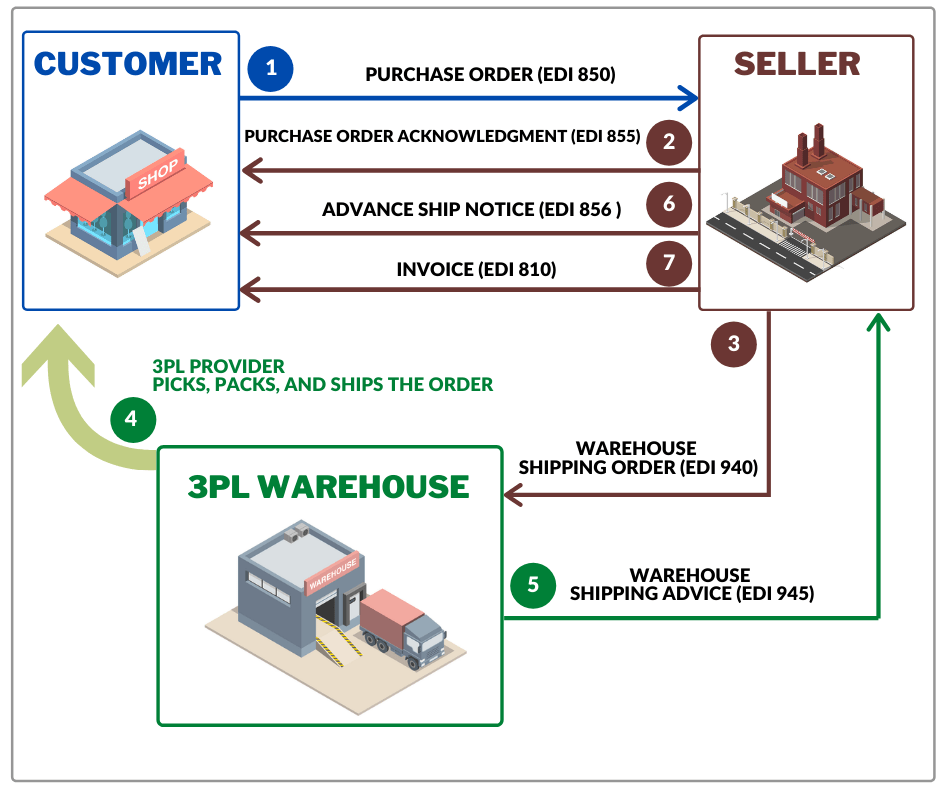
Workflow to Exchange EDI 940 Warehouse Shipping Order

The above workflow is for a general understanding of the process, so keep in mind that there can be a much more complex relationship between buyer, seller, and third-party warehouse. In addition to the transactions mentioned above, the 3PL provider and supplier can exchange other documents such as:

โ€ข Warehouse Stock Transfer Shipment Advice ( EDI 943)
โ€ข Warehouse Stock Transfer Receipt Advice (EDI 944)
โ€ข Inventory Inquiry/Advice (EDI 846)
โ€ข Warehouse Inventory Adjustment Advice (EDI 947)

EDI 940 and EDI 945

The Warehouse Shipping Advice (EDI 945) is playing a special role in the partnership between the 3PL provider and supplier. The function of Warehouse Shipping Advice is like an EDI 856 (Advance Ship Notice).
Using the EDI 945 warehouse notifies the seller of the shipment. Moreover, by EDI 945, the 3PL provider notifies the seller whether a full order has been shipped or has been shipped with exceptions.
EDI 945 usually contains the following information:
โ€ข buyer’s order number
โ€ข the actual date of shipment
โ€ข used carrier
โ€ข bill of lading number
โ€ข Item and quantity
The warehouse can also explain why the shipment date was changed, why the products were excluded from the batch and information about the replacement of the product.

Benefits of using an EDI 940 Warehouse Shipping Order

The advantages of using EDI in general and EDI 940 transaction, over traditional methods of communications such as e-mail, paper or fax, are undeniable:

1. Reduced time of order processing.

2. Reduced expenses related to office supplies and delivery of documents, as well as for staff salaries.

3. Reduced manual data entry, making it easier for both sellers and warehouses

4. Elimination of loss of documents and human errors.

5. Instant delivery and receipt of documents.

6. Speed up payments

3PL Warehouse EDI Integration

You can start exchanging EDI 940 messages in less than an hour using our EDI2XML REST web service. You do not need to commit to any contracts; We provide a free 15-days trial period.

You can also take advantage of our over 21 years of EDI integration experience by choosing a fully managed EDI service.

Contact us for a free consultation with one of our EDI experts to choose what works best for your business.


You may also be interested in reading about:
– Electronic Data Interchange (EDI) in the Supply Chain
– How EDI can speed the receiving of goods in a warehouse
– EDI for Third-Party Logistics providers (3PL)
– DELFOR, DELJIT, DESADV โ€“ key EDI messages in supply chain management for manufacturing


Our EDI2XML Blog was selected by Feedspot as one of the Top 10 EDI (Electronic Data Interchange) Blogs on the web.

August 19, 2020
https://www.edi2xml.com/wp-content/uploads/2020/08/EDI-940.png 350 1024 Tatyana Vandich https://www.edi2xml.com/wp-content/uploads/2024/08/edi2xml.com-EDI2XML-company-logo.png Tatyana Vandich2020-08-19 16:22:082024-07-24 15:30:18What is EDI 940 Warehouse Shipping Order?
Recent
  • EDI 990 Response to a Load Tender
    EDI 990 โ€“ Response to a Load Tender: A Definitive Guide...September 1, 2026 - 3:46 pm
  • Case Study about EDI and WMS Integration
    Piper Warehouse Case Study: Automating EDI-to-WMS Integration...August 27, 2026 - 4:19 pm
  • EDI Integration with WMS
    EDI and WMS Integration: A Practical Guide for Warehouses...August 21, 2026 - 4:26 pm
  • EDI 213 โ€“ Motor Carrier Shipment Status Inquiry: A Complete Guide for Supply Chain and Logistics Professionals
    EDI 213 โ€“ Motor Carrier Shipment Status Inquiry: A Complete...August 10, 2026 - 3:33 pm
  • EDi Integration for SMB - Complete Guide
    Electronic Data Interchange (EDI): The Complete Guide for...July 17, 2026 - 4:46 pm
Popular
  • How to Quickly Connect to a Large Retailer's EDI Requirements
    How to Get EDI-Compliant Quickly For A Large RetailerNovember 21, 2025 - 4:29 pm
  • EDI-as-a-services
    EDI Translation Software “On-premises” or “As...January 21, 2014 - 1:28 pm
  • order-automation in e-commerce
    Why Is It Crucial to Automate the E-Commerce Order Fulfillment...May 10, 2022 - 1:58 pm
  • EDI for Logistics and transportation
    EDI Integration for Efficient Transportation ManagementOctober 6, 2023 - 1:33 pm
  • information technology definitions
    Business Tech Terms DefinitionsMay 24, 2018 - 1:32 pm

Browse by tag

Amazon Amazon Integration ANSI ASC x12 ASC X12 EDI B2B EDI integration e-commerce e-commerce business e-commerce integration eCommerce eCommerce integration EDI EDI2XML EDI 850 EDI as a Service EDI Communication EDI converter EDIFACT EDI for supply chain EDI for Third-Party Logistics EDI for transportation EDI implementation EDI Integration EDI Integration Project EDI project EDI Translation EDI Web Service EDI x12 ERP Integration integration platform integration project JDE Magic xpi Magic xpi Integration platform NetSuite online store Salesforce Shopify Shopify eCommerce integration Shopify integration Supply Chain Supply Chain Management Translation Software X12 EDI XML

Subscribe to our Blog

Menu

  • Home | EDI2XML
  • About the EDI2XML Company
  • About EDI2XML EDI Converter
  • Advantages
  • Privacy Policy EDI2XML Company
  • Blog

Solutions & Services

  • POINT โ€“ Business Operations Platform
  • Fully Managed Integration Services
  • Fully Managed EDI Services
  • EDI2XML REST web service (API)
  • E-Commerce Integration Services
  • Managed Cloud Services
  • AI Solutions

Latest Blog Posts

  • EDI 990 Response to a Load Tender
    EDI 990 โ€“ Response to a Load Tender: A Definitive Guide for Supply Chain and Transportation ProfessionalsSeptember 1, 2026 - 3:46 pm
  • Case Study about EDI and WMS Integration
    Piper Warehouse Case Study: Automating EDI-to-WMS Integration for a 3PLAugust 27, 2026 - 4:19 pm
  • EDI Integration with WMS
    EDI and WMS Integration: A Practical Guide for Warehouses and 3PL ProvidersAugust 21, 2026 - 4:26 pm

Contact Us

400 Blvd Curรฉ-Labelle, #304 Laval QC H7V 2S7 Canada

Contact EDI2XML Team
Phone: +1 450-681-3009
Website: https://www.edi2xml.com/

ยฉ 2000-2026 EDI2XML (by Namtek Consulting Services). All rights reserved.
  • Link to Facebook
  • Link to LinkedIn
  • Link to X
  • Link to Youtube
  • Home | EDI2XML
  • About the EDI2XML Company
  • About EDI2XML EDI Converter
  • Advantages
  • Privacy Policy EDI2XML Company
  • Blog
Scroll to top Scroll to top Scroll to top