EDI2XML
  • About
    • The Company
    • EDI2XML
    • Advantages
    • Partnership with EDI2XML
    • Testimonials
  • Services
    • Enterprise AI
    • Fully Managed Integration
    • Fully Managed EDI Services
    • EDI Web Portal
    • EDI Web Service
    • EDI On Premises
    • Managed Cloud Services
    • Amazon Integration
    • Shopify Integration
    • BigCommerce Integration
    • NetSuite Integration
    • JD Edwards Integration
    • Dynamics 365 Integration
    • SAP B1 Integration
    • Salesforce Integration
    • Industry 4.0 Integration
  • Pricing
    • EDI Managed Services
    • EDI Web Service
    • EDI On-Premises
    • Managed Cloud Services
    • Shopify Integration
    • JD Edwards Integration
    • E-commerce Integration
    • All other Integrations
  • Blog
  • Resources
    • Resource Center
    • List of EDI Codes
    • List of EDIFACT Messages
    • EDI Documents Library
    • Trading Partners
  • Contact us
  • Book a Consultation
  • Click to open the search input field Click to open the search input field Search
  • Menu Menu
  • Link to Facebook
  • Link to LinkedIn
  • Link to X
  • Link to Youtube

Magic xpi a No-Code integration platform by Magic Software. Visual Mapping of data from source to destination, with certified connectors to branded ERP/CRM.

Tag Archive for: Magic xpi

Salesforce integration and Magic xpi: Things you should know

Blog

Salesforce is a cloud CRM solution, designed to manage customer relationships, sales, and marketing. The company was founded in 1999 in San Francisco. At that time, the existing CRM systems were quite complicated to configure and expensive to operate, therefore, only large companies could afford a CRM system. The initial idea of Salesforce was to offer CRM in the “cloud” and sell the software through an annual subscription or lease model, computed per user of the software.

CRM IntegrationHelp: What is CRM?

CRM or Customer Relationship Management is a software system that allows your business to manage contacts, collaborate effectively, increase productivity & grow your business. It is based on the preservation and analysis of information to improve the marketing, service and business relations with your customers.

Why Salesforce?

Salesforce CRM is provided in a “software as a service” model (SaaS). Customers receive ready-made, ready to use CRM software application, fully serviced by the provider. Salesforce is accessible in a web-based interface on a Desktop, mobile or tablet. It is also accessible via mobile devices. This offers a great number of advantages to end-users in comparison with other traditional solutions.

When opting to Software as a service, end-users get the benefits of a reduced cost associated with the initial installation and continuous maintenance of the software.

Moreover, the SaaS model reduces to the maximum the upfront investment to acquire hardware equipments where the software should be installed, along with its continuing maintenance and support.

Add to the above, the convenience to be able to access and run the software application, from any device, browser or mobile application from anywhere in the world, since it is sitting in the cloud.

Who uses Salesforce?

Salesforce CRM is the ideal solution for small and medium businesses, as well as for large organizations. More than 150,000 customers of all sizes and various industries are connecting with their customers, partners, and employees with Salesforce’s Customer Relationship Management (CRM) software.

Integration with Salesforce

Salesforce plays an important role within lots of companies of any size, however, it does not cover all the business processes an enterprise can have. Therefore, the enterprise will certainly have in place another software solutions (mainly ERP) deployed in the “cloud” or “on-premises”.

The ERP is mainly the main vehicle an enterprise uses to cover the main business processes (for example, inventory, pick, pack ship…); it is a very common scenario to find a company running a Salesforce instance in its Marketing and sales department, while running an Oracle JDE or SAP or Microsoft ERP, in the other departments.

The above scenario creates a delicate situation where the master data (i.e. customers, accounts, items, prospects…) are entered and maintained separately in each one of the software systems of the company, hence creating the need to “Orchestrate” and “integrate” data between all the above systems, in a safe and automatic manner.

What is Magic xpi?

Magic xpi and Salesforce IntegrationIn summary, Magic xpi is a code-free, low maintenance platform that maps your company’s data, automates your business processes and connects your apps, databases, APIs and more – all on a single platform. Magic xpi is a technology proprietary of Magic Software enterprises, a NASDAQ company, present in almost every country in the world with millions of users Worldwide.

Magic xpi certified connector for Salesforce

To soften the integration challenges and allow enterprises to orchestrate and integrate data between different dispersed systems, Magic Software (MSE) the manufacturer of “Magic xpi” integration platform, built a “Salesforce connector”.

This connector eases the integration with Salesforce by discovering the objects built within the application and allowing the user to build mapping between source and destination, visually with a simple drag and drop process, without the need for extensive development and programming skills.

Moreover, MSE went farther into certifying this connector with Salesforce themselves, to add to it the stamp and approval of Salesforce.

Salesforce API or Magic xpi?

The answer to this question is that using Magic xpi as a backend integration platform, will eliminate the need for point-to-point integration between Salesforce and any system or API.

Add to it, the agnostic nature of Magic xpi, makes any integration from Salesforce to any other system similar in nature: You always do things the same way, without any coding.

I invite my readers to click here in order to download Magic xpi product sheet, in order to know more about this great integration platform.

Improve your integration projects

If you need more information or help in determining your need in Salesforce Integration, please click on the below image to contact our integration team and feel free to request a free demonstration of Magic xpi platform integration with Salesforce.

Magic-xpi Integration Platform


March 19, 2018
https://www.edi2xml.com/wp-content/uploads/2024/08/edi2xml.com-EDI2XML-company-logo.png 0 0 Tatyana Vandich https://www.edi2xml.com/wp-content/uploads/2024/08/edi2xml.com-EDI2XML-company-logo.png Tatyana Vandich2018-03-19 17:08:202019-01-29 10:53:21Salesforce integration and Magic xpi: Things you should know

Systems integration platform to improve business performance

Blog

This post was updated to reflect current trends and information.


Information Technology is developing at a fast pace. Many experts call IT the fastest-growing area of human activity. Systems and applications integration play an important role in the IT space, and has a significant impact on a company’s performance as well as the entire industrial and commercial sectors. This is why we have noticed a surge in companies’ interest when it comes to integration…

Key Takeaway:

  • Systems integration connects disconnected software systems and databases.
  • It improves data accuracy, automates processes, and boosts productivity.
  • Magic xpi is a proven no-code integration platform for ERP, CRM, and more.
  • Businesses using integration platforms make faster decisions and increase profitability.

What Is Systems Integration and How Does It Help Businesses?

According to Wikipedia: “System integration is defined in engineering as the process of bringing together the component sub-systems into one system (an aggregation of subsystems cooperating so that the system is able to deliver the overarching functionality)….”

But, it would be a mistake to consider that “system integration” is only the assembly of hardware and software tools together; the essence of the concept is much broader than that.

“System integration” is an activity to improve the efficiency of an enterprise, the decision-making process, and the quality of the information, through an automated process, where “heterogenous” systems can communicate and integrate to each other on a real-time basis.

Most companies in today’s business environment run lots of “heterogeneous” systems and software applications, where each one does not communicate with the other; this kind of environment, creates lots of inefficiencies, poor quality of information, which most of the time results in a reduction of profits, and delays in executive decisions.

Automated “systems integration”, comes into play in creating a “bridge”, where data flows between heterogenous systems, software applications, and databases in multiple directions, based on pre-defined business rules, as if the systems are totally “homogenous”

Why Do Modern Companies Need Systems Integration Today?

Companies are increasingly adopting software solutions and equipment to solve specific business needs, therefore adding new “standalone” applications and systems to their software management suite. Most of the time, those software solutions do not communicate natively to each other.

While adopting a specific software application (either cloud-based or on-premise) might satisfy a business need and solve a business issue, it will create at the other hand a series of new challenges such as :

  • Redundant data entry; most data already exist in another system.
  • Need to hire more staff to manage more systems
  • Open a door for more human errors when managing new systems.

The above challenges are relevant in any size company, be it small medium or large.

How Can Businesses Overcome Integration Challenges Without Coding?

To solve integration challenges, companies should not hesitate to embrace integration projects to synchronize and orchestrate software systems, databases, processes, and equipment.

To do so, companies should adopt a capable “integration platform” having the following properties:

  • Easy to use, drag and drop
  • No coding required
  • Quick to learn, develop and deploy
  • Easy debugging and simple errors tracking and handling
  • Multiple options for triggering and launching processes and flows
  • Capable of connecting to most of the databases commonly used in today’s marketplace
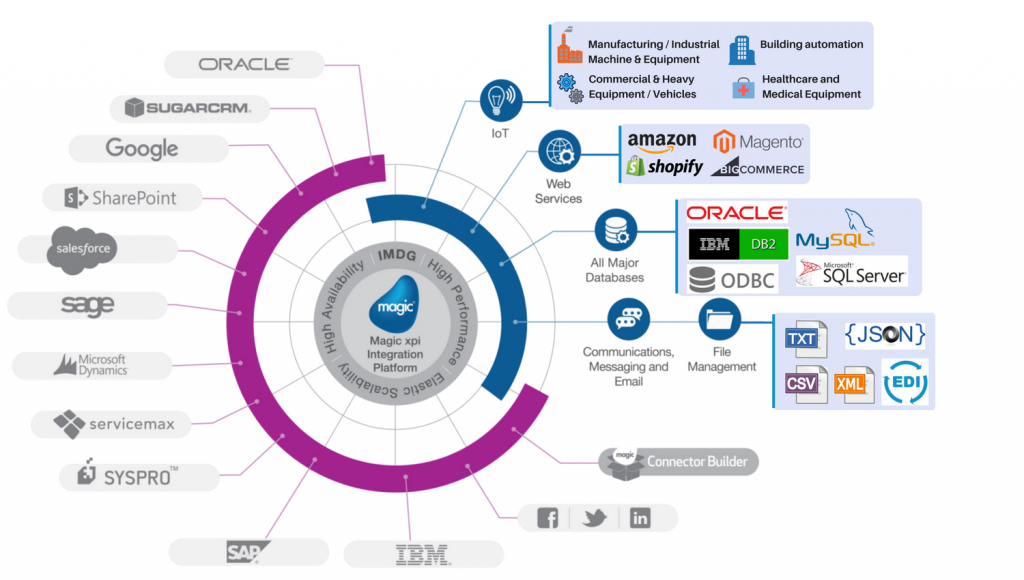
  • Capable of connecting to the branded software systems (i.e. SAP, Salesforce, Oracle, SugarCRM…) with certified connectors by the manufacturer
  • Have built-in generic API driven connectors for IoT projects
  • Extensible to go beyond the “out-of-the-box” where you can build your own connectors and drivers for specific proprietary solutions

Top 5 Benefits of Using a Systems Integration Platform

The benefits of implementing an API-driven solid integration that is capable of connecting to a wide range of business ecosystems, are valuable. Here are the to 5 benefits:

1. Real-Time data synchronization

Having a robust integration platform in charge of orchestrating ad synchronizing data and processes, eliminates the delays in data publication. The data is synchronized between different systems in a real-time basis without the need of any human intervention.

2. Quicker data processing

With an automated integration platform, capable of synchronizing data and trigger flows and processes efficiently based on rules and conditions, processing data becomes also real-time, which eliminates the needs of data extraction, transformation and load (ETL). No need for a separate ETL tool.

3. Improvement of employees’ productivity

Data synchronization and orchestration obviously eliminates lots of time and effort for employees to manage and feed/extract data into one system to another. Employees can focus on business related issues, where they can generate more revenues, rather than entering and manipulating data into “heterogenous” systems.

4. Quicker executive decision-making

Having a robust integration platform in place, with all the benefits identified above, company executives will be empowered with the capability to take quick decisions, and avoid the lengthy process of extracting data from different systems, and merging it together in order to build unified data sheet.

5. Increase in profitability

The above benefits put together will result in a considerable increase in the profitability of any company having heterogenous software systems and applications.
Magic xpi Integration Platform

9 Signs Your Company Needs a Systems Integration Solution

The following are the top signs in any company that will indicate an integration platform is required in order to improve business processes.

1- Your company has multiple software systems that are standalone, with no direct link between them

2- Your company has a mix of on-premise and cloud-based software solutions that are not connected

3- Employees spend considerable time on their day-to-day job to feed multiple systems

4- Your company has an eCommerce site that is managed separately from the internal ERP system

5- The IT department at the company is not capable of delivering reports and analytics on time

6- Unable to respond to business requirements from your clients, to deliver within 48 hours

7- Data is in great mismatch between systems and solutions, due to its redundancy

8- Lots of employees are working on building reports and data entry work

9- No visibility of the company’s equipment data and performance (i.e. production machines, cameras, field service data…)

Which Integration Platform Is Best for Your Business Needs?

For 25 years now, our company has been an official partner of Magic Software Enterprises Ltd. a global enterprise software company, delivering Magic xpi, a fully reliable SOA, API-driven integration platform for all connectivity needs. Magic xpi Business Integration Platform delivers enterprise-grade integration, business process automation, and data synchronization solutions, with comprehensive security and proven reliability. Implementing a wide range of certified and optimized connectors and adaptors, Magic xpi integrates leading ERP, CRM, finance, and other enterprise systems, such as SAP, Oracle, Salesforce, Microsoft, IBM, Google, and many more.

Looking for Integration Solutions? Contact Us Today

FAQ: Systems Integration for Modern Businesses

1. What is the difference between systems integration and data migration?

Systems integration connects multiple systems to work together in real time, while data migration is a one-time process of moving data from one system to another. Integration is continuous and dynamic; migration is static and transitional.


2. Can systems integration improve cybersecurity?

Yes. A well-implemented integration platform can centralize access control, reduce data silos, and monitor data flows, which helps identify anomalies and prevent breaches more effectively.


3. How does systems integration support digital transformation?

Systems integration is a core enabler of digital transformation, allowing businesses to automate processes, unify data sources, and adopt new technologies (like IoT and AI) without disrupting existing infrastructure.


4. Is systems integration only for large enterprises?

No. Small and medium-sized businesses (SMBs) benefit significantly from integration by reducing manual work, improving data accuracy, and scaling operations efficiently — often with no-code platforms that don’t require IT teams.


5. What industries benefit most from systems integration?

Industries with complex operations and multiple software systems benefit most, including:

  • Manufacturing (machine data + ERP)
  • Retail & eCommerce (inventory + CRM + website)
  • Logistics (fleet tracking + warehouse systems)
  • Healthcare (patient records + billing + scheduling)
  • Finance (CRM + accounting + compliance tools)

6. How long does it take to implement an integration platform?

Implementation time depends on the complexity of systems and business rules. With platforms like Magic xpi, many integrations can be deployed in days or weeks, especially when using pre-built connectors.


7. What is the role of APIs in systems integration?

APIs (Application Programming Interfaces) are the communication bridges between systems. They allow platforms to exchange data securely and efficiently, making API-driven integration the most flexible and scalable approach.


8. Can systems integration help with compliance and reporting?

Absolutely. Integration ensures data consistency across systems, which simplifies regulatory reporting, audit trails, and compliance with standards like GDPR, HIPAA, or ISO.


9. What happens if one system fails in an integrated environment?

Robust integration platforms include error handling, logging, and fallback mechanisms. They can isolate failures, retry operations, or alert administrators — ensuring minimal disruption.


Free-It-consultation

February 5, 2018
https://www.edi2xml.com/wp-content/uploads/2018/02/FI-systems-integration.png 350 1024 Tatyana Vandich https://www.edi2xml.com/wp-content/uploads/2024/08/edi2xml.com-EDI2XML-company-logo.png Tatyana Vandich2018-02-05 12:23:032025-09-09 15:47:40Systems integration platform to improve business performance

EDI Integration with JDE Made Easy with EDI2XML

Blog, Magic xpi

EDI integration project

This post was updated to reflect current trends and information.

What is Magic xpi

Magic xpi is a business integration platform proprietary technology for Magic Software. This business integration suite is very powerful and comes loaded with tons of built-in components to build workflows and orchestrate an entire business flow:

  • Database gateways: to connect “natively” to the most common databases used within an enterprise (i.e. SQL server, Oracle, DB2, Pervasive, MySQL, ODBC…).
  • Connectors: to directly connect to JDE, SAP, Dynamics, SalesForce.
  • Triggers and Data mappers: whether to monitor a folder content or to parse and map from one file format to another
  • Connectivity and messaging: through FTP, SOAP, MSMQ, etc.

And the list goes on…

Read: How to Solve the Biggest EDI integration Problems With JDE

How EDI2XML works within Magic xpi

As you might already know by now, EDI2XML is our own technology to convert an X12 EDI transaction to XML. When doing the conversion from EDI to XML, EDI2XML is able to generate the FA 997 (Functional Acknowledgment) as a response to the incoming EDI transaction. In the meantime, EDI2XML installer comes with all the xml schemas (.xsd) of the EDI2XML format.

Since Magic xpi is missing a component to transform X12 EDI to XML, EDI2XML can fill this gap. By creating a custom component and inserting the command to trigger EDI2XML from within a Magic xpi business flow, EDI2XML will turn an incoming EDI file (i.e. 850) into XML format.

In a subsequent step, using a Data mapper component, the user can map the content of the EDI file in XML and map it to any other format (Flat file, database….).

Read: Top 3 Challenges to Overcome in Salesforce and EDI Integration Projects

Mapping EDI from EDI2XML to JDE

As mentioned previously, Magic xpi comes loaded with connectors to major systems such as SAP, JDE, Salesforce, etc. As an example, any table in JDE can be used as a source or destination in data mapping process, using a Data Mapper step within Magic xpi.

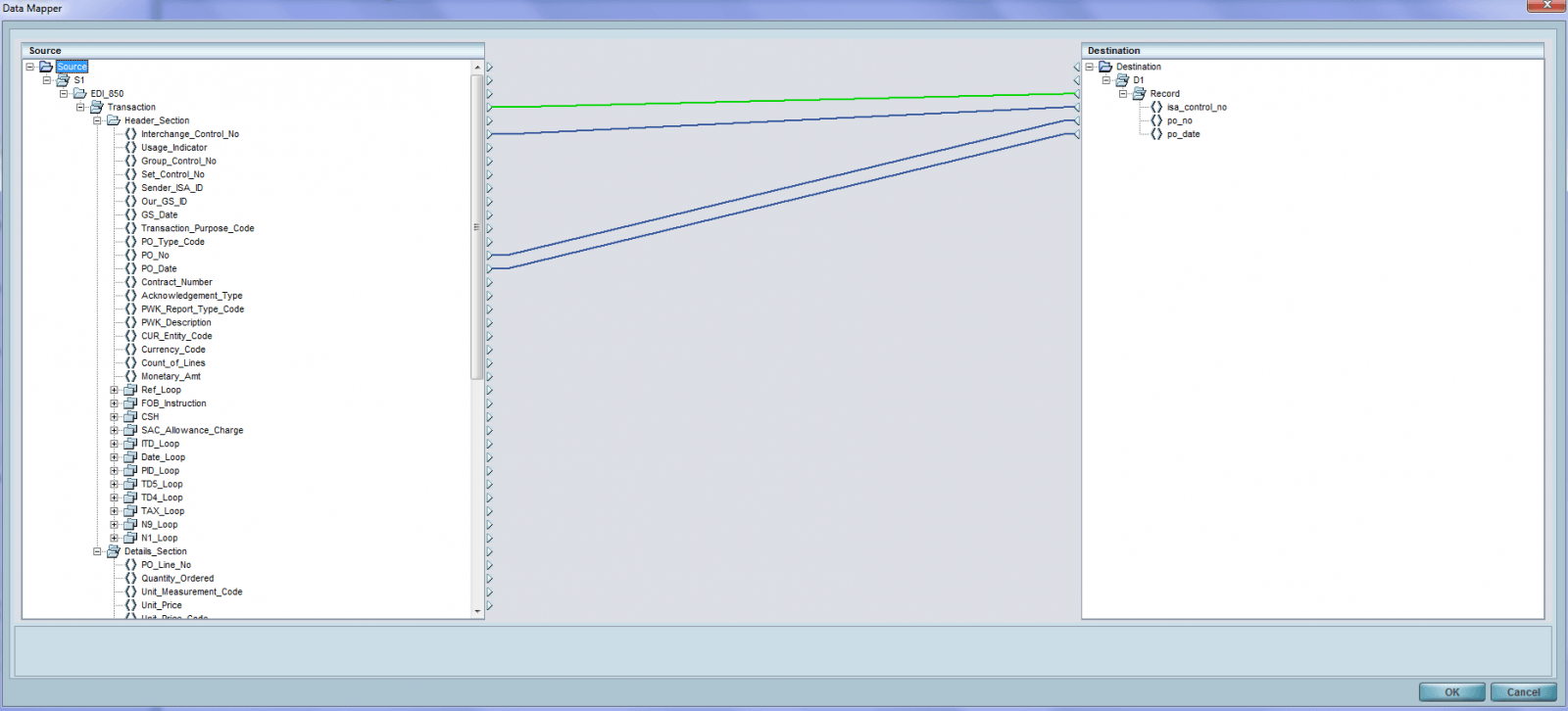
Once the incoming EDI X12 file is converted to XML, it is very simple to then map it to JDE:

  • Create a step with a Data mapper
  • Source: XML based on the EDI2XML .xsd (schema file)
  • Destination: the JDE table to feed from the XML format

Once the source and destination are defined, the user can use his mouse to drag and drop to map fields from the source to the destination (JD table).

EDI Integration with JDE


Looking to integrate your EDI or eCommerce processes with Oracle JDE enterprise one, look no further, since we have the best integration option where we turn your Oracle JDE system into a modern REST API, that receives https requests and acts accordingly. LEARN MORE>


This is why we love EDI2XML in EDI integration with JDE

EDI2XML has a rich library of EDI documents to translate and it is expandable. In addition, using EDI2XML within a flow in Magic xpi is a MUST in order to map EDI data to XML and from XML directly to JDE. Most importantly, there is no need for EDI knowledge to interpret the fields and segments, as it is all easily understandable by any person. On top of it all, all .xsd files are provided with the EDI2XML engine!

EDI integration into JDE is as simple as mapping from XML to JDE using drag and drop!

Free EDI consultation
February 26, 2014/0 Comments
https://www.edi2xml.com/wp-content/uploads/2024/08/edi2xml.com-EDI2XML-company-logo.png 0 0 Pierre Namroud https://www.edi2xml.com/wp-content/uploads/2024/08/edi2xml.com-EDI2XML-company-logo.png Pierre Namroud2014-02-26 13:18:252020-06-05 14:03:51EDI Integration with JDE Made Easy with EDI2XML

How to Solve the Biggest EDI integration Problems With JDE

Blog, Magic xpi


This post was updated to reflect current trends and information.


EDI integration projects have always been time consuming, as it requires an expert team with EDI knowledge and many resources. No matter how small or large the company is, the previous statement falls true for them all. It is the nature of EDI and all the processes involved that makes an EDI integration project complex and problematic for the developers and executives. In this article, I would like to identify a few of the major problems of EDI integration with JDE (JD Edwards) and how to solve them, in order to have a smooth and successful EDI implementation.

About JDE

JD Edwards, also known as JDE, is an Enterprise Resource Planning (ERP) software that Oracle sells and supports. JDE is offered in two different lines (or editions): JD Edwards EnterpriseOne and JD Edwards World. In most cases, JDE software solutions are implemented and deployed in corporate level enterprises. It is less present in small enterprises since most SMEs cannot afford its maintenance costs.

Why EDI integration with JDE is a problem

Read: EDI Integration with JDE Made Easy with EDI2XML

While JDE is a great corporate level ERP solution, offering lots of tools and connectors for data integration (flat file and other format), it does NOT offer out of-the-box an integrated EDI solution or connector that would make EDI integration seamless. It offers the necessary interfaces to define file formats for export and import, but it stops short on completing the loop into a full EDI solution.
For EDI project integration, JDE heavily relies on third-party “EDI translation software” to send or receive EDI files, and to turn the EDI files into a format (flat file for example) that can be easily interpreted and processed by JDE.

Having said that, you can now imagine how complex and time-consuming integration of EDI in JDE is for a company’s IT personnel and developers. The major problems can be summarized as follows:

  1. IT personnel need to have an extensive EDI expertise; for example, a high knowledge of EDI is needed to be able to define the data to be extracted from the incoming EDI file
  2. They need to learn how the “EDI Translation software” works as well as how and when to extract data and transform it into the proper format for JDE
  3. Of course, they need to know how to work with JDE and setup interfaces and connectors. This one is not of a major concern as IT personnel handling JDE are experienced with this platform

Looking to integrate your EDI or eCommerce processes with Oracle JDE enterprise one, look no further, since we have the best integration option where we turn your Oracle JDE system into a modern REST API, that receives https requests and acts accordingly. LEARN MORE>


How to solve the integration problems

In order to solve problems associated with EDI integration with JDE, it comes down to reducing the number of points identified in the previous section to 2 rather than 3, by capitalizing and building on JDE expertise. So how can this be done in order to have an EDI integration project run smoothly, on budget and on time?

Read: Top 3 Challenges to Overcome in Salesforce and EDI Integration Projects

The answer is simple. Companies running JDE can leverage:

  • EDI2XML : the technology to convert EDI to XML (and XML to EDI)
  • Magic xpi: the business integration platform from Magic Software, that is able to orchestrate the entire business process. It is an “Oracle Validated Integration” solution for both JD Edwards EnterpriseOne and JD Edwards World.

Magic xpi comes with a lot of built-in features to support an EDI project implementation such as:

  • Communication components (FTP,sFTP)
  • Ability to execute scheduled tasks based on several triggers
  • Ability to execute tasks based on file scanning triggers

EDI2XML has complementary features to make an EDI integration project within JDE very simple and straightforward:

  • EDI2XML is able to generate FA 997 out-of-the box for incoming EDI documents
  • EDI2XML turns the EDI files received into readable XML format, so no need for extensive EDI expertise

Therefore, EDI integration projects with JDE don’t have to be so dreadful anymore. The marriage of EDI2XML, Magic xpi and our team’s EDI expertise can definitely benefit your company and make EDI projects easy and under budget.

To read more about using EDI with JD Edwards and the third-party applications, Click here

Free consultation ecommerce JDE integration
February 6, 2014/0 Comments
https://www.edi2xml.com/wp-content/uploads/2024/08/edi2xml.com-EDI2XML-company-logo.png 0 0 Pierre Namroud https://www.edi2xml.com/wp-content/uploads/2024/08/edi2xml.com-EDI2XML-company-logo.png Pierre Namroud2014-02-06 11:06:572020-03-26 14:54:33How to Solve the Biggest EDI integration Problems With JDE
Page 3 of 3123
Recent
  • EDI compliance with Loblaw
    How to Meet Loblaw EDI Requirements as a Small BusinessJune 4, 2026 - 2:05 pm
  • The Infrastructure Behind Modern Commerce: Why EDI Still Matters
    EDI in E-Commerce and Retail: Why Modern Commerce Still...May 1, 2026 - 4:54 pm
  • Key Statistics on AI Use in the Workplace
    The Risks of Using Public AI Tools in Business: Data Privacy,...March 11, 2026 - 5:51 pm
  • Enterprise AI
    How to Securely Access Enterprise AI: GPT, DeepSeek &...February 20, 2026 - 3:09 pm
  • EDI 754 Guide
    EDI 754 Routing Instructions: Complete Guide to Purpose,...February 18, 2026 - 4:54 pm
Popular
  • How to Quickly Connect to a Large Retailer's EDI Requirements
    How to Get EDI-Compliant Quickly For A Large RetailerNovember 21, 2025 - 4:29 pm
  • EDI-as-a-services
    EDI Translation Software “On-premises” or “As...January 21, 2014 - 1:28 pm
  • order-automation in e-commerce
    Why Is It Crucial to Automate the E-Commerce Order Fulfillment...May 10, 2022 - 1:58 pm
  • EDI for Logistics and transportation
    EDI Integration for Efficient Transportation ManagementOctober 6, 2023 - 1:33 pm
  • information technology definitions
    Business Tech Terms DefinitionsMay 24, 2018 - 1:32 pm

Browse by tag

Amazon Amazon Integration ANSI ASC x12 ASC X12 EDI B2B EDI integration e-commerce e-commerce business e-commerce integration eCommerce eCommerce integration EDI EDI2XML EDI 850 EDI as a Service EDI Communication EDI converter EDIFACT EDI for supply chain EDI for Third-Party Logistics EDI for transportation EDI implementation EDI Integration EDI Integration Project EDI project EDI Translation EDI Web Service EDI x12 ERP Integration integration platform integration project JDE Magic xpi Magic xpi Integration platform NetSuite online store Salesforce Shopify Shopify eCommerce integration Shopify integration Supply Chain Supply Chain Management Translation Software X12 EDI XML

Subscribe to our Blog

Menu

  • Home
  • About the EDI2XML Company
  • About EDI2XML EDI Converter
  • Blog
  • Book A Free Consultation
  • Privacy Policy EDI2XML Company

Our Services

Fully Managed Integration

E-Commerce Integration

Business Systems Integration

Fully Managed EDI

EDI Web Service 

On Premises EDI 

Managed Cloud Service


Latest Blog Posts

  • EDI compliance with Loblaw
    How to Meet Loblaw EDI Requirements as a Small BusinessJune 4, 2026 - 2:05 pm
  • The Infrastructure Behind Modern Commerce: Why EDI Still Matters
    EDI in E-Commerce and Retail: Why Modern Commerce Still Depends on EDIMay 1, 2026 - 4:54 pm
  • Key Statistics on AI Use in the Workplace
    The Risks of Using Public AI Tools in Business: Data Privacy, Compliance, and Shadow AIMarch 11, 2026 - 5:51 pm

Contact Us

400 Blvd Curé-Labelle, #304 Laval QC H7V 2S7 Canada

Contact EDI2XML Team
Phone: +1 450-681-3009
Website: https://www.edi2xml.com/

© 2000-2026 EDI2XML (by Namtek Consulting Services). All rights reserved.
  • Link to Facebook
  • Link to LinkedIn
  • Link to X
  • Link to Youtube
  • Blog
Scroll to top Scroll to top Scroll to top