EDI2XML
  • About
    • The Company
    • EDI2XML
    • Advantages
    • Partnership with EDI2XML
    • Testimonials
  • Services
    • Enterprise AI
    • Fully Managed Integration
    • Fully Managed EDI Services
    • EDI Web Portal
    • EDI Web Service
    • EDI On Premises
    • Managed Cloud Services
    • Amazon Integration
    • Shopify Integration
    • BigCommerce Integration
    • NetSuite Integration
    • JD Edwards Integration
    • Dynamics 365 Integration
    • SAP B1 Integration
    • Salesforce Integration
    • Industry 4.0 Integration
  • Pricing
    • EDI Managed Services
    • EDI Web Service
    • EDI On-Premises
    • Managed Cloud Services
    • Shopify Integration
    • JD Edwards Integration
    • E-commerce Integration
    • All other Integrations
  • Blog
  • Resources
    • Resource Center
    • List of EDI Codes
    • List of EDIFACT Messages
    • EDI Documents Library
    • Trading Partners
  • Contact us
  • Book a Consultation
  • Click to open the search input field Click to open the search input field Search
  • Menu Menu
  • Link to Facebook
  • Link to LinkedIn
  • Link to X
  • Link to Youtube

Tag Archive for: JDE Orchestrator

Oracle JD Edwards Orchestrator: A Powerful Tool for Digital Transformation

Blog

Are you looking for a way to leverage the power of data automation in your business? Do you want to integrate your Oracle JD Edwards EnterpriseOne with other applications, devices, and systems? Do you want to explore how JDE Orchestrator can help achieve your business goals? If you said “yes” to any of these questions, then this blog is for you.

Introduction: Oracle JD Edwards Orchestrator

In this article, we will provide a comprehensive overview of the Oracle JD Edwards Orchestrator. We will discuss the components of JDE Orchestrator, and answer some common FAQs about this technology. We will also share some expert tips and advice based on our experience as a successful business systems integration provider, with more than 24 years of experience.

What is Oracle JD Edwards Orchestrator?

Oracle JD Edwards Orchestrator is a JDE component, provided by Oracle as an add-on to their JDE install, at no additional charge. It enables us to collect, filter, analyze, and act on real-time data extracted from JD Edwards ERP using REST API. It can also trigger actions in EnterpriseOne based on predefined rules and logic.

Thus, JDE Orchestrator can help transform your JDE system from a static record-keeper to a dynamic modern, API provider/consumer of real-time business operations.

JDE Orchestrator was first introduced in 2015 as a tool for IoT integration, but since then it has evolved into a powerful and versatile tool for digital transformation in the JDE world. According to Oracle documentation, JDE Orchestrator is compatible with JD Edwards EnterpriseOne 9.1 and above, and it is constantly updated with new features and enhancements. However, some of the features and capabilities of JDE Orchestrator may require a higher tools release or patch level.

What are the Components of JDE Orchestrator?

Oracle JD Edwards Orchestrator consists of several key components that work together to automate and streamline business processes. These components include:

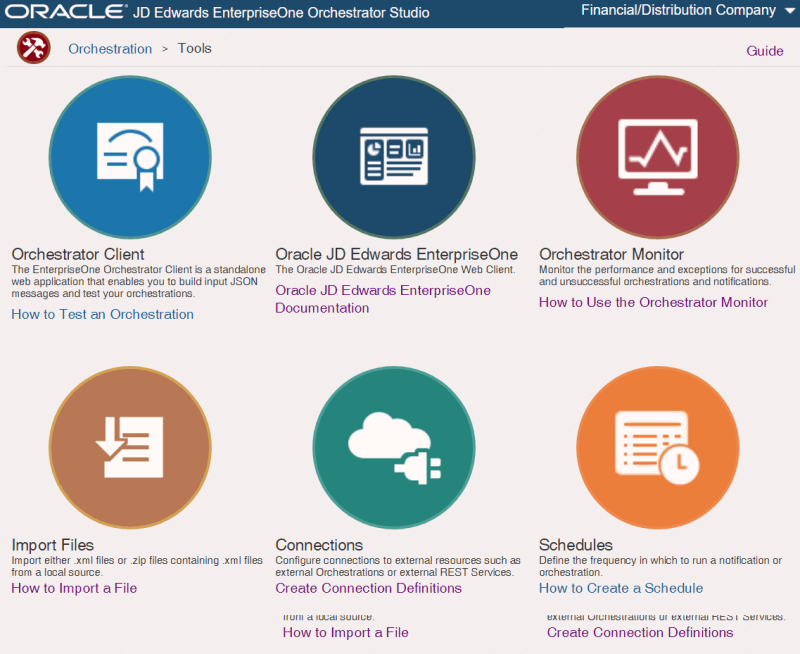
JDE Orchestrator Studio

JDE Orchestrator Studio is a web-based application that allows you to design, test, and deploy orchestrations, which are the workflows that define the logic and actions of JDE Orchestrator. JDE Orchestrator Studio features a graphical drag-and-drop interface, a simplified data mapping tool, a built-in testing tool, and a version control system.

JDE Orchestrator Studio is a user-friendly and intuitive tool for creating and managing orchestrations for various use cases, such as automation, integration, IoT, and user experience enhancement.

The Orchestration Studio empowers users to automate and streamline business processes with ease, leveraging a combination of visual design tools, pre-built components, and customization options. Its intuitive interface and robust features make it a powerful tool for driving digital transformation and improving operational efficiency within JD Edwards environments.

JDE Orchestrator Server

JDE Orchestrator Server is a component of the Application Interface Services (AIS) Server that executes the orchestrations and communicates with the EnterpriseOne system and other external systems.

JDE Orchestrator Server is responsible for processing the input data, applying the logic and rules, performing the actions and service requests, and generating the output data for each orchestration. The JDE Orchestrator Server can handle multiple orchestrations concurrently and efficiently, using a queue-based mechanism and a thread pool.

JDE Orchestrator Server can also handle large data sets, parallel processing, and temporary tables to optimize and scale the orchestration performance.

The Orchestrator Server of JDE, can be configured and managed using the Server Manager Console, where you can set up the server properties, security settings, logging options, and runtime parameters.

The Orchestrator Server can also be monitored and troubleshooted using the Orchestrator Monitor, where you can view the health and exception records, as well as the run details and results of each orchestration.

JDE Orchestrator Monitor

JDE Orchestrator Monitor is a web-based interface that allows you to view and manage the performance and status of the JDE Orchestrator and its orchestrations, as well as troubleshoot any issues or exceptions. The Orchestrator Monitor enables you to:

  • Monitor the health and exception records of the JDE Orchestrator, which indicates the availability and reliability of the Orchestrator Server and the orchestrations.
  • Monitor the run details and results of each orchestration, which show the input, output, and execution logs of the orchestrations.
  • Manage the health and exception records, such as deleting, archiving, or resubmitting them, to resolve any issues or errors that occur during the orchestration execution.
  • Filter and sort the records by different criteria, such as user, environment, role, date, time, status, etc., to find the relevant information quickly and easily.
  • Refresh and reset the data displayed in the JDE Orchestrator Monitor, to ensure that the information is up-to-date and accurate.

What is the Use of JDE Orchestrator?

Oracle JD Edwards (JDE) Orchestrator can be used for critical mission purposes within an organization:

JDE Orchestrator for Automation of Business Processes

One of the primary uses of JDE Orchestrator is to automate various business processes within the JD Edwards ERP system. This includes tasks such as order processing, inventory management, procurement, financial transactions, and more. By automating these processes, organizations can improve efficiency, reduce manual errors, and accelerate decision-making.

Integration with External Systems via JDE Orchestrator

The Orchestrator enables seamless integration between JD Edwards and external systems, such as CRM/ERP platforms, supply chain management systems, e-commerce platforms, EDI, and IoT devices. This integration allows for the exchange of data and transactions, facilitating real-time decision-making and enhancing overall business agility.

Streamlining Workflows with JDE Orchestrator

With JDE Orchestrator, organizations can streamline complex workflows that involve multiple steps and stakeholders. For example, they can create orchestrations to automate approval processes, route documents for review, and notify stakeholders of important events. This streamlining of workflows helps in reducing bottlenecks and improving collaboration across departments.

Integration
 

JDE Orchestrator for Real-Time Data Processing

The Orchestrator enables real-time data processing by triggering actions based on predefined events or conditions. This allows organizations to react quickly to changing circumstances, such as inventory shortages, customer inquiries, or production delays. Real-time data processing enhances decision-making and enables organizations to stay responsive in dynamic business environments.

What are Some Common FAQs about Oracle JDE Orchestrator?

The JDE Orchestrator is a relatively new and innovative technology that may raise some questions and concerns among JD Edwards users and partners. Here are some of the common FAQs about JDE Orchestrator, along with their answers:

How does the Orchestrator integrate with external systems?

The Orchestrator integrates with external systems using connectors that support various protocols such as REST, SOAP, and others. These connectors facilitate the exchange of data and transactions between JD Edwards and external applications.

Do I need coding knowledge to use the Orchestrator?

While coding knowledge is not required, basic understanding of concepts like data mapping and conditional logic can be helpful. The Orchestrator provides a graphical interface for designing orchestrations, but users may need to write custom scripts for advanced functionalities.

To take advantage of all the benefits of Orchestrator, you don’t have to figure it out yourself, entrust the integration to professionals. We, at EDI2XML can quickly and efficiently perform integration of any complexity for you using JDE Orchestrator. Book your free JDE consultation now!

Is the Orchestrator scalable for enterprise use?

Yes, the Orchestrator is designed to be scalable and can handle a large number of orchestrations and transactions to meet the needs of enterprise-level businesses.

Can I customize orchestrations to fit my specific business requirements?

JDE
 

Yes, the Orchestrator provides flexibility for customization. You can create custom data structures, define complex logic using JavaScript, and integrate with custom business functions and services to tailor orchestrations to your specific needs.

What is JDE Orchestrator REST API?

JDE Orchestrator REST API is a set of endpoints that allow you to interact with the JDE Orchestrator and its orchestrations using HTTP requests and responses. The JDE Orchestrator REST API enables you to execute, monitor, and manage orchestrations from any external application or system that supports REST.

What are Some Expert Tips and Advice for Using JDE Orchestrator?

As a successful business systems integration provider with more than 24 years of experience, we have gained a lot of knowledge and expertise in using JDE Orchestrator for various projects and clients. Here are some of our expert tips and advice for using the JDE Orchestrator:

Plan and design your orchestrations carefully, considering the business requirements, the data sources, the logic and actions, the input and output formats, the error handling, and the security aspects.

Test and debug your orchestrations thoroughly, using the built-in testing tool in the Orchestrator Studio, and the Orchestrator Monitor for troubleshooting and resolving any issues or exceptions.

Document and maintain your orchestrations properly, using the version control system in the Orchestrator Studio, and the export and import features for backup and recovery.

Optimize and scale your orchestrations efficiently, using the Orchestrator Capability for large data set retrieval, the parallel processing option, and the temporary tables feature.

Conclusion: Oracle JD Edwards Orchestrator

Oracle JD Edwards Orchestrator stands out as a great tool for businesses seeking to embrace digital transformation. Its ability to seamlessly integrate with external systems, automate processes, streamline workflows, and process real-time data makes it a valuable asset for organizations aiming to enhance efficiency and agility.

For those who are considering using JDE Orchestrator’s capabilities but aren’t sure where to start or how to navigate the complexities, it’s essential to seek guidance from experienced professionals.

At EDI2XML, we offer comprehensive integration services tailored to your specific business requirements. Our team of experts with over 20 years of experience can efficiently guide you through the integration process, ensuring seamless implementation and optimal utilization of the JDE Orchestrator. Don’t let the potential of your JD Edwards system go untapped. Take the first step towards unlocking its full capabilities by engaging with us for a free JDE consultation. Together, we can propel your business toward success.

Free Consultation
February 23, 2024/0 Comments
https://www.edi2xml.com/wp-content/uploads/2024/02/EDI2XML-JDE-Orchestrator-Service.png 675 1200 Tatyana Vandich https://www.edi2xml.com/wp-content/uploads/2024/08/edi2xml.com-EDI2XML-company-logo.png Tatyana Vandich2024-02-23 16:16:172026-05-28 14:57:00Oracle JD Edwards Orchestrator: A Powerful Tool for Digital Transformation

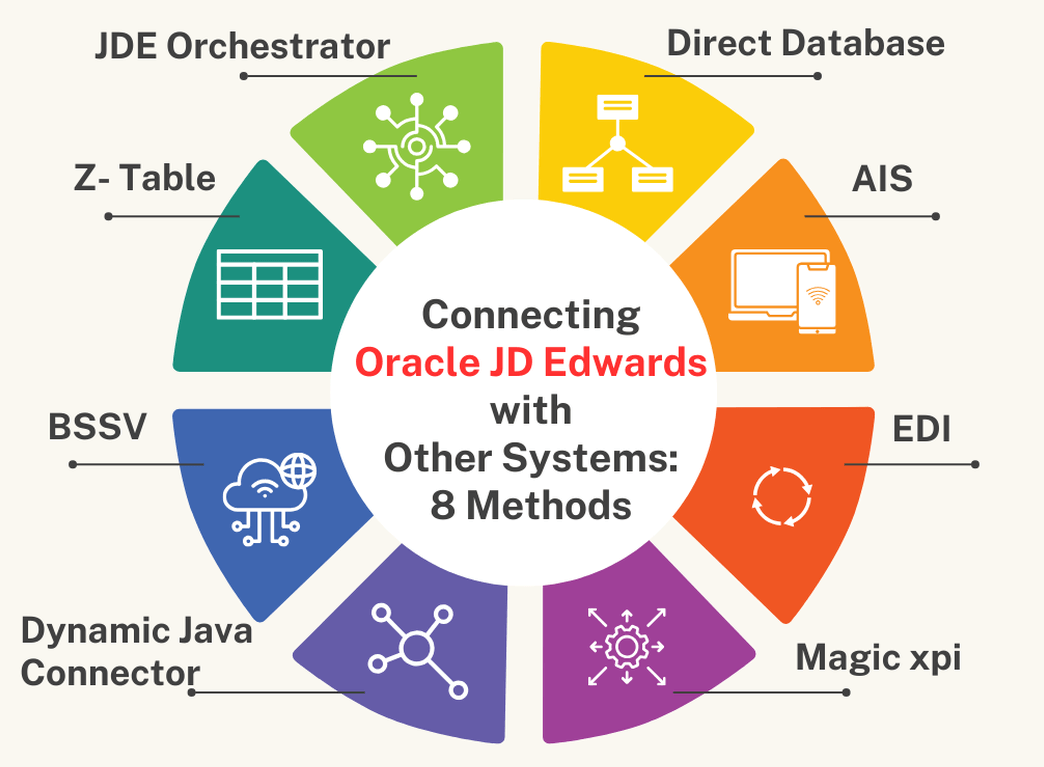
How to Connect Oracle JD Edwards with Other Systems: Overview of Eight Methods

Blog

As an experienced systems integrator, EDI2XML has completed many successful integrations across diverse industries. Based on our extensive experience, in this article, we want to discuss what the various integration methods available to businesses to integrate with Oracle JD Edwards.

We’ll keep it simple and give you a basic understanding of each method. Our goal is to give you the knowledge you need to make integration easier for your business. In future articles, we’ll dive deeper into each method to help you understand them better.

Oracle JD Edwards (JDE) Explained: ERP Integration & Key Features

Oracle JD Edwards, or JD Edwards EnterpriseOne, or just JDE is a comprehensive suite of enterprise resource planning (ERP) software that helps businesses manage their financial, operational, and human resources processes.

Oracle JD Edwards utilizes cutting-edge technologies like cloud computing, mobile platforms, the Internet of Things (IoT), artificial intelligence (AI), and machine learning (ML) to create smart solutions and make users’ experience better.

In the past, Oracle JD Edwards went by various names like OneWorld, B732, Xe, and 8.98, each representing different software versions. However, its current and widely recognized name is Oracle JD Edwards EnterpriseOne. People may also refer to it informally as JDE, JDEdwards, JDE E1, or OJDE, which are typically shortened versions or acronyms based on its official name.


USEFUL READING: Oracle JD Edwards Integration: The Key to Digital Transformation


While Oracle JD Edwards provides over 80 configurable modules to meet specific customer needs, it may not address all enterprise application requirements. Nevertheless, it seamlessly integrates with other business applications and systems, offering various interaction and integration patterns for optimal integration.

Oracle vs. JD Edwards: Understanding the Relationship for ERP Users

JD Edwards (JDE) is not the same as Oracle, but it is a product line owned and developed by Oracle. Here’s how they are related:

JD Edwards (JDE): Initially an independent company, JD Edwards developed ERP solutions that became widely used by industries requiring robust supply chain and financial management tools. Its flagship products include:

    • JD Edwards EnterpriseOne: A flexible, web-based ERP platform that supports multiple databases and operating systems.
    • JD Edwards World: A platform designed for IBM System i (AS/400) hardware, known for its reliability.

Oracle’s Acquisition: In 2003, PeopleSoft acquired JD Edwards. Then, in 2005, Oracle purchased PeopleSoft, which included JD Edwards as part of the acquisition. Since then, JD Edwards has been under Oracle’s ownership.

Oracle’s Role: Oracle has continued to develop and support JD Edwards products. JD Edwards now benefits from Oracle’s broader ecosystem, including integration with Oracle Cloud Infrastructure, Oracle Database, and other Oracle applications.

Key Difference:

    • JD Edwards remains a product line within Oracle’s extensive portfolio.
    • Oracle, as a company, offers a vast range of software, hardware, and cloud services beyond JD Edwards, such as Oracle Fusion ERP, Oracle E-Business Suite, and Oracle NetSuite.

Oracle JD Edwards Integration: Essential Methods for System Connectivity

Oracle JD Edwards (JDE) EnterpriseOne offers various integration methods that enable the system to interact with external applications, databases, and services.

Thus, integrating JDE with other systems involves linking its robust functionalities with diverse software applications like CRM, ERP, HRM, EDI, and more. This integration facilitates data exchange, automation, and real-time insights, enhancing overall business performance.

Comparing Oracle JD Edwards Integration Methods: Orchestrator, EDI, & More

Here’s a list outlining different methods of Oracle JD Edwards (JDE) integration, including JDE Orchestrator, Direct Database integration, Dynamic Java Connector, and Magic xpi.

Oracle JD Edwards Orchestrator: Streamlining JDE Integration with REST Services

JDE Orchestrator is a tool that enables you to create, test, and deploy REST services that interact with JD Edwards EnterpriseOne applications and data.

  • Easy to use and configure
  • Supports real-time integration
  • Supports JSON and XML formats
  • Supports IoT devices and cloud services

USEFUL READING: Streamlining Business Operations: Expert Perspectives on JD Edwards Orchestrator Integration


Direct Database Integration for Oracle JD Edwards: SQL & Real-Time Data

Integrating external systems directly with the JD Edwards database, typically using SQL queries and database connections.

  • Fast and simple
  • Supports batch and real-time integration
  • Supports any database format
  • No additional software required

We have the expertise and the tools to help you integrate JDE with other systems in the most efficient and effective way. Book a free consultation now

Java Connector for Oracle JD Edwards: Custom Integration & Business Logic

A tool that enables you to create Java classes that interact with JDE business functions using the Java Connector Architecture (JCA) specification.

  • Supports real-time integration
  • Supports complex business logic
  • Supports any Java-based platform or application
  • Supports transactions and security

Z-Table Processing in Oracle JD Edwards: Bulk Data Integration Methods

The “Z tables” are transition tables in SQL/Oracle, whose sole objective is to load data into JDE. In general, this way is used for “Bulk import” of data into the JDE database.

  • Can be done using various methods, such as flat files (CSV, TXT, etc.) to import and export data between JDE and external systems.
  • In general, used for “Bulk import” of data into the JDE database.
  • Z-table integration can be used for both inbound and outbound transactions

Oracle JD Edwards BSSV: Enterprise-Level Integration & Transaction Management

BSSV is a component within the JDE system that facilitates communication and integration between JD Edwards applications and external systems.

  • Supports SOAP-based and RESTful services for integration.
  • BSSV efficiently manages high volumes of transactions, ideal for enterprise-level deployments


Oracle JD Edwards AIS: RESTful API Integration for Mobile & External Systems

AIS is a component of Oracle JDE that provides a lightweight RESTful interface that allows JDE applications to run on various devices such as smartphones and tablets through REST API calls.              

  • Acts as a middleware layer, allowing external systems, mobile applications, and other software solutions to interact with JDE.

EDI Integration with Oracle JD Edwards: Streamlining B2B Data Exchange

EDI is one of the integration methods with Oracle JDE. JDE has a data interface system (code 47) that acts as a staging area for moving data in and out of the application systems using EDI standard formats.

  • Supports various EDI standard formats, such as X12, EDIFACT, HL7, and others
  • Enables JDE to communicate with external systems.

Magic xpi for Oracle JD Edwards: Visual Integration & Drag-and-Drop Solutions

Magic xpi is an integration platform designed for connecting various enterprise applications, including JD Edwards, through a visual drag-and-drop interface. It has an Oracle certified connector to JDE, that can interact directly with JDE Business Services and its Dynamic Java Connector.

  • Easy to use and maintain.
  • Supports batch and real-time integration.
  • Supports multiple protocols and formats.
  • Supports cloud and on-premises. deployment
  • Visual mapping, drag and drop from source to destination.

These methods can be used separately or in combination, depending on the complexity and requirements of the integration. It’s also important to note that integration strategies should be selected and implemented in a way that suits the organization’s IT policies, security standards, and performance requirements.

Optimizing Oracle JD Edwards Integration: Choosing the Right Methods for Your Business

Integrating JD Edwards (JDE) with other systems is crucial for streamlining business processes and maximizing operational efficiency. Each method offers unique advantages and capabilities, enabling seamless data exchange and collaboration across your organization and beyond.

If you’re ready to explore the possibilities of JDE integration or have questions about implementing these methods in your organization, our team is here to help.

Book your free consultation today to learn more and start optimizing your JD Edwards system for enhanced performance and productivity.

Free IT Consultation

We’d love to hear from you! What integration methods have you found most effective in your JDE implementation? Do you have any questions or suggestions regarding JDE integration? Leave a comment below and let’s continue the conversation!

February 14, 2024/0 Comments
https://www.edi2xml.com/wp-content/uploads/2024/02/EDI2XML-JDE-Integration.png 675 1200 Tatyana Vandich https://www.edi2xml.com/wp-content/uploads/2024/08/edi2xml.com-EDI2XML-company-logo.png Tatyana Vandich2024-02-14 14:38:022026-05-28 15:00:43How to Connect Oracle JD Edwards with Other Systems: Overview of Eight Methods

Streamlining Business Operations: Expert Perspectives on JD Edwards Orchestrator Integration

Blog

Explore how JD Edwards Orchestrator simplifies automation and integration across different systems. See real-life examples of JDE integration from experts with real-world JD Edwards knowledge.

What is JDE EnterpriseOne?

JD Edwards EnterpriseOne, or JDE EnterpriseOne commonly known as JDE, is an integrated applications suite of comprehensive enterprise resource planning (ERP) software. It is developed and marketed by Oracle Corporation. JD Edwards offers a wide range of modules and applications to support various business functions.

JD Edwards and Companies

Oracle JD Edwards is used by a significant number of businesses globally, spanning various industries such as manufacturing, distribution, construction, and services.

Oracle, being a major player in the enterprise software market, has a significant customer base for its JD Edwards EnterpriseOne software. The adoption of JDE varies across regions and industries, and many large and mid-sized enterprises leverage JD Edwards EnterpriseOne for their ERP needs.

Is JD Edwards a Good ERP System?

Determining whether JD Edwards is a good ERP system depends on various factors, including the specific needs and requirements of your business. Here are some considerations to help you evaluate whether JD Edwards is a good fit for your organization:

Industry Fit: JD Edwards is known for providing industry-specific solutions. It may be a good fit if your business operates in industries such as manufacturing, distribution, construction, or services, as JD Edwards offers modules tailored to these sectors.

Scalability: JDE is designed to scale with the growth of your business. If scalability is a crucial factor for your organization, JD Edwards’ modular structure and ability to handle increased data volumes can be an advantage.

Integration Capabilities: JD Edwards (JDE) is designed to be easily integrated with other systems and applications. Oracle recognizes the importance of interoperability in the modern business landscape, and JD Edwards provides various tools and capabilities to facilitate seamless integration.

Global Operations: If your business has a global presence, JD Edwards offers features to support multi-language and multi-currency requirements, making it suitable for companies with international operations.

Functionality: Consider whether JD Edwards provides the specific functionality your business needs. It covers a wide range of ERP functions, including finance, human resources, manufacturing, distribution, and CRM. Evaluate whether these modules align with your business processes.

User-Friendly Interface: JD Edwards is designed with a user-friendly interface, which can contribute to faster adoption and ease of use for employees. Evaluate the system’s usability based on the needs of your user base.

Thus, the “goodness” of an ERP system depends on how well it aligns with your business goals, processes, and long-term strategy.

What is JD Edwards Orchestrator?

JD Edwards Orchestrator is a powerful tool within JD Edwards EnterpriseOne suite that enables organizations to automate, integrate, and streamline business processes. Here are key points about JDE Orchestrator:

JDE Automation and Orchestration

The Orchestrator allows users to create and manage orchestrated processes. These processes can automate a wide range of tasks and activities within JD Edwards, such as data entry, data validation, and business process automation. Best of all, it turns a JDE process or form into a REST API endpoint, that can be called to POST or Get data from/to JDE.

JDE Orchestrator Integration Capabilities

JDE Orchestrator is designed to simplify integration between JD Edwards EnterpriseOne and external systems. It supports integration with other applications, databases, EDI and services, enabling the seamless exchange of data and processes.

JDE Web-Based Design Studio

Orchestrations are created and managed through a web-based design studio. This intuitive interface allows users to define, design, and configure orchestrations without the need for extensive coding or scripting.

JDE-Orchestration-tools
 

JDE Real-Time Event Monitoring

JDE Orchestrator can respond to real-time events and triggers within the JD Edwards system. This capability enables organizations to build responsive and event-driven workflows that react to changes in the business environment.

JDE Orchestrator Interoperability

Orchestrator supports interoperability with various protocols and data formats, making it versatile for connecting with different systems and technologies. It often leverages industry standards such as REST and JSON for communication.

Interoperability refers to the ability of software systems or components to work together, exchange information, and use each other’s functionality seamlessly.

In the context of JD Edwards Orchestrator, interoperability means that the Orchestrator is designed to work well with various systems, technologies, and data formats, allowing for smooth communication and integration.

Various Protocols and Data Formats

Orchestrator is capable of communicating with other software systems using different communication protocols. A protocol is essentially a set of rules that determines how data is transmitted over a network. Examples of communication protocols include HTTP (Hypertext Transfer Protocol) and HTTPS (HTTP Secure).

Data formats refer to the structure in which data is organized. Common data formats include JSON (JavaScript Object Notation) and XML (eXtensible Markup Language).

Integration
 

Versatility for Connecting

Orchestrator’s versatility lies in its ability to connect and interact with different types of systems and technologies. For example, it can integrate with databases, external applications, or web services.

This flexibility is crucial for businesses that use a variety of software solutions and need them to work cohesively.

Communication

Orchestrator often leverages industry standards like REST and JSON for communication between different systems. This means that when Orchestrator interacts with external applications or services, it does so using established and widely adopted methods and formats.

REST (Representational State Transfer) is an architectural style for designing networked applications. RESTful APIs are common in modern web development.

JSON is a lightweight data interchange format that is easy for humans to read and write, and easy for machines to parse and generate. It’s often used as a data format for transmitting information between a server and a web application.

Mobile Access

Orchestrator supports mobile access, allowing users to create and manage orchestrations using mobile devices. This is especially useful for organizations with mobile workforces or those looking to manage processes on the go.

Pre-Built Orchestrations

Oracle provides pre-built orchestrations that serve as templates for common business processes. These templates can be customized to fit specific organizational needs, providing a starting point for implementation.

Data Transformation

Orchestrator includes capabilities for data transformation, allowing organizations to map and transform data between different systems or formats as part of the orchestrated processes.

Security Features

Orchestrator integrates with JD Edwards security features, ensuring that access to orchestrations and sensitive data is controlled and secure.

JD Edwards EnterpriseOne Common Integration

Here are some common types of systems and applications that are frequently integrated with JD Edwards using Orchestrator:

E-Commerce Platforms

Integration with e-commerce platforms like Shopify is common, allowing businesses to synchronize order and inventory data between their online stores and JD Edwards.

EDI (Electronic Data Interchange) Systems

EDI integration is a popular use case for JD Edwards Orchestrator. It enables the exchange of standardized business documents such as purchase orders and invoices electronically, improving efficiency in supply chain management.

Marketplaces

Integration with Amazon, allows businesses to automate the transfer of order and inventory data between Amazon and JD Edwards.

CRM (Customer Relationship Management) Systems

Integration with Salesforce CRM enables the synchronization of customer data, sales leads, and opportunities between Salesforce and JD Edwards.

Other ERP Systems

In scenarios where businesses have multiple ERP systems, Orchestrator can be used to integrate and synchronize data between JD Edwards and other enterprise systems.

Custom Applications

Orchestrator’s flexibility allows businesses to integrate with their Custom-built applications, providing a tailored solution to meet specific business requirements.

HR Systems

Orchestrator can be used to connect JD Edwards with human resources management systems, ensuring seamless data exchange related to employee information, payroll, and benefits.

Logistics and Warehouse Management Systems

Orchestrator can streamline processes related to inventory management, order fulfillment, and shipping by integrating with systems designed for these purposes.

It’s important to note that the suitability of integration depends on the specific business goals and processes. JD Edwards Orchestrator’s flexibility allows organizations to adapt and integrate with a wide range of systems, enabling them to create a cohesive and interconnected IT ecosystem tailored to their needs.

The mentioned integrations are common examples, but the possibilities are extensive based on the unique requirements of each organization.

JD Edwards Orchestrator Services by EDI2XML

Companies often face the challenge of integrating their EDI or eCommerce processes with Oracle JD Edwards EnterpriseOne, and this is where integration providers like EDI2XML play a crucial role.

EDI2XML offers a comprehensive integration service that leverages the power of Oracle Orchestrator studio and experienced Orchestrator engineers.

The combination of EDI2XML’s managed services and Orchestrator’s capabilities offers quick development and deployment, transforming integration projects into efficient and streamlined workflows.

EDI2XML supports a wide range of EDI documents and e-commerce platforms, ensuring flexibility and adaptability to diverse business needs. Whether a company needs integration with Shopify, Amazon, BigCommerce, Magento, or any API-ready platform, EDI2XML offers a tailored solution.

With EDI2XML’s expertise, companies can entrust their integration projects to a team that understands JDE technology, EDI, and all the details of an integration project. EDI2XML it is your trusted integration partner to simplify complex processes and optimize Oracle JD Edwards integration. Contact us for a free consultation with one of our integration experts.

Get A Free EDI Consultation
January 8, 2024/0 Comments
https://www.edi2xml.com/wp-content/uploads/2023/12/EDI2XML-JDE-Orchestrator.png 675 1200 Tatyana Vandich https://www.edi2xml.com/wp-content/uploads/2024/08/edi2xml.com-EDI2XML-company-logo.png Tatyana Vandich2024-01-08 08:23:222026-05-28 14:58:28Streamlining Business Operations: Expert Perspectives on JD Edwards Orchestrator Integration
Recent
  • EDI compliance with Loblaw
    How to Meet Loblaw EDI Requirements as a Small BusinessJune 4, 2026 - 2:05 pm
  • The Infrastructure Behind Modern Commerce: Why EDI Still Matters
    EDI in E-Commerce and Retail: Why Modern Commerce Still...May 1, 2026 - 4:54 pm
  • Key Statistics on AI Use in the Workplace
    The Risks of Using Public AI Tools in Business: Data Privacy,...March 11, 2026 - 5:51 pm
  • Enterprise AI
    How to Securely Access Enterprise AI: GPT, DeepSeek &...February 20, 2026 - 3:09 pm
  • EDI 754 Guide
    EDI 754 Routing Instructions: Complete Guide to Purpose,...February 18, 2026 - 4:54 pm
Popular
  • How to Quickly Connect to a Large Retailer's EDI Requirements
    How to Get EDI-Compliant Quickly For A Large RetailerNovember 21, 2025 - 4:29 pm
  • EDI-as-a-services
    EDI Translation Software “On-premises” or “As...January 21, 2014 - 1:28 pm
  • order-automation in e-commerce
    Why Is It Crucial to Automate the E-Commerce Order Fulfillment...May 10, 2022 - 1:58 pm
  • EDI for Logistics and transportation
    EDI Integration for Efficient Transportation ManagementOctober 6, 2023 - 1:33 pm
  • information technology definitions
    Business Tech Terms DefinitionsMay 24, 2018 - 1:32 pm

Browse by tag

Amazon Amazon Integration ANSI ASC x12 ASC X12 EDI B2B EDI integration e-commerce e-commerce business e-commerce integration eCommerce eCommerce integration EDI EDI2XML EDI 850 EDI as a Service EDI Communication EDI converter EDIFACT EDI for supply chain EDI for Third-Party Logistics EDI for transportation EDI implementation EDI Integration EDI Integration Project EDI project EDI Translation EDI Web Service EDI x12 ERP Integration integration platform integration project JDE Magic xpi Magic xpi Integration platform NetSuite online store Salesforce Shopify Shopify eCommerce integration Shopify integration Supply Chain Supply Chain Management Translation Software X12 EDI XML

Subscribe to our Blog

Menu

  • Home
  • About the EDI2XML Company
  • About EDI2XML EDI Converter
  • Blog
  • Book A Free Consultation
  • Privacy Policy EDI2XML Company

Our Services

Fully Managed Integration

E-Commerce Integration

Business Systems Integration

Fully Managed EDI

EDI Web Service 

On Premises EDI 

Managed Cloud Service


Latest Blog Posts

  • EDI compliance with Loblaw
    How to Meet Loblaw EDI Requirements as a Small BusinessJune 4, 2026 - 2:05 pm
  • The Infrastructure Behind Modern Commerce: Why EDI Still Matters
    EDI in E-Commerce and Retail: Why Modern Commerce Still Depends on EDIMay 1, 2026 - 4:54 pm
  • Key Statistics on AI Use in the Workplace
    The Risks of Using Public AI Tools in Business: Data Privacy, Compliance, and Shadow AIMarch 11, 2026 - 5:51 pm

Contact Us

400 Blvd Curé-Labelle, #304 Laval QC H7V 2S7 Canada

Contact EDI2XML Team
Phone: +1 450-681-3009
Website: https://www.edi2xml.com/

© 2000-2026 EDI2XML (by Namtek Consulting Services). All rights reserved.
  • Link to Facebook
  • Link to LinkedIn
  • Link to X
  • Link to Youtube
  • Blog
Scroll to top Scroll to top Scroll to top