
How to Connect Oracle JD Edwards with Other Systems: Overview of Eight Methods
Last Updated on May 28, 2026 by Tatyana Vandich
As an experienced systems integrator, EDI2XML has completed many successful integrations across diverse industries. Based on our extensive experience, in this article, we want to discuss what the various integration methods available to businesses to integrate with Oracle JD Edwards.
We’ll keep it simple and give you a basic understanding of each method. Our goal is to give you the knowledge you need to make integration easier for your business. In future articles, we’ll dive deeper into each method to help you understand them better.
Oracle JD Edwards (JDE) Explained: ERP Integration & Key Features
Oracle JD Edwards, or JD Edwards EnterpriseOne, or just JDE is a comprehensive suite of enterprise resource planning (ERP) software that helps businesses manage their financial, operational, and human resources processes.
Oracle JD Edwards utilizes cutting-edge technologies like cloud computing, mobile platforms, the Internet of Things (IoT), artificial intelligence (AI), and machine learning (ML) to create smart solutions and make users’ experience better.
In the past, Oracle JD Edwards went by various names like OneWorld, B732, Xe, and 8.98, each representing different software versions. However, its current and widely recognized name is Oracle JD Edwards EnterpriseOne. People may also refer to it informally as JDE, JDEdwards, JDE E1, or OJDE, which are typically shortened versions or acronyms based on its official name.
USEFUL READING: Oracle JD Edwards Integration: The Key to Digital Transformation
While Oracle JD Edwards provides over 80 configurable modules to meet specific customer needs, it may not address all enterprise application requirements. Nevertheless, it seamlessly integrates with other business applications and systems, offering various interaction and integration patterns for optimal integration.
Oracle vs. JD Edwards: Understanding the Relationship for ERP Users
JD Edwards (JDE) is not the same as Oracle, but it is a product line owned and developed by Oracle. Here’s how they are related:
JD Edwards (JDE): Initially an independent company, JD Edwards developed ERP solutions that became widely used by industries requiring robust supply chain and financial management tools. Its flagship products include:
-
- JD Edwards EnterpriseOne: A flexible, web-based ERP platform that supports multiple databases and operating systems.
- JD Edwards World: A platform designed for IBM System i (AS/400) hardware, known for its reliability.
Oracle’s Acquisition: In 2003, PeopleSoft acquired JD Edwards. Then, in 2005, Oracle purchased PeopleSoft, which included JD Edwards as part of the acquisition. Since then, JD Edwards has been under Oracle’s ownership.
Oracle’s Role: Oracle has continued to develop and support JD Edwards products. JD Edwards now benefits from Oracle’s broader ecosystem, including integration with Oracle Cloud Infrastructure, Oracle Database, and other Oracle applications.
Key Difference:
-
- JD Edwards remains a product line within Oracle’s extensive portfolio.
- Oracle, as a company, offers a vast range of software, hardware, and cloud services beyond JD Edwards, such as Oracle Fusion ERP, Oracle E-Business Suite, and Oracle NetSuite.
Oracle JD Edwards Integration: Essential Methods for System Connectivity
Oracle JD Edwards (JDE) EnterpriseOne offers various integration methods that enable the system to interact with external applications, databases, and services.
Thus, integrating JDE with other systems involves linking its robust functionalities with diverse software applications like CRM, ERP, HRM, EDI, and more. This integration facilitates data exchange, automation, and real-time insights, enhancing overall business performance.
Comparing Oracle JD Edwards Integration Methods: Orchestrator, EDI, & More
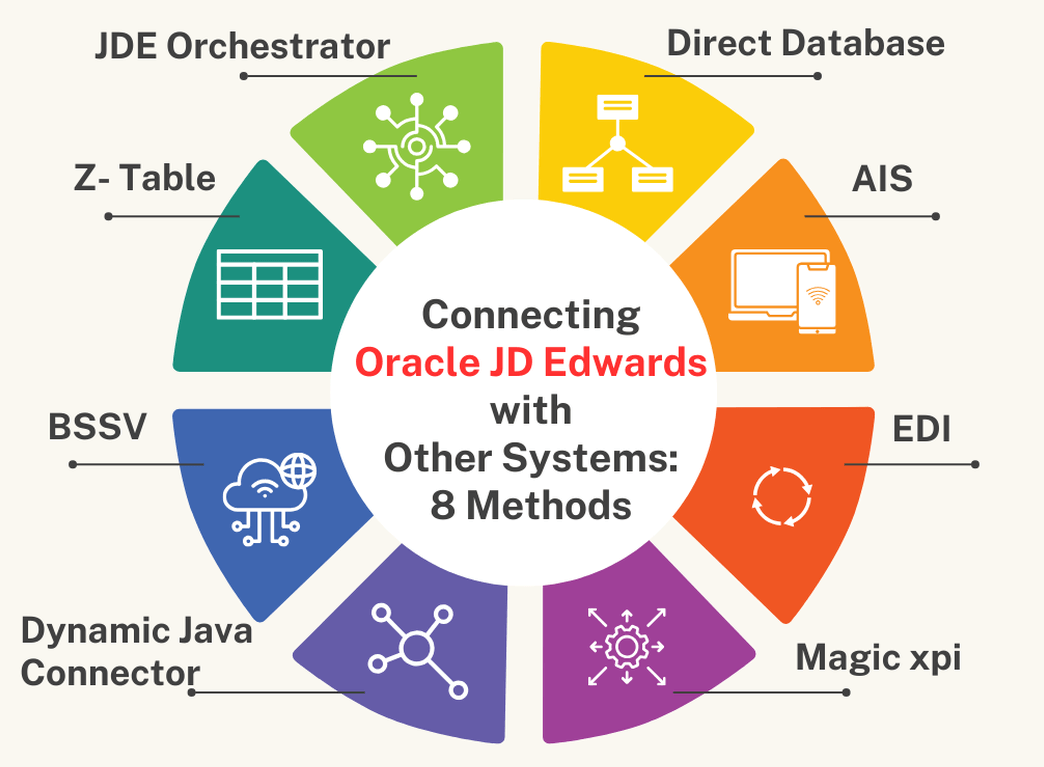
Here’s a list outlining different methods of Oracle JD Edwards (JDE) integration, including JDE Orchestrator, Direct Database integration, Dynamic Java Connector, and Magic xpi.
Oracle JD Edwards Orchestrator: Streamlining JDE Integration with REST Services
JDE Orchestrator is a tool that enables you to create, test, and deploy REST services that interact with JD Edwards EnterpriseOne applications and data.
- Easy to use and configure
- Supports real-time integration
- Supports JSON and XML formats
- Supports IoT devices and cloud services
USEFUL READING: Streamlining Business Operations: Expert Perspectives on JD Edwards Orchestrator Integration
Direct Database Integration for Oracle JD Edwards: SQL & Real-Time Data
Integrating external systems directly with the JD Edwards database, typically using SQL queries and database connections.
- Fast and simple
- Supports batch and real-time integration
- Supports any database format
- No additional software required
We have the expertise and the tools to help you integrate JDE with other systems in the most efficient and effective way. Book a free consultation now
Java Connector for Oracle JD Edwards: Custom Integration & Business Logic
A tool that enables you to create Java classes that interact with JDE business functions using the Java Connector Architecture (JCA) specification.
- Supports real-time integration
- Supports complex business logic
- Supports any Java-based platform or application
- Supports transactions and security
Z-Table Processing in Oracle JD Edwards: Bulk Data Integration Methods
The “Z tables” are transition tables in SQL/Oracle, whose sole objective is to load data into JDE. In general, this way is used for “Bulk import” of data into the JDE database.
- Can be done using various methods, such as flat files (CSV, TXT, etc.) to import and export data between JDE and external systems.
- In general, used for “Bulk import” of data into the JDE database.
- Z-table integration can be used for both inbound and outbound transactions
Oracle JD Edwards BSSV: Enterprise-Level Integration & Transaction Management
BSSV is a component within the JDE system that facilitates communication and integration between JD Edwards applications and external systems.
- Supports SOAP-based and RESTful services for integration.
- BSSV efficiently manages high volumes of transactions, ideal for enterprise-level deployments
Oracle JD Edwards AIS: RESTful API Integration for Mobile & External Systems
AIS is a component of Oracle JDE that provides a lightweight RESTful interface that allows JDE applications to run on various devices such as smartphones and tablets through REST API calls.
- Acts as a middleware layer, allowing external systems, mobile applications, and other software solutions to interact with JDE.
EDI Integration with Oracle JD Edwards: Streamlining B2B Data Exchange
EDI is one of the integration methods with Oracle JDE. JDE has a data interface system (code 47) that acts as a staging area for moving data in and out of the application systems using EDI standard formats.
- Supports various EDI standard formats, such as X12, EDIFACT, HL7, and others
- Enables JDE to communicate with external systems.
Magic xpi for Oracle JD Edwards: Visual Integration & Drag-and-Drop Solutions
Magic xpi is an integration platform designed for connecting various enterprise applications, including JD Edwards, through a visual drag-and-drop interface. It has an Oracle certified connector to JDE, that can interact directly with JDE Business Services and its Dynamic Java Connector.
- Easy to use and maintain.
- Supports batch and real-time integration.
- Supports multiple protocols and formats.
- Supports cloud and on-premises. deployment
- Visual mapping, drag and drop from source to destination.
These methods can be used separately or in combination, depending on the complexity and requirements of the integration. It’s also important to note that integration strategies should be selected and implemented in a way that suits the organization’s IT policies, security standards, and performance requirements.
Optimizing Oracle JD Edwards Integration: Choosing the Right Methods for Your Business
Integrating JD Edwards (JDE) with other systems is crucial for streamlining business processes and maximizing operational efficiency. Each method offers unique advantages and capabilities, enabling seamless data exchange and collaboration across your organization and beyond.
If you’re ready to explore the possibilities of JDE integration or have questions about implementing these methods in your organization, our team is here to help.
Book your free consultation today to learn more and start optimizing your JD Edwards system for enhanced performance and productivity.

We’d love to hear from you! What integration methods have you found most effective in your JDE implementation? Do you have any questions or suggestions regarding JDE integration? Leave a comment below and let’s continue the conversation!


Leave a Reply
Want to join the discussion?Feel free to contribute!