EDI2XML
  • About
    • The Company
    • EDI2XML
    • Advantages
    • Partnership with EDI2XML
    • Testimonials
  • Services
    • Enterprise AI
    • Fully Managed Integration
    • Fully Managed EDI Services
    • EDI Web Portal
    • EDI Web Service
    • EDI On Premises
    • Managed Cloud Services
    • Amazon Integration
    • Shopify Integration
    • BigCommerce Integration
    • NetSuite Integration
    • JD Edwards Integration
    • Dynamics 365 Integration
    • SAP B1 Integration
    • Salesforce Integration
    • Industry 4.0 Integration
  • Pricing
    • EDI Managed Services
    • EDI Web Service
    • EDI On-Premises
    • Managed Cloud Services
    • Shopify Integration
    • JD Edwards Integration
    • E-commerce Integration
    • All other Integrations
  • Blog
  • Resources
    • Downloadable Guides
    • List of EDI Codes
    • List of EDIFACT Messages
    • EDI Documents Library
    • Trading Partners
    • Customer Case Studies
  • Contact us
  • Book a Consultation
  • Click to open the search input field Click to open the search input field Search
  • Menu Menu
  • Link to Facebook
  • Link to LinkedIn
  • Link to X
  • Link to Youtube

Unlocking Efficiency: How Small Businesses Benefit from EDI and API Integration

Blog

Small businesses, regardless of the industry they operate in, are constantly looking for ways to improve efficiency and remain competitive. This article explores how Electronic Data Interchange (EDI), and Application Programming Interface (API) can transform operations, offering insights into their benefits, key differences, and practical implementation tips.

EDI and API Integration Intro

In today’s fast-paced digital world, small businesses are constantly seeking ways to streamline their operations and boost efficiency.

Two key integration solutions have gained significant popularity in recent years: Electronic Data Interchange (EDI) and Application Programming Interface (API).

By harnessing the power of these technologies, small businesses can unlock a whole new level of operational efficiency and seamlessly integrate their systems for improved workflow.

Let’s start with a refresher on what are these two technologies, and how they differ;

What is EDI ?

EDI (or Electronic Data Interchange) allows for the automated exchange of business documents, such as orders, invoices, and shipping notices, between trading partners. This eliminates the need for manual data entry and reduces errors, saving small businesses valuable time and resources.

EDI is also known as ANSI X12, or Electronic Data interchange; EDI as a protocol, existed for long time, and it has been standardized. For example, X12, is the standard that is most popular in North America, while UN/EDIFACT is the standard managed and maintained by the United Nations, and it is very popular in Europe and outside of North America. There are several EDI standards today, commonly used in different industries, however the most commonly known and used today are X12 and EDIFACT.

Useful reading: What Are the Differences Between ANSI X12 and UN/EDIFACT

What is API ?

API (or Application programming Interface) enables different systems to communicate and share data in real-time enhancing collaboration and eliminating the need for manual data transfers.

API communication between the source and destination application, happens via internet, using https protocol, in a very secured and controlled manner, regardless of the geography and distance between sender and receiver of the data.

API, is a protocol to send formatted data from a sender to a receiver application, via a web server that would parse the received data and give it to the the application for processing and integration.

The format of the data exchanged, is structured and mostly based on json or xml, over the REST or SOAP that is also used but in a more moderate frequency.

Useful Reading: SOAP or REST Web Services: what you should use for EDI implementation?

EDI integration: Understanding the Benefits for Small Businesses

In the fast-paced world of modern business, small enterprises are constantly seeking ways to streamline their operations and enhance efficiency. One of the most powerful solutions in this regard is Electronic Data Interchange (EDI).

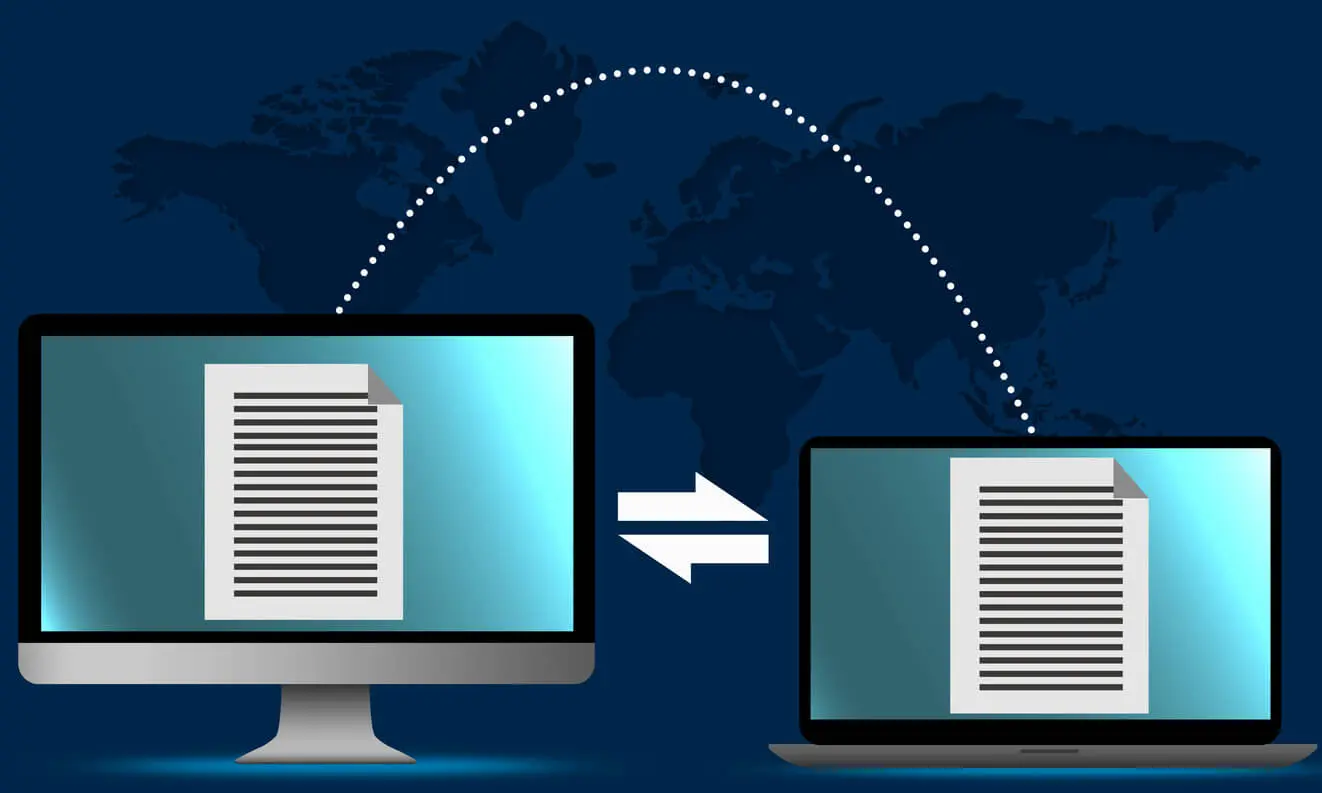
EDI is a technology that enables the automated exchange of business documents, such as purchase orders, invoices, and shipping notifications, between trading partners.
EDI

By adopting EDI, small businesses can unlock a myriad of benefits that can significantly improve their overall operational efficiency:

  • EDI eliminates the need for manual data entry, reducing the risk of errors and ensuring accuracy in the exchange of critical business information. This, in turn, leads to faster processing times, improved customer service, and enhanced decision-making capabilities.
  • EDI integration allows small businesses to seamlessly integrate their systems with those of their trading partners, fostering stronger, more collaborative relationships. This seamless integration facilitates the real-time exchange of data, enabling small businesses to respond quickly to changing market conditions and customer demands.
  • Additionally, the automation of document exchange through EDI reduces the administrative burden on small business owners, freeing up valuable time and resources that can be redirected towards other strategic initiatives.

API integration: Exploring the advantages for small businesses

Let’s explore the advantage of integration via API; By adopting an integration strategy based on API, a small business can also harness the power of Application Programming Interface (API) integration to streamline their operations and enhance efficiency:

  • An API acts as the digital bridges that enable different software systems to communicate and share data in real-time, eliminating the need for manual data transfers and improving collaboration across the organization.
  • One of the primary advantages of API integration for small businesses is the ability to connect disparate systems and automate data flows. By integrating their various software applications, such as accounting, inventory management, and customer relationship management (CRM) systems, small businesses can create a seamless, interconnected ecosystem that enhances visibility, reduces errors, and improves overall productivity.
  • Furthermore, API integration empowers small businesses to access and leverage a wealth of data from external sources, such as market intelligence, weather forecasts, and social media analytics. This data can be seamlessly integrated into the company’s decision-making processes, enabling small business owners to make more informed, data-driven decisions that drive growth and competitive advantage.

API

Key Differences Between EDI and API Integration

While both EDI and API integration serve to streamline business operations and enhance efficiency, there are some key differences between the two technologies that small businesses should be aware of:

  • The primary distinction lies in the underlying technology and the way data is exchanged. EDI is a more traditional, standardized approach to data exchange, typically involving the transmission of structured, formatted documents between trading partners. This format ensures compatibility and facilitates the automated processing of the exchanged data.
  • In contrast, API integration is a more modern, flexible approach that allows for the real-time exchange of data between different software systems. APIs enable the seamless transfer of data in various formats, including JSON, XML, and even unstructured data, making them more adaptable to the evolving needs of small businesses.
  • Another key difference is the level of integration complexity. EDI typically requires a more robust and specialized infrastructure, including the use of specific communication protocols and software. API integration, on the other hand, is generally more straightforward and can often be implemented using web-based tools and cloud-based services, making it more accessible for small businesses with limited IT resources.

Implementing Integration in a Small Business

Implementing integration based on EDI or API, in a small business can be a transformative process, but it requires careful planning and execution to ensure a successful outcome.

The first step is to conduct a comprehensive assessment of the business’s existing systems, processes, and data flows to identify areas where EDI and API integration can provide the greatest impact.

Once the areas of focus have been identified, small businesses should work closely with their trading partners and software providers to establish the necessary technical infrastructure and protocols. This may involve the deployment of specialized EDI solutions or services, the establishment of secure data exchange channels, and the integration of APIs with the company’s existing software systems.

Throughout the implementation process, it is crucial for small businesses to maintain clear communication with all stakeholders, including employees, customers, and service provides or integrators. This helps to ensure that everyone understands the benefits of the integration and is prepared to adapt to the new processes and workflows.

Book your Free Consultation with Integration expert

Common Challenges to Overcome During the Integration Process

While the benefits of integration for small businesses are numerous, the implementation and ongoing management of these technologies can also present some common challenges that must be addressed;

  • One of the primary challenges is the potential for resistance to change within the organization. Employees may be hesitant to adapt to new processes and technologies, which can slow down the integration process and limit the overall effectiveness of the solutions. To overcome this, small businesses should prioritize change management, providing clear communication, training, and support to ensure a smooth transition.
  • Another challenge is the need for seamless integration with existing systems and trading partner requirements. Small businesses must ensure that their EDI and/or API solutions are compatible with the systems and protocols used by their partners, which can be a complex and time-consuming process. To mitigate this, small businesses should work closely with their technology service providers and trading partners to establish clear standards and protocols, ensuring a streamlined integration process.
  • Additionally, small businesses may face challenges related to data security and compliance. The exchange of sensitive business information through EDI or APIs requires robust security measures to protect against cyber threats and ensure compliance with relevant regulations. To address this, small businesses should invest in comprehensive security protocols, such as encryption, access controls, and regular data backups, as well as staying up-to-date with industry best practices and regulatory requirements.

EDI or API Integration, What is the Best Choice?

Based on my long time experience in systems integration, the choice for EDI or API integration is not up to the business owners as per say. It is the full business context and use case that would “dictate” what integration path should be adopted in a small business, rather than a choice and selection.

As an example, a business won’t be able to decide to go with EDI X12 integration, knowing that his business partner (i.e. his customer) does not support EDI. He might be able to support API but not EDI. That is why such a decision is really based on the capability and the readiness of the different partners to support any of the integration options (EDI or API).

Can We Work with EDI via API?

Lots of times, we receive this question from partners and clients. And the answer is yes. Thanks to the EDI2XML REST API that is able to convert EDI X12, EDIFACT messages to XML via straight and simple xml structured format.

The need arose a few years back where the new generation of developers invested their time and efforts in building expertise around API only, ignoring the fact that EDI even though a legacy protocol, it is still engrained deeply into the major systems of big retailers and corporations, and it is mostly impossible to get rid of it.

This is when we at www.edi2xml.com took the initiative to provide a very intelligent Rest API that would receive and X12 message for example, and turn into xml, and vice versa;

Such an API allowed the end integrators to seamlessly work with EDI via an API interface, knowing that most of the developers in today’s technology space are experts in API development and integration. 

Useful Reading: API Web Service for EDI X12 exchange – Discover the advantages

How to Evaluate Your Integration Project

If you are looking to review your integration strategy or project, and you are not sure what is best for your business, it is recommended to consult with a professional team with lots of years of EDI and API integration.

Our specialists with over 24 years of experience in EDI and API integration will be happy to help hope on a FREE one hour Teams meeting to listen to your challenges, and offer you the best approach and recommendation.

Just book a time convenient for you in our calendar.

Or click on this image to book your FREE consultation.

Book a free Consultation


September 3, 2024/2 Comments
https://www.edi2xml.com/wp-content/uploads/2024/09/edi2xml.com-blog-EDI-and-API.webp 675 1200 Pierre Namroud https://www.edi2xml.com/wp-content/uploads/2024/08/edi2xml.com-EDI2XML-company-logo.png Pierre Namroud2024-09-03 11:23:042026-06-04 14:50:30Unlocking Efficiency: How Small Businesses Benefit from EDI and API Integration

Mastering X12 EDI 940 Warehouse Shipping Orders

Blog

The Electronic Document EDI 940 – Warehouse Shipping Order plays an important role in effective communication between third-party warehouses and their customers.

The use of electronic document exchange, and in particular EDI 940, improves communication between all participants in the supply chain and increases the efficiency of warehouse management.

We, as an EDI provider with more than 24 years of experience, in this blog will take a closer look at all the necessary information regarding this electronic document, which raises so many questions among goods suppliers who want to establish business cooperation with third-party warehouses or 3 PL providers.

What is EDI 940?

EDI 940 is an electronic document used by manufacturers and wholesalers of goods who use 3PL services or third-party warehouse.

When a manufacturer or seller whose goods are located in a third-party warehouse or distribution center receives a purchase order from a buyer (EDI 850), it generates EDI 940 in order to instruct the warehouse to ship the required goods. In EDI 940, the company indicates when, to whom and how many goods need to be shipped from the warehouse.

Key Components of EDI 940 Document

The goods owner generates EDI 940 document for the warehouse based on the received purchase order (EDI 850). The information in the EDI 940 document may vary depending on the specifics of the goods and the special requirements of the companies, but the following information is usually indicated:

Order details:

  • Order ID (this can be an order number or a customer number).
  • Quantity and description of goods to be shipped.
  • Units of measurement (for example, pieces, boxes, pallets).
  • Weight and volume of cargo

Information about delivery:

  • Date and time of expected shipment.
  • Delivery method (for example, truck, container, mail).
  • Recipient’s address (including postal code).

In addition, the document may include special delivery instructions or additional details such as the number of the warehouse from which the shipment will be made, information about the transport company or logistics provider, and so on.

Warehouse and EDI
 

EDI 940 X12 Specification

Warehouse Shipping Order EDI 940 is an electronic document in the X12 standard.

This EDI document contains of the following segments:

Message Envelop / Group:

  • ISA Interchange Control Header
  • GS Functional Group Header

Heading:

  • ST Transaction Set Header
  • W05 Shipping Order Identification (N = Original Order)
  • N1 Name (‘SF’ – Ship-from, ‘SF’ – Ship-from)
  • N3 Address Information
  • N4 Geographic Location
  • G62 Date/Time (‘02’ – Requested Arrival ‘10’ – Pick-Up Date)
  • NTE – Notes/Special Instructions (‘WHI’ Warehouse Instruction)
  • W66 Warehouse Carrier Information

Detail (Begins detail loop):

  • LX – Assigned Number
  • W01 – Line Item Detail – Warehouse
  • G69 Line Item Detail – Description
  • N9 Reference Identification
  • W20 – Line-Item Detail (Miscellaneous)
  • AMT – Monetary Amount

Summary:

  • W76 Total Shipping Order
  • SE Transaction Set Trailer (the last segment of each transaction set)

Message Envelop / Group Footer:

  • GE Functional Group Trailer
  • IEA Interchange Control Trailer

EDI 940 Warehouse Shipping Order Workflow Process

Below we will look at one of the possible scenarios in which the EDI 940 document is involved.

  • The buyer creates a purchase order (EDI 850) and sends it to the seller.
  • The seller confirms the order using the EDI 855 document.
  • Based on the received order, the supplier generates an EDI 940 document where he describes all the necessary details of the order and sends it to his third-party warehouse.
  • To confirm shipment from the warehouse, the warehouse sends an EDI 945 document to the seller.
  • Based on the received EDI 945 document, the seller creates an EDI 856 to notify the buyer of the upcoming delivery.
  • The seller sends an invoice (EDI 810) to the buyer after receiving the goods.

How to Exchange EDI With a Trading Partner?

In order for the entire process of exchanging EDI documents between the seller and a third-party warehouse, seller and buyer to be possible, this exchange must first be configured. This usually involves an EDI provider who can offer several types of EDI solutions.

For example, an EDI provider such as EDI2XML offers the service as a Fully Managed EDI Service. In this case, the provider is fully responsible for the process of setting up and transferring EDI documents between business partners.

Another method is the EDI Web Service, it is suitable for companies that have technical specialists who can work with REST API (call and consume HTTP Rest Web services); this option is much more economical, in addition, EDI2XML specialists help you make the first settings, they provide everything to your developers to get started, a java client with its source code and instructions on how to work with it.

The advantages of this EDI service are that companies can connect and start exchanging EDI documents with their business partner within an hour. There are no contracts, and low cost per KC.

If you have questions regarding EDI document exchange, our specialists with over 24 years of experience in EDI integration will be happy to help you resolve your issues. They can suggest the most profitable EDI solution for you, and can also provide a free 15-day trial period of our EDI web service.

Just book a time convenient for you in our calendar.

Free EDI online Consultation
July 23, 2024/0 Comments
https://www.edi2xml.com/wp-content/uploads/2024/07/edi2xml.com-EDI-940.webp 675 1200 Tatyana Vandich https://www.edi2xml.com/wp-content/uploads/2024/08/edi2xml.com-EDI2XML-company-logo.png Tatyana Vandich2024-07-23 15:48:212025-04-22 11:30:29Mastering X12 EDI 940 Warehouse Shipping Orders

EDI ANSI X12 Transaction Set 850 Purchase Order Explained

Blog

In this blog, we will navigate through the ANSI X12 EDI standard, with a focus on the 850 (Purchase Order) transaction set. This transaction set is a major business document exchanged between most business partners, whether they are a manufacturer, retailer, or businesses part of the same supply chain. The 850-transaction set is the backbone of the electronic data interchange in today’s heavily digitized world. This post is based on over 24 years of EDI experience with hundreds of EDI integration projects implementations.

What is Electronic Data Interchange (EDI)?

Let’s start with a little refresher; Electronic Data Interchange (EDI) is the protocol designed to exchange business documents, electronically, between business entities wanting to collaborate at the business level, as vendor and client.

In simple terms, EDI is an electronic exchange of digital business documents, between a sender and a receiver company, in a very structured and standard format. This protocol is used by businesses around the world as their main method to exchange business documents. Obviously, since it is standardized, there are currently lots of organizations and standards to manage i.e. ANSI, UN/EDIFACT, Tradacomms and many others depending on the industry and business needs.

EDI Purchase Order (850) Definition

The ANSI X12 EDI Purchase Order coded as 850, is a “Transaction Set” nick named as EDI 850 or EDI X12 850 or just PO, is a fundamental document in EDI. EDI 850 is a formal business and commercial request sent by the buyer (purchasing company) to the supplier (seller) for demand of delivery of goods and/or services at an agreed price.

What business information is contained in an EDI Purchase Order?

A typical EDI 850 Purchase Order includes typical commercial data included in any business purchase order, such as:

  • Purchase order date
  • Purchase order number
  • Item description
  • Item price and quantities
  • Payment terms
  • Discounts
  • Shipping details
  • Requested delivery date
  • Location(s) where the goods should be delivered to

How is the EDI 850 handled by the EDI service provider?

A little summary description about the EDI 850 flow:

Typically, the buyer creates a Purchase Order in his internal ERP system (i.e. SAP, Microsoft Dynamics, JD Edwards, etc.); it can be created in the ERP system automatically or manually, depending on the business process of the company.

Then, the generated Purchase Order is converted to an appropriate format acceptable by the EDI service provider to translate to the appropriate standard and format. Once the purchase order is transferred to the EDI provider, he will then convert the PO document to ANSI X12 EDI 850 transaction set. After conversion, the EDI 850 is sent to the destination (or the recipient).

USEFUL: If you are looking for an EDI Service provider or you are not satisfied with your current provider and want to get the best EDI services, find out here how to choose the right EDI Service Provider.


Difference Between EDI 850 and 875?

EDI 875 and EDI 850 are two different transaction sets that are used in electronic data interchange (EDI) to exchange business documents between trading partners.

Unlike the 850, EDI 875 transaction set is used to place orders for grocery products specifically. It sent by chain stores to their suppliers and vendors, to replenish inventory at the store level. However, the EDI 850 transaction set is used for purchase orders. The main difference between the two is the specific industry or vertical.

The EDI 850 Purchase Order transaction set is more generic in terms of its usage; it is used across various industries to communicate purchase ordering for goods and services from a buyer to a supplier. The 850 typically includes the minimum information needed on a purchase order, such as item description, quantity, price, delivery date, and payment terms.

On the other hand, the EDI 875 Grocery Products Purchase Order transaction set is used specifically in the grocery industry for the purchase of perishable and non-perishable goods, and includes additional information such as weight, temperature requirements, expiry date and other special handling instructions.

In summary, both EDI 850 and EDI 875 are used as a legal purchase order to buy goods and services. They are designed for different industries and have different data requirements.

EDI 850 X12
 

EDI 850 Exchange and Communication Protocols

For the exchange of EDI documents, including EDI 850, there exist different methods and communication protocols used in this industry:

For the exchange of EDI documents, including EDI 850, there are various communication Protocols:

VAN (Value-Added-Network)

A value-added network (VAN) is a private network that ensures the secure transfer of EDI data between the source and the destinations (or partners). VANs normally interconnect between each other’in order to keep the transmission secure.

AS2 (Applicability Statement 2)

AS2 (Applicability Statement 2) is secure messaging over the Internet using digital certificates and encryption.

FTP (File Transfer Protocol)

FTP (File Transfer Protocol) is a standard network protocol built on a client-server architecture.

sFTP (Secure File Transfer Protocol)

sFTP (Secure File Transfer Protocol) secure version of FTP for data transfer over the Internet.

HTTPS (Hypertext Transfer Protocol Secure)

HTTPS (Hypertext Transfer Protocol Secure) is an extension of HTTP and a secure way for communication over the Internet.

It is to note thar one company may decide to use several protocols to exchange EDI documents with its various trading partners. This usually happens because suppliers must meet the requirements of their trading partners.

What EDI documents are involved in EDI X12 850 workflow?

For a business relationship between business partners, a single EDI 850 transaction is not enough. Although a purchase order is a basic document, business partners generally would exchange the complimentary additional following documents:

  • EDI 997 Functional Acknowledgement – sent by the receiver of the transaction as a response to confirm receipt of EDI 850 or any other EDI document. This is a signature to indicate that the digital file was received physically, its content is valid in terms of Syntax, but without looking at the data values.
  • EDI 855 Purchase Order Acknowledgment– used by sellers to accept, reject, or modify a Purchase Order.
  • EDI 860 Purchase Order Change Request – used by buyer if necessary to make changes to a previously submitted Purchase Order; or to accept change initiated by the seller.
  • EDI 856 Advance Ship Notice –send by a seller to a buyer to describe the shipped items and type of packaging. ASN is sent immediately after the goods left the seller’s location.
  • EDI 810 Invoice –request for payment of goods or services

Structure of EDI X12 850 Transaction Set

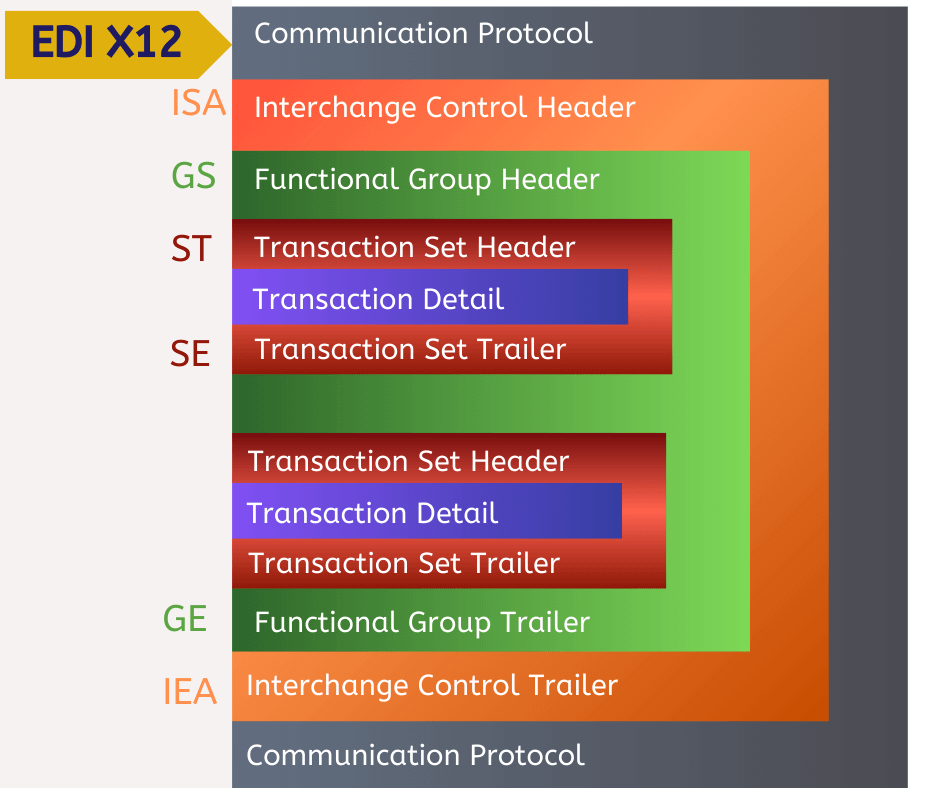
Any EDI X12 document, including the 850 (Purchase Order) transaction, consists of different segments where the initial segments are called Header, and the final segment is called Trailer:

a. Interchange Control Header (ISA) /Trailer (IEA)

b. Functional Group Header (GS) / Trailer (GE)

c. Transaction Set Header (ST) / Trailer (SE)

EDI 850

For more information about EDI structure, data elements, and terminology learn our article:

EDI ANSI ASC X12 Standards – Technical Overview

Purchase Order 850 Sample File

The ISA, GS, ST elements contain Functional ID code, the sender’s and receiver’s ID code, date, time etc.

The transaction set envelope contains transaction detail, with information about a product, weight, size, color, volume etc.

ISA*00*          *00*          *ZZ*A1STORES    *12*5142645505     *190510*0728*|*00403*100000013*0*P*}

GS*PO*A1STORES*5142645505*20200510*0728*1013*X*004030

ST*850*1013

BEG*00*SA*2332233**20200510

REF*IA*66910

PER*BD*Contact Name*TE*123-455-7880

FOB*DF

DTM*010*20200517

DTM*001*20200525

TD5*****Carrier Routing*******CG

N1*ST*Towner Square Schooms*92*006

N3*Williston Towner Square*2100 11th St SW

N4*Williston*ND*58701

PO1*1*4*EA*4.15**UP*066810348563*IT*WACT750SP16-BLK

CTP**RTL*7.99

PID*F*08***Nike Boy Short Black sz M

PO1*2*6*EA*5.00**UP*066810349983*IT*WACT170SP16-AMP

CTP**RTL*7.99

PID*F*08*** Reebok Boy Short Abstract Print sz M

PO1*3*4*EA*5.25**UP*066810349747*IT*WACT790SP16-BLK

CTP**RTL*9.99

PID*F*08*** Puma Boy Short Red sz M

CTT*3

SE*22*1013

GE*1*1013

IEA*1*100000013

Although EDI 850 must comply with ANSI ASC X12 standard, a Purchase Order can vary greatly depending on industry and trading partners. Even in the same industry, EDI 850 may vary, as it is customized to the specific needs of the company.

Benefits and Opportunities of the 850 Purchase Order

Profitability

  • speeds up the supply chain
  • saves on printing and document delivery
  • increases the speed of payment
  • saves resources for duplication, sorting and storage of documents

Efficiency

  • instantly notifies partners of new orders
  • eliminates manual input errors
  • reduces the number of adjustments
  • allows rational use of human resources

Integration

  • Integrates with any business system (ERP, CRM, Warehouse Management, accounting, etc.)
  • allows companies to build analytical reports
  • connects business partners from anywhere in the world

Security

  • electronic documents in encrypted and unchanged form
  • eliminates the risk of losing orders

About EDI2XML

Our knowledge, expertise, and experience in EDI integration allow us to provide our customers with solutions that take business to a new level.

We cooperate with leading technology companies to develop cutting-edge solutions that can change your business. We use innovative solutions for various industries and help our customers solve the most complex EDI integration issues.

EDI 850

RELATED POSTS:

  • DELFOR, DELJIT, DESADV – key EDI messages in supply chain management for manufacturing
  • ORDERS and ORDRSP: The main EDIFACT messages in the supply chain management
  • What is Advanced Ship Notice (ASN) 856 transaction set?
  • What Are the Differences Between ANSI X12 and UN/EDIFACT
July 19, 2024/0 Comments
https://www.edi2xml.com/wp-content/uploads/2024/07/edi2xml.com-EDI-850-PO.webp 675 1200 Tatyana Vandich https://www.edi2xml.com/wp-content/uploads/2024/08/edi2xml.com-EDI2XML-company-logo.png Tatyana Vandich2024-07-19 12:11:282026-06-04 15:10:23EDI ANSI X12 Transaction Set 850 Purchase Order Explained

Dynamics 365 E-commerce Integration: Boost Sales & Efficiency

Blog

Many businesses leverage Dynamics 365 Business Central (D365 BC) for their back-office operations. However, connecting data between Dynamics 365 Business Central and popular e-commerce platforms like Shopify, BigCommerce, or Amazon can be a challenge.

When your data is locked away in different places, it’s hard to be efficient, keep customers happy, and make the most of every sale.

EDI2XML: Your Integration Experts

At EDI2XML, we’re not just integration providers, we’re your strategic partners. We have over 24 years of experience crafting seamless connections between disparate systems.


In fact, we integrated business systems before most e-commerce platforms even existed!

Especially, we specialize in connections between Dynamics 365 Business Central and your chosen e-commerce platform.

Our deep well of knowledge allows us to approach your project with a unique blend of proven methods and cutting-edge technology.

Streamlining the Order-to-Fulfillment Cycle

Based on our years of experience, integrating Dynamics 365 with e-commerce platforms most often automates processes to optimize the order fulfillment cycle.

This can include:

  • Automatic order creation in Dynamics 365 Business Central upon receiving a new order in your online store.
  • Dynamic inventory updates across both systems, ensuring real-time availability for customers.
  • Customer information gets synced, eliminating manual data entry and guaranteeing accurate customer records.


This automation not only saves you time and reduces errors, but also provides a smoother experience for your customers.

Benefits of Integrated E-commerce with Dynamics 365 Business Central

Accurate Information, Happy Customers: Eliminate data errors and inconsistencies. Customers see real-time inventory levels and product details, leading to a more trustworthy and satisfying shopping experience.

Streamlined Operations, Boosted Efficiency: Automate order processing, fulfillment, and customer communication can save time and resources.

Data-Driven Decisions, Informed Strategy: Gain a holistic view of your sales data across all channels. Make data-driven decisions to optimize pricing, promotions, and inventory management.

E-commerce Integration and Dynamics 365 Commerce

Dynamics 365 Commerce is a Microsoft product designed specifically for e-commerce needs. It’s part of the broader Dynamics 365 suite that offers various business applications. Here’s a breakdown of what Dynamics 365 Commerce offers:

Omnichannel Commerce: It provides a unified platform to manage your online store, in-store operations, and call center interactions. This allows for a consistent customer experience across all channels.

Inventory Management: Dynamics 365 Commerce offers real-time inventory visibility across all locations (physical stores and online store). This helps ensure accurate product availability and prevent overselling.

 
Integration price
 

Order Management: The platform streamlines order processing, fulfillment, and returns. It automates tasks like order creation, picking, packing, and shipping, leading to increased efficiency.

Marketing and Customer Engagement: Dynamics 365 Commerce integrates with marketing automation tools, allowing you to create targeted campaigns and personalize the customer experience.

Customer Relationship Management (CRM): It can connect with your CRM system, providing a 360-degree view of your customers and their purchase history.

Dynamics 365 Commerce vs Dynamics 365 Business Central

While both are Dynamics 365 products, they cater to different needs:

Dynamics 365 Business Central

This is a strong back-office ERP system that manages core business functions like accounting, inventory control (to an extent), and purchasing. It can integrate with an e-commerce platform to provide product and customer data.

Dynamics 365 Commerce

This is a dedicated e-commerce platform that offers functionalities specifically designed for online stores, including order management, marketing tools, and content management. It can also integrate with Dynamics 365 Business Central for functionalities like advanced inventory management or financial reporting.

In the context of integration: You can integrate Dynamics 365 Commerce with your D365 BC system for a more comprehensive solution, leveraging the strengths of both platforms.

Understanding the Integration Landscape: Choosing Your Path

Connecting your online store to Dynamics 365 Business Central (D365 BC) unlocks a world of efficiency and improved operations. But before diving in, it’s crucial to understand the integration landscape and choose the approach that best suits your business needs. Here’s a breakdown of the two main options:

1. Pre-built Connectors and Integration Solutions

These are pre-developed applications that act as a bridge between your e-commerce platform (Shopify, Bigcommerce, etc.) and D365 BC. They offer a faster and often more cost-effective solution, especially for small businesses with standard integration needs.

2. Custom Integration

For businesses with unique workflows or extensive integration requirements, custom development offers a tailored solution. This could be necessary even if you choose Dynamics 365 Commerce, for example, to integrate it with your existing D365 BC system or other business applications.

Custom integrations can be built to scale and adapt as your business grows. Moreover with this option, you have full control over the integration logic and data flow.

Choosing the Right Path

The best approach depends on your specific needs and resources. Here are some factors to consider:

  • Complexity of Integration Needs: How standard are your integration requirements?
  • Budget and Timeline: How much time and money can you dedicate to the project?
  • Technical Expertise: Do you have the internal resources to manage a custom development project?

By carefully considering your requirements and the pros and cons of each approach, you can make an informed decision and choose the integration path that unlocks the full potential of your online store and D365 BC. If you need help to better understand this options, just book a call with our integration expert, for a free consultation.

Tailored Customization: Meeting Your Unique Needs

Every business is unique, and so are its integration requirements. EDI2XML specializes in providing customized integration solutions that align with your specific business processes and goals. Here’s what sets our tailored approach apart:

Custom Workflows:

We design integration workflows that mirror your internal processes, ensuring a seamless fit with your existing operations. Whether you need custom order routing, unique inventory management rules, or specific customer data handling procedures, we can develop a solution that meets your needs.

Scalability and Flexibility:

Our integrations are built to scale with your business. As you expand your e-commerce operations, our solutions can easily accommodate increased data volumes and additional sales channels without compromising performance.

Comprehensive Support:

We provide end-to-end support, from initial consultation and design to implementation and ongoing maintenance. Our team of experts is always available to assist with any issues, ensuring that your integration continues to operate smoothly.

Why EDI2XML Leverages Magic xpi

Magic xpi is a robust integration platform developed by Magic Software Enterprises. It’s designed to simplify the process of connecting various business applications, databases, and APIs, enabling seamless data exchange and automated workflows.

At EDI2XML, we leverage Magic xpi’s capabilities to provide several advantages to our clients:

  • Faster Implementation: Pre-built connectors and a user-friendly interface can expedite the integration process compared to custom coding from scratch.
  • Reduced Costs: The low-code/no-code approach and pre-built connectors can potentially lower development costs compared to full custom development.
  • Flexibility: Magic xpi offers the ability to combine pre-built connectors with custom development for a solution that is tailored to your specific needs.
  • Reliable Integrations: Magic xpi is a proven platform known for its stability and performance, ensuring reliable data exchange between your systems.

By using Magic xpi, EDI2XML can deliver efficient and scalable integration solutions for your Dynamics 365 environment (BC or Commerce) and your chosen e-commerce platform.

Dynamics 365 Business Central Successful integration

Don’t let disconnected systems hold your business back. Leverage EDI2XML’s proven track record of successful integrations across varying complexities.

Contact us by filling out a simple contact form or book a time convenient for you on our calendar for a free one-on-one consultation with one of our experts.

Discover how a custom integration can unlock the full potential of your Dynamics 365 Business Central and e-commerce platform.

Free IT Consultation
June 5, 2024/2 Comments
https://www.edi2xml.com/wp-content/uploads/2024/07/edi2xml.com-Dynamics-365-and-e-commerce-integration.webp 675 1200 Tatyana Vandich https://www.edi2xml.com/wp-content/uploads/2024/08/edi2xml.com-EDI2XML-company-logo.png Tatyana Vandich2024-06-05 14:27:442024-08-20 09:21:38Dynamics 365 E-commerce Integration: Boost Sales & Efficiency

Integrating EDI and Microsoft Business Central using Magic XPI

Blog

This article discusses how to integrate EDI with Microsoft Business Central using Magic xpi to extend the software’s functionalities.

Streamlining Business Processes with EDI2XML

In the realm of Electronic Data Interchange (EDI), EDI2XML stands as a beacon of expertise and reliability. With over 20 years of experience in the field, EDI2XML has been at the forefront of simplifying EDI communications and transforming them into a more user-friendly format. This blog post will delve into the integration of EDI with Microsoft Business Central using Magic xpi, leveraging the extensive knowledge and proven methodologies that EDI2XML has honed over two decades.

Without an effective EDI system, your business may be hampered by inaccuracies and communication gaps, which, of course, will affect your business performance overall. Fortunately, this drawback can be addressed by using Magic xpi—a platform that allows businesses to integrate EDI into Dynamics 365 Business Central.

EDI and Microsoft Business Central at a Glance

What is EDI?

EDI is an electronic exchange of business documents, typically in a standardized format. It is more structured than mail or email and follows a standard, which helps avoid inaccuracies and human errors. EDI works completely electronically, so it’s fast.

Understanding Microsoft Business Central

Microsoft Dynamics 365 Business Central is a business management solution for small and medium-sized businesses (SMBs). It is a cloud-based software that offers a range of features for managing different business aspects, such as resource planning, budgeting, operations, and sales. It works seamlessly with other Microsoft products like Teams, Outlook, Sheets, and Co-Pilot.


Why Integrate EDI with Business Central?

Microsoft Business Central (formerly called Dynamics Navision) is an all-inclusive business management solution that lacks EDI capabilities. However, using a reliable platform, EDI can be integrated.

If you run a business that caters to other businesses, there’s a chance there’s frequent document exchange. For instance, if you’re a vendor selling and shipping goods all over the world, you send invoices and advanced shipping notices (ASNs) to your clients.

Wouldn’t it be more efficient to create those from scratch rather than do it right there within your Business Central platform? That’s where EDI integration comes in. Once integrated with your existing system, in this case, Business Central, EDI exchange will use the data in business central to automate the creation of documents such as ASNs.

EDI integration offers business convenience and efficiency, as workers don’t have to spend a lot of time creating documents and sending them through email. And the system also works in favor of your partners or clients (if they have EDI on their end), as they, too, save time and receive the documents right in their system.


More insights about Business Central integration: Microsoft Dynamics 365 Integration


How to Integrate EDI with Microsoft Business Central?

To integrate EDI into Business Central, you’ll need an out-of-the-box connector that essentially connects the software with the EDI platform. That EDI platform, in turn, communicates with the systems used by your business partners.

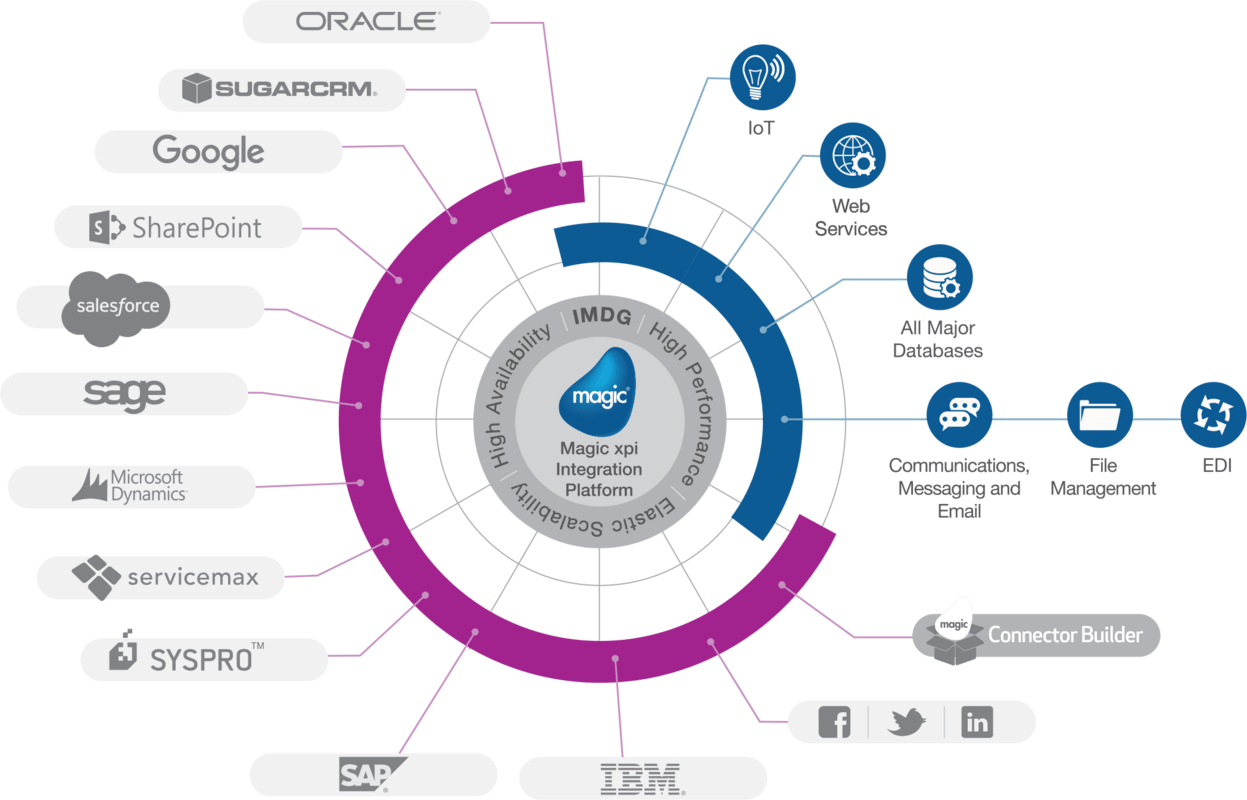
Magic xpi is a reliable integration platform that enables the connection between Dynamics Business Central and the EDI Service Platform. The latter is the platform that connects with outside systems and establishes connections per business process.

How Does Integration Work?

Magic xpi coordinates with your system, like Business Central, and sends the data to the EDI platform, which then creates a standardized document. For this process to work correctly, EDI mapping is used, which takes data from one system and translates it into a format that can be understood by another system.

Also, the EDI connector collects data from the application automatically, as per the requirement for the EDI standardized document. For instance, the EDI platform will need data from your inventory or sales management systems if you’re sending out an ASN.

Magic xpi boasts hundreds of connectors, meaning the technology is endorsed by the software company it is integrating with. More importantly, it offers a no-code integration, so there’s little to no coding required on your end. That said, setting up the integration with Magic xpi requires some technical expertise. You can create up to 10,000 business partner profiles to exchange documents.

 
EDI2XML-Magic-xpi-integration-platform
 

Magic xpi Benefits

Although there are many EDI integration solutions in the market, Magic easily stands out. 

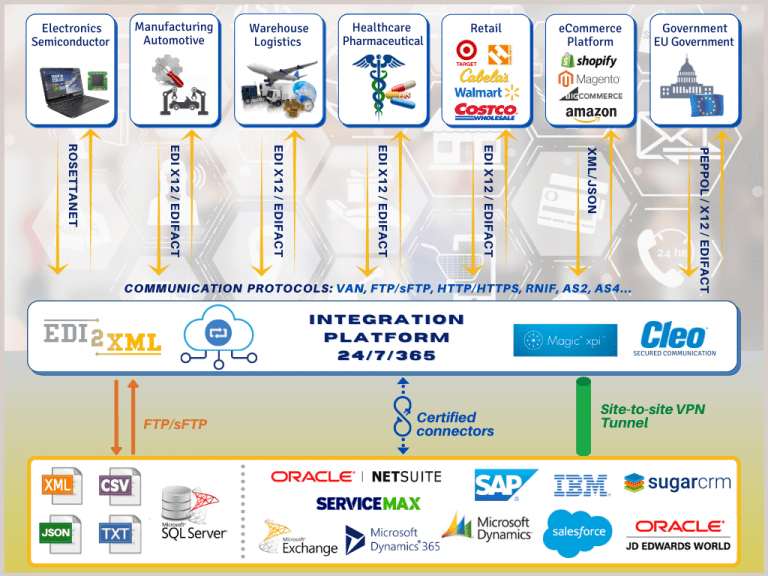
The main reason is that we at Edi2Xml extended Magic xpi power and capability to be able to process EDI documents, from different several standards such as (EDIFACT, TRADACOMS, EDIA, etc.).

Magic xpi uses a one-to-many approach, where a single connection is created for a business process that can connect with many partners. For instance, it will create a connection for invoicing that can be used to create invoices for different partners/clients who may be using a different document standard/language.

Consider Fully Managed EDI Integration for Business Success

If you want to optimize EDI integration with Microsoft Business Central, go with a fully managed EDI integration service with EDI2XML. At EDI2XML, we utilize Magic xpi to integrate Magic’s EDI platform with your system, setting up connectors and communication channels with your business partners. 

Learn more about how EDI2XML can benefit your business. Get your free consultation today with our experts to help you get started!

 
EDI2XML-Book-a-free-consultation
May 29, 2024/0 Comments
https://www.edi2xml.com/wp-content/uploads/2024/05/EDI2XML-Integrating-EDI-and-Microsoft-Business-Central-using-Magic-XPI.png 675 1200 Tatyana Vandich https://www.edi2xml.com/wp-content/uploads/2024/08/edi2xml.com-EDI2XML-company-logo.png Tatyana Vandich2024-05-29 15:25:182025-03-07 15:34:39Integrating EDI and Microsoft Business Central using Magic XPI

From CRM to ERP: Understanding Microsoft Dynamics 365 and Business Central

Blog

Microsoft Dynamics 365 and Dynamics 365 Business Central are both business management solutions offered by Microsoft, designed to help companies manage their operations more efficiently. In this blog series, we continue our exploration of Microsoft Dynamics 365, focusing today on the specifics of Dynamics 365 Business Central.

What is Microsoft Dynamics 365 Business Central

Dynamics 365 Business Central is a cloud-based ERP solution specifically designed for small and medium-sized businesses (SMBs). The original name of the product before it was renamed Business Central was Dynamics NAV. The key difference is that Dynamics NAV operates directly on-site and is installed on local servers. Dynamics 365 Business Central is built on top of Dynamics NAV, it provides improved usability, cloud accessibility, and a more comprehensive feature set.

It offers comprehensive functionalities to manage finances, sales, purchasing, inventory, projects, and more, all within a single platform.

Business Central could be seamless integrated with other Microsoft applications like Office 365, Power BI, and Microsoft 365.

Advantages of Business Central

Dynamics 365 Business Central continues to gain popularity, especially among small and medium-sized businesses seeking streamlined ERP capabilities.

Affordability: Cost-effective solution tailored for the budget and needs of SMBs.

Ease of Use: Intuitive user interface designed for non-technical users, with minimal training required.

Rapid Implementation: Quick deployment and setup compared to traditional on-premises ERP systems.

Scalability: Can grow with the business, accommodating increasing data volumes and users.

Cloud-based: Offers the flexibility of accessing data and applications from anywhere, anytime.

Integration EDI2XML
 

Differences Between Microsoft Dynamics 365 and Business Central

The most frequently asked question is what is the difference between Dynamics 365 and Business Central?

Above we have already talked about the basic characteristics of Business Central. Let’s compare the main differences between these two business systems.

What is Microsoft Dynamics 365?

Microsoft Dynamics 365 is a suite of cloud-based business applications that integrate customer relationship management (CRM) and enterprise resource planning (ERP) capabilities. It encompasses various solutions to address the diverse needs of organizations.

Target Audience

Dynamics 365 is suitable for businesses of all sizes, while Business Central is specifically targeted at SMBs.

Scope

Dynamics 365 offers a broader range of functionalities and modules, including CRM capabilities, while Business Central focuses primarily on ERP functionalities.

Complexity

Dynamics 365 may be more complex due to its extensive feature set and customization options, whereas Business Central is simpler and easier to implement, especially for smaller organizations.

Cost

Dynamics 365 may involve higher licensing and implementation costs, whereas Business Central is typically more affordable, with subscription-based pricing tailored for SMBs.

Both Microsoft Dynamics 365 and Business Central are powerful business solutions, the choice between them depends on the size, complexity, and specific needs of the business. Large enterprises with complex requirements may opt for Dynamics 365, while SMBs looking for a more streamlined and cost-effective solution may prefer Business Central.

Dynamics 365 Business Central Integration

Organizations that use Dynamics 365 Business Central often integrate it with various systems and applications to enhance their business processes.

Integrating Dynamics 365 Business Central with other business applications instead of relying solely on the broader Dynamics 365 suite can be influenced by several factors.

Let’s explore some common integration scenarios and reasons why companies make this choice:

Dynamics 365 Business Central and E-Commerce Integration

Integration Purpose: Connecting Business Central with e-commerce platforms (such as Shopify, BigCommerce, Magento or Amazon) allows seamless synchronization of product catalogs, inventory levels, orders, and customer data.

Why?: By integrating e-commerce systems, businesses can automate order processing, maintain accurate stock levels, and provide real-time information to customers.

Business Central and Electronic Data Interchange (EDI) Integration

Integration Purpose: EDI integration enables the exchange of business documents (such as purchase orders, invoices, and shipping notices) electronically between Business Central and trading partners.

Why?: EDI streamlines communication, reduces manual data entry, and ensures data accuracy in business transactions.

Business Central and Customer Relationship Management (CRM) Software Integration

Many companies have existing systems, such as CRM platforms like Salesforce, or other specialized tools. These systems may already be deeply integrated into their processes. Migrating everything to a new system can be disruptive and costly.

Integration Purpose: Linking Business Central with CRM systems (like Microsoft Dynamics 365 Sales or Salesforce) ensures a unified view of customer interactions, sales opportunities, and order history.

Why?: Seamless CRM integration enhances customer service, sales forecasting, and personalized marketing efforts.

Book your Free Consultation with Integration expert
 

Business Central Integration with Business Intelligence and Analytics Tools

Integration Purpose: Integrating with tools like Power BI or Tableau allows organizations to analyze data from Business Central, create dashboards, and gain insights into financial performance, inventory trends, and operational efficiency.

Why?: Data-driven decision-making becomes more effective when integrated with robust analytics platforms.

Business Central Integration with Financial Services

Integration Purpose: Connecting Business Central with financial services (such as payment gateways, credit card processors, or banking systems) streamlines payment processing, reconciliation, and financial reporting.

Why?: Efficient financial operations are critical for any business, and fintech integrations enhance accuracy and speed.

While Dynamics 365 offers a comprehensive suite, licensing costs can add up. Integrating Business Central with existing systems and applications allows companies to optimize costs by paying only for necessary features.

Outsourcing Integration Services

Many companies realize the importance of integrating their systems and applications. However, not every company can afford to maintain its own team of specialists exclusively for integration projects. This is why we, at EDI2XML offer our integration services.

Our Expertise, Your Advantage

Turnkey Solutions:

We offer end-to-end integration services—from planning to post-implementation support. You don’t need to worry about assembling a team or managing the intricacies of integration projects. We handle it all.

Customized Approach

Every business is unique. Our experienced professionals tailor integration solutions to your specific needs. Whether it’s connecting Dynamics 365 Business Central with your existing CRM, e-commerce platform, or financial system, we’ve got you covered.

Cost-Effective Strategy

Outsourcing integration eliminates the need for full-time specialists. You invest in the expertise required, ensuring you’re only paying for the specific knowledge and skills essential for your current objectives and challenges. No overhead costs, no idle resources.

Seamless Transition

Worried about disruptions during implementation? Don’t be. Our seamless transition ensures minimal impact on your daily operations. We work behind the scenes, so you can focus on what matters most.

Scalability and Flexibility

As your business grows, so do your integration needs. We scale our services accordingly. Plus, with cloud-based solutions like Business Central, you’re ready for future expansion.

Your Success, Our Mission By partnering with us, you gain access to a dedicated team of integration experts who understand the intricacies of Dynamics 365 Business Central and beyond. Let us handle the technical details while you stay focused on driving your business forward. Book a free consultation with our integration expert!

Free IT Consultation - Dynamics 365
May 9, 2024/0 Comments
https://www.edi2xml.com/wp-content/uploads/2024/05/EDI2XML-Dynamics-365-and-Business-Central.png 675 1200 Tatyana Vandich https://www.edi2xml.com/wp-content/uploads/2024/08/edi2xml.com-EDI2XML-company-logo.png Tatyana Vandich2024-05-09 17:00:092025-04-22 11:31:06From CRM to ERP: Understanding Microsoft Dynamics 365 and Business Central

Decoding Microsoft Dynamics– Overview from Systems Integration Experts

Blog

In an environment of rapidly growing competition and rising business standards, many companies are faced with the challenge of integrating their different business systems and processes. Our company, EDI2XML, has been working in the field of business systems integration for over 24 years, assisting companies across various industries in enhancing their operational workflows.

Why Microsoft Dynamics Matters

Microsoft Dynamics is a suite of business applications developed by Microsoft, played a pivotal role in this journey. From customer relationship management (CRM) to enterprise resource planning (ERP), Dynamics offers a comprehensive set of tools designed to enhance efficiency, streamline operations, and drive growth. As experts in the field, we recognize the impact that Dynamics has had on businesses worldwide.

Dynamics Family Explained

Over time, Microsoft has rebranded and evolved its Dynamics products, leading to different names.

Let’s break down the different terms related to Microsoft Dynamics and explore their meanings and differences:Dynamics: This is the overarching brand name for Microsoft’s suite of business applications. Originally introduced in 2001, it encompasses a range of ERP and CRM solutions designed to streamline various business processes.

Microsoft Dynamics GP (Originally known as Great Plains) is a comprehensive enterprise resource planning (ERP) solution for small and medium-sized businesses. It offers modules for financial management, supply chain management, human resources, and more. While it’s part of the Dynamics family, it’s often referred to separately due to its long-standing history and dedicated user base.

Microsoft Dynamics NAV (formerly Navision): NAV stands for “Navision,” the original name of the product before Microsoft acquired it in 2002. Dynamics NAV is an ERP solution primarily aimed at small and medium-sized enterprises. It covers financial management, manufacturing, distribution, customer relationship management, and e-commerce.

Dynamics 365: This is Microsoft’s cloud-based suite of ERP and CRM applications. It combines Dynamics ERP and CRM solutions into a unified platform, leveraging the power of cloud computing and offering scalability and flexibility. Dynamics 365 includes modules for finance, sales, customer service, marketing, operations, and more.

Dynamics 365 Business Central (formerly Dynamics NAV): In 2018, Microsoft rebranded Dynamics NAV as Dynamics 365 Business Central. It’s essentially the cloud-based version of Dynamics NAV, offering similar functionalities but with the advantages of cloud deployment, including automatic updates, improved accessibility, and integration with other Microsoft services like Office 365.

How is Dynamics 365 Different from Other Dynamics Products?

Here’s a summary of the key differences:

On-Premises vs. Cloud: Dynamics GP and NAV (now Dynamics 365 Business Central) were traditionally on-premises solutions, meaning they were installed and operated on local servers. Dynamics 365, on the other hand, is cloud-based, offering the benefits of remote access, automatic updates, and scalability.

Target Audience: Dynamics GP and NAV/Business Central are aimed at small to medium-sized businesses, while Dynamics 365 caters to businesses of all sizes, including large enterprises.

Flexibility and Scalability: Dynamics 365 is designed to be highly flexible and scalable, allowing businesses to adapt and grow without significant infrastructure investments. It also offers tighter integration with other Microsoft cloud services.

Subscription Model: Dynamics 365 follows a subscription-based pricing model, where customers pay a recurring fee to access to the software and updates. This contrasts with the traditional perpetual licensing model used for Dynamics GP and NAV.

In summary, while all these products are part of the Microsoft Dynamics family and share similar goals of improving business operations, they differ in terms of deployment model, target audience, and pricing structure, catering to various needs and preferences within the business community.

What is Microsoft Dynamics 365?

Dynamics 365: This is the flagship product within the Microsoft Dynamics family. As we mentioned above, it combines customer relationship management (CRM) and enterprise resource planning (ERP) functions into one platform. Here are the key components:

Dynamics 365 CRM

Purpose: Focuses on managing customer interactions, sales, marketing, and customer service.

Key Functions:

  • Sales Management: Tracks leads, opportunities, and deals.
  • Customer Profiles: Stores customer information and interactions.
  • Pipeline Management: Manages sales pipelines.

Dynamics 365 ERP

Purpose: Handles broader business processes such as finance, supply chain management, human resources, and manufacturing.

Key Functions:

  • Financial Management: Manages accounting, budgeting, and financial reporting.
  • Supply Chain Management: Handles inventory, procurement, and logistics.
  • Human Resources: oversees employee information, payroll processing, and benefits administration.
Integration price
 

Microsoft Dynamics 365 – Versions and Editions

Dynamics 365 offers various editions tailored to different business needs. These include:

  • Sales Enterprise: A comprehensive CRM solution for sales teams.
  • Sales Professional: A scaled-down version of CRM for smaller businesses.
  • Finance and Operations: An ERP solution for financial management, supply chain, and manufacturing.
  • Business Central: A mid-market ERP solution.
  • Human Resources: Focused on managing HR processes.
  • Customer Service: Enhances customer support capabilities.

Dynamics NAV vs. Dynamics 365 Business Central

While Microsoft Dynamics 365 Business Central has become the preferred choice for many organizations due to its cloud-based deployment and modern features, some companies still use Dynamics NAV (Navision) on-premises. Let’s explore the reasons behind this:

Legacy Systems:

Companies that have been using Dynamics NAV for years may have extensive customizations and integrations built around it. Migrating to a new system can be complex and costly, especially if the existing solution meets their needs.

Industry-Specific Requirements:

Some industries have unique requirements that are well-supported by Dynamics NAV. Customizations allow companies to tailor the system to their specific business processes.

Data Security and Control:

On-premises deployments provide greater control over data security and compliance. Companies with strict data privacy regulations may prefer to keep their systems on-premises.

Resource Constraints:

Smaller businesses or those with limited IT resources might find it challenging to transition to a cloud-based solution. Maintaining an on-premises system allows them to manage it locally.

Cost Considerations:

While cloud solutions offer scalability and flexibility, they come with subscription costs. Some companies weigh the ongoing subscription fees against the one-time investment in an on-premises system.

Hybrid Approach:

Some organizations adopt a hybrid approach, using both on-premises and cloud solutions. They may keep critical data on-premises while leveraging cloud services for other functions.

In summary, while Dynamics 365 Business Central is the future-forward choice, Dynamics NAV continues to serve companies with specific needs, legacy systems, or resource constraints.

Dynamics 365 Third Party Integration with EDI2XML

EDI2XML, a trusted integration service provider, offers a cost-effective and fully managed solution to integrate Microsoft Dynamics 365 with other third-party systems, software, and applications.

Let’s explore the key features and benefits of our integration service:

Dynamics 365
 

Fully Managed Dynamics 365 Integration Service

EDI2XML ensures a hassle-free integration process by expertly connecting Dynamics 365 data with various enterprise applications, including SCM, FSM, ITSM, ERP, and CRM systems. Our no-coding visual approach simplifies the process, allowing businesses to automate workflows efficiently.

Certified Connectors: When integrating with major branded software systems (such as JD Edwards, SAP, Salesforce, and more), EDI2XML provides certified connectors. These connectors ensure compatibility and reliable data exchange, minimizing the risk of errors and enhancing overall efficiency.

Ecommerce Platform Integration: EDI2XML enables seamless connectivity with popular e-commerce platforms like Amazon, Shopify, and BigCommerce. By syncing data across these platforms and Dynamics 365, businesses can manage orders, inventory, and customer information effortlessly.

Benefits of Dynamics 365 Integration

Visibility and Decision-Making: Critical data from dispersed systems becomes accessible within Dynamics 365, empowering better decision-making at all levels.

Speed and Cost Efficiency: Information flows faster, reducing operating costs associated with manual data entry and export/import processes.

Enhanced Productivity: Automation eliminates manual tasks, improving overall enterprise operations.

EDI2XML’s Dynamics 365 integration service ensures a quick return on investment (ROI) and positions businesses for success in today’s competitive landscape. Trust our professional integrators to deliver a seamless integration experience.

Ready to Get Started? Reserve a spot on our calendar for a free consultation with one of our integration experts!

Whether you’re exploring integration possibilities or need guidance on optimizing your existing setup, our team is here to help. Schedule your consultation today and take the next step toward seamless integration!

Free Consultation for Dynamics Integration
May 1, 2024/0 Comments
https://www.edi2xml.com/wp-content/uploads/2024/05/EDI2XML-Decoding-Microsoft-Dynamics.png 675 1200 Tatyana Vandich https://www.edi2xml.com/wp-content/uploads/2024/08/edi2xml.com-EDI2XML-company-logo.png Tatyana Vandich2024-05-01 16:04:472025-04-22 11:32:16Decoding Microsoft Dynamics– Overview from Systems Integration Experts

EDI 211 Motor Carrier Bill of Lading Transaction Set

Blog

In this blog, we discuss about ANSI X12 EDI 211 Motor Carrier Bill of Lading Transaction Set. Whether you’re a manufacturer, retailer, or freight forwarder, understanding the nuances of this electronic document is vital for optimizing your logistics operations.

What is EDI 211?

EDI 211 Motor Carrier Bill of Lading is a standard electronic document used in the transportation and logistics industry. EDI stands for Electronic Data Interchange, which is the electronic exchange of business documents between different companies using a standardized format.

EDI 211 ANSI X12 Motor Carrier Bill of Lading Transaction Set is specifically used to exchange motor carrier bill of lading information between trading partners.

Understanding the Functionality of EDI 211 Motor Carrier Bill of Lading

In the exchange of the EDI 211 Motor Carrier Bill of Lading, there are typically two main parties involved: the shipper and the carrier.

Shipper: The shipper is the entity that is sending the goods or products. They generate the bill of lading document, which includes details about the shipment, such as the origin and destination of the goods, the quantity, weight, and description of the items being shipped, and any special instructions for the carrier.

The shipper may also include information about the consignee (the party receiving the goods) in the bill of lading.

Carrier: The carrier (such as FedEx, UPS, or other transportation company responsible for transporting the goods from the shipper to the consignee. The carrier receives the EDI 211 Motor Carrier Bill of Lading from the shipper.

Truck-Transportation EDI
 

Upon receiving the document, the carrier acknowledges receipt and may also provide updates on the status of the shipment, such as pickup, transit, and delivery information, using other EDI transaction sets like the EDI 214 Transportation Carrier Shipment Status Message.

Shipper Company and Motor Carrier Bill of Lading (EDI 211)

In the transportation and logistics industry a variety of entities can act as shippers and initiate electronic documents such as the EDI 211.

Here are some examples:

Manufacturers: Manufacturers often ship their own products to distributors, retailers, or end customers.

Wholesalers and Distributors: Wholesalers and distributors arrange shipments from manufacturers to retailers or other businesses.

Retailers: Retailers may act as shippers when sending goods from their distribution centers to individual stores.

E-commerce Sellers: Online sellers shipping products directly to customers are also considered shippers.

Freight Forwarders: These intermediaries coordinate shipments on behalf of other businesses.

Third-Party Logistics (3PL) Providers: 3PL providers offer a range of logistics services, including transportation, warehousing, and distribution, on behalf of their clients. They may act as intermediaries between shippers and carriers, coordinating the movement of goods and managing supply chain operations.

The shipper’s role involves preparing goods for transport, arranging carriers, and ensuring proper documentation.

What are the Essential Components of EDI 211?

  • Unique Shipment Identifier (ID number): Unique identifier for the shipment.
  • Contact information: Details of the shipper, carrier, and receiving parties.
  • Ship-to location address: Where the goods are to be delivered.
  • Product descriptions: Depending on the nature of the goods being shipped, product information could include details about quantities, weight, and size.
  • Load information: Details like the number of pallets, total weight, and freight class.
  • Expected delivery date: When the shipment should arrive.
  • Special instructions: Any specific handling requirements.
EDI- Price
 

Motor Carrier Bill of Lading Transaction Set (EDI 211) Format Example

The EDI 211 represents a Motor Carrier Bill of Lading, which contains essential information about a shipment.

ISA*00*          *00*          *02*CN             *ZZ*GENERIC        *170710*1339*U*00501*006298415*0*P*>~

GS*IM*XYZXYZAN*XYZBORNZ*20200709*1928*111170654*X*004010~

ST*211*2430002~

BOL*SCAC*PP*155000123*20200713*085414~

B2A*00*BL~

MS3*SCAC*B*CARLSTADT~

L11*127.16*XY*Bill Total~

L11*AMAZ*ZZ~

L11*155000123*CN~

L11*ECA5910167*BM~

L11*R2098-872304797*PO~

G62*35*20200713~

G62*54*20200713~

G62*86*20200711*8*1923~

AT5***RESIDENTIAL DELIVERY~

K1*ABF Measured Cube: 25.0000 CUF~

K1*// DO NOT REMOVE FROM PALLET O*BREAK SHRINK WRAP // ALL~

K1*LIFTGATE DELIVERIES ARE*PREAPPROVED~

N1*SH*AMAZON THRESHOLD~

N3*2001 HARRISBURG PIKE~

N4*CARLISLE*PA*17015*US~

N1*CN*SUSAN PARKS~

N3*361 S COLLINGWOOD AVE~

N4*SYRACUSE*NY*13206*US~

G61*RE*Consignee Phone*TE*555-555-5555~

AT1*1~

AT4*OF 2 PC BATH TUBS NOI NMFC 158260-4 CL 150 STL SKS~

AT4*NMFC 158290-5 CL 150 FRPLCS ITEM 158290-00V~

AT2*1*PLT*B*L*170~

SE*28*2430002~

GE*1*111170654~

IEA*1*006298415~

Keep in mind that EDI 211 may include additional segments and data specific to the shipment.


Dive into the world of EDI (Electronic Data Interchange) with our insightful video explanation. Explore the video


What is the Difference Between EDI 211 and EDI 214?

EDI 211 and EDI 214 transaction sets both serve different purposes in the context of electronic data interchange (EDI) for transportation and logistics:

EDI X12 (211) – Motor Carrier Bill of Lading:

Purpose: EDI 211 serves as a legal bill of lading for a shipment.

Sender: Shippers or other parties responsible for contracting with a motor carrier use the EDI 211.

Content:

  • Provides details about the shipment, including product descriptions, quantities, and delivery instructions.
  • Not used for load tender, pick-up manifest, or appointment scheduling.

Significance: Ensures accurate documentation for the shipment.

EDI X12 (214) – Transportation Carrier Shipment Status Message:

Purpose: EDI 214 provides status updates for shipments.

Sender: Transportation carriers (e.g., trucking companies) use the EDI 214.

Content:

  • Conveys information about dates, times, locations, route, and identifying numbers.
  • Accommodates multiple stops for less-than-truckload (LTL) shipments.

Significance: Allows shippers, consignees, and agents to track shipment progress.

In summary, while the EDI 211 focuses on providing a legal bill of lading, the EDI 214 focuses on conveying real-time shipment status information. Both play essential roles in efficient logistics and supply chain management.

Benefits of Using EDI 211

The exchange of EDI 211 Motor Carrier Bill of Lading streamlines the communication process between the shipper and the carrier, allowing for faster and more accurate transmission of shipment information. This helps both parties to efficiently manage the transportation of goods and ensures that all necessary documentation is in place for the shipment.

The Best EDI Provider to Integrate EDI 211

As part of our commitment to streamlining business processes, our company offers EDI Managed Services. As a fully managed EDI solution, we handle all aspects of Electronic Data Interchange (EDI) for businesses across various industries.

From initial project planning to designing custom file formats (such as XML, TXT, or CSV), our expert team ensures seamless communication with trading partners.

With no on-site installations required, our customers receive timely and budget-friendly EDI projects.

Seeking a cost-effective solution for your EDI needs? Look no further than our EDI web service. Whether you’re a small business or a large enterprise, our EDI Web Service is designed to meet your requirements without breaking the bank.

USEFUL: Choosing the Right EDI Solution: A Comprehensive Comparison

Interested in learning more about our comprehensive range of EDI solutions? Book a free consultation with one of our seasoned EDI experts today. Simply choose a convenient time for you, and our team will provide you with expert guidance tailored to your specific needs.

With over 24 years of experience in the EDI market, we are confident in our ability to deliver the best solution for your business.

Let us help you optimize your logistics processes and drive efficiency with our EDI services.

EDI for transportation free consultation
April 25, 2024/2 Comments
https://www.edi2xml.com/wp-content/uploads/2024/04/EDI2XML-EDI-211.png 675 1200 Tatyana Vandich https://www.edi2xml.com/wp-content/uploads/2024/08/edi2xml.com-EDI2XML-company-logo.png Tatyana Vandich2024-04-25 17:45:522025-09-12 12:09:20EDI 211 Motor Carrier Bill of Lading Transaction Set

Shopify Integration with EDI using Magic xpi

Blog

Explore the seamless integration of Shopify with Electronic Data Interchange (EDI) using Magic XPI for efficient business operations.

Why EDI2XML?

With more than twenty years of experience in EDI integration, EDI2XML offers a wealth of specialized knowledge that enriches the functionalities of Magic xpi, enabling comprehensive integration and streamlined operations. Explore the transformative potential of combining EDI2XML‘s expertise with Magic xpi to optimize your business procedures, promoting efficiency and success in today’s ever-evolving market environment.

Understanding EDI and Its Benefits for E-commerce

What is EDI?

Electronic Data Interchange (EDI) is a digital communication method that allows businesses to exchange data via electronic means.

Why use it in E-commerce?

In the context of e-commerce, EDI is particularly beneficial for several reasons:

  • Efficiency: By automating data exchange, EDI reduces the need for manual entry, thereby saving time and resources.
  • Speed: EDI enables real-time processing of transactions, which can significantly speed up business cycles.
  • Cost Savings: EDI can lead to substantial cost savings by reducing the use of paper, storage space, and administrative effort.
  • Accuracy: The automation of data transfer through EDI minimizes the risk of errors, leading to improved data quality.
  • Competitive Advantage: The ability to process transactions faster and more accurately can enhance customer satisfaction and boost a business’s reputation.

EDI offers a range of benefits that can enhance the operations of an e-commerce business, making it a valuable tool in today’s digital marketplace.

Introduction to Shopify and Its Integration Capabilities

Shopify is a leading e-commerce platform that allows businesses to create online stores and sell products. It’s known for its user-friendly interface, making it accessible even to those without technical expertise. But what sets Shopify apart is its robust integration capabilities.

 It can seamlessly connect with various third-party applications, such as:

  • Inventory management systems
  • Customer relationship management tools
  • Marketing automation software.
 
EDI2XML-Shopify-Integration-with-EDI-using-Magic-xpi
 

This means business owners can manage different aspects of their operations from a single platform. These integrations not only simplify the management of an online store but also enhance its functionality, providing a better shopping experience for customers. Therefore, Shopify is a powerful tool for business owners looking to establish or expand their online presence.

The Role of Magic XPI in Streamlining Shopify-EDI Integration

Magic xpi is a powerful and versatile integration platform designed to facilitate the seamless connection of various software systems and data sources within an organization. In the context of e-commerce, Magic xpi stands out by streamlining business operations, automating data exchange, and enhancing customer experiences, thereby unlocking the full potential of e-commerce.

Magic xpi is a versatile integration platform that allows you to connect Shopify with various EDI systems smoothly. It acts as a bridge, facilitating the smooth exchange of data between the two platforms. With Magic XPI, business owners can automate the transfer of data such as orders, inventory updates, and shipping details from Shopify to their EDI system and vice versa.

This automation reduces manual data entry, minimizes errors, and speeds up business processes. As a result, businesses can operate more efficiently, fulfill orders faster, and provide a better customer experience.


Useful readings: Fully Managed Shopify Integration with EDI2XML


Drop shipping and EDI integration (Why Do You Need EDI if You Have a Shopify Store?)

If you’re running a Shopify store, you might wonder why you need EDI integration for drop shipping. Here’s the deal: EDI, or Electronic Data Interchange, is a system that allows different software to talk to each other. In the context of drop shipping, it means your Shopify store can communicate directly with your suppliers’ systems. When a customer places an order, the details are automatically sent to the supplier who then ships the product to the customer.

This automation eliminates the need for manual data entry, reducing errors and speeding up the order fulfillment process. So, even though Shopify is a powerful platform, integrating EDI can take your drop shipping business to the next level by enhancing efficiency and accuracy.

Apps vs Managed EDI Service

When it comes to electronic data interchange (EDI), you have two main options: apps or managed services. Apps, like those you can add to your Shopify store, can handle basic EDI tasks. They’re user-friendly and often affordable, making them a good choice for small businesses or those new to EDI. However, they may lack advanced features and scalability.

On the other hand, a managed EDI service takes care of all your EDI needs for you. This includes not just the technology, but also handling setup, maintenance, updates, and troubleshooting. While this option might cost more, it provides a comprehensive solution that can be adapted as your business grows.

 
EDI2XML-Shopify-Integration-with-EDI-using-Magic-xpi
 

Enhancing Business Efficiency and Growth through Shopify-EDI Integration

In conclusion, integrating Shopify with EDI can significantly enhance business efficiency and growth by streamlining operations, improving data accuracy, and fostering stronger business relationships. 

EDI2XML plays a pivotal role in this integration, offering a robust, flexible, and cost-effective solution that can be tailored to your specific business needs. By leveraging our services, businesses can establish and boost their performance, thereby gaining a competitive edge in the market.

If you’re interested in exploring how EDI2XML can transform your business operations, we invite you to book a free consultation with our experts.

Let us help you unlock your business’s full potential.

Retail automation, Shopify Integration using Magic xpi


April 16, 2024/0 Comments
https://www.edi2xml.com/wp-content/uploads/2024/04/EDI2XML-shopify-integration-with-EDI-using-Magic-xpi.jpg 675 1200 Tatyana Vandich https://www.edi2xml.com/wp-content/uploads/2024/08/edi2xml.com-EDI2XML-company-logo.png Tatyana Vandich2024-04-16 12:15:332025-09-12 14:28:08Shopify Integration with EDI using Magic xpi

All You Need to Know About EDI 864 Text Messages

Blog

In this article, we’ll explore what EDI 864 is, its importance in B2B communication, common use cases, benefits, challenges, and why partnering with experienced EDI providers like EDI2XML is essential for successful EDI integration.

What is EDI 864 (Text Messages)?

The EDI 864 transaction, also known as Text Messages, is part of the Electronic Data Interchange (EDI) standard used in business-to-business communication. The EDI 864 transaction set is used for the exchange of various types of text messages between trading partners.

Unlike other EDI transactions designed for computer processing, the 864 is specifically crafted for transmitting various communications in a human-readable form.

These messages can include general information, errors, warnings, inquiries, acknowledgments, responses, and other types of textual communications related to business processes.

864 EDI Transaction: Purpose and Content

The primary purpose of the EDI 864 is to facilitate one-time communications between trading partners. This EDI document allows for the transmission of free-form text, which can include simple messages, contracts, explanations, and other human-readable content.

Rather than being structured for automated processing, the EDI 864 focuses on conveying information to people.

Document Components:

An EDI 864 document includes the following elements:

  • Message date and time: Indicates when the message was sent.
  • Recipient identifying information: Ensures proper delivery of the message.
  • Free-form message text: The actual content of the communication.

While originally designed for one-time communications, some businesses have adopted it for regular updates (e.g., store or distribution center location information) when no other specific transaction set exists.

EDI 864

EDI 864 Format Example

To provide further clarity, we present below an illustrative example of an Electronic Data Interchange (EDI) 864 X12 transaction set. This example is intended to clarify the structure and components of an EDI 864 transaction, offering a tangible reference for understanding its implementation and functionality.

ISA*00* *00* *08*123485CA00 *08*5143737508 *230331*0004*:*00501*864000005*0*P*>

~GS*TX*123485CA00*5143737508*20230331*000400*864000005*X*005010

~ST*864*0001

~BMG*00*THESE DOCUMENTS WILL NOT BE PROCESSED.*03

~N1*FR*Wal-Mart Stores, Inc*UL*0681131000000

~N1*TO*New Manufacturing Inc.

~REF*IA*860515

~REF*IV*000000000682426

~MIT*PLEASE CORRECT AND RESEND.*THESE DOCUMENTS WILL NOT BE PROCESSED.*175*60

~MSG*SEGMENT ELEMENT ERROR*SS

~MSG*INVOICE NUMBER PO NUMBER ID POS – REF DATA COMMENTS*SS

~MSG*00682426 3400008253 TXI 001 – 603 0030063320000 INVALID TAX QUALIFIER PROD*SS

~SE*11*0001

~GE*1*864000005

~IEA*1*864000005~

EDI- Price
 

EDI 864 Specification

Let’s break down this example of the EDI 864 file:

ISA segment:

ISA stands for Interchange Control Header. It specifies details such as sender ID, receiver ID, date, time, and control numbers.

– Sender ID: 123485CA00

– Receiver ID: 5143737508

– Date: 230331 (March 31, 2023)

– Control Numbers: 0004

GS segment:

The functional group header segment specifies the sender and receiver of the transaction, as well as the date and time.

– Functional Identifier Code (TX for text message)

– Application Sender’s Code (123485CA00)

– Application Receiver’s Code (5143737508)

– Date (20230331 for March 31, 2023)

– Time (000400 for 4:00 AM)

– Group Control Number (unique identifier)

– Responsible Agency Code (X for industry-specific code)

– Version/Release/Industry Identifier Code (005010)

ST segment:

The transaction set header segment indicates the start of a transaction set and provides identifying information.

– Transaction Set Identifier Code: 864

– Transaction Set Control Number: 0001

BMG segment:

This is a text message segment containing the message “THESE DOCUMENTS WILL NOT BE PROCESSED.” with a message code “00” and a text “03”.

N1 segments:

These segments provide information about the parties involved in the transaction.

– N1*FR: Sender (Wal-Mart Stores, Inc.)

– N1*TO: Receiver (New Manufacturing Inc.)

REF*IA: Invoice number reference (860515)

REF*IV: Invoice value reference (000000000682426)

MIT segment:

This is another text message segment containing the message “PLEASE CORRECT AND RESEND.” with additional details.

MSG Segments:

MSG stands for Message Text. Contains human-readable messages. Examples:

– “SEGMENT ELEMENT ERROR”

– “INVOICE NUMBER PO NUMBER ID POS – REF DATA COMMENTS”

– “00682426 3400008253 TXI 001 – 603 0030063320000 INVALID TAX QUALIFIER PROD”

SE segment:

The transaction set trailer segment indicates the end of a transaction set and provides control information.

– Number of Included Segments (11 in this case)

– Transaction Set Control Number (matches ST02)

GE segment:

The functional group trailer segment provides control information for the functional group.

– Number of Transaction Sets Included: 1

– Group Control Number: 864000005

IEA segment:

The interchange control trailer segment indicates the end of an interchange and provides control information.

– Number of Included Groups: 1

– Interchange Control Number: 864000005

Overall, this EDI 864 file contains a text message indicating that certain documents will not be processed and includes references, informational messages, and details about the parties involved in the transaction. Additionally, it highlights specific errors encountered during processing and provides instructions for correction and resending.

EDI Guide
 

EDI 864 Example Scenarios

Here are some example scenarios illustrating the use of the EDI 864 transaction set:

Order Rejection Notification with EDI 864

Scenario: A retail company sends a purchase order (EDI 850) to a supplier. Upon reviewing the order, the supplier finds discrepancies or issues that prevent them from fulfilling the order.

Use of EDI 864: The supplier generates an EDI 864 transaction to inform the retail company about the rejection of the order. The 864 message may include details about the reasons for rejection, such as product availability, pricing discrepancies, or incorrect item information.

EDI 864
 

EDI 864 for Invoice Discrepancy Notification

Scenario: A manufacturer sends an invoice (EDI 810) to a distributor. However, upon receipt, the distributor identifies errors or discrepancies in the invoice.

Use of EDI 864: The distributor generates an EDI 864 transaction to notify the manufacturer about the invoice discrepancies. The 864 message may detail the specific issues found in the invoice, such as incorrect pricing, missing items, or incorrect quantities.

Error Notification in Shipping with EDI 864

Scenario: A logistics company sends shipping instructions (EDI 856) to a carrier. However, the carrier encounters issues during the shipment process.

Use of EDI 864: The carrier generates an EDI 864 transaction to notify the logistics company about the encountered errors. The 864 message may detail the issues faced during shipment, such as address discrepancies, delivery delays, or damaged goods.

In each of these scenarios, the EDI 864 transaction set plays a critical role in facilitating communication between trading partners, providing notification, acknowledgment, or resolution of issues encountered during various business processes.

What are the Benefits of EDI 864 Transaction Set?

Streamlined Communication: The EDI 864 streamlines the communication process, reducing the likelihood of errors associated with manual data entry.

Safe and Secure Communication: Like other EDI documents, the EDI 864 offers trading partners a safe and secure way to communicate with one another.

Efficiency: By automating the exchange of text messages related to business processes, EDI 864 helps streamline communication workflows. This can lead to faster resolution of issues, quicker decision-making, and overall improved efficiency in business operations.

Timeliness: EDI 864 enables real-time or near-real-time communication between trading partners, allowing them to promptly address issues, confirm receipt of messages, or provide updates on the status of transactions. This helps improve responsiveness and agility in business interactions.

Thus, the adoption of EDI 864 offers numerous benefits for businesses seeking to improve communication efficiency, reduce errors, enhance collaboration, and achieve cost savings in their electronic data interchange processes.

Delve into the realm of Electronic Data Interchange (EDI) through our illuminating video explanation. Discover the video.

Integration Challenges of EDI 864

The EDI 864 Text Message can be difficult to integrate and automate because it is a free-form text message designed for human readers. While the EDI 864 serves its purpose for human-readable communication, it is not optimized for machine processing. The absence of a predefined structure means that different organizations may use the EDI 864 in varying ways.

When it comes to implementing the EDI 864 and other EDI documents, partnering with an experienced EDI provider is crucial.

Conclusion: EDI 864 Text Messages for Business Communication

Integrating EDI 864 and other electronic data interchange (EDI) documents into your business processes can be challenging. From navigating complex validation rules to ensuring seamless integration with existing systems, there are numerous pitfalls that businesses may encounter along the way. That’s why it’s crucial to seek the expertise of an experienced EDI supplier like EDI2XML.

With over 24 years of experience in the field of EDI, we possess in-depth knowledge and understanding of the intricacies involved in EDI integration. Our team is well-equipped to handle the complexities of integrating EDI 864 and any other EDI document efficiently and effectively.

By partnering with us, businesses can benefit from our proven track record, streamlined processes, and personalized support, ensuring a smooth and successful EDI implementation tailored to their specific needs.

Book a free EDI consultation to discuss the challenges of EDI integration with our experts.

Book-a-free-consultation
April 10, 2024/0 Comments
https://www.edi2xml.com/wp-content/uploads/2024/04/EDI2XML-EDI-864-Text-Messages.png 675 1200 Tatyana Vandich https://www.edi2xml.com/wp-content/uploads/2024/08/edi2xml.com-EDI2XML-company-logo.png Tatyana Vandich2024-04-10 16:29:322025-05-22 15:26:33All You Need to Know About EDI 864 Text Messages
Page 5 of 24«‹34567›»
Recent
  • EDi Integration for SMB - Complete Guide
    Electronic Data Interchange (EDI): The Complete Guide for...July 17, 2026 - 4:46 pm
  • EDI Process Guide from EDI EDI Provider
    How EDI Documents Work Together: A Complete Guide to the...July 9, 2026 - 1:22 pm
  • Wayfair EDI & API Integration Guide
    Wayfair EDI & API Integration Guide for SuppliersJune 30, 2026 - 3:24 pm
  • Promotional banner about whether EDI is required for small businesses and a supplier’s guide to retail onboarding. Women at a desk inside a circular cutout image on the right.
    Is EDI Required for Small Businesses? A Supplier’s Guide...June 17, 2026 - 7:02 pm
  • EDI compliance with Loblaw
    How to Meet Loblaw EDI Requirements as a Small BusinessJune 4, 2026 - 2:05 pm
Popular
  • How to Quickly Connect to a Large Retailer's EDI Requirements
    How to Get EDI-Compliant Quickly For A Large RetailerNovember 21, 2025 - 4:29 pm
  • EDI-as-a-services
    EDI Translation Software “On-premises” or “As...January 21, 2014 - 1:28 pm
  • order-automation in e-commerce
    Why Is It Crucial to Automate the E-Commerce Order Fulfillment...May 10, 2022 - 1:58 pm
  • EDI for Logistics and transportation
    EDI Integration for Efficient Transportation ManagementOctober 6, 2023 - 1:33 pm
  • information technology definitions
    Business Tech Terms DefinitionsMay 24, 2018 - 1:32 pm

Browse by tag

Amazon Amazon Integration ANSI ASC x12 ASC X12 EDI B2B EDI integration e-commerce e-commerce business e-commerce integration eCommerce eCommerce integration EDI EDI2XML EDI 850 EDI as a Service EDI Communication EDI converter EDIFACT EDI for supply chain EDI for Third-Party Logistics EDI for transportation EDI implementation EDI Integration EDI Integration Project EDI project EDI Translation EDI Web Service EDI x12 ERP Integration integration platform integration project JDE Magic xpi Magic xpi Integration platform NetSuite online store Salesforce Shopify Shopify eCommerce integration Shopify integration Supply Chain Supply Chain Management Translation Software X12 EDI XML

Subscribe to our Blog

Menu

  • Home
  • About the EDI2XML Company
  • About EDI2XML EDI Converter
  • Blog
  • Book A Free Consultation
  • Privacy Policy EDI2XML Company

Our Services

Fully Managed Integration

E-Commerce Integration

Business Systems Integration

Fully Managed EDI

EDI Web Service 

On Premises EDI 

Managed Cloud Service


Latest Blog Posts

  • EDi Integration for SMB - Complete Guide
    Electronic Data Interchange (EDI): The Complete Guide for Modern BusinessesJuly 17, 2026 - 4:46 pm
  • EDI Process Guide from EDI EDI Provider
    How EDI Documents Work Together: A Complete Guide to the EDI Transaction ProcessJuly 9, 2026 - 1:22 pm
  • Wayfair EDI & API Integration Guide
    Wayfair EDI & API Integration Guide for SuppliersJune 30, 2026 - 3:24 pm

Contact Us

400 Blvd Curé-Labelle, #304 Laval QC H7V 2S7 Canada

Contact EDI2XML Team
Phone: +1 450-681-3009
Website: https://www.edi2xml.com/

© 2000-2026 EDI2XML (by Namtek Consulting Services). All rights reserved.
  • Link to Facebook
  • Link to LinkedIn
  • Link to X
  • Link to Youtube
  • Blog
Scroll to top Scroll to top Scroll to top