EDI2XML
  • About
    • The Company
    • EDI2XML
    • Advantages
    • Partnership with EDI2XML
    • Testimonials
  • Services
    • Enterprise AI
    • Fully Managed Integration
    • Fully Managed EDI Services
    • EDI Web Portal
    • EDI Web Service
    • EDI On Premises
    • Managed Cloud Services
    • Amazon Integration
    • Shopify Integration
    • BigCommerce Integration
    • NetSuite Integration
    • JD Edwards Integration
    • Dynamics 365 Integration
    • SAP B1 Integration
    • Salesforce Integration
    • Industry 4.0 Integration
  • Pricing
    • EDI Managed Services
    • EDI Web Service
    • EDI On-Premises
    • Managed Cloud Services
    • Shopify Integration
    • JD Edwards Integration
    • E-commerce Integration
    • All other Integrations
  • Blog
  • Resources
    • Downloadable Guides
    • List of EDI Codes
    • List of EDIFACT Messages
    • EDI Documents Library
    • Trading Partners
    • Customer Case Studies
  • Contact us
  • Book a Consultation
  • Click to open the search input field Click to open the search input field Search
  • Menu Menu
  • Link to Facebook
  • Link to LinkedIn
  • Link to X
  • Link to Youtube

Oracle eBusiness Suite Integration with EDI using Magic xpi.

Blog

Oracle eBusiness Suite, or EBS, is a powerful collection of products, businesses use to facilitate their business operations. It includes essential tools for finance, logistics, and human capital management. With over two decades of expertise in EDI integration, EDI2XML brings specialized knowledge to the table, enhancing the capabilities of Magic xpi for all-in-one integration and more efficient operations.

EDI helps businesses exchange documents electronically using standardized formats. For instance, your company can use EDI to share invoices of purchased goods with clients. Doing so streamlines the process and eliminates the need to share documents manually. 

Thankfully, with the help of Magic xpi, you can integrate EDI into Oracle eBusiness Suite. This article will provide insights about EDI integration with EBS. 

Oracle eBusiness Suite Overview

Oracle, one of the leading enterprise software makers in the world, offers the eBusiness Suite to help businesses manage different parts of their operations. There are a wide range of products under the suite categorized as follows:

  • Order management
  • Logistics
  • Procurement
  • Projects
  • Manufacturing
  • Asset lifecycle management
  • Services
  • Financials 
  • Human capital management

EBS offers applications such as enterprise resource planning, customer relationship management, project resource management, and more through modules. Unlike the Oracle Cloud ERP solution, the eBusiness Suite is not based on the cloud, so it’s deployed on-premises or on a private cloud.  
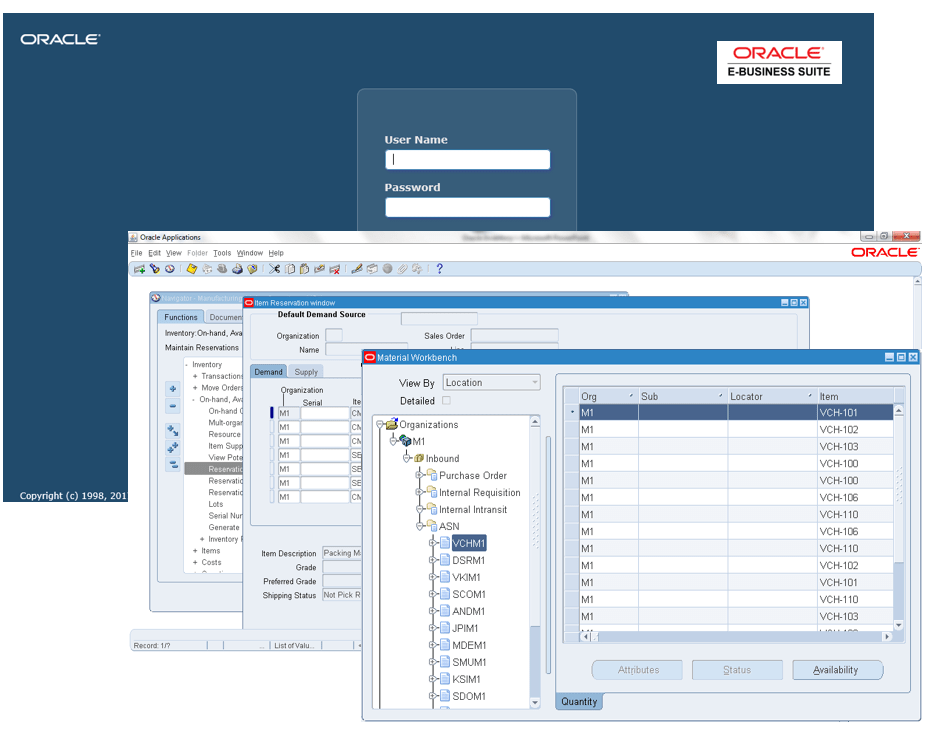
EDI2XML-Oracle-ebusiness-Suite-Magic-xpi-EDI-Integration
 

EBS is the company’s most widely used product lineup, powering medium to large businesses worldwide. Companies can find niche solutions that meet their requirements within the many modules. 

The Need for EDI with Oracle eBusiness Suite

Knowing that Oracle EBS is a versatile suite of enterprise software catering to businesses in different industries, hence the need for fast and accurate document sharing between different systems.

For instance, if you use the Oracle Order Management product, you may be unable to share an order invoice with a client, especially if they use a different system. Things can get even more complicated if the business partner or client is in another country/region. That’s why an EDI solution becomes necessary to facilitate the sharing of standardized business documents. 

Magic xpi for EDI Integration with Oracle EBS

Magic xpi, a smart integration platform tool designed to connect different heterogenous systems and make business tasks easier. It comes with ready-made connectors and adaptors made specifically for popular branded ERP and CRM systems, including Oracle’s verified connector.

While Oracle EBS is a versatile suite of enterprise software for various industries, sharing documents with business partners, vendors, and clients can still be challenging. However, it partners with companies like EDI2XML to make sharing documents between EBS and any other ERP and CRM system easy and smooth.
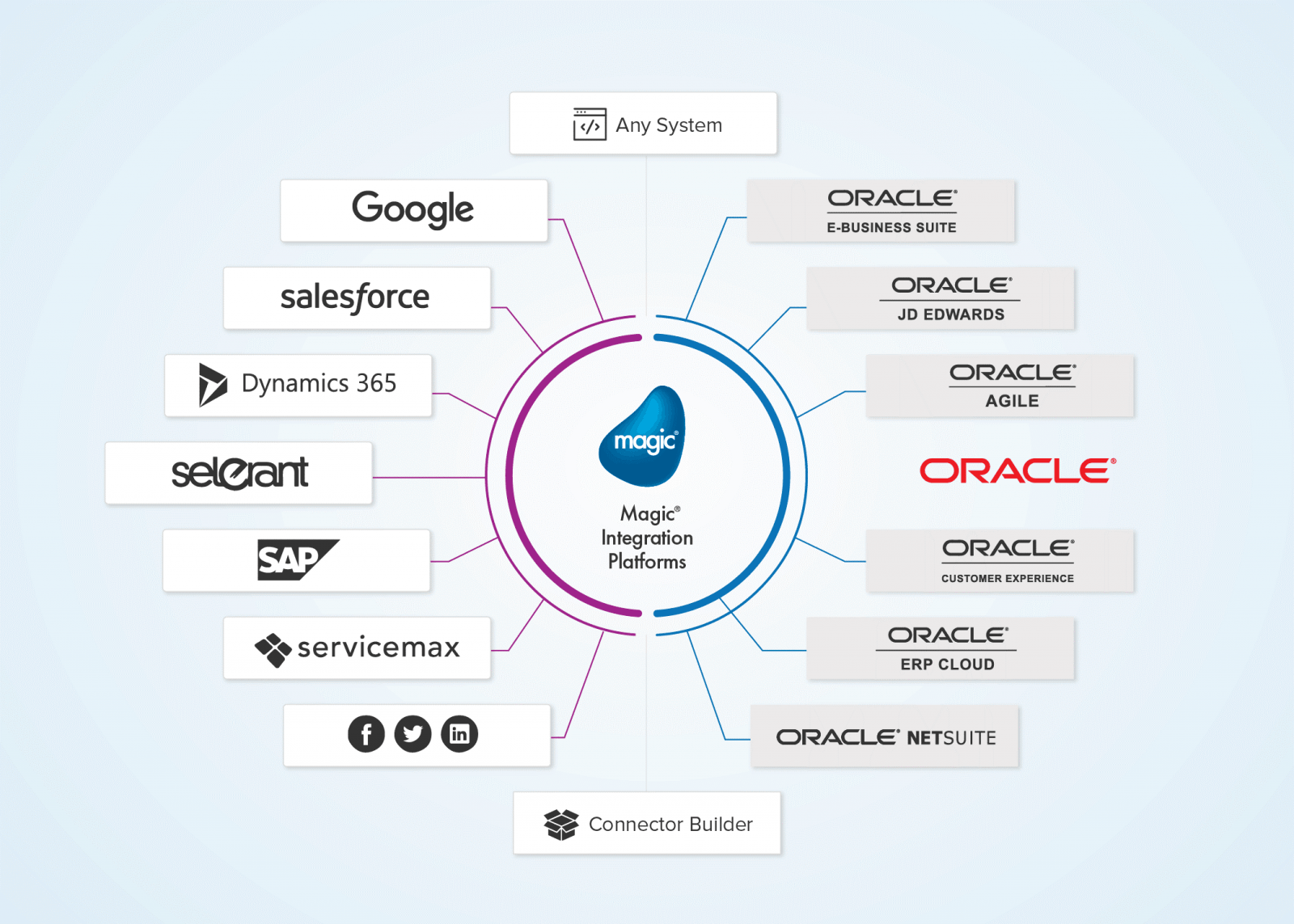
EDI2XML-Magic xpi-Oracle E-Business-integration
 

Why Magic xpi?

Compared to other integration platforms, Magic xpi is the most simplified. It’s designed to support B2B operations and work with different systems seamlessly. Here are some of the other benefits it offers:

  • Wide range of formats: For businesses with an international presence, Magic xpi can be used to integrate EDI with ERP and CRM systems whether it be a branded-on home grown system.
  • Automated conversion: Besides the initial setup, the process of sharing documents electronically is automated. This may save businesses considerable time and money. 
  • Easy-to-use interface: Magic xpi provides a unified gateway to automate and process documents of different types and formats, including EDI, when using EDI2XML add-on connector.

Useful readings: Synchronizing EDI Orders 850 with NetSuite using Magic xpi


Benefits of Integrating EDI with Oracle EBS

Without Magic xpi and EDI2XML’s combined solution for Oracle eBusiness Suite products, you may spend time and resources manually translating and sharing documents, such as order forms or invoices. An EDI integration solution is necessary for EBS to optimize the document-sharing process, regardless of which application you’re using. 

Here’s how EDI will help you grow your business:

  • Fast document delivery: No need to wait for days just to send an invoice. You can do it in minutes using your existing Oracle EBS application. It eliminates the need to create and share documents manually. 
  • Reliability and accuracy: Information is highly accurate with automated conversion between standards. Doing it manually may result in errors that can cause financial or reputational damage. 
  • One system for all: The same EDI solution can be used to share documentation with all your clients, regardless of the system they use, what type of business they run, and where they operate. 

Extend the Power of Oracle EBS with EDI2XML

Oracle eBusiness Suite can accommodate EDI with the help of Magic xpi. You need the right technical expertise to set up the connection, choose the applicable standards, and connect with partner systems. Without it, deployment can be delayed, and misconfigurations can occur. 

EDI2XML’s managed EDI services can handle all the Oracle eBusiness Suite EDI integration using Magic xpi. This service ensures that your EDI connection is always on and that any technical issues are resolved swiftly. It can empower you and your business partners by speeding up the document-sharing process. 

Learn more about EDI2XML’s managed EDI services today!

 
EDI2XML-Oracle-e-business-suite-magic-xpi-EDI-Consulation


April 3, 2024/0 Comments
https://www.edi2xml.com/wp-content/uploads/2024/04/EDI2XML-Oracle-eBusiness-Suite-Integration-with-EDI.png 625 1200 Tatyana Vandich https://www.edi2xml.com/wp-content/uploads/2024/08/edi2xml.com-EDI2XML-company-logo.png Tatyana Vandich2024-04-03 16:41:082025-09-12 15:24:41Oracle eBusiness Suite Integration with EDI using Magic xpi.

How to Master Shopify Inventory Management: Expert Insights from EDI2XML

Blog

Even before Shopify arrived on the e-commerce scene in 2006, our company EDI2XML already had solid experience in e-commerce integration.

We have helped companies in a variety of industries improve inventory management and operational efficiency.

Since then, our experience includes many successful e-commerce integration projects, and our passion for e-commerce remains unwavering.

Today, we’ll delve into a topic that’s exceptionally relevant for all Shopify store owners: inventory management.

The Essential of All Shopify Stores: Inventory Management

At its core, Shopify Inventory is about managing stock levels, tracking SKUs, and ensuring seamless order fulfillment.

Your inventory is not a static object. It constantly changes with each order or new arrival of goods. In Shopify, you need to get real-time information about inventory levels. Guessing games or manual reconciliations have caused a lot of problems for many businesses who haven’t gotten their inventory management right.

That is why, effective inventory management is crucial for customer satisfaction, sales, and overall business success.

Stock and Inventory Organization ERP vs Shopify Practices

Shopify store owners employ various strategies to organize their inventory efficiently. Let’s explore how ERP (Enterprise Resource Planning) systems like Oracle NetSuite ERP, SAP Business One, Microsoft Dynamics 365, Sage Intacct etc. handle inventory organization and management, drawing parallels with Shopify practices:

Collections and Sub-Collections:

  • While Shopify uses collections and sub-collections to group related products, ERP systems often organize inventory using categories or product hierarchies.
  • ERP categories allow businesses to group items based on attributes such as product type, brand, or department.
  • Sub-collections in Shopify align with ERP subcategories or nested product hierarchies.

Product Management and Variants:

  • ERP systems provide robust tools for managing product details, including descriptions, images, and pricing.
  • Similar to Shopify variants, ERP systems handle product variations (e.g., different sizes, colors) within a single product record.
  • ERP variants allow specifying unique inventory quantities for each variation.

Barcode Scanning:

  • Both Shopify and ERP systems benefit from barcode scanning.
  • ERP solutions integrate with handheld scanners, mobile apps, or RFID tags to track inventory movements.
  • Barcode scanning streamlines stock intake, sales, and restocking processes.

Advanced Features in ERP:

  • ERP systems go beyond Shopify by offering additional features:
  • Demand Forecasting: ERP predicts future inventory needs based on historical data and market trends.
  • Multi-Warehouse Management: ERP handles inventory across multiple locations or warehouses.
  • Serial and Batch Tracking: ERP tracks individual items using serial numbers or batch codes.
  • Safety Stock Calculation: ERP sets optimal safety stock levels to prevent stockouts.

Integration with Other Business Processes:

  • ERP integrates inventory management with broader business functions such as finance, procurement, and manufacturing.
  • It ensures a holistic view of operations, from raw materials to finished goods.

Customization and Scalability:

  • ERP systems are highly customizable to fit specific business needs.
  • As companies grow, ERP scales seamlessly to accommodate increased inventory complexity.

What are Common Inventory Management Challenges for Shopify Owners?

Inventory management is crucial for e-commerce businesses to efficiently track, organize, and control their product stock. Based on our many years of experience working with various companies (both small startups that are just starting their business and large companies that have owned a Shopify store for many years), we’ve identified several key challenges associated with Shopify inventory management.

Manual Inventory Management

Some Shopify owners may rely on manual methods for inventory management, which are prone to errors and inefficiencies, especially as the business scales.

Overselling and Stockouts

Inaccurate inventory tracking or manual errors can lead to overselling (selling more products than available) or stockouts (running out of stock) which can result in frustrated customers and lost sales.

Inventory Synchronization

If you sell across multiple channels (e.g., Shopify, Amazon, eBay), ensuring accurate inventory synchronization can be challenging. Discrepancies in stock levels across platforms can lead to fulfillment issues and customer dissatisfaction.

Complex Product Variants

Managing inventory for products with numerous variants (e.g., size, color, style) can be complex and time-consuming.

Inventory Storage and Fulfillment

Efficiently managing inventory storage and fulfillment processes, including picking, packing, and shipping orders, requires careful planning and optimization to minimize costs and streamline operations.

Some of these problems can be solved by using Shopify’s built-in features and public applications, but in our experience, using custom third-party integrations greatly improves efficiency and accuracy, especially for growing and ever-changing businesses.


Shopify Inventory Management Options: Built-in Tools vs. Integrating with ERP

When it comes to Shopify inventory management, choosing between built-in tools and integration with your ERP (Enterprise Resource Planning) system is a crucial decision.

The choice depends on your business model, scalability, and existing infrastructure.

New businesses embarking on their e-commerce journey often face the decision of how to manage inventory effectively. Often they start with Shopify’s native tools, but as they evolve, ERP integrations become more appealing.

For companies that already have an ERP system in place, integrating with a Shopify store provides many benefits. Again, here companies with an existing ERP system can choose from two main approaches: use ready-made public app or use the services of a third-party integration provider for custom integration completed just for you.

Let’s explore the Shopify build-in inventory tool, as well as the Integration with ERP via public app and custom integrations with third-party providers.

USEFUL READING: Secrets and rules of Shopify integration with your ERP or CRM

Shopify’s Built-In Inventory Tracking

Shopify’s native inventory tracking system is reliable for most new, small businesses. It provides real-time updates on stock levels, preventing overselling and stockouts.

Advantages:

Ease of Use: It’s straightforward to set up and manage within the Shopify admin.

Cost-Effective: No additional fees for using Shopify’s built-in tracking.

Centralized Solution: Integrated seamlessly with other Shopify features.

Limitations:

Scalability: As your business grows, these tools might become less robust. Moreover, for medium-size and large enterprises or complex multi-channel operations, Shopify’s native system may lack advanced features.

Customization: Limited customization options for specific business needs.

Standard Features: Built-in tools may not cover all advanced inventory management needs.

Customization: Limited flexibility for unique requirements.

Shopify Ready-Made Public Apps vs Custom Integration with Third-Party Integration Provider

Here’s a comparison of using a public app for integration versus opting for custom integration with third-party providers:

Customization and Tailored Solutions:

Public App: Public apps offer standardized solutions with predefined features and functionalities. While they provide convenience and quick setup, they may lack the ability to fully customize the integration to fit specific business needs.

Custom Integration with Third-Party Provider: Custom integrations with third-party providers allow for tailor-made solutions that can be precisely customized to meet the unique requirements of the business.

This level of customization ensures that the integration aligns closely with the business’s workflows, processes, and objectives, potentially leading to more efficient and profitable outcomes.

Scalability and Flexibility:

Public App: Public apps are designed to be scalable and accessible to businesses of all sizes. However, they may have limitations in terms of scalability and flexibility, particularly as the business grows or requires more advanced features.

Custom Integration with Third-Party Provider: Custom integrations offer greater scalability and flexibility, allowing businesses to adapt and evolve the integration as their needs change over time. This scalability ensures that the integration remains effective and efficient, supporting the business’s growth and expansion while maximizing profitability.

Cost-Effectiveness and ROI:

Public App: Public apps generally offer affordable pricing plans, including free options with basic features and premium plans with advanced functionalities. While they provide value for businesses with limited budgets, the return on investment (ROI) may vary depending on the specific needs and requirements of the business.

Custom Integration with Third-Party Provider: Custom integrations may involve higher upfront costs due to development expenses. However, the potential for a higher ROI exists as the integration can be tailored to deliver specific business outcomes, such as increased efficiency, productivity, and profitability. By investing in a custom integration with a third-party provider, businesses can potentially achieve greater long-term value and competitive advantage.

Competitive Advantage and Differentiation:

Public App: Public apps offer standardized solutions that are accessible to all businesses using the same platform. While they provide essential functionalities, they may not offer unique features or capabilities.

Custom Integration with Third-Party Provider: Custom integrations enable businesses to differentiate themselves from competitors by implementing unique features, workflows, and capabilities that are tailored to their specific needs and objectives. This competitive advantage can help businesses stand out in the market, attract more customers, and ultimately drive profitability.

Shopify ERP integration
 

Benefits of Custom ERP integration with Shopify

Custom integrations require technical expertise and development time, but the benefits far outweigh the initial investment. Let’s explore why this integration is crucial:

Streamlined Business Processes:

  • Custom integrations between ERP and Shopify allow you to tailor the connection to match your specific workflows.
  • Automate processes such as order management, inventory control, and fulfillment.
  • Minimize manual data input and enhance workflow efficiency throughout your entire business.

Increased Data Accuracy:

  • Real-time synchronization ensures that data remains consistent between systems.
  • Eliminate discrepancies caused by manual transfers.
  • A better decision can be made with accurate inventory information, pricing, and product information.

Better Inventory Management:

  • ERP integration provides real /or near real-time inventory counts across your stores and warehouses.
  • Continually updated inventory levels prevent stockouts and overselling.

Improved Customer Experience:

  • Real-time access to order status, inventory levels, and delivery information.
  • Customers receive accurate information promptly.

Enhanced Efficiency and Productivity:

  • Automation reduces manual tasks, allowing your team to focus on strategic activities.
  • Increased efficiency translates to higher productivity and cost savings.

Advanced Reporting and Insights:

  • Combined data from ERP and Shopify enables comprehensive reporting.
  • Analyze sales trends, inventory velocity, and financial performance.
  • Make informed decisions based on data-driven insights.

Conclusion: How to Master Shopify Inventory Management

Eventually, the decision between built-in Shopify applications or integrations with ERP depends on your specific business requirements, and long-term goals. For simple inventory management needs and smaller businesses, built-in Shopify applications may suffice.

However, if you want better inventory management, investing in a custom integration may be the better option for long-term scalability and competitiveness.

Collaboration with experienced integration provider like EDI2XML to build a robust connection between your ERP and Shopify.

We at EDI2XML are committed to helping companies improve their e-commerce businesses.

Our experts are ready to help. Book a free consultation to discuss your goals, challenges, and vision for your e-commerce business. Feel free to schedule a convenient time with us through our calendar or reach out via the contact form below. We look forward to helping you succeed in your e-commerce journey!

Shopify integration
April 2, 2024/0 Comments
https://www.edi2xml.com/wp-content/uploads/2024/04/EDI2XML-Shopify-Inventory-Management.png 675 1200 Tatyana Vandich https://www.edi2xml.com/wp-content/uploads/2024/08/edi2xml.com-EDI2XML-company-logo.png Tatyana Vandich2024-04-02 13:16:352025-07-02 14:43:19How to Master Shopify Inventory Management: Expert Insights from EDI2XML

JDE Integration Using Magic xpi Certified Oracle JD Edwards Connector

Blog

The smooth flow of data between business systems and applications is an important element in the day-to-day business operations of any enterprise. This cannot be achieved without integrating business systems with each other.

Integration & Automation

As an integration service provider with more than 24 years of experience, we help companies find the best integration solution that not only works but also improves their business processes.

Continuing our series of articles about various integration methods of Oracle JD Edwards, today we will look at the integration of JD Edwards using Magic xpi Certified Connector.

Oracle JD Edwards – Overview

Oracle JD Edwards EnterpriseOne, often abbreviated as JDE, is an enterprise resource planning (ERP) software system. JD Edwards helps organizations manage their business processes and streamline operations. It covers areas such as financial management, supply chain, manufacturing, human capital management, and more.

The Oracle JD Edwards EnterpriseOne solution can be installed either on-premises or through a cloud-based service. Business owners can choose the deployment model that best suits their needs thanks to this flexibility.

Oracle Cloud Infrastructure (OCI): You can provision JD Edwards EnterpriseOne on Oracle Cloud Infrastructure. This allows you to create a multi-host, secure, high-availability topology. Benefits include elastic expansion, lower costs, and risk reduction.

A hybrid cloud approach is widely adopted by many organizations. For example:

  • Deploy development and test environments on the cloud while keeping production on-premises.
  • Run JD Edwards instances on the cloud while integrating with on-premises systems.
  • Extend JD Edwards functionality using cloud-based services like Oracle Mobile Cloud or Business Intelligence Cloud.

Content and Collaboration: JD Edwards integrates with Oracle Content and Experience Cloud, enabling real-time enterprise conversations and access to content in the cloud.

Magic xpi Integration Platform and its Certified Oracle JD Edwards Connector

Magic xpi is an integration platform that connects different software applications, systems, and databases. It acts as a bridge, allowing them to communicate and share data seamlessly.

The Magic xpi Oracle certified JDE Connector acts as a bridge, connecting your JD Edwards ERP system with other applications, databases, and systems. Its goal is to enable smooth data exchange, automate processes, and enhance business agility.

JDE Integration using Magic xpi
 

JDE Connector – Certified and Validated by Oracle

Magic xpi is the only solution that comes with a built-in, certified JD Edwards connector. Magic xpi’s JDE connector has undergone rigorous testing and evaluation by Oracle. Thus, Oracle has independently verified that Magic xpi’s JDE connector meets specific criteria and confirms that the connector works harmoniously with Oracle products.

Why it matters:

  • Reliability: Certification ensures that the connector functions as intended, minimizing errors and issues.
  • Compatibility: It seamlessly integrates with JD Edwards, adhering to JDE’s standards and protocols.
  • Peace of Mind: Organizations can trust that the connector won’t disrupt their JDE environment.

Out-of-the-Box Integration with JDE Connector

When a solution offers out-of-the-box integration, it means that you can use it immediately without requiring extensive custom development or additional coding.

Magic xpi JDE Connector is specifically designed to work seamlessly with JD Edwards’ business functions right out of the box. So, you don’t have to spend weeks writing custom code or configuring intricate settings. Instead, you can start integrating JDE with other systems quickly, leveraging the connector’s built-in capabilities.


USEFUL: Download Free Whitepaper – Magic xpi Integration Platform

Magic xpi – Loosely Coupled Integration

Often organizations face difficulties in the process of upgrading their customized JD Edwards environment. When businesses have tailored their JDE system to meet specific needs (custom fields, workflows, etc.), upgrading to a new version can be complex.

Challenges may include:

  • Ensuring that customizations remain compatible with the upgraded JDE version.
  • Migrating custom data and business logic seamlessly.
  • Testing and validating the entire environment post-upgrade.

Magic xpi’s certified connector addresses these challenges by providing a reliable integration solution that bridges the gap between customized JDE environments and other systems.

Magic xpi Integration Platform and Business Logic Enhancement

Business logic refers to the rules, processes, and calculations that govern how an application or system behaves based on business requirements.

Business logic resides in the core functionality of software applications. It defines how data is processed, validated, transformed, and acted upon.

Examples:

  • Order Processing: When an order is placed online, business logic determines how it’s validated, whether inventory is available, and how payment is processed.
  • Pricing Calculations: Business logic calculates prices based on discounts, taxes, and other factors.
  • Workflow Approval: Logic defines who approves a purchase request and under what conditions.

In the context of integration flows, business logic plays a crucial role:

Data Transformation: Logic ensures that data from one system is correctly mapped and transformed to fit the requirements of another system.

Decision Making: Logic determines when certain actions should occur. For example, if an order exceeds a certain amount, additional approval steps might be needed.

Error Handling: Logic defines how errors are handled—whether to retry, notify, or take alternative actions.

Data Enrichment: Logic can enhance data by adding context (e.g., customer segmentation, product categorization).

Event Triggers: Logic decides when an integration flow should be triggered (e.g., when a new customer is added to the CRM system).

Magic xpi’s Role in Business Logic Enhancement

Oracle Orchestrator connects to JD Edwards (JDE) and handles basic integration tasks. Magic xpi complements this by providing additional layers of intelligence:

  • Custom Logic: Magic xpi allows you to add custom business rules specific to your organization.
  • Complex Workflows: You can create intricate workflows involving multiple systems, approvals, and notifications.
  • Conditional Logic: Magic xpi lets you define conditions for data routing (e.g., if the order value is high, send it for manager approval).
  • Data Enrichment: Enhance data during integration by adding relevant information.
  • Error Handling Strategies: Magic xpi provides options for handling errors gracefully.

By enhancing business logic, Magic xpi ensures that integration flows align with your organization’s unique processes and requirements. Therefore, business logic is the brain behind how systems behave, and Magic xpi enriches this logic to create powerful, customized integration flows.

Free Consultation with an Integration expert
 

Business Functions in JD Edwards

Business functions are modular units of code within JD Edwards. They encapsulate specific tasks, operations, or business logic.

These functions serve as building blocks for various processes within JDE. They handle data validation, security, and data integrity. For example:

  • An order processing function that validates customer orders.
  • An inventory adjustment function that updates stock levels.
  • A financial calculation function that computes tax amounts.

Magic xpi and Business Functions

As previously stated, JDE Business Functions are specific actions or operations performed within the JD Edwards framework, that encompass a wide range of tasks to facilitate data transformation, validation and manipulation.

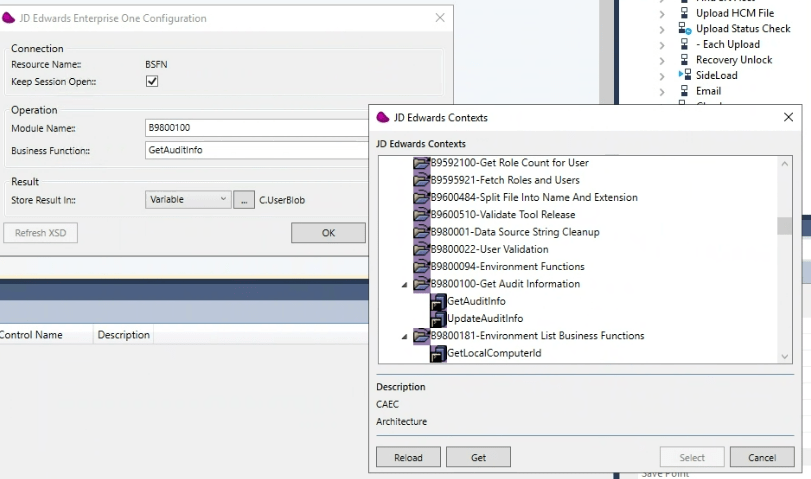
JDE Contexts in Magic xpi
Magic xpi JD Edwards Contexts

Invoking Business Functions from within Magic xpi:

Magic xpi allows you to invoke JD Edwards business functions directly similar to triggering functions and procedures of other applications, databases, or APIs. For example, an e-commerce platform can trigger an HTTP request (or webhook) running on top of Magic xpi, at the same time, Magic xpi, will issue a call to a JDE business function to create the new order in JDE, as soon as a consumer places the order online.

Triggering Business Functions:

Magic xpi can trigger JDE business functions based on specific events. Events might include:

  • New orders received.
  • Inventory updates (e.g., stock replenishment).
  • Changes in customer data (e.g., address updates).

When an event occurs, Magic xpi initiates the execution of the corresponding JDE business function.

Magic xpi and Data Flow:

When integrating JDE with external systems, data needs to flow smoothly between these components.

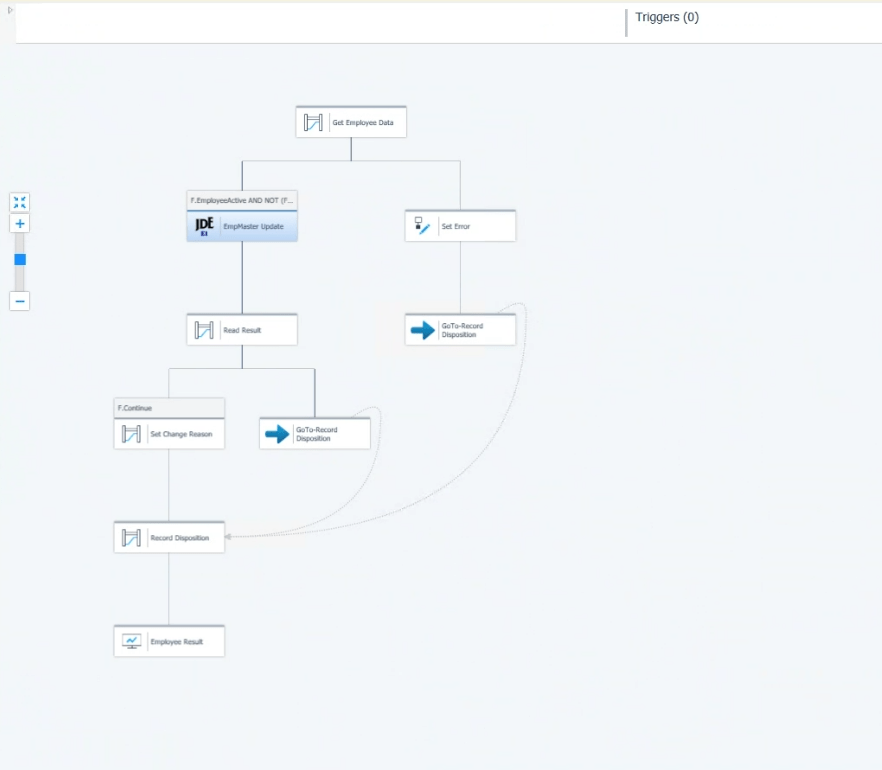
As mentioned above, the data flow involves both sending data to JDE (e.g., invoking a business function) and retrieving data from JDE (e.g., querying for information).

Magic xpi ensures that data can move between the source and JDE through business functions.

Magic xpi JDE flow
Magic xpi – JDE Flow
 

Why Integrate Oracle JD Edwards with Third-Party Software and Applications?

Integrating other business systems and applications with Oracle JD Edwards (JDE) is essential for businesses:

Centralized Data Management: JDE serves as a comprehensive enterprise resource planning (ERP) solution, consolidating core business functions such as finance, inventory, and manufacturing. Integrating with JDE enables businesses to centralize their data, providing a single source of truth for critical operational information.

Optimized Workflows: Integration with JDE streamlines business processes by automating data exchange between disparate systems. This automation reduces manual intervention, minimizes errors, and accelerates workflows such as order fulfillment, procurement, and supply chain management.

Real-Time Analytics: JDE integration facilitates access to real-time data insights, empowering decision-makers with up-to-date information for strategic planning and operational optimization. By leveraging timely analytics, businesses can identify trends, anticipate customer needs, and respond swiftly to market dynamics.

Competitive Differentiation: Integration with JDE confers competitive advantages by enhancing operational efficiency, customer service, and agility. Businesses can achieve faster order processing, improved inventory management, and superior customer experiences, positioning themselves ahead of competitors in the market.

JD Edwards Integration – Your Next Steps

Evaluate Your Needs: Assess your integration requirements. What systems need to communicate with JDE (e.g., EDI, CRM, HR, logistics)? Visualize your end-to-end business processes. How does information flow within your organization?

Reach Out: Connect with EDI2XML, the integration experts with over 24 years of experience. We’ll guide you through the process, tailor solutions to your unique needs, and ensure a successful implementation.

Free consultation
March 22, 2024/0 Comments
https://www.edi2xml.com/wp-content/uploads/2024/03/EDI2XML-JDE-Magic-xpi-integration.png 675 1200 Tatyana Vandich https://www.edi2xml.com/wp-content/uploads/2024/08/edi2xml.com-EDI2XML-company-logo.png Tatyana Vandich2024-03-22 15:16:212026-05-28 14:59:34JDE Integration Using Magic xpi Certified Oracle JD Edwards Connector

Synchronizing Accounts in Salesforce with Customers in NetSuite using Magic xpi

Blog

This article sheds light on syncing Salesforce and NetSuite, using Magic xpi and how it opens doors to streamlined operations and enhanced customer experiences.


Enhancing Efficiency: EDI2XML’s Magic xpi Solution

If your organization uses Salesforce and NetSuite, synchronizing data between the two software can help optimize your business processes. With the proper integration tool, you can easily sync Salesforce accounts with NetSuite customers.

Salesforce and NetSuite are two popular systems that EDI2XML excels at integrating using Magic xpi. With over 24 years of industry experience, your business will be in expert hands with EDI2XML.

In this blog, we’ll show you how to optimize Salesforce CRM integration with Oracle NetSuite, using Magic xpi, enabling you to connect sales and customer service teams for enhanced productivity and superior customer experience.

Insights on Salesforce

Salesforce is a top CRM platform helping businesses manage sales, marketing, and support functions through cloud-based tools that enhance productivity and growth. It centralizes customer information, tracks sales, automates marketing, and provides excellent service, making it crucial for collaboration, real-time business insights, and maintaining competitive advantages in the modern marketplace.

It’s typically used by medium to large enterprises that need all-encompassing solutions for running their business operations alongside other ERP systems like J.D. Edwards known as Oracle JDE and/or Oracle NetSuite. It’s highly scalable and integrates with other software and platforms with the help of APIs.


Check out this blog for more in depth information about Salesforce Integration: Salesforce integration and Magic xpi: Things you should know


Understanding NetSuite

Oracle NetSuite on the other hand is an all-encompassing cloud ERP software supporting financial, inventory, order management, and HR functions. Its integrated applications are built to manage operations and provide real-time business visibility, centralizing processes and enhancing decision-making.

It allows organizations to unify different operations and use the various systems within its ecosystem to manage their business.

Netsuite-edi2xml
 

Integrating Salesforce and Oracle NetSuite

In Salesforce, accounts store information about customers. These may be business or individual accounts. On the other hand, NetSuite customers represent business customers accessed by different modules, such as customer service management. 

Synchronizing Salesforce accounts and NetSuite customers has several benefits. It helps maintain a cohesive and efficient business ecosystem. Salesforce and NetSuite are integral components of an organization’s tech stack, handling different customer and business management aspects. 

By synchronizing accounts and customers between these platforms, businesses ensure an easier flow of information across departments, guarantee a better data quality and human errors free process.

Salesforce is typically used by sales and marketing teams to capture data on leads, opportunities, and customer interactions. NetSuite, on the other hand, focuses more on business operations, for instance, finance or inventory management. Connecting Salesforce accounts with NetSuite customers provides a unified view through the customer lifecycle.

The Benefits of Synchronizing Salesforce and NetSuite Accounts

Integrating Salesforce and NetSuite through Magic xpi offers many benefits.

Some of these benefits are:

– Real-time synchronization boosts collaboration between sales and customer service teams.

– Improved communication and coordination lead to better customer experiences.

– Combined data enables comprehensive reports and informed decision-making.

– CRM integration cuts down on manual data entry, reducing errors and saving time for employees.

These benefits underscore the value and efficiency that integrating Salesforce and NetSuite through Magic xpi can bring to businesses of all sizes.

Configuring Magic xpi for Integration

Magic xpi at a Glance

Magic xpi is a user-friendly integration solution that connects Salesforce and NetSuite accounts through built-in connectors. It enables efficient data synchronization without requiring coding expertise, hence simplifying the integration process for businesses. These certified connectors, including “Salesforce Connector” and “NetSuite Connector”, are pre-built and rigorously tested to ensure compatibility and reliability, offering businesses a trusted solution for their integration needs.

Configuration Process

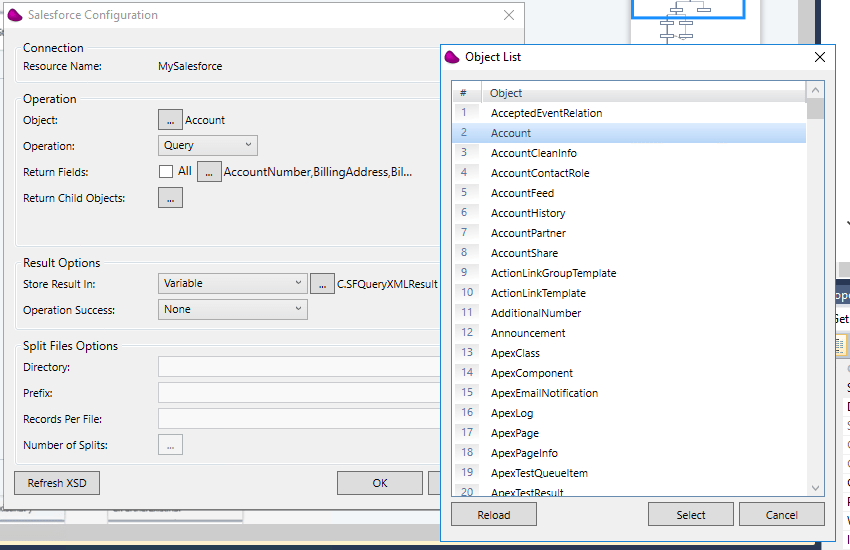
Configuring Magic xpi for Integration is a straightforward process. First, you create the link to your Salesforce and NetSuite accounts using the built-in connectors in Magic xpi. These connectors serve as bridges between the two platforms, allowing seamless communication and data exchange.

The configuration process is very straight forward: get the username and password of a user on the system with sufficient access rights, and from there the connector will do the rest in discovering the objects, and building the schemas of each one, for an easy visual mapping. The power of the connector relies on the fact it can detect standard and custom objects of salesforce.

Magic-xpi-configuration-process
 

By leveraging Magic xpi’s certified connectors, businesses can accelerate their integration projects, minimize the risk of errors, and unlock the full potential of their CRM systems.


Get to know more about Magic xpi: Free Magic xpi product overview and How to Optimize Your Business Processes with Magic xpi Integration Platform


Data mapping with Magic xpi

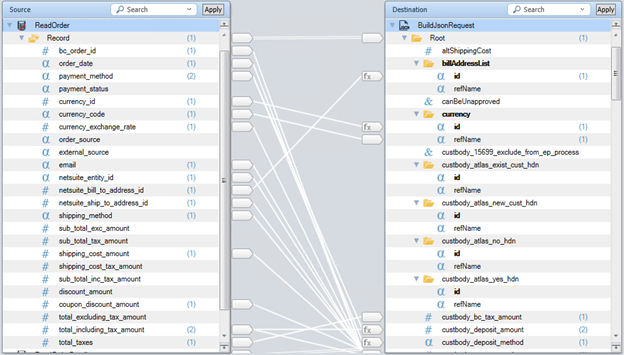
Magic xpi makes data mapping between two systems intuitive. It uses a visual mapper, where you can click on fields to connect them, making it easy to integrate Salesforce and NetSuite. Users can simply define mappings between Salesforce objects (like accounts and opportunities) and NetSuite entities (such as customers and orders).

To synchronize Salesforce accounts with NetSuite customers in Magic xpi, you must map the correct fields from each object. For instance, the name field in the Salesforce account record must be mapped to the name field in the NetSuite customer object. This ensures accurate data transfer without complex coding.

Magic xpi’s visual data mapping also handles complex transformations and business rules, allowing customization to suit unique workflows. With support for real-time synchronization and event-based triggers, businesses can create dynamic integrations that respond to changes instantly.

Testing and Troubleshooting

Testing is crucial for a successful integration project with Magic xpi, ensuring smooth synchronization between Salesforce and NetSuite accounts. It helps identify and fix any issues or bugs that could disrupt operations.

Once you’ve mapped the data objects in Salesforce to those in NetSuite, it’s time to test if the integration works.

First, add a new account to Salesforce. If the integration is successful, the API on the backend will check if the same record exists in NetSuite Customers objects. If it doesn’t, it will create one in NetSuite as a Salesforce account.

If the integration was unsuccessful, troubleshoot the problem using Magic xpi. It’s possible that the data wasn’t mapped properly, or the field types mapped to one another are of different types.

Common problems like data mapping errors or connectivity issues need to be addressed promptly. Understanding the integration system and having a troubleshooting plan in place can help resolve these issues swiftly, ensuring a seamless integration process.

Monitoring and Maintenance

Monitoring integration processes is essential in maintaining data consistency and system stability. Regular monitoring allows for the detection of any errors or discrepancies, enabling prompt corrective action to be taken.

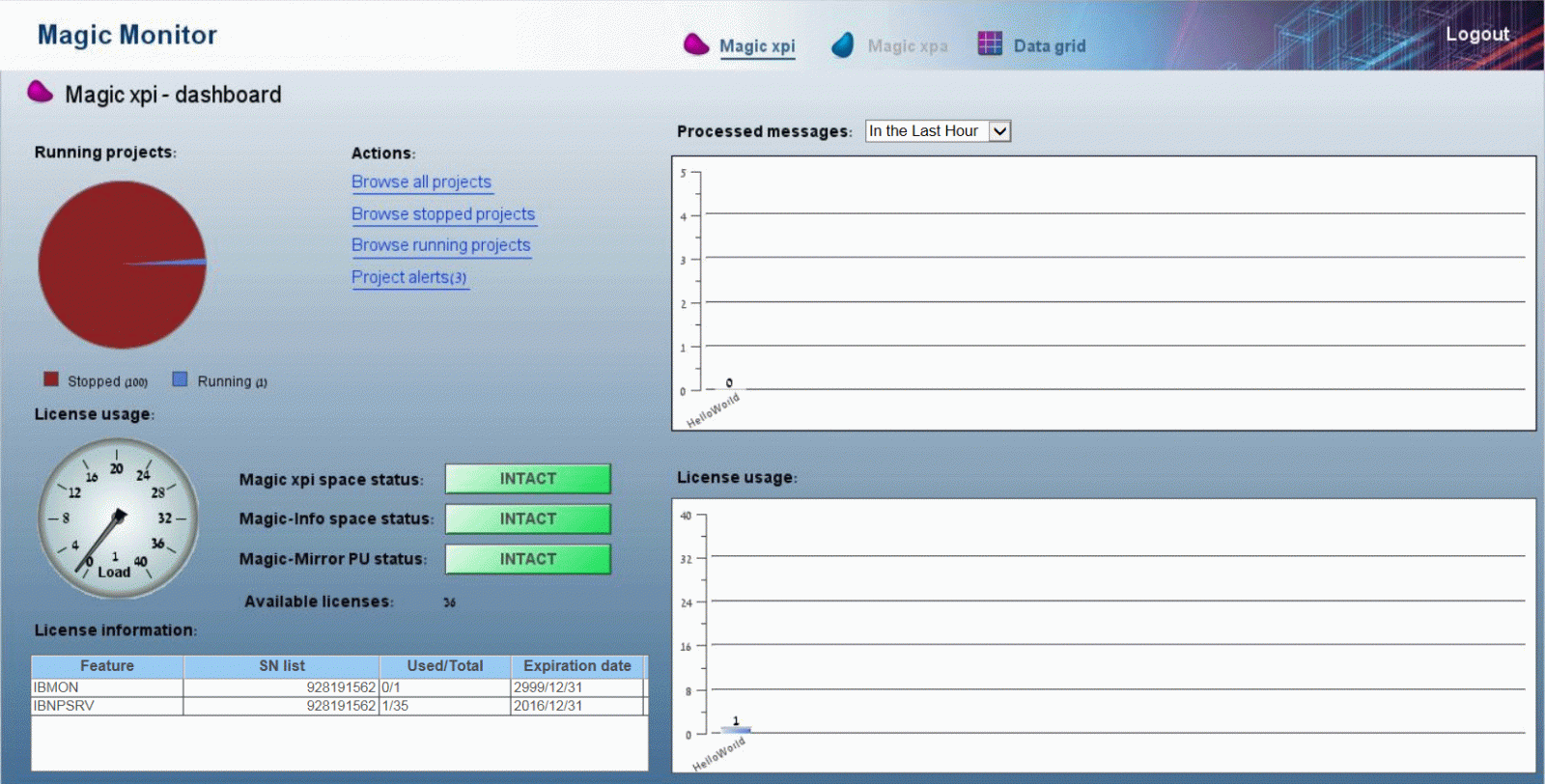
Magic xpi’s easy-to-use dashboard lets you monitor your integrations between platforms. It can give you an overview of performance with real-time graphs and charts. You can also set up alerts to issues with data synchronization, so you’re informed immediately.

magic-xpi-monitoring-and-maintenance
 

Periodically run tests to check if the Salesforce accounts and NetSuite customers are fully synched. This can be checked by adding new ones or changing existing records.

By maintaining a proactive approach to monitoring, any potential issues can be identified and addressed before they escalate, minimizing downtime and maximizing efficiency.

Conclusion

In summary, integrating Salesforce and NetSuite through Magic xpi presents a powerful solution for businesses seeking to optimize their operations and elevate customer experiences. With user-friendly configuration processes and certified connectors, Magic xpi streamlines data synchronization, empowering businesses to drive growth and efficiency in today’s competitive market.

Optimize Business Operations with EDI2XML

In a world where data is very crucial, seamless integration between key business systems is the key to unlocking new opportunities and driving growth. By embracing innovative integration solutions like Magic xpi with the help of EDI2XML experts, businesses can not only sync accounts and customers between Salesforce and NetSuite but also pave the way for greater success and competitive advantage.

 Let EDI2XML transform your business and propel you towards a brighter, more connected future. Interested? Get your free consultation today!

EDI2XML-Netsuite-Salesforce-Magic-xpi


March 19, 2024/0 Comments
https://www.edi2xml.com/wp-content/uploads/2024/03/EDI2XML-Netsuite-Magic-xpi-Salesforce.jpg 675 1200 Tatyana Vandich https://www.edi2xml.com/wp-content/uploads/2024/08/edi2xml.com-EDI2XML-company-logo.png Tatyana Vandich2024-03-19 12:31:042025-09-12 16:11:08Synchronizing Accounts in Salesforce with Customers in NetSuite using Magic xpi

Oracle JD Edwards Integration Using Dynamic Java Connector

Blog

Today, we continue our series of articles about Oracle JD Edwards integration. In this article, we will look at what the Dynamic Java Connector is and its main features.

We, as an integration service provider with 25 years of experience, will provide an overview that will be interesting and useful to integration specialists across different proficiency levels. However, if you have any questions, we are happy to give you a free consultation. Just book a time convenient for you in our calendar.

What is the Dynamic Java Connector?

The Dynamic Java Connector is a powerful feature that enables Java applications to interact with business functions within the JD Edwards EnterpriseOne environment.  In other words, it acts as a bridge, allowing Java code to invoke business logic and perform operations on JD Edwards data.

Oracle JD Edwards EnterpriseOne is an integrated suite of enterprise resource planning (ERP) software for managing various business processes, including finance, human resources, manufacturing, distribution, and supply chain management.

The need for a Dynamic Java Connector has been driven by the extensive use of Java applications across various domains, particularly in the business environment

To better understand why and how the Dynamic Java Connector is used, let’s recall the basic concepts, such as Java applications and Business Functions in JD Edwards.

Java Applications

Java applications refer to software programs or systems developed using the Java programming language. Its platform independence, reliability, and extensive library make Java one of the most versatile and widely used programming languages.

Java
 

Java is commonly used to develop Enterprise Applications like Oracle JD Edwards, Microsoft Dynamics, Salesforce, SugarCRM, and some components of SAP Business Suite. It is widely used for building web applications, including e-commerce platforms as well as for financial software, embedded systems, IoT, and many more.

JD Edwards Business Functions

JD Edwards Business Functions are pre-built, reusable units of business logic within the JD Edwards EnterpriseOne software suite.

Business Functions in JD Edwards encapsulate specific business processes or tasks, such as creating a purchase order, processing payroll, or generating financial reports and provide a common way to access the JD Edwards EnterpriseOne database.

These functions are designed to be configurable and can be customized to meet the specific needs of an organization without requiring extensive coding. Thus, JD Edwards Business Functions provide additional power, flexibility, and control by allowing applications to interact with the JD Edwards EnterpriseOne system.

Dynamic Java Connector: Key Features

Dynamic Java Connector enables seamless communication between external Java applications and JD Edwards EnterpriseOne. It allows you to invoke business functions, retrieve data, and perform transactions programmatically.

Compared to the regular Java connector, the Dynamic Java Connector has some distinctive features:

Dynamic Introspection:

Unlike the regular Java connector, which relies on pre-generated wrappers, the dynamic connector dynamically inspects business function metadata during application design. It directly retrieves metadata from the JD Edwards server. This means you don’t need to manually create wrappers for each business function; the connector handles it dynamically.

Calling Business Functions Dynamically:

With dynamic invocation, developers can call business functions without requiring pre-generated wrappers. Since there’s no local storage of business function spec metadata, the dynamic Java connector ensures compatibility with the server spec metadata.

Environment Flexibility:

The Java application designed using the dynamic Java connector can run on any compatible environment. It adapts to different JD Edwards EnterpriseOne setups seamlessly.

LEARN MORE ABOUT OUR  INTEGRATION SERVICES. BOOK a FREE consultation with one of our IT experts to see how we can help you increase overall company efficiency with our IT services.

Services Provided by the Dynamic Java Connector:

Application Design: Introspects business function specification metadata during design.

Application Deployment: Validates whether a client application can run through a specific JD Edwards EnterpriseOne server.

Application Runtime: Provides an interface for the connector client to call business functions on the JD Edwards EnterpriseOne server.

Purpose of Dynamic Java Connector

Dynamic Java Connector comes into play when you need to integrate JD Edwards with external systems, such as other ERP, CRM, EDI, or e-commerce solutions.

ERP Integration

By leveraging the dynamic Java connector, you can seamlessly transfer data between JD Edwards and other ERP systems like SAP or Dynamics 365.

CRM Integration

The dynamic Java connector enables integration between JD Edwards and CRM applications such as Salesforce or Microsoft Dynamics CRM. You can automate workflows, share customer data, and ensure consistency across both systems.

For example, integrating JD Edwards with your CRM could automatically update customer records based on sales orders or service requests.

E-commerce Integration

Integrating JD Edwards with e-commerce platforms enhances your business capabilities. The dynamic Java connector allows you to enrich JD Edwards by integrating it with various e-commerce platforms (e.g., Shopify, Magento, BigCommerce, WooCommerce).

Use cases include automating order processing, inventory management, and customer data synchronization.

Thus, Dynamic Java Connector allows you to build custom integrations tailored to your organization’s unique needs. It facilitates real-time communication with JD Edwards, ensuring up-to-date data.

Dynamic Java Connector Benefits

The dynamic Java connector empowers developers to build robust, adaptable applications that seamlessly interact with JD Edwards EnterpriseOne’s business functions.

Efficiency: Developers can work more efficiently by avoiding manual wrapper generation.

Adaptability: The dynamic connector adapts to changes in business functions without recompilation.

Simplicity: It simplifies the integration of Java applications with JD Edwards.

FAQs About Oracle JD Edwards Integration Using Dynamic Java Connector

Is Dynamic Java Connector Suitable for Real-Time Data Sync?

Absolutely! Dynamic Java Connector’s real-time capabilities make it an excellent choice for keeping your JD Edwards data synchronized with external systems.

Can Dynamic Java Connector Handle Complex Transactions?

Yes, Dynamic Java Connector can handle intricate transactions. Whether it’s creating purchase orders, updating inventory, or processing invoices, Dynamic Java Connector has you covered.

How Secure is Dynamic Java Connector?

Dynamic Java Connector adheres to JD Edwards security protocols. Ensure proper authentication and authorization to maintain data integrity.

Is Dynamic Java Connector compatible with non-Oracle systems?

While Dynamic Java Connector is primarily designed for JDE integration, it plays well with others too. Whether you’re dealing with SAP, Salesforce, or custom-built applications, Dynamic Java Connector can establish seamless connections with ease.

What is the Dynamic Java Connector in JD Edwards integration?

The Dynamic Java Connector is a feature that allows Java applications to interact with business functions within the JD Edwards EnterpriseOne environment, acting as a bridge for invoking business logic and managing data operations.

How does the Dynamic Java Connector differ from the regular Java connector?

Unlike the regular Java connector which relies on pre-generated wrappers, the Dynamic Java Connector performs dynamic inspection of business function metadata directly from the JD Edwards server and calls functions without pre-generated wrappers, offering greater flexibility.

What are the main features of the Dynamic Java Connector?

Its main features include dynamic introspection of metadata, calling business functions dynamically, compatibility with different environments, and supporting various integration needs such as ERP, CRM, and e-commerce systems.

Is the Dynamic Java Connector suitable for real-time data synchronization?

Yes, the Dynamic Java Connector is well-suited for real-time data synchronization, enabling seamless and up-to-date communication between JD Edwards and external systems.

What benefits does the Dynamic Java Connector offer to developers?

It enhances efficiency by eliminating manual wrapper creation, provides adaptability to changes in business functions without recompilation, and simplifies the integration process of Java applications with JD Edwards.

Memo from the Integration Provider

When designing your integration using the Dynamic Java Connector, keep the following in mind:

Business Function Introspection: Understand how the connector dynamically retrieves business function metadata.

Environment Compatibility: Ensure that your Java application can run on environments compatible with the one it was designed for.

Application Deployment: Validate deployment scenarios and server compatibility.

Runtime Interaction: Familiarize yourself with the interface for calling business functions dynamically.

Conclusion: Dynamic Java Connector for JD Edwards Integration

The Dynamic Java Connector empowers IT specialists to create seamless connections between JD Edwards and external systems. This is a good technology, but you need to know how to “use it”.

We, at EDI2XML, specialize in business systems integration solutions. With our extensive knowledge of technology and business processes, we have helped many companies make their businesses more efficient and successful.

Therefore, if your company aims to integrate JDE with other ERP, CRM, EDI, or e-commerce platforms, reach out to us for a free consultation or to get a price quote.


March 15, 2024/0 Comments
https://www.edi2xml.com/wp-content/uploads/2024/03/EDI2XML-JDE-integration-dinamic-Java-connector.png 675 1200 Tatyana Vandich https://www.edi2xml.com/wp-content/uploads/2024/08/edi2xml.com-EDI2XML-company-logo.png Tatyana Vandich2024-03-15 17:18:232025-09-17 10:49:11Oracle JD Edwards Integration Using Dynamic Java Connector

Oracle JD Edwards Integration: Direct Database

Blog

If you are an IT specialist working with Oracle JD Edwards (JDE) EnterpriseOne, you might be wondering how other experts are integrating their ERP system with other applications, such as CRM, EDI, or E-Commerce. You might also be looking for a reliable and cost-effective integration platform and solution.

With over 24 years of experience, we, at EDI2XML understand the intricacies of integration and are ready to assist businesses in achieving seamless connectivity across their IT environment.

Direct Database Integration Meaning

Direct Database Integration is a technique that involves reading and writing data from and to database tables of an application, directly, without using any intermediate layer or interface.

This means that you can bypass the application logic and access the data directly from the source or target database.

For example, if you want to integrate JDE with Oracle Sales Cloud, you can use Direct Database Integration to read data from the JDE tables and write data to the Oracle Sales Cloud tables, or vice versa, without using any JDE or Oracle Sales Cloud APIs or web services.

Why Use Direct Database Integration for JDE?

JDE is a comprehensive ERP system that covers various business functions, such as finance, manufacturing, distribution, human resources, and more. It is designed to support complex business processes and data models, and it uses a proprietary database structure that is not easy to understand or manipulate.

Using Direct Database Integration for JDE is very risky, but can offer several advantages, if done right. Those advantages can be such as:

Performance: Direct Database Integration can provide faster and more efficient data transfer, as it eliminates the overhead of using APIs or web services that can slow down the integration process.

Flexibility: Direct Database Integration can give you more control and customization over the data integration, as you can define your own queries and mappings to suit your specific business needs and requirements.

Cost-effectiveness: Direct Database Integration can reduce the cost and complexity of the integration, as you do not need to purchase, install, or maintain any additional software or hardware components, such as middleware, adapters, or connectors.

Integration
 

Direct Database Integration for Oracle JDE

To use direct database Integration for JDE, you need to have a good understanding of the JDE database structure, as well as the database structure of the other application you want to integrate with. You also need to have the appropriate skills to access and manipulate the data at the database level.

Thus, direct database Integration may require expertise in both JD Edwards application development and database management, as developers need to understand the underlying database structure and SQL querying.

At EDI2XML, we specialize in integration between JD Edwards EnterpriseOne and a numerous of other business systems and applications, including Salesforce, NetSuite, SAP B1, Microsoft Dynamics 365, or EDI and E-commerce platforms. Our expertise ensure that data flows seamlessly between disparate systems, eliminating bottlenecks and enhancing operational efficiency.

What are the Common FAQs about Direct Database Integration for JDE?

Here are some of the common questions and answers about direct database Integration for JDE:

What are the benefits of Direct Database Integration over other methods?

Direct integration offers real-time data exchange, reduces complexity, minimizes the risk of data loss, and enhances overall system performance.

What are the challenges or risks of using Direct Database Integration for JDE?

One of the main challenges of using Direct Database Integration for JDE is to ensure the data quality and integrity, as you are bypassing the application logic and validation rules. You need to make sure that the data you read or write is accurate, consistent, and compliant with the JDE data standards and formats. You also need to ensure that the data integration does not affect the performance or security of the JDE system or the other application.


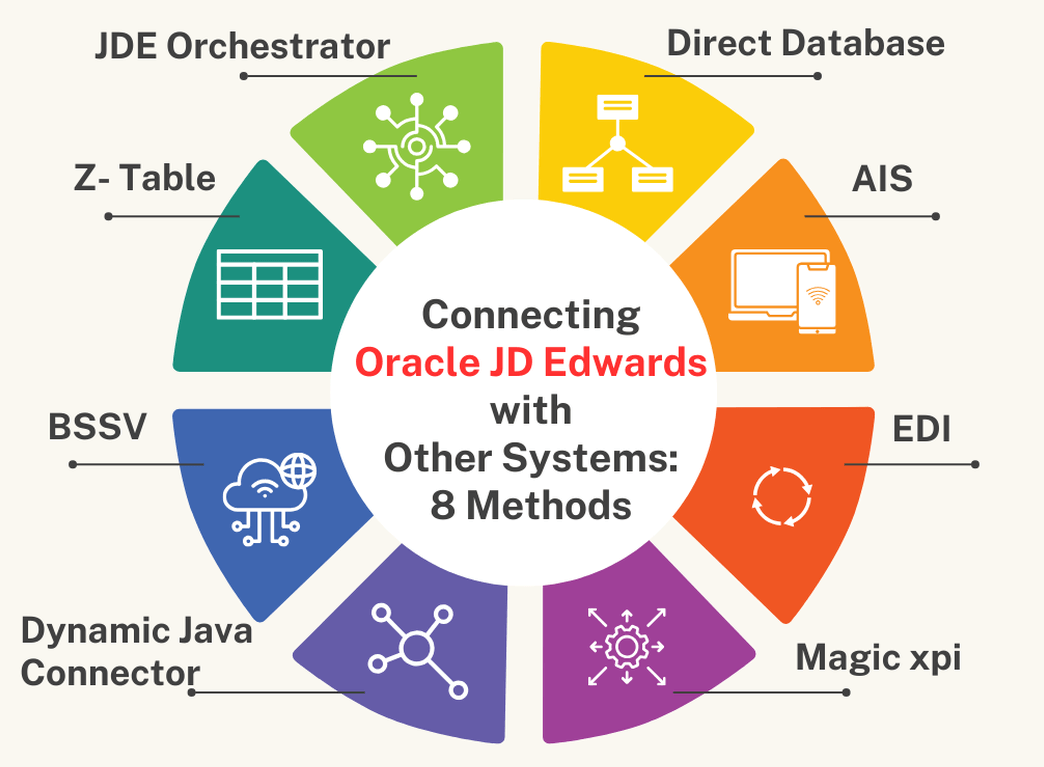
Useful Reading: How to Connect Oracle JD Edwards with Other Systems: Overview of Eight Methods


Is Direct Integration with JDE complex to implement?

While it requires expertise, leveraging the right integration partner like EDI2XML, simplifies the process and ensures a smooth transition.

Can Direct Integration support bi-directional data flow?

Absolutely. Direct Integration enables bidirectional data exchange, ensuring that information flows seamlessly between systems.


What are the best practices or tips for using Direct Database Integration for JDE?

Some of the best practices or tips for using Direct Database Integration for JDE are:

1. Use a test or development environment to test and validate your data integration before deploying it to the production environment.

2. Use a backup or recovery plan to protect your data in case of any errors or failures during the data integration process.

3. Use a monitoring or auditing tool to track and troubleshoot your data integration activities and results.

4. Use a documentation or metadata management tool to document and maintain your data integration logic and mappings.

How can EDI2XML help with Direct Database Integration for JDE?

EDI2XML can certainly help with direct database Integration for JDE by providing a complete and affordable integration service, that can handle the integration of JDE with other business systems.

What are the Expert Tips and Advice for Direct Database Integration for JDE?

As a leading business systems integration provider, EDI2XML has more than 24 years of experience in integration projects of various complexities. Based on our extensive experience, here are some of the expert tips and advice we can share with you:

Understand your business needs and requirements: Before you start any data integration project, you need to have a clear understanding of your business needs and requirements, such as the scope, objectives, deliverables, and expected outcomes of the project. You also need to identify the stakeholders, roles, and responsibilities involved in the project, and communicate with them effectively throughout the project lifecycle.

Choose the right integration method and technology: Depending on your business needs and requirements, you need to choose the most suitable integration method and technology for your project. You need to consider the factors such as the data volume, frequency, complexity, and quality, as well as the cost, time, and resources available for the project. You also need to evaluate the pros and cons of each integration method and tool, compare them with your expectations and constraints.

Don’t miss this opportunity to find the best integration method and tool for your business. Book your free one-hour consultation with our integration experts today!

Leverage the expertise and experience of a professional integration service provider: If you are not confident or comfortable with using Direct Database Integration for JDE, or if you need any assistance or guidance with your data integration project, you can leverage the expertise and experience of a professional integration provider, such as EDI2XML. We can help you to design, develop, implement, and maintain your JDE integration, and provide you with the best quality, performance, and support.

Conclusion: Direct Database Integration

Direct Database Integration is a powerful and efficient technique that can help integrate JDE with other systems. It offers several benefits, such as performance, flexibility, and cost-effectiveness, but it also comes with some challenges and high risks, such as data quality and integrity.

If you want to learn more about this topic, or if you need any help with your data integration project, please book a free consultation with one of our integration expert at EDI2XML. We are always happy to hear from you and to assist you with your integration needs.

February 28, 2024/0 Comments
https://www.edi2xml.com/wp-content/uploads/2024/02/EDI2XML_JDE-Integration-Direct-Database.png 675 1200 Tatyana Vandich https://www.edi2xml.com/wp-content/uploads/2024/08/edi2xml.com-EDI2XML-company-logo.png Tatyana Vandich2024-02-28 19:40:312025-10-03 14:20:50Oracle JD Edwards Integration: Direct Database

Oracle JD Edwards Orchestrator: A Powerful Tool for Digital Transformation

Blog

Are you looking for a way to leverage the power of data automation in your business? Do you want to integrate your Oracle JD Edwards EnterpriseOne with other applications, devices, and systems? Do you want to explore how JDE Orchestrator can help achieve your business goals? If you said “yes” to any of these questions, then this blog is for you.

Introduction: Oracle JD Edwards Orchestrator

In this article, we will provide a comprehensive overview of the Oracle JD Edwards Orchestrator. We will discuss the components of JDE Orchestrator, and answer some common FAQs about this technology. We will also share some expert tips and advice based on our experience as a successful business systems integration provider, with more than 24 years of experience.

What is Oracle JD Edwards Orchestrator?

Oracle JD Edwards Orchestrator is a JDE component, provided by Oracle as an add-on to their JDE install, at no additional charge. It enables us to collect, filter, analyze, and act on real-time data extracted from JD Edwards ERP using REST API. It can also trigger actions in EnterpriseOne based on predefined rules and logic.

Thus, JDE Orchestrator can help transform your JDE system from a static record-keeper to a dynamic modern, API provider/consumer of real-time business operations.

JDE Orchestrator was first introduced in 2015 as a tool for IoT integration, but since then it has evolved into a powerful and versatile tool for digital transformation in the JDE world. According to Oracle documentation, JDE Orchestrator is compatible with JD Edwards EnterpriseOne 9.1 and above, and it is constantly updated with new features and enhancements. However, some of the features and capabilities of JDE Orchestrator may require a higher tools release or patch level.

What are the Components of JDE Orchestrator?

Oracle JD Edwards Orchestrator consists of several key components that work together to automate and streamline business processes. These components include:

JDE Orchestrator Studio

JDE Orchestrator Studio is a web-based application that allows you to design, test, and deploy orchestrations, which are the workflows that define the logic and actions of JDE Orchestrator. JDE Orchestrator Studio features a graphical drag-and-drop interface, a simplified data mapping tool, a built-in testing tool, and a version control system.

JDE Orchestrator Studio is a user-friendly and intuitive tool for creating and managing orchestrations for various use cases, such as automation, integration, IoT, and user experience enhancement.

The Orchestration Studio empowers users to automate and streamline business processes with ease, leveraging a combination of visual design tools, pre-built components, and customization options. Its intuitive interface and robust features make it a powerful tool for driving digital transformation and improving operational efficiency within JD Edwards environments.

JDE Orchestrator Server

JDE Orchestrator Server is a component of the Application Interface Services (AIS) Server that executes the orchestrations and communicates with the EnterpriseOne system and other external systems.

JDE Orchestrator Server is responsible for processing the input data, applying the logic and rules, performing the actions and service requests, and generating the output data for each orchestration. The JDE Orchestrator Server can handle multiple orchestrations concurrently and efficiently, using a queue-based mechanism and a thread pool.

JDE Orchestrator Server can also handle large data sets, parallel processing, and temporary tables to optimize and scale the orchestration performance.

The Orchestrator Server of JDE, can be configured and managed using the Server Manager Console, where you can set up the server properties, security settings, logging options, and runtime parameters.

The Orchestrator Server can also be monitored and troubleshooted using the Orchestrator Monitor, where you can view the health and exception records, as well as the run details and results of each orchestration.

JDE Orchestrator Monitor

JDE Orchestrator Monitor is a web-based interface that allows you to view and manage the performance and status of the JDE Orchestrator and its orchestrations, as well as troubleshoot any issues or exceptions. The Orchestrator Monitor enables you to:

  • Monitor the health and exception records of the JDE Orchestrator, which indicates the availability and reliability of the Orchestrator Server and the orchestrations.
  • Monitor the run details and results of each orchestration, which show the input, output, and execution logs of the orchestrations.
  • Manage the health and exception records, such as deleting, archiving, or resubmitting them, to resolve any issues or errors that occur during the orchestration execution.
  • Filter and sort the records by different criteria, such as user, environment, role, date, time, status, etc., to find the relevant information quickly and easily.
  • Refresh and reset the data displayed in the JDE Orchestrator Monitor, to ensure that the information is up-to-date and accurate.

What is the Use of JDE Orchestrator?

Oracle JD Edwards (JDE) Orchestrator can be used for critical mission purposes within an organization:

JDE Orchestrator for Automation of Business Processes

One of the primary uses of JDE Orchestrator is to automate various business processes within the JD Edwards ERP system. This includes tasks such as order processing, inventory management, procurement, financial transactions, and more. By automating these processes, organizations can improve efficiency, reduce manual errors, and accelerate decision-making.

Integration with External Systems via JDE Orchestrator

The Orchestrator enables seamless integration between JD Edwards and external systems, such as CRM/ERP platforms, supply chain management systems, e-commerce platforms, EDI, and IoT devices. This integration allows for the exchange of data and transactions, facilitating real-time decision-making and enhancing overall business agility.

Streamlining Workflows with JDE Orchestrator

With JDE Orchestrator, organizations can streamline complex workflows that involve multiple steps and stakeholders. For example, they can create orchestrations to automate approval processes, route documents for review, and notify stakeholders of important events. This streamlining of workflows helps in reducing bottlenecks and improving collaboration across departments.

Integration
 

JDE Orchestrator for Real-Time Data Processing

The Orchestrator enables real-time data processing by triggering actions based on predefined events or conditions. This allows organizations to react quickly to changing circumstances, such as inventory shortages, customer inquiries, or production delays. Real-time data processing enhances decision-making and enables organizations to stay responsive in dynamic business environments.

What are Some Common FAQs about Oracle JDE Orchestrator?

The JDE Orchestrator is a relatively new and innovative technology that may raise some questions and concerns among JD Edwards users and partners. Here are some of the common FAQs about JDE Orchestrator, along with their answers:

How does the Orchestrator integrate with external systems?

The Orchestrator integrates with external systems using connectors that support various protocols such as REST, SOAP, and others. These connectors facilitate the exchange of data and transactions between JD Edwards and external applications.

Do I need coding knowledge to use the Orchestrator?

While coding knowledge is not required, basic understanding of concepts like data mapping and conditional logic can be helpful. The Orchestrator provides a graphical interface for designing orchestrations, but users may need to write custom scripts for advanced functionalities.

To take advantage of all the benefits of Orchestrator, you don’t have to figure it out yourself, entrust the integration to professionals. We, at EDI2XML can quickly and efficiently perform integration of any complexity for you using JDE Orchestrator. Book your free JDE consultation now!

Is the Orchestrator scalable for enterprise use?

Yes, the Orchestrator is designed to be scalable and can handle a large number of orchestrations and transactions to meet the needs of enterprise-level businesses.

Can I customize orchestrations to fit my specific business requirements?

JDE
 

Yes, the Orchestrator provides flexibility for customization. You can create custom data structures, define complex logic using JavaScript, and integrate with custom business functions and services to tailor orchestrations to your specific needs.

What is JDE Orchestrator REST API?

JDE Orchestrator REST API is a set of endpoints that allow you to interact with the JDE Orchestrator and its orchestrations using HTTP requests and responses. The JDE Orchestrator REST API enables you to execute, monitor, and manage orchestrations from any external application or system that supports REST.

What are Some Expert Tips and Advice for Using JDE Orchestrator?

As a successful business systems integration provider with more than 24 years of experience, we have gained a lot of knowledge and expertise in using JDE Orchestrator for various projects and clients. Here are some of our expert tips and advice for using the JDE Orchestrator:

Plan and design your orchestrations carefully, considering the business requirements, the data sources, the logic and actions, the input and output formats, the error handling, and the security aspects.

Test and debug your orchestrations thoroughly, using the built-in testing tool in the Orchestrator Studio, and the Orchestrator Monitor for troubleshooting and resolving any issues or exceptions.

Document and maintain your orchestrations properly, using the version control system in the Orchestrator Studio, and the export and import features for backup and recovery.

Optimize and scale your orchestrations efficiently, using the Orchestrator Capability for large data set retrieval, the parallel processing option, and the temporary tables feature.

Conclusion: Oracle JD Edwards Orchestrator

Oracle JD Edwards Orchestrator stands out as a great tool for businesses seeking to embrace digital transformation. Its ability to seamlessly integrate with external systems, automate processes, streamline workflows, and process real-time data makes it a valuable asset for organizations aiming to enhance efficiency and agility.

For those who are considering using JDE Orchestrator’s capabilities but aren’t sure where to start or how to navigate the complexities, it’s essential to seek guidance from experienced professionals.

At EDI2XML, we offer comprehensive integration services tailored to your specific business requirements. Our team of experts with over 20 years of experience can efficiently guide you through the integration process, ensuring seamless implementation and optimal utilization of the JDE Orchestrator. Don’t let the potential of your JD Edwards system go untapped. Take the first step towards unlocking its full capabilities by engaging with us for a free JDE consultation. Together, we can propel your business toward success.

Free Consultation
February 23, 2024/0 Comments
https://www.edi2xml.com/wp-content/uploads/2024/02/EDI2XML-JDE-Orchestrator-Service.png 675 1200 Tatyana Vandich https://www.edi2xml.com/wp-content/uploads/2024/08/edi2xml.com-EDI2XML-company-logo.png Tatyana Vandich2024-02-23 16:16:172026-05-28 14:57:00Oracle JD Edwards Orchestrator: A Powerful Tool for Digital Transformation

Synchronizing EDI Orders 850 with NetSuite using Magic xpi

Blog

This article highlights seamless integration of EDI orders (850) into NetSuite via Magic xpi, to streamline business operations for maximum enterprise efficiency.

Empowering Businesses with EDI2XML’s Magic xpi Expertise     

With EDI2XML‘s specialized knowledge and 24+ years of experience in e-commerce automation, businesses can tap into the full potential of Magic xpi for effortless integration and streamlined operations. Join us as we explore how EDI2XML‘s expertise combined with Magic xpi can transform your business processes, driving efficiency and success in today’s fast-paced market.

EDI Integration with NetSuite Using Magic xpi

Oracle NetSuite is an enterprise management software solution (ERP) that small and medium size companies use worldwide. Although a great system, it lacks built-in electronic data interchange (EDI) capabilities. For that reason, companies need to build their own custom integration to push EDI orders received from their EDI partners, into NetSuite.

EDI at a Glance

EDI is a computer-to-computer exchange of information, particularly business documents, that eliminates manual intervention. It utilizes a standard electronic format between business partners, making it easy to share documents, regardless of the system used at each end.

An EDI solution essentially automates the process of document sharing. Businesses can send and receive documents without the tedious work of filling-in the information, changing the format, and sending the document.

Several EDI standards are used worldwide, and it’s important for business partners to agree on a standard. For instance, in the US, the ANSI.X12 standard is very commonly used. Similarly, EDIFACT is another global standard that provides formats for EDI orders, widely used in Europe and the rest of the world.

If a trading partner uses a different standard, the EDI solution or service provider must convert it into the destination format/standard to be able to translate the electronic information.


Learn more about EDI by reading this article: What is EDI


What is EDI Order 850?

Within the EDI standard, each transaction has a specific code. For example, a Purchase order is coded 850, a P/O Change is coded 860 and so on.

Basically, an EDI 850 Order is a formal request sent by the buyer (purchasing company) to the supplier (seller) for the demand of delivery of goods and/or services at an agreed price.

An EDI order 850, when transmitted via EDI, has a specific structure and syntax, that conforms to the ANSI X12 standard, and it is sent via EDI connectivity transport protocols adopted by the partners.

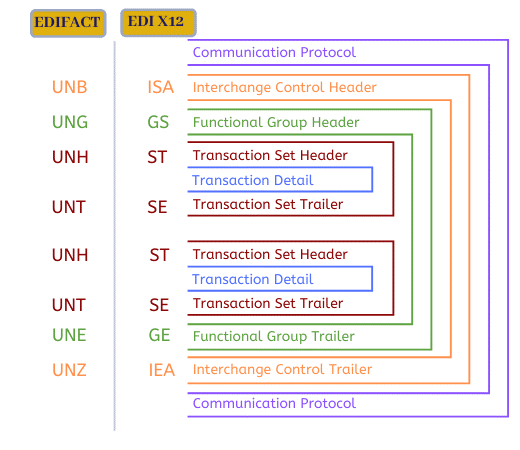
Whether the Order was in X12 or EDIFACT standard, both have similar structure, but different syntax. For illustration in this article, we are using EDI 850. Following is a diagram comparing the structure of the order between X12 and EDIFACT.

EDI X12  vs EDIFACT

For more information about the EDI 850 order, it is very important to read this article: All you need to know about EDI ANSI X12 Transaction Set 850 (Purchase Order)


Magic xpi at a Glance

Magic xpi is an advanced integration platform designed to connect various systems and automate business processes. It provides pre-built connectors and adaptors specifically designed for branded ERP and CRM systems. Thanks to the team at EDI2XML for adding an EDI connector to Magic xpi, to simplify NetSuite integration. These connectors enable seamless data exchange between the two systems, ensuring accurate and real-time order synchronization.

Unique Features and Benefits of Magic

Magic xpi offers several unique features and benefits that make it an ideal choice for integration.

Data mapping, transformation, and validation: Magic xpi provides a visual data mapper that enables users to easily map data between the EDI system and NetSuite, ensuring data integrity. This includes data transformation and validation, preventing the transfer of inaccurate or incomplete data.

Pre-built connectors and adaptors: Magic xpi comes with generic pre-built connectors and adaptors specifically designed to connect to branded and non-branded systems that are API ready, such as NetSuite. These connectors simplify the integration process, reducing development time and effort.

Flexibility and scalability: With Magic xpi, businesses have the flexibility to adapt the integration process to their specific needs. The platform supports various data formats and protocols, allowing businesses to seamlessly integrate with different systems. Additionally, Magic xpi is scalable, capable of supporting growing business needs and increasing transaction volumes.

Automation and workflow capabilities: Magic xpi enables businesses to automate order fulfillment processes (for example), by defining workflows and business rules. This eliminates the need for manual intervention and ensures consistent order processing, regardless of the order source or trading partner.

Real-time monitoring and alerts: Magic xpi provides real-time monitoring of order synchronization processes. Users can set up alerts and notifications to be immediately informed of any errors or issues, enabling quick resolution, and preventing any potential disruptions to the order fulfillment process.

NetSuite and EDI Integration

Oracle NetSuite offers various modules for human resource management, accounting, finance, customer relations and analytics. As a cloud-based solution, it offers the flexibility and convenience of managing different operations and departments in a business. 

As previously stated, NetSuite does not offer EDI integration out of the box, hence why users of NetSuite will have no choice other than building some kind of integrations. Following are the different methods allowing integration with, asp per their own website:

  1. Csv import: NetSuite allows integration through comma separated files import mostly used to bulk load data into NetSuite.
  2. SuiteTalk SOAP and REST web services:  this is another programmatical access provided by NetSuite, to allow integration using both SOAP and REST API.
  3. RESTLets: scripting using custom REST-based scripts is another method provided by NetSuite out-of-the box to allow integration.

To be able to integrate with NetSuite, using one of the above methods, requires certain level of expertise with NetSuite; mostly, companies use the services of NetSuite consultants with integration expertise, to accomplish such objectives, which can be long, hard, and costly, due to the fact it requires lots of coding and testing.

What if there is a solution that does not require such an effort, time, and resources, where results can be observed within a short period of time, fraction of the time of coding and doing it yourself, without installing anything on the customer premises?

This is where our expertise at EDI2XML comes into play and can show the difference.

Useful reading: NetSuite SuiteCloud Platform Integration

Understanding the Importance of Orders Synchronization

Managing EDI orders (850) manually can be a complex and time-consuming task; it is almost humanly impossible, especially when it involves handling large volumes of data, ensuring data integrity, and coordinating with multiple trading partners. These manual processes increase the chances of errors and delays, leading to dissatisfied customers and potential revenue loss.

Real-time orders synchronization is the key to enhancing efficiency and customer satisfaction. By automating the order process, businesses can eliminate manual tasks, reduce human errors, and expedite order fulfillment. Customers receive faster updates on order status, ensuring a seamless buying experience. Additionally, real-time synchronization enables businesses to make informed decisions based on accurate and up-to-date order information.

Streamlined order processing has a significant impact on overall business operations and profitability. With accurate and timely order synchronization, businesses can improve inventory management, optimize production schedules, and enhance supply chain efficiency. This leads to cost savings, reduced lead times, and improved overall business performance.

How Does the Integration Happen?

Here is the flow described in very simple terms:

  • The EDI2XML platform will sit in the middle between the company and its trading partner.
  • Once the EDI trading partner submits a purchase order (850) to his supplier, EDI2XML will receive that EDI 850 on behalf of the receiving party.
  • Upon receiving the Order in its X12 format or EDIFACT format, EDI2XML will right away go through several data format transformation to an xml format.
  • That xml format of the 850, will then be mapped to the NetSuite Schema of the order and pushed to NetSuite.

The following diagram illustrates a high level visual of how EDI2XML works and how the transformation and integration happen.

You can also notice that Magic xpi integration platform is also featured in the middle of the process and plays the orle of the maestro who synchronize the actions and the one who publish the data to NetSuite (or another ERP system).

EDI Fully Managed Services
 

The following image describes how Magic xpi allows the discovery and visual mapping from a source to a destination, making it easy and quick to map data from one side to another.

how Magic xpi allows the discovery and visual mapping
 

The screenshot above illustrates the mapping process facilitated by EDI2XML, acting as the intermediary between an order received via EDI and NetSuite. With our expertise, businesses enjoy a hassle-free integration experience, eliminating the need for server installations and saving valuable time and costs in the process. This is a screenshot taken from a real project and being shared with our audience for education and information purposes.

How EDI2XML Enables EDI Orders Synchronization with NetSuite

Integrating EDI transactions (i.e., Orders 850) with NetSuite can be complex and time-consuming without the right tools.

The team at EDI2XML have over 24 years of proven experience on how to leverage technology to deliver efficient integration in a relatively short time, and the most efficient manner while staying on budget. One of the technologies we use is Magic xpi, a comprehensive integration platform meant to bridge the gap between systems.

Streamlining integration with Magic xpi is crucial for optimizing business operations and enhancing customer satisfaction. Leveraging our extensive expertise in integration processes, we offer proven strategies to maximize the efficiency of your online trading endeavors.

If you’re ready to transform your business operations, start by scheduling a free consultation with our integration expert today. Discover how our expertise in seamless integration and efficient data exchange can empower your business to thrive in today’s competitive landscape.

Frre Consultation


February 20, 2024/0 Comments
https://www.edi2xml.com/wp-content/uploads/2024/02/EDI2XML-EDI-Orders-850-NetSuite-Magic-xpi.png 675 1200 Pierre Namroud https://www.edi2xml.com/wp-content/uploads/2024/08/edi2xml.com-EDI2XML-company-logo.png Pierre Namroud2024-02-20 10:02:112026-06-04 15:14:36Synchronizing EDI Orders 850 with NetSuite using Magic xpi

How to Connect Oracle JD Edwards with Other Systems: Overview of Eight Methods

Blog

As an experienced systems integrator, EDI2XML has completed many successful integrations across diverse industries. Based on our extensive experience, in this article, we want to discuss what the various integration methods available to businesses to integrate with Oracle JD Edwards.

We’ll keep it simple and give you a basic understanding of each method. Our goal is to give you the knowledge you need to make integration easier for your business. In future articles, we’ll dive deeper into each method to help you understand them better.

Oracle JD Edwards (JDE) Explained: ERP Integration & Key Features

Oracle JD Edwards, or JD Edwards EnterpriseOne, or just JDE is a comprehensive suite of enterprise resource planning (ERP) software that helps businesses manage their financial, operational, and human resources processes.

Oracle JD Edwards utilizes cutting-edge technologies like cloud computing, mobile platforms, the Internet of Things (IoT), artificial intelligence (AI), and machine learning (ML) to create smart solutions and make users’ experience better.

In the past, Oracle JD Edwards went by various names like OneWorld, B732, Xe, and 8.98, each representing different software versions. However, its current and widely recognized name is Oracle JD Edwards EnterpriseOne. People may also refer to it informally as JDE, JDEdwards, JDE E1, or OJDE, which are typically shortened versions or acronyms based on its official name.


USEFUL READING: Oracle JD Edwards Integration: The Key to Digital Transformation


While Oracle JD Edwards provides over 80 configurable modules to meet specific customer needs, it may not address all enterprise application requirements. Nevertheless, it seamlessly integrates with other business applications and systems, offering various interaction and integration patterns for optimal integration.

Oracle vs. JD Edwards: Understanding the Relationship for ERP Users

JD Edwards (JDE) is not the same as Oracle, but it is a product line owned and developed by Oracle. Here’s how they are related:

JD Edwards (JDE): Initially an independent company, JD Edwards developed ERP solutions that became widely used by industries requiring robust supply chain and financial management tools. Its flagship products include:

    • JD Edwards EnterpriseOne: A flexible, web-based ERP platform that supports multiple databases and operating systems.
    • JD Edwards World: A platform designed for IBM System i (AS/400) hardware, known for its reliability.

Oracle’s Acquisition: In 2003, PeopleSoft acquired JD Edwards. Then, in 2005, Oracle purchased PeopleSoft, which included JD Edwards as part of the acquisition. Since then, JD Edwards has been under Oracle’s ownership.

Oracle’s Role: Oracle has continued to develop and support JD Edwards products. JD Edwards now benefits from Oracle’s broader ecosystem, including integration with Oracle Cloud Infrastructure, Oracle Database, and other Oracle applications.

Key Difference:

    • JD Edwards remains a product line within Oracle’s extensive portfolio.
    • Oracle, as a company, offers a vast range of software, hardware, and cloud services beyond JD Edwards, such as Oracle Fusion ERP, Oracle E-Business Suite, and Oracle NetSuite.

Oracle JD Edwards Integration: Essential Methods for System Connectivity

Oracle JD Edwards (JDE) EnterpriseOne offers various integration methods that enable the system to interact with external applications, databases, and services.

Thus, integrating JDE with other systems involves linking its robust functionalities with diverse software applications like CRM, ERP, HRM, EDI, and more. This integration facilitates data exchange, automation, and real-time insights, enhancing overall business performance.

Comparing Oracle JD Edwards Integration Methods: Orchestrator, EDI, & More

Here’s a list outlining different methods of Oracle JD Edwards (JDE) integration, including JDE Orchestrator, Direct Database integration, Dynamic Java Connector, and Magic xpi.

Oracle JD Edwards Orchestrator: Streamlining JDE Integration with REST Services

JDE Orchestrator is a tool that enables you to create, test, and deploy REST services that interact with JD Edwards EnterpriseOne applications and data.

  • Easy to use and configure
  • Supports real-time integration
  • Supports JSON and XML formats
  • Supports IoT devices and cloud services

USEFUL READING: Streamlining Business Operations: Expert Perspectives on JD Edwards Orchestrator Integration


Direct Database Integration for Oracle JD Edwards: SQL & Real-Time Data

Integrating external systems directly with the JD Edwards database, typically using SQL queries and database connections.

  • Fast and simple
  • Supports batch and real-time integration
  • Supports any database format
  • No additional software required

We have the expertise and the tools to help you integrate JDE with other systems in the most efficient and effective way. Book a free consultation now

Java Connector for Oracle JD Edwards: Custom Integration & Business Logic

A tool that enables you to create Java classes that interact with JDE business functions using the Java Connector Architecture (JCA) specification.

  • Supports real-time integration
  • Supports complex business logic
  • Supports any Java-based platform or application
  • Supports transactions and security

Z-Table Processing in Oracle JD Edwards: Bulk Data Integration Methods

The “Z tables” are transition tables in SQL/Oracle, whose sole objective is to load data into JDE. In general, this way is used for “Bulk import” of data into the JDE database.

  • Can be done using various methods, such as flat files (CSV, TXT, etc.) to import and export data between JDE and external systems.
  • In general, used for “Bulk import” of data into the JDE database.
  • Z-table integration can be used for both inbound and outbound transactions

Oracle JD Edwards BSSV: Enterprise-Level Integration & Transaction Management

BSSV is a component within the JDE system that facilitates communication and integration between JD Edwards applications and external systems.

  • Supports SOAP-based and RESTful services for integration.
  • BSSV efficiently manages high volumes of transactions, ideal for enterprise-level deployments


Oracle JD Edwards AIS: RESTful API Integration for Mobile & External Systems

AIS is a component of Oracle JDE that provides a lightweight RESTful interface that allows JDE applications to run on various devices such as smartphones and tablets through REST API calls.              

  • Acts as a middleware layer, allowing external systems, mobile applications, and other software solutions to interact with JDE.

EDI Integration with Oracle JD Edwards: Streamlining B2B Data Exchange

EDI is one of the integration methods with Oracle JDE. JDE has a data interface system (code 47) that acts as a staging area for moving data in and out of the application systems using EDI standard formats.

  • Supports various EDI standard formats, such as X12, EDIFACT, HL7, and others
  • Enables JDE to communicate with external systems.

Magic xpi for Oracle JD Edwards: Visual Integration & Drag-and-Drop Solutions

Magic xpi is an integration platform designed for connecting various enterprise applications, including JD Edwards, through a visual drag-and-drop interface. It has an Oracle certified connector to JDE, that can interact directly with JDE Business Services and its Dynamic Java Connector.

  • Easy to use and maintain.
  • Supports batch and real-time integration.
  • Supports multiple protocols and formats.
  • Supports cloud and on-premises. deployment
  • Visual mapping, drag and drop from source to destination.

These methods can be used separately or in combination, depending on the complexity and requirements of the integration. It’s also important to note that integration strategies should be selected and implemented in a way that suits the organization’s IT policies, security standards, and performance requirements.

Optimizing Oracle JD Edwards Integration: Choosing the Right Methods for Your Business

Integrating JD Edwards (JDE) with other systems is crucial for streamlining business processes and maximizing operational efficiency. Each method offers unique advantages and capabilities, enabling seamless data exchange and collaboration across your organization and beyond.

If you’re ready to explore the possibilities of JDE integration or have questions about implementing these methods in your organization, our team is here to help.

Book your free consultation today to learn more and start optimizing your JD Edwards system for enhanced performance and productivity.

Free IT Consultation

We’d love to hear from you! What integration methods have you found most effective in your JDE implementation? Do you have any questions or suggestions regarding JDE integration? Leave a comment below and let’s continue the conversation!

February 14, 2024/0 Comments
https://www.edi2xml.com/wp-content/uploads/2024/02/EDI2XML-JDE-Integration.png 675 1200 Tatyana Vandich https://www.edi2xml.com/wp-content/uploads/2024/08/edi2xml.com-EDI2XML-company-logo.png Tatyana Vandich2024-02-14 14:38:022026-05-28 15:00:43How to Connect Oracle JD Edwards with Other Systems: Overview of Eight Methods

Cloud-Based Integration of E-commerce with Dropshipping Supplier

Blog

This article spotlights a real-world scenario, where EDI2XML steps in to facilitate an efficient data exchange between an e-commerce entity and its dropshipping supplier.

How EDI2XML Simplifies E-commerce and Dropshipping Integration

As a company with a deep understanding of e-commerce automation, EDI2XML is committed to sharing its wealth of experience with other businesses. Through our knowledge and proven strategies, we strive to empower businesses to unlock the full potential of their online trading operations.

Role of EDI in Dropshipping for Online Retailers

The e-commerce ecosystem often relies on partnerships to enhance efficiency and broaden product selections. For instance, online retailers frequently join forces with dropshippers, eliminating the need for inventory storage and management. This mutually beneficial collaboration allows businesses to focus on customer experience and marketing, leaving the logistics to reliable dropshipping partners.


USEFUL: What is Dropshipping on Amazon?


Dropship suppliers, often require EDI (Electronic Data Interchange) for its efficiency in automating order processing, inventory management, and communication.

Integration Goals: What EDI2XML Automates in the E-commerce Workflow

Our e-commerce integration model centers on the integration between a client’s online store, which could be built on any e-commerce platform like Shopify, BigCommerce, or eBay, and a dropshipping supplier.

The primary objective is to seamlessly exchange Electronic Data Interchange (EDI) transactions, between the Client and their dropshipping partner.

Amazon Integration
 

This involves EDI2XML acting as an intermediary to collect and transform orders from the e-commerce store into EDI X12 format for transmission to the dropshipping supplier. Additionally, it ensures the smooth reception and processing of inventory feeds (EDI 846), and advanced ship notices (EDI 856) from dropshipper, updating the e-commerce instances using REST API connectors.

Technical Overview: EDI Documents and Connectivity Explained

Integration of e-commerce and dropshipping supplier typically involves the use of the following standard EDI documents:

  • Outgoing Documents (From Client to Dropshipping Supplier): EDI 850 Sales Order
  • Incoming Documents (From Dropshipping Supplier to Client): EDI 846 Inventory Inquiry and Advice, EDI 856 Advanced Ship Notice
  • Possible Connectivity: VAN/FTP/sFTP for Dropshipping Supplier, Shopify REST API, eBay API Tools or other API for respective e-commerce instances.

TAKEAWAY: Implementing Application Programming Interface (API) integration is fundamental for real-time communication between the e-commerce platform and the dropshipping supplier’s systems. APIs enable the exchange of data related to product information, inventory levels, order processing, and more. A robust API connection forms the backbone of a successful e-commerce integration.

Key Components of a Successful E-commerce Integration

Embarking on an e-commerce integration project, especially with a dropshipping supplier, involves several crucial components to ensure a seamless and efficient collaboration. Below are the key elements typically considered in such projects:

Automated Order Processing:

One of the primary goals of integrating with a dropshipping supplier is to automate the order processing workflow. This involves near real-time synchronization between the online store’s platform and dropshipper’s management system.

e-commerce
 

When a customer places an order on the online store, the integration should seamlessly transmit order details to the supplier’s system. This automation eliminates the need for manual order placement and expedites order fulfillment.

Example of the flow of data for outgoing documents from client to dropshipper

  • EDI2XML processor initiates every 15 minutes.
  • Checks for new orders on e-commerce platform.
  • Extracts information, converts to X12 format and builds EDI 850 document.
  • Connects to drop shipper’s sFTP mailbox and drops the generated x12 file(s).

Another option is when the received order is converted into the required format (XML, JSON, CSV) and pushed directly to the dropshipper’s management system.

Inventory Management, Pricing and Product Updates:

Efficient inventory management is crucial for preventing stockouts and ensuring timely order fulfillment. The integration will include a mechanism to update the online store’s inventory in near real-time based on dropshipper’s stock levels. This ensures that customers are presented with accurate product availability information.

Example of the flow of data for incoming information from dropshipper to client

  • EDI2XML processor connects to dropshipper’s mailbox every 15 minutes.
  • EDI 846-Inventory Status in x12 format.
  • Converts x12 documents to appropriate formats for e-commerce.
  • Updates inventory values (EDI 846) on e-commerce platform.
  • Sends email notification about received and processed documents.

Pricing instabilities and product updates are common in the retail industry. Exchanging EDI 846 allows the online store to reflect real-time changes in dropshipping supplier’s pricing and product catalog, ensuring that customers always receive the latest information.


Not sure if your business is running as efficiently as possible?

Book a FREE one-on-one consultation session with our integration experts.


Shipping and Tracking Integration:

Seamless communication between the online store and dropshipper’s shipping system is essential for providing customers with accurate shipping estimates and order fulfillment / tracking information. The use of EDI 856 Advanced Ship Notice enable real-time updates on shipping status and tracking details directly within the online store’s interface.

Benefits of E-commerce Automation

Time and Cost Savings:

By automating order processing, inventory management, and other essential tasks, the online store can significantly reduce the time and resources spent on manual operations. This translates to cost savings and increased overall operational efficiency.

Enhanced Customer Experience:

Automated integration ensures that customers receive accurate product information, timely order updates, and reliable shipping details. This contributes to an improved overall shopping experience, fostering customer loyalty and satisfaction.

Scalability:

In contrast to public app, our custom e-commerce integration solution can easily scale to accommodate increased order volumes and a growing product catalog.

This scalability feature becomes particularly crucial for businesses aiming to expand without facing the limitations often encountered with off-the-shelf automation tools.


Useful reading: Shopify Private or Public app: What’s Best for ERP Integration


Conclusion: E-Commerce Integration with Dropshipping Suppliers

Successful e-commerce integration with dropshipping suppliers is vital for enhancing operational efficiency and customer satisfaction. At EDI2XML, we understand the intricate details of this process and offer proven strategies to unlock the full potential of your online trading operations.

If you’re ready to streamline your e-commerce integration, take the first step by scheduling a free consultation with our integration expert.

Discover how our expertise can empower your business through seamless EDI transactions and efficient data exchange.

February 6, 2024/0 Comments
https://www.edi2xml.com/wp-content/uploads/2024/01/EDI2XML-Cloud-Integration.png 675 1200 Tatyana Vandich https://www.edi2xml.com/wp-content/uploads/2024/08/edi2xml.com-EDI2XML-company-logo.png Tatyana Vandich2024-02-06 14:10:002025-06-20 15:42:59Cloud-Based Integration of E-commerce with Dropshipping Supplier
Page 6 of 24«‹45678›»
Recent
  • EDi Integration for SMB - Complete Guide
    Electronic Data Interchange (EDI): The Complete Guide for...July 17, 2026 - 4:46 pm
  • EDI Process Guide from EDI EDI Provider
    How EDI Documents Work Together: A Complete Guide to the...July 9, 2026 - 1:22 pm
  • Wayfair EDI & API Integration Guide
    Wayfair EDI & API Integration Guide for SuppliersJune 30, 2026 - 3:24 pm
  • Promotional banner about whether EDI is required for small businesses and a supplier’s guide to retail onboarding. Women at a desk inside a circular cutout image on the right.
    Is EDI Required for Small Businesses? A Supplier’s Guide...June 17, 2026 - 7:02 pm
  • EDI compliance with Loblaw
    How to Meet Loblaw EDI Requirements as a Small BusinessJune 4, 2026 - 2:05 pm
Popular
  • How to Quickly Connect to a Large Retailer's EDI Requirements
    How to Get EDI-Compliant Quickly For A Large RetailerNovember 21, 2025 - 4:29 pm
  • EDI-as-a-services
    EDI Translation Software “On-premises” or “As...January 21, 2014 - 1:28 pm
  • order-automation in e-commerce
    Why Is It Crucial to Automate the E-Commerce Order Fulfillment...May 10, 2022 - 1:58 pm
  • EDI for Logistics and transportation
    EDI Integration for Efficient Transportation ManagementOctober 6, 2023 - 1:33 pm
  • information technology definitions
    Business Tech Terms DefinitionsMay 24, 2018 - 1:32 pm

Browse by tag

Amazon Amazon Integration ANSI ASC x12 ASC X12 EDI B2B EDI integration e-commerce e-commerce business e-commerce integration eCommerce eCommerce integration EDI EDI2XML EDI 850 EDI as a Service EDI Communication EDI converter EDIFACT EDI for supply chain EDI for Third-Party Logistics EDI for transportation EDI implementation EDI Integration EDI Integration Project EDI project EDI Translation EDI Web Service EDI x12 ERP Integration integration platform integration project JDE Magic xpi Magic xpi Integration platform NetSuite online store Salesforce Shopify Shopify eCommerce integration Shopify integration Supply Chain Supply Chain Management Translation Software X12 EDI XML

Subscribe to our Blog

Menu

  • Home
  • About the EDI2XML Company
  • About EDI2XML EDI Converter
  • Blog
  • Book A Free Consultation
  • Privacy Policy EDI2XML Company

Our Services

Fully Managed Integration

E-Commerce Integration

Business Systems Integration

Fully Managed EDI

EDI Web Service 

On Premises EDI 

Managed Cloud Service


Latest Blog Posts

  • EDi Integration for SMB - Complete Guide
    Electronic Data Interchange (EDI): The Complete Guide for Modern BusinessesJuly 17, 2026 - 4:46 pm
  • EDI Process Guide from EDI EDI Provider
    How EDI Documents Work Together: A Complete Guide to the EDI Transaction ProcessJuly 9, 2026 - 1:22 pm
  • Wayfair EDI & API Integration Guide
    Wayfair EDI & API Integration Guide for SuppliersJune 30, 2026 - 3:24 pm

Contact Us

400 Blvd Curé-Labelle, #304 Laval QC H7V 2S7 Canada

Contact EDI2XML Team
Phone: +1 450-681-3009
Website: https://www.edi2xml.com/

© 2000-2026 EDI2XML (by Namtek Consulting Services). All rights reserved.
  • Link to Facebook
  • Link to LinkedIn
  • Link to X
  • Link to Youtube
  • Blog
Scroll to top Scroll to top Scroll to top