EDI2XML
  • About
    • The Company
    • EDI2XML
    • Advantages
    • Partnership with EDI2XML
    • Testimonials
  • Services
    • Enterprise AI
    • Fully Managed Integration
    • Fully Managed EDI Services
    • EDI Web Portal
    • EDI Web Service
    • EDI On Premises
    • Managed Cloud Services
    • Amazon Integration
    • Shopify Integration
    • BigCommerce Integration
    • NetSuite Integration
    • JD Edwards Integration
    • Dynamics 365 Integration
    • SAP B1 Integration
    • Salesforce Integration
    • Industry 4.0 Integration
  • Pricing
    • EDI Managed Services
    • EDI Web Service
    • EDI On-Premises
    • Managed Cloud Services
    • Shopify Integration
    • JD Edwards Integration
    • E-commerce Integration
    • All other Integrations
  • Blog
  • Resources
    • Downloadable Guides
    • List of EDI Codes
    • List of EDIFACT Messages
    • EDI Documents Library
    • Trading Partners
    • Customer Case Studies
  • Contact us
  • Book a Consultation
  • Click to open the search input field Click to open the search input field Search
  • Menu Menu
  • Link to Facebook
  • Link to LinkedIn
  • Link to X
  • Link to Youtube

Integration with Salesforce “custom objects” using Magic xpi.

Blog

Having completed lots of integration projects between Salesforce and other platforms such as Amazon, Big Commerce, EDI in addition to many CRM/ ERP systems, I decided to write this article to present how quick and simple it is to use Magic xpi integration platform, to build integration flows that can read or write data into Salesforce standard and custom objects. All of this is without deep knowledge and expertise with salesforce scripting or programming.

Let me start with a high-level definition of important terminologies, even though some might look like repetition from previous articles, but it serves as an important refresher.

What is Salesforce?

Integration Salesforce

Salesforce is a cloud CRM solution, designed to manage customer relationships, sales, and marketing. The company was founded in 1999 in San Francisco. At that time, the existing CRM systems were quite complicated to configure and expensive to operate, therefore, only large companies could afford a CRM system. The initial idea of Salesforce was to offer CRM in the “cloud” and sell the software through an annual subscription or lease model, computed per user of the software.

Salesforce “Object”

An object in salesforce, is the equivalent to a “table” in a database. A table in SQL database for example, has columns and stores data based on rows. The same thing in Salesforce Object, whereas the difference is only in terminologies:

  • A “table” in SQL server, is equivalent to “object” in salesforce.
  • A “column” in SQL server, is equivalent to “field” in salesforce term.
  • A “row” in a SQL table, is equivalent to “record” in salesforce term.

As a conclusion, an “object” in Salesforce is a container of the information created by the end-user, using the Salesforce user interface.

Standard vs. Custom Salesforce Object

 

Salesforce “objects” are of two types:

a) “Standard Objects”: These are the objects that are available by default with every instance or subscription of Salesforce. For example, the “Account” is one of many standard objects in Salesforce.

b) “Custom Objects”: unlike standard objects in Salesforce, Custom Objects are the objects created by the Administrator of the Salesforce instance, to hold very specific information just for his organization, that is why we call it “Custom Object”. NOT every instance of salesforce will have the Custom objects defined by one administrator.


Suggested Readings: Salesforce integration and Magic xpi: Things you should know


What is Magic xpi?

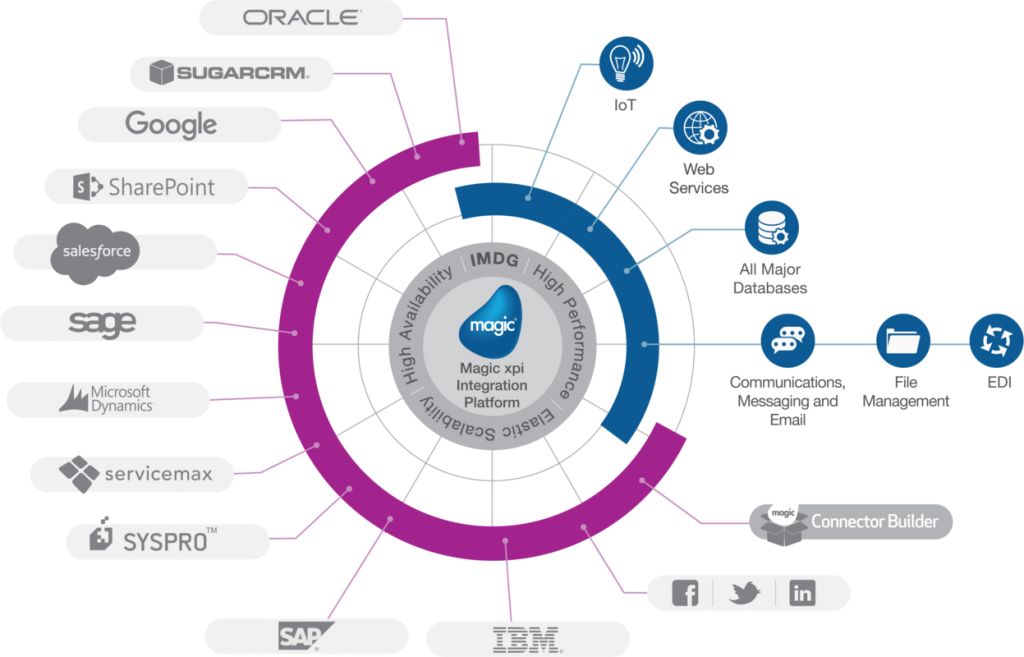
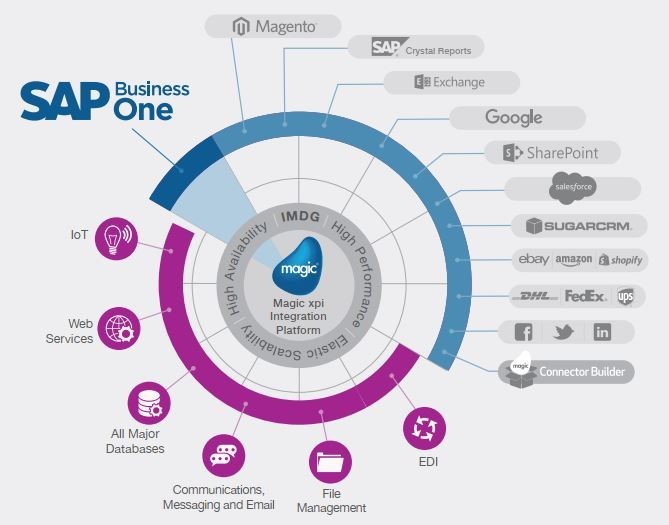
Magic xpi is in integration platform to allow the integration from any system to any system, be it cloud or on premises. Magic xpi includes built-in connectors to:

  • The most commonly used Databases in the marketplace (i.e. Oracle, IBM DB2, MSSQL server, Pervasive, ODBC, JDBC…)
  • The most used file formats in the marketplace (i.e. XML, CSV, TXT, JSON)
  • REST and SOAP API
 
Magic xpi  B2B Integration
 

Moreover the manufacturer of Magic xpi, has built and certified a connector for Salesforce, among other branded CRM/ERP systems in the marketplace (i.e. Oracle JDE, SAP…)


Suggested Readings: Magic xpi Integration Platform: The Best Fit for Enterprise Data Integration


Magic xpi “certified connector” for Salesforce

Let me explain first what is “salesforce connector” before getting into the “Certified” portion.

In simple terms, a Magic xpi “Salesforce connector” is a software module offered part of Magic xpi, that can automatically perform the following:

  1. Connect to a specific Salesforce instance.
  2. Read and discover the Schema of Salesforce instance. Meaning, discovering ALL objects (Standard and Custom), including their fields.
  3. Read from any custom or standard salesforce object.
  4. Write to any custom or standard salesforce object.

All the above with a click of a button, without any coding or development whatsoever; It is all done automatically.

Now, what about the “certified” portion?

Magic software, the manufacturer of Magic xpi and the connector to salesforce, they took the extra step, and went to Salesforce, and presented the Connector. The team at salesforce, took the time to review the way the connector works, and approved it as functioning as per Salesforce best practices and recommendations. Hence why there is an additional licensing fee when using Magic xpi salesforce connector.

Ease of use of Magic xpi

Magic xpi is in integration platform to allow the integration from any system to any system. It has so many advantages over similar competing products in the marketplace, especially when it comes to its ease of use and deployment. Here are some of those advantages:

  • Deployable on premises, in a public or private cloud
  • Licensed based on a subscription basis.
  • Connect and synchronize: Cloud to On-Premises, Cloud to Cloud
  • Connect and synchronize a Cloud based to On-Premises system.
  • Visual Mapping, Drag and drop with NO coding.
  • Ideal for systems analysts with little experience in coding

Why Integration with Salesforce

There are many business cases where companies need to integrate their disparate systems and processes, into their Salesforce instance. I will list few of those cases:

  1. Integration of sales orders received from customers via Electronic Document Interchange (EDI / X12 / EDIFACT)
  2. Integration of sales orders received from customers in xslx, csv, xml or json format.
  3. Integration of eCommerce orders created by the consumer in Shopify or Big Commerce as an example and populating it automatically into the company’s salesforce instance.
  4. Updating the inventory status in eCommerce platform by reading the Salesforce instance Standard or Custom objects, extracting the necessary information, and populating it into Shopify or Big Commerce for example, using their REST API.

The above use cases are for information and example purposes, but there are many challenging business cases that a company can face daily, especially during this difficult times of COVID-19 where business owners and executives are becoming creative to adapt to the situation and stay the course in a profitable manner.

Steps to build an integration to Salesforce with Magic xpi

There are about [5] steps to build a simple flow to integrate with Salesforce.

1. Create the Connection to Salesforce
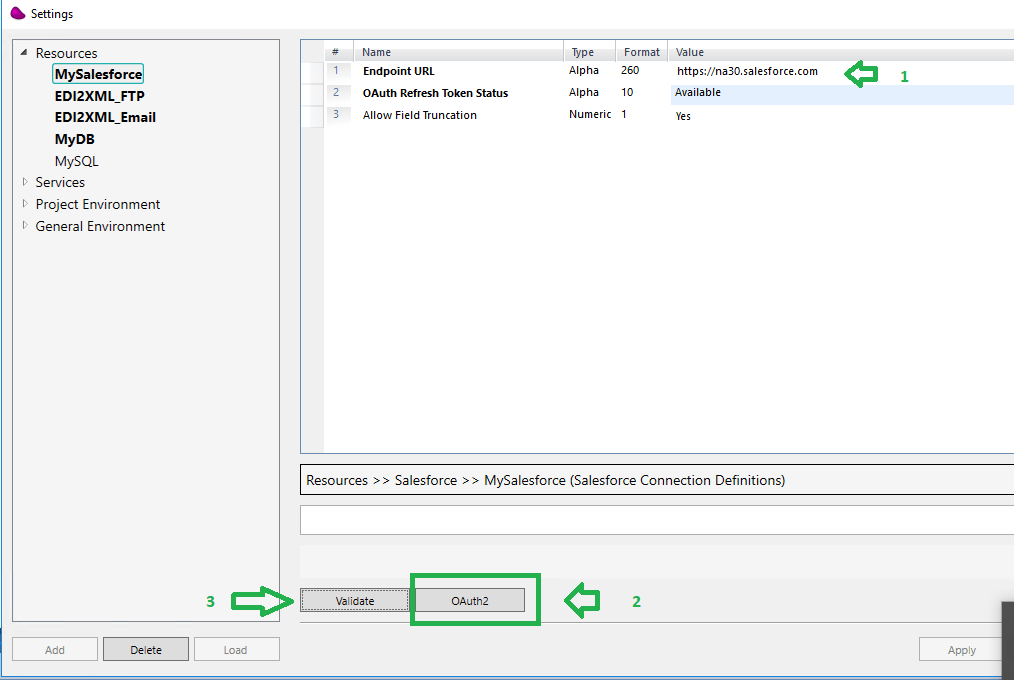
 

As the above illustration, there are 3 steps to create the connectivity to Salesforce, once. Enter the url, click on the “OAuth2” button, where the Salesforce OAuth screen will popup and ask the developer to enter the Salesforce credentials. Once entered and validated, it will ask to Authorize the access. Once authorized, it will close the screen and go back to the above.

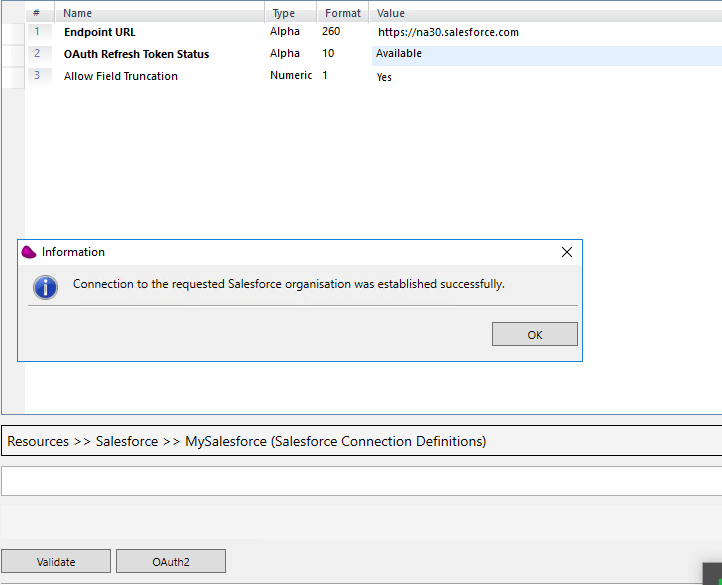
To validate the connection is active, click “Validate” and a message will appear to indicate it is Successful.
 

2. Create the connection to the Database or to any other CRM/ERP/API (if needed):
Depending on whether there is a need to use different resources, they need to be defined once.

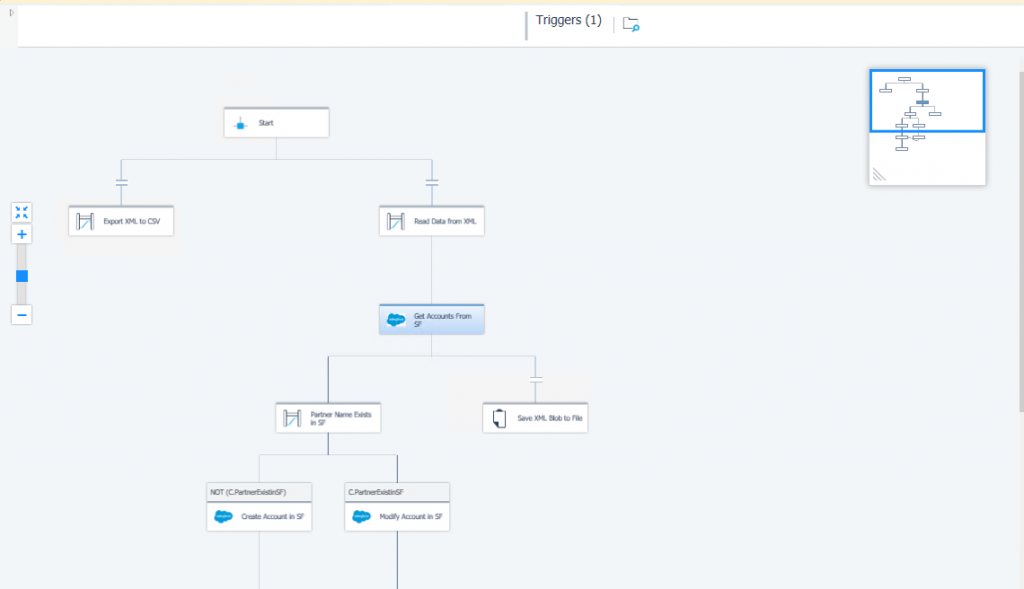
3. Define the logic of the integration flow.

This step is to define the logic and steps of the flow on paper, before starting to draw the logic in Magic xpi. A systems analyst should have a clear vision where he is heading, prior to starting the project. This step can be the most difficult one.
 

4. Start Mapping from source to destination.

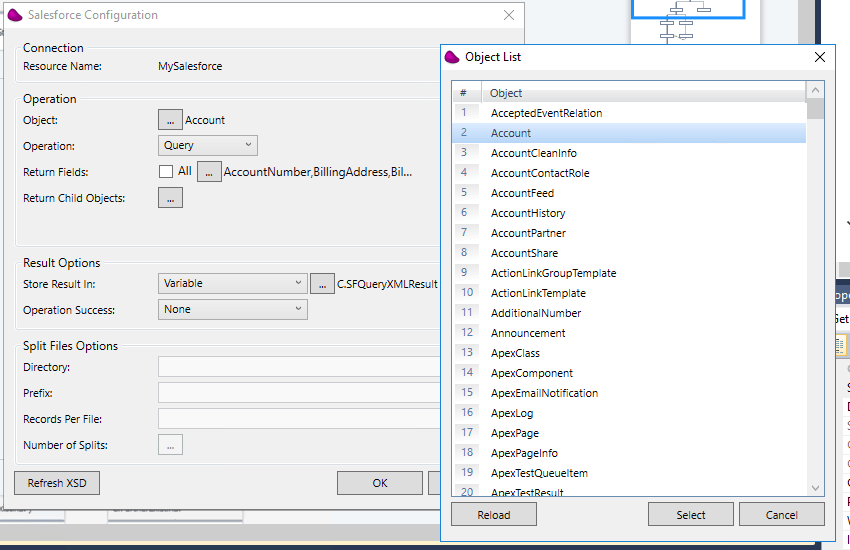
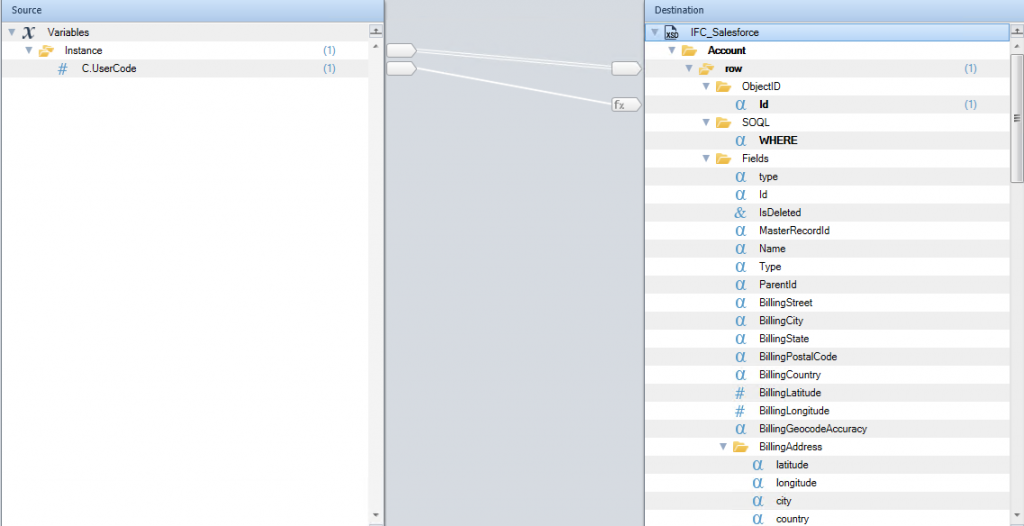
First step is to select the Object to map from / to in salesforce (screenshot # 1), and then start mapping (screenshot # 2).

Screenshot # 1
 

Screenshot # 2
 

Trust our experts for a fully managed integration

To find out more about our salesforce integration expertise, and evaluate how we can help you, you can reach us by phone: (450) 681-3009 or use the form below to speak to our integration specialist!

 

January 28, 2021
https://www.edi2xml.com/wp-content/uploads/2021/01/Salesforce-Magic-xpi.png 675 1200 Pierre Namroud https://www.edi2xml.com/wp-content/uploads/2024/08/edi2xml.com-EDI2XML-company-logo.png Pierre Namroud2021-01-28 13:11:442024-12-24 16:10:03Integration with Salesforce “custom objects” using Magic xpi.

E-commerce Integration with business systems – outperform the competition

Blog

The purpose of this article is to highlight the major points of e-commerce integration with business software systems such as ERP or CRM and others.

Let us start with a high-level definition of important terminologies.

What is an e-commerce platform?

An e-commerce platform is software platform, that enables companies to launch, host, and manage their online eCommerce store, normally in a “self-service” model.

According to various sources, there are more than 300 different e-commerce platforms in the marketplace. They all offer different features and terms of use but allow merchants to create an online store to sell their products.

In other words, thanks to e-commerce platforms, companies and individuals can create or expand their e-commerce business without coding and web design skills; most importantly, without the need of a large budget to implement such projects.

Online shopping is one of the most popular online activities

The incredible number of e-commerce platforms, as well as the huge number of online stores opening every day, are driven by the growing interest of consumers in online shopping.

Moreover, in connection with the Covid-19 pandemic, the popularity of online shopping in the grocery segment and among local businesses has also grown.

According to Statista, online shopping is one of the most popular online activities worldwide, thus a global number of digital buyers is growing rapidly. Over 2.14 billion people worldwide are expected to buy goods and services online, up from 1.66 billion global digital buyers in 2016.

Why is e-commerce important in 2021?

Just some 5-8 years ago, it was common for a small business to work offline only. The companies did not have their e-commerce sites and did not run online sales. It seemed to them that this was not necessary to invest time and effort in the e-commerce business.

Times have changed and companies began to develop more and more online businesses. However, the turning point came in early 2020, caused by the global Covid-19 pandemic and massive lockdowns. Due to restrictions, many sellers, especially those who did not expand their e-commerce business, were on the verge of collapse. Continue sales despite the closure of physical stores has become vital even for a local business.

Now the company may no longer have an offline store or even not have an office with employees. Everything goes online. Workers around the world had to switch to a “work from home model” (WFH)

Huge sales happen through online stores or marketplaces like Amazon.

However, creating your own online store does not guarantee success yet. The next challenge is customer satisfaction.

According to HubSpot 80% of respondents said they had stopped doing business with a company because of poor customer experience.

Thus, customer satisfaction depends on how you are going to handle online sales in the future. How quickly, efficiently, and accurately you can process orders. How fast and correctly you will manage inventory, etc. To do this you need to synchronize your e-commerce website with your internal business system (ERP/CRM or accounting)

In other words, the success of online sales largely depends on the level of your ecommerce integration with other business systems of the company.

Leading e-commerce platforms in 2020

Despite the fact that there are huge varieties of e-commerce platforms, there are certainly unchanging leaders among them.

In the top of e-commerce platforms are:

  • Shopify
  • BigCommers
  • WooCommerce
  • Magento
  • Volusion
  • Wix

If you want to learn more about e-commerce platforms, check out this article: The Top 9 Absolute Best Ecommerce Platforms for 2021

Why you need e-commerce Integration?

If the online store operates independently, for example without connecting the company’s ERP system, employees have to manually upload product data; enter customer delivery addresses, tracking codes, etc. Each order placed through the online shop must be manually transferred to the business systems. The manual data entry always carries a high risk of human error. Moreover, it is ineffective and leads to delays in fulfilling. Besides, if the process is completely dependent on the staff, order processing cannot be processed on weekends.

Thus, achieving high efficiency and profitability of a company business, as well as customer satisfaction, is almost impossible.

To increase the efficiency of its online store, a company needs to integrate its back-end systems with its e-commerce platform. In this case, all key information such as customer data, delivery information, orders, and warehouse stock levels will be automatically synchronized and do not require human intervention.

Most common third-party eCommerce Integration

Systems listed below are commonly integrated with e-commerce platforms for product master data, customer records, financial transaction, and supplier management and so on:

  • ERP (Enterprise resource planning)
  • CRM (Customer Relationship Management)
  • PLM (Product Lifecycle Management)
  • SCM (Supply chain management)

Typical Integration Tasks

– Automate online orders, improve efficiency, and meet delivery times.

– Improved data accuracy

– Stop using employees to enter data and perform repetitive tasks

– Perform integration without internal IT specialists.

Integration platform

It is very important to choose an integration solution that connects your e-commerce online store with back-end systems, as well as for real-time integration and a robust scalable integration platform.

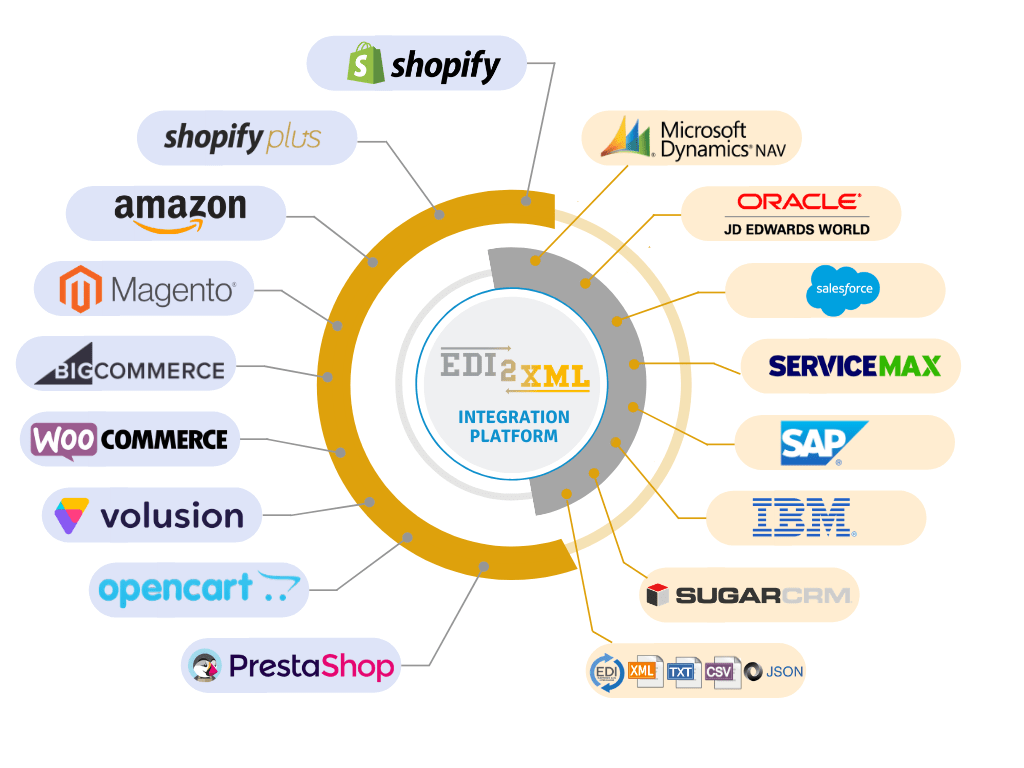
We provide a fully managed and cost-effective integration solution to integrate your e-commerce store seamlessly and quickly with all leading business systems such as:

  • SAP Business One / SAP ERP
  • Salesforce
  • Oracle JD Edwards
  • Microsoft Dynamics
  • ServiceMax
e-commerce ERP integration

With Magic xpi integration platform, we integrate quickly and seamlessly using a no-code visual drag and drop approach as well as large numbers of certified connectors.

Integrate easily, quickly, and efficiently with the best experts and solutions

At any stage of the development of your online store, we can quickly and efficiently set up data exchange with your business system. Bi-directional data exchange such as

  • customer information
  • sales orders
  • order status
  • stock information and so on.

To find out more about synchronizing with an online store, contact us.

Call (450) 681-3009 or use the form below to contact our integration specialist!
Free Consultation

January 6, 2021
https://www.edi2xml.com/wp-content/uploads/2020/12/ecommerce-integration-erp-crm.png 675 1200 Tatyana Vandich https://www.edi2xml.com/wp-content/uploads/2024/08/edi2xml.com-EDI2XML-company-logo.png Tatyana Vandich2021-01-06 08:00:002023-06-15 15:02:31E-commerce Integration with business systems – outperform the competition

Magento E-commerce Integration: Boost Your Online Sales with ERP, CRM, and AI-Driven Solutions

Blog

Intro: E-Commerce Integration

The integration of e-commerce with third-party systems such as ERP, CRM, accounting software, or EDI is a very hot topic and challenging for many companies.  While the COVID-19 pandemic accelerated the digital transformation of many businesses, today, businesses are more focused on sustainable omnichannel strategies.

Today, we focus on one of the most popular e-commerce platforms – Magento. We will explore the most important aspects of Magento integration, which have a significant impact on the performance and efficiency of your Magento store.

What is Magento?

Magento is one of the most popular e-commerce platforms in the world.

One of the reasons of Magento’s popularity is its flexibility and extensibility. You can integrate almost any functionality into your online store – which is why so many companies choose Magento.

There are two distinct platforms of Magento:

Magento Open Source

Magento Open Source (formerly under the name Community Edition) is an open-source e-commerce platform, that is, available to anyone for free. Magento Open Source provides basic e-commerce capabilities that enables to create an online store from scratch. However, for full functionality, Adobe Commerce is recommended.

It should be remembered that if you choose to use Magento Open Source, this does not mean that you can get your online store free of charge. You need to consider hosting costs, themes, domain name, SSL certificate, fees for processing payments, etc. Besides, to create and customize a full-fledged online store, you will need a developer with PHP experience because this task can be a little daunting for beginners without much programming knowledge.

Adobe Commerce (formerly Magento Commerce)

Adobe Commerce (platform as a service) includes cloud-optimized architecture and hosting, unlimited customization, third-party integrations, and AI-powered merchandising and analytics. Over 250,000 merchants worldwide use Adobe Commerce.

Adobe Commerce is a very reliable and powerful e-commerce platform used by many popular online stores with high traffic. This means that Adobe Commerce fit for large companies. However, if you plan to expand your online store (increase the catalog product, etc.) we would recommend starting with Adobe Commerce as it is a performance-proven platform for supporting large stores. Adobe Commerce is worth installing in the first place instead of switching from Magento Open Source to Adobe Commerce at a later stage. Even if there are data transfer tools, such as the Magento Mass Importer (MAGMI) for migration of Shopify to Magento this process will not be easy and demands time and effort.

Nevertheless, it should be kept in mind that Magento is aimed at three levels of companies: small businesses, medium-sized and large businesses.

Thus, Adobe Commerce delivers:

  • Cloud-Optimized Architecture & Hosting: Ensures high performance and scalability.
  • Unlimited Customization: Tailor your store with advanced third-party integrations.
  • AI-Powered Merchandising & Analytics: Leverage data for smarter business decisions.

Adobe Commerce is designed for large businesses that require robust, scalable e-commerce solutions, while the open-source version continues to be available as Magento Open Source.

According to recent market research, Magento-powered platforms are a key driver in global e-commerce, which reached over US$6.3 trillion in sales in 2023 and is projected to grow significantly in the coming years.

Magento History and Future Trends

The development of Magento started in 2007 by Varien Inc. and was officially launched on March 31, 2008.

In 2011, eBay, which already owns 49% of Magento, acquired the remaining 51%. In May 2018, Magento Inc. became the property of Adobe Inc. 

Adobe acquired Magento and rebranded Magento Commerce as Adobe Commerce in April 2021. The open-source version remains Magento Open Source, while the enterprise solution is now called Adobe Commerce.

This change reflects Adobe’s strategy to integrate Magento’s robust e-commerce capabilities into its broader Adobe Experience Cloud, offering enhanced features such as cloud hosting, AI-powered personalization, and seamless integration with other Adobe tools.

Magento Market Share: Adobe Commerce (Magento) now powers 15% of the top 100k e-commerce sites globally, with a 22% surge in enterprise adoption since 2023 (BuiltWith).

Useful Reading: In our EDI2XML Blog, we have covered a lot of e-commerce integration topics including Shopify, BigCommerce, or Amazon integration. Thus, if you are interested in learning more about these integration topics, please check out our articles:

  • What Is Amazon Integration & How Does It Work?
  • Must-Have BigCommerce Integrations
  • Secrets and rules of Shopify integration with your ERP or CRM

Why Integrate Magento with ERP and CRM?

Companies that have linked their ERP system with their Magento online store, succeed by optimizing work processes, which positively affects the shopping experience, reduces order-processing time, and minimizes errors.

ERP stands for Enterprise Resource Planning. It is a business process management software that can be on-premises or cloud-based. ERP system helps to manage an enterprise in the following main areas:

– Financial Management
– Manufacturing Management
(product data management)
– Distribution Management
with three key areas of distribution management: sales order, inventory, and warehouse management.

Synchronizing data between Magento store and ERP system, eliminates the need for sales managers to enter sales order information manually into a business software system. This significantly increases the speed of order execution and eliminates possible errors, as well as improves the quality of customer service.

Due to Magento ERP integration, you can achieve efficient Inventory management that allows you to have complete control over your Magento online store. With automatic inventory management, you will always be aware of the goods received and sold, and most importantly, your customers will not place orders for goods that are out of stock. You do not have to bear the costs and waste time to contact the client to offer him a substituted item or to issue a refund.

A recent report by Forrester Research shows that companies using integrated ERP systems can reduce order processing time by 15–20% and experience overall operational efficiency gains.

The Role of Integration Platforms – Magic xpi 

One of the most important decisions when integrating your Magento online store with your business systems is choosing a reliable and scalable integration platform.

Adobe Commerce is API ready; the API capability, gives the flexibility to connect integration platforms such as Magic xpi and other systems.

Magic xpi integration platform is a leading solution for integration, enterprise-grade data synchronization, and complete automation of business processes.

Magento ERP integration

Magic xpi leverages code-free technologies to streamline business processes and manage communications between on-premises and/or cloud-based enterprise systems, automatically integrating data from multiple sources on a many-to-one basis.

Magic xpi implements comprehensive ready-made certified and optimized connectors and adapters, to synchronize leading ERP, CRM, Finance, and other busyness systems with e-commerce platforms and marketplaces.

Thus, besides Magento ERP/CRM integration, you can expand your sales channels and synchronize your Magento store with marketplaces like Amazon or eBay.

Magento Inventory Management

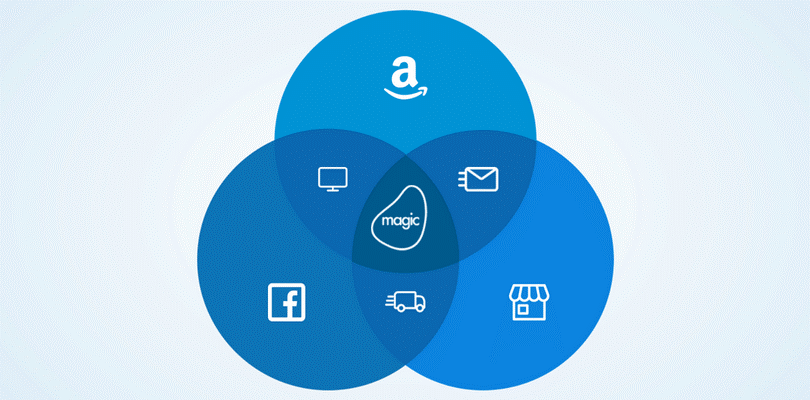
Inventory management is one of the important points in e-commerce integration with ERP. Up-to-date information about product availability is a key issue in online sales. This is an especially pertinent issue for companies with a multi-channel approach, i.e. offline (physical store) and online sales, such as sales via Magento online store, Amazon, eBay, or social media like Facebook or Instagram.

With Magic xpi integration platform, you can update your inventory in near real-time, giving you a unique competitive edge.

The Common Magento Business Process Integration

As mentioned above, Magic xpi is a proven integration platform that seamlessly connects the front office and back office IT systems for two-way communication. The most common examples of business process integration between Magento and business systems are:

  • Integration of e-commerce catalog data with ERP
  • E-commerce data integration with (PLM) Product Lifecycle Management
  • Inventory data pushed to Magento online store
  • Bi-directional Pricing updates – ERP with e-commerce
  • Real time inventory checks
  • Order information from e-commerce to ERP
  • Real-time credit card processing
  • Bi-directional address book updates
  • Shipment confirmation
  • Package tracking
  • Delivery notifications
  • Inventory notification/alarm for e-commerce managers
  • Call center integration
  • CRM integration

Choose the Right Integration Provider and Technology

Aside from using cutting-edge and well-established technology, the most important part of any integration project is having the right people to integrate quickly and efficiently without any disruption and within your budget.

Our team has implemented integration projects of different types and complexities. Many years of integration experience, as well as the use of new technologies, allow us to carry out projects quickly and efficiently allowing clients to see quickly the benefits of e-commerce integration with business systems.

Contact us for a free consultation with one of our integration experts.


December 30, 2020
https://www.edi2xml.com/wp-content/uploads/2020/12/Magento-ERP-Integration_.png 675 1200 Tatyana Vandich https://www.edi2xml.com/wp-content/uploads/2024/08/edi2xml.com-EDI2XML-company-logo.png Tatyana Vandich2020-12-30 09:00:002025-03-19 16:01:16Magento E-commerce Integration: Boost Your Online Sales with ERP, CRM, and AI-Driven Solutions

What Is Amazon Integration & How Does It Work?

Blog

What is Amazon?

Amazon is the largest and most successful online marketplace in the world, because they deliver the best customer service and create the best customer experience.

There are two options for a company to sell its products online on Amazon marketplace:

  • Amazon Vendor Central
  • Amazon Seller Central

What is Amazon Vendor Central?

When you register your company as a vendor, and once your company is approved, Amazon becomes a regular distributor of your company’s products. Amazon buys and stores your company’s merchandise, handles pricing, and arranges shipping, returns, and full customer service. Basically, you become a supplier for Amazon, while Amazon buys your company’s products and pays you.

Learn more here about Amazon Vendor Central or Amazon Seller Central

What is Amazon Seller Central?

It means you or your company, can register as an independent seller on Amazon marketplace. You pay a monthly fixed fee, and a percent of your sales on Amazon, in return of the use of the platform. There are two types of accounts: either “Individual” or “Professional” Seller account. The account owner is responsible for the setup, ongoing maintenance, and integration of their Amazon Seller account.

Seller Central account is the most popular choice for companies of different sizes, but at the same time, it causes the most challenges to store owners, especially when it comes to integration of the seller account with other business systems.

Things to know: According Amazon Seller Central guide, you may only have one Seller Central account for each region you sell in unless you have a legitimate business need to open a second account and all of your accounts are in good standing.

Who Needs Amazon Integration?

Integration with Amazon is necessary for companies that aim to automate e-commerce and logistics systems, improve the quality of their customer service, reduce various costs associated with logistics, order processing, data synchronization, manual input of information into various systems, etc.

Basically, the candidates for integration are medium and large retailers who already have or planning to create an Amazon Seller account, and using business systems such as:

  • SAP (including SAP S/4HANA, SAP Business One, SAP CRM, SAP ERP, SAP PLM  SAP SCM, and SAP SRM)
  • Microsoft Dynamics 365
  • Salesforce
  • JD Edwards
  • Oracle ERP
  • Sage
  • SugarCRM
  • ServiceMax
  • Important legacy applications, as well as other ERP / CRM or accounting systems

What is the Most Important Amazon Integration?

To successfully grow an online business on Amazon, a merchant needs to process orders correctly and quickly, which is why Amazon ERP Integration is the most important and frequently requested integration. Amazon ERP integration allows you to get rid of manual order entry or huge loading of daily orders from Amazon Seller accounts to ERP or other accounting systems.

Thanks to our integration platform Magic xpi, you no longer need to manually enter data from your Amazon e-commerce account into the internal accounting system. With Magic xpi, all important information is automatically synchronized:

– New orders

– Inventory (between Amazon & ERP or other channels)

– Delivery updates

– Customer information

– The stock availability

– Real-time tracking

– Prices and much more.

Thus, Magic xpi can support all e-commerce integration requests quickly and reliably.

Benefits of Amazon ERP Integration

Integrating Amazon with an Enterprise Resource Planning (ERP) system can bring numerous benefits to businesses.

Automation of online selling processes

Integration of ERP with an online store on Amazon allows you to synchronize order information, customer data, and automatically update information on warehouse stocks. Thus, the automatic exchange of data between ERP and Amazon seller account makes the business process much faster and more efficient. This allows you to streamline business processes and increase revenue.

Accurate e-commerce data

A great advantage of integrating an online store with ERP is the accuracy of the transmitted data. Whereas when manually entering data into the business system, there can be errors leading to delays or disruptions in the delivery of goods, which negatively affects customer satisfaction.

Faster order processing

The Amazon ERP Integration eliminates manual data entry and reduces errors. With correct and accurate data, the Amazon Seller account owner can dramatically improve the accuracy of the business, which will make e-commerce processes faster and smoother.

Thus, Amazon ERP integration can streamline business processes, optimize inventory management, and improve order fulfillment. By integrating Amazon with an ERP system, businesses can automate data entry and reduce manual errors. This helps in maintaining accurate and up-to-date data across multiple systems, resulting in improved business decision-making. Additionally, businesses can leverage the data insights gained from the integration to optimize their inventory management and ensure timely order fulfillment, resulting in higher customer satisfaction. Overall, Amazon ERP integration can help businesses improve efficiency, reduce costs, and enhance customer experience.

What is EDI2XML Amazon Integration Service?

Beating the extremely high competition in the e-commerce segment is only possible for companies that follow the latest technological trends.

EDI2XML Amazon integration is a fully managed service offered on top of a state-of-the art technology (Magic xpi), where companies can leverage a full automation of their eCommerce process, to optimize their internal business processes and accelerate online business growth. It is a fully managed cloud integration solution with no-on premise software required.

Leverage innovative solutions to seamlessly share order and customer information and improve customer service.

EDI2XML integration to Amazon is a centralized platform as a service, that maps all critical information across different business systems, and provides a complete view of your leads and customers.

Amazon Seller Central Integration with EDI2XML

No matter what Amazon marketplace you sell on, we can help improve your e-commerce business and complete the Amazon integration project efficiently and quickly with any of these Amazon marketplaces:

– Amazon European Marketplaces. Amazon Europe Marketplaces account: Amazon.de, Amazon.co.uk, Amazon.fr, Amazon.it, Amazon.es, and Amazon.nl

– Amazon North America Marketplaces. North America Unified Account: Amazon.com, Amazon.ca, and Amazon.com.mx

– Amazon Asia-Pacific Marketplaces. (Japan, Australia, Singapore, India)

– Amazon Middle East and North Africa Marketplaces (Middle East Turkey)

Moreover, we provide unlimited support and availability 24/7/365.

Contact us for a free consultation with one of our integration experts.


Amazon Integration

December 14, 2020
https://www.edi2xml.com/wp-content/uploads/2020/12/EDI2XML-What-is-Amazon-Integration.jpg 350 1024 Tatyana Vandich https://www.edi2xml.com/wp-content/uploads/2024/08/edi2xml.com-EDI2XML-company-logo.png Tatyana Vandich2020-12-14 17:04:002023-04-27 15:37:26What Is Amazon Integration & How Does It Work?

Industry 4.0: Do legacy Manufacturing Systems Stand a Chance?

Blog

Manufacturing companies around the world are in the process of digital transformation. Industry 4.0 is fundamentally changing the models of industrial markets and increasing the competitiveness of their members. Thus, the level of digitalization determines the growth prospects of any manufacturing company.

Understand the Benefits of Digital Transformation

Now, more and more manufacturing enterprises are investing not only in the automation of existing processes, but also in the implementation of new, breakthrough business models and technologies based on Industry 4.0, to improve their capacity in integration and maximize the use of their digital platforms. This kind of aggressive approach will only help in improving their digital ecosystems and allow companies to get in-depth analytics of big data, and wider implementation of the Internet of Things (IoT).

According to the McKinsey Global Institute by 2025 the Internet of Things (IoT) applications could have a total economic impact of $11 trillion US dollars annually.

Implementation of Industry 4.0 technologies should be a priority for all manufacturers. By integrating production machines, business systems and their legacy systems, manufacturers can achieve much greater productivity and efficiency and become more agile and lean. The principle of Industry 4.0 is based on the massive introduction of information technology into industry, as well as large-scale automation of business processes.

The main goal of Industry 4.0 is to make manufacturing and its related industries, such as logistics, faster, more efficient, and more customer-centric. At the same time, moving beyond automation and optimization, and discovering new business opportunities.

Manufacturing Digital Transformation and Prejudice

Many factories are lagging behind the rapid growth of new technologies. This can be explained by the cost of the equipment (which is very expensive to change to a new one), as well as by the fear of changing their production processes. Despite outdated technology and old machines, they still work and play a main role in the entire manufacturing business.

Often, manufacturing executives think they cannot do anything with their old equipment, which may have been made even before the Internet. Therefore, they continue to use these bulky and expensive to maintain production machines. Moreover, older technologies cannot provide complete real-time data.

The lack of real-time information makes it difficult to make decisions and prevents executives from successfully developing further and competing on an equal footing with more technologically advanced competitors in the market.

Meanwhile, the erroneous assumption about the need to replace all equipment drives them away from increasing productivity and taking full advantage of the integration of new technologies into production. We have a solution that can help any factory and any production!

Transformation of Legacy Systems with FactoryEye

All factories have different resources, strengths, and weaknesses, and unique capabilities. However, there are proactive and proven solutions that can be applied across all industries, even with legacy systems and old equipment, to accelerate IT transformation.

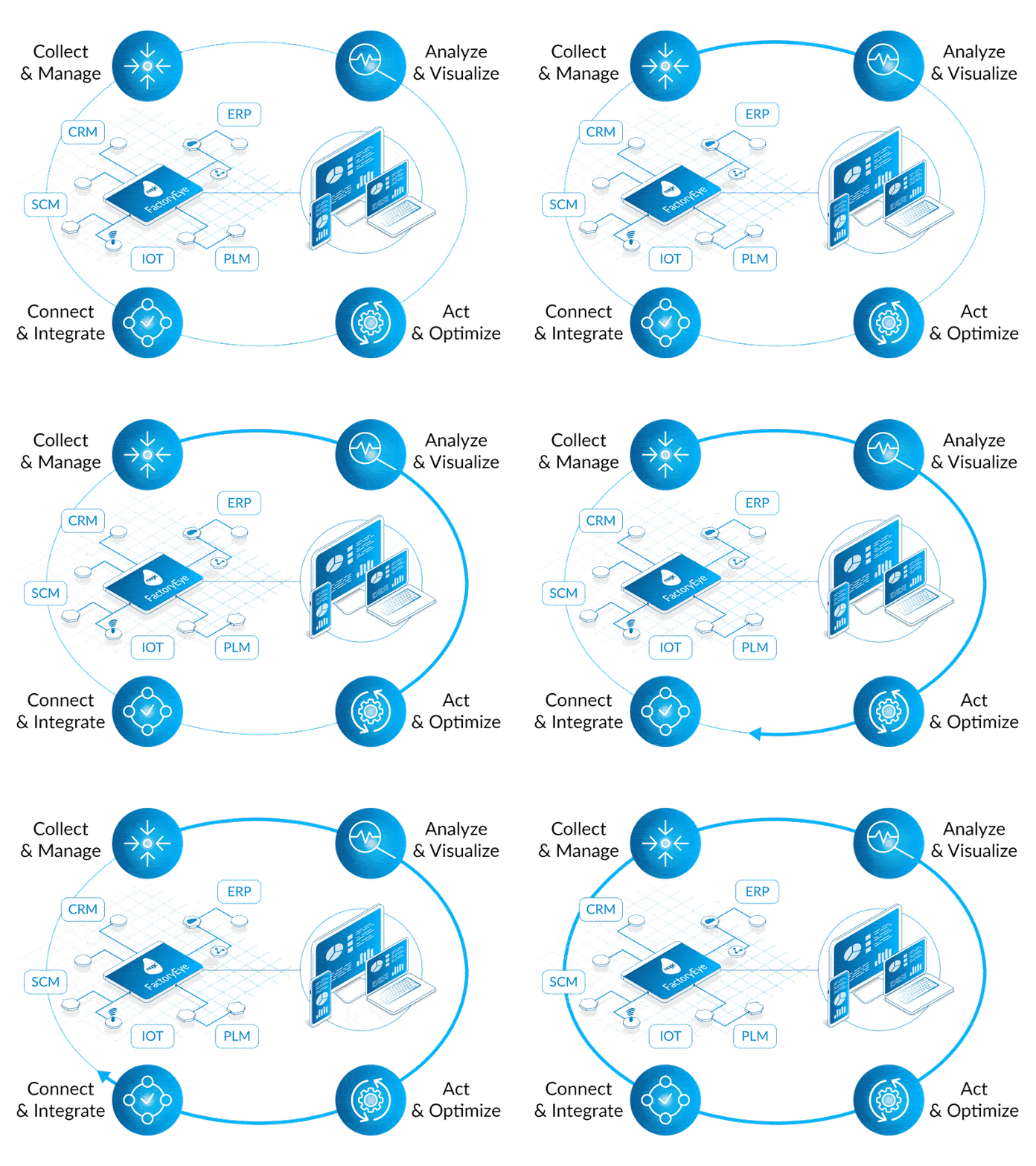
FactoryEye is a unique solution capable of fully integrating all IT systems in your company (ERP, CRM, PLM, MES, WMS, SCM) with manufacturing production machines. It provides complete visibility and analysis of operational processes in real time.

With FactoryEye, all critical and disparate data is visible and accessible in real time. Most importantly, you do not need to change existing manufacturing machines, existing systems and infrastructure to do this.

Why is the Transformation of Legacy Systems Useful in Manufacturing?

Reduces operating costs. IoT sensors monitor hard-to-reach parts and signal hazards, record fuel consumption, monitor equipment temperatures, and automatically alerts when something goes wrong.

Reduces labor costs. Employees receive the necessary data using sensors and cameras. They don’t have to go anywhere anymore to take the readings off the equipment or request information from colleagues.

Reduces the risks of accidents and, accordingly, the costs of eliminating the consequences. Devices and sensors have learned to predict abnormal situations or accidents.

In other words, the optimization of processes and productivity is the first advantage that manufacturers enjoy. In addition to cost savings, increased profitability, reduced waste, automation to avoid errors and delays, which results in faster production.

Looking for an IT Service Provider with Hands-On Experience? 

To help in such concept implementation, a manufacturing company should team up and partner with a service provider who can share their own experience in implementing digital transformation projects for the manufacturing world, based on Industry 4.0

An experienced IT provider with such engineering expertise will be able to define the project path and actions, recommend the best procedures and services, and help you find the best way to transform your factory to gain new benefits. If the project is planned and executed correctly, it will lead to increased profits and quicker ROI.

To learn more about how our solutions can help your business overcome manufacturing challenges, contact us today

Industry 4.0 whitepaper
November 30, 2020
https://www.edi2xml.com/wp-content/uploads/2020/11/EDI2XML-_-FactoryEye.png 350 1024 Tatyana Vandich https://www.edi2xml.com/wp-content/uploads/2024/08/edi2xml.com-EDI2XML-company-logo.png Tatyana Vandich2020-11-30 14:19:052025-07-04 14:45:14Industry 4.0: Do legacy Manufacturing Systems Stand a Chance?

Must-Have BigCommerce Integrations

Blog

Many companies, especially during the COVID-19 times, have begun to develop their online business in a more active and aggressive way. Increasingly, companies use Multichannel E-commerce practice, that is, selling through multiple marketplaces such as Amazon, eBay, Facebook, Instagram, as well as use third-party eCommerce platforms like BigCommerce, Shopify, Magento, Volusion or WooCommerce.

Some people think that e-commerce is the default, fully automated business model. However, this is not at all true.

Of course, e-commerce can be fully automated, but for that, you will need to do some integration work.

In this article, let us take a closer look at the popular BigCommerce marketplace and its integration with various business systems.

What is BigCommerce

BigCommerce is a SaaS (Software as a Service) or cloud-based ecommerce platform for building an online store. It is suitable for trading both physical and digital goods and creating large and high-quality online stores. BigCommerce is a powerful, functionally mature ecommerce platform that takes into account everything that at least somehow affects sales efficiency. Integration can further diversify and expand capabilities.

BigCommerce ERP/CRM Integration

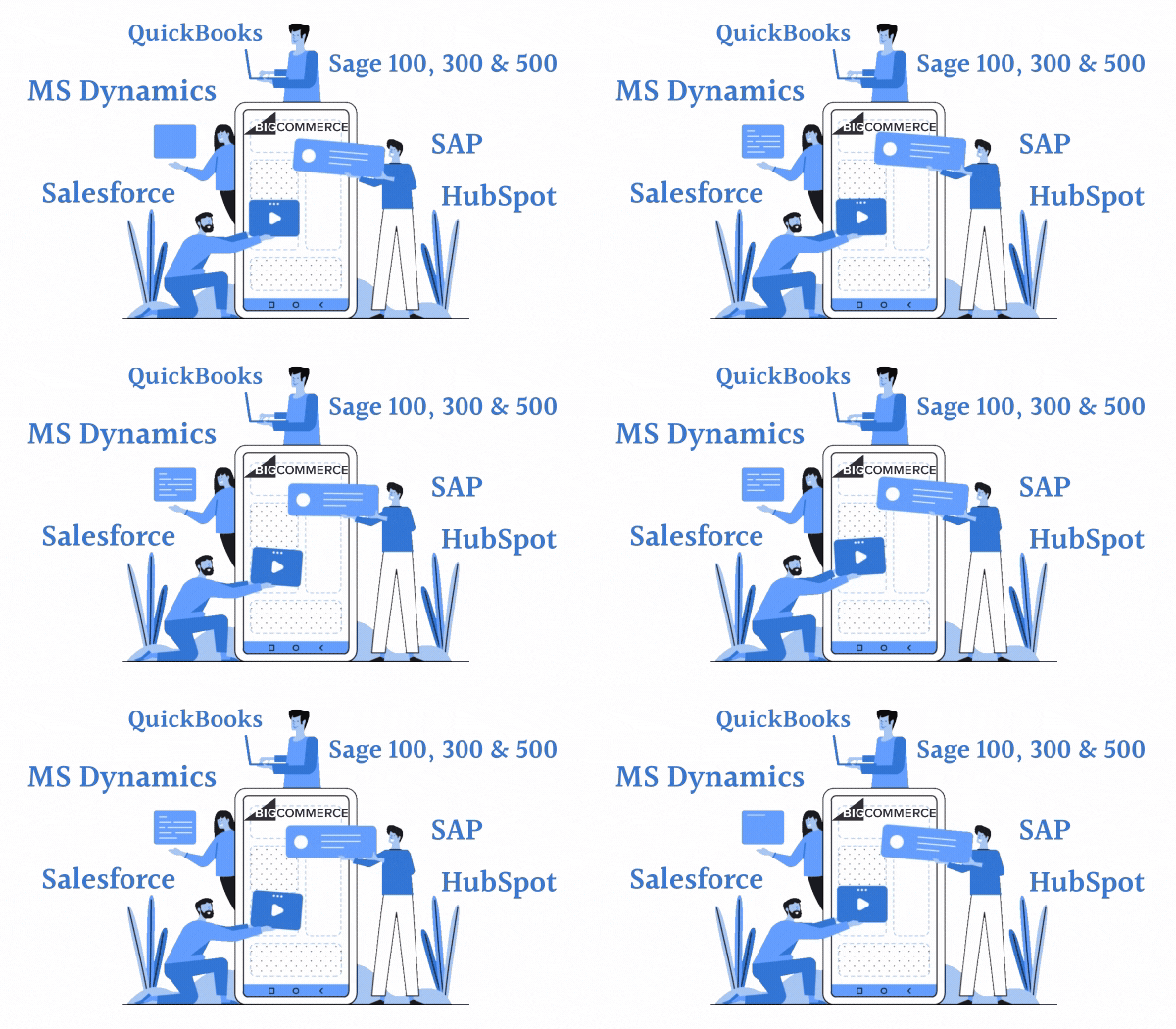
Integration of a BigCommerce account with an enterprise Accounting, ERP, or CRM system is one of the most basic integration requests. The main integrations are:

  • BigCommerce MS Dynamics integration
  • BigCommerce SAP integration
  • BigCommerce Salesforce integration
  • BigCommerce Sage 100, 300 & 500 integration
  • BigCommerce QuickBooks integration
  • BigCommerce HubSpot integration
BigCommerce Integration

For businesses that sell products through an online store, integration is an absolute must, regardless of whether they use e-commerce as an additional or primary way of making a profit.

Here are some of the benefits of integrating an online store with ERP and CRM systems:

  • Reduces the time and cost of administration and synchronization of the online store database and ERP.
  • Eliminates manual data entry and associated human errors
  • Improves the efficiency of customer service
  • Ensures the accuracy of product data. Unloading goods from ERP to the website of the online store in exact accordance with the specified parameters.
  • Receive orders from the online store in ERP. Automatic update of order statuses from the online store to the system.
  • Automatic upload of customer information from the online store to ERP and CRM. Communication with customers of the online store through CRM.

BigCommerce and EDI Integration

Since EDI remains almost the only way to transfer business information between trading partners, the integration of BigCommerce with EDI is in high demand. For integration in e-commerce, these two most common standards are usually used:

  • UN/EDIFACT – United Nations/Electronic Data Interchange for Administration, Commerce and Transport
  • ANSI ASC X12 (or EDI X12) – American National Standards Institute Accredited Standards Committee X12

EDI in e-commerce is used mostly in the supplier-seller relationship and in the dropshipping model. Therefore, EDI is the link between business partners and provides up-to-date information on stock levels, orders, shipments, and more. The most common EDI BigCommerce integration are:

EDI 850 Purchase Order from the BigCommerce account owner (hereinafter BigCommerce) to the business partner (manufacturer /supplier / dropshipping partner).

EDI 855 PO Acknowledgment from business partner to BigCommerce. As soon as the business partner receives the PO (850) from the BigCommerce, he will issue a PO Acknowledgment to confirm receiving of the PO and its items.

EDI 856 Advanced Ship Notice (ASN) from business Partner to BigCommerce. As soon as the business partner ships the merchandise to the consumer, he will issue an advance shipping notice. EDI 856 contains information about the consumer to whom merchandise was shipped, along with the tracking number of the boxes shipped as proof of shipping.

EDI 810 Invoice from business partner to BigCommerce. As soon as the business partner ships the merchandise to the consumer, he will issue an invoice for his products and services, to pay.

EDI 940 Warehouse Shipping Order from BigCommerce to the business partner. EDI 940 is used when the online shop owner outsources warehouse functionalities such as shipping and fulfillment operations to a 3PL provider. Warehouse Shipping Order is used to notify the 3PL supplier to ship the item to the buyer.

EDI 846 Inventory Inquiry/Advice from business Partner to BigCommerce. BigCommerce inventory management – this is the most common issues faced by online store owners. The use of EDI 846 is one of the ways to quickly and reliably resolve inventory management issues. Inventory Inquiry/Advice is used to notify the seller about stock availability. Depending on business agreements, EDI 846 can be sent 2-3 times a week, up to several times a day.

BigCommerce Dropshipping Integration

There is a very common situation when the BigCommerce store owner wants to dropship certain products and needs real-time data of stock levels from the manufacturer.

BigCommerce does not have a built-in native solution that would automatically sync inventory between a merchant store and a third-party supplier.

To do this, the supplier will need to connect to the seller’s store via the BigCommerce API. however, for a more robust solution, hire a third-party integration service provider to build fast, high-quality integrations.


For more information about Drop-Ship, read our blog: 4 Challenges of EDI and Drop-Ship in eCommerce


BigCommerce integration with Amazon

As stated at the beginning of this article, many companies use different platforms to grow their e-commerce business. Of course, many companies use one of the most popular marketplaces – Amazon. However, they faced to the most common issues in multichannel sales – logistics. You need to track orders, availability of goods, and stock levels at various locations.

Doing electronic business in unconnected systems is not effective and a serious waste of your time, as well as a high risk of errors.

Therefore, owners of BigCommerce store connect their BigCommerce account to Amazon Seller Central account to automatically sync Inventory stock levels between BigCommerce store and Amazon.

Reliable BigCommerce integration from the leading B2B integration provider

Our company has done many different e-commerce integrations. We help our clients to manage their e-business efficiently and find the best integration solutions.

Our solution enables companies to reduce operational delays and costly mistakes. As well as to increase work efficiency and improve the quality of customer service.

Contact us today for your free consultation.

November 24, 2020
https://www.edi2xml.com/wp-content/uploads/2020/11/BigCommerce-ERP_CRM-Integration.png 675 1200 Tatyana Vandich https://www.edi2xml.com/wp-content/uploads/2024/08/edi2xml.com-EDI2XML-company-logo.png Tatyana Vandich2020-11-24 10:24:052023-06-15 15:02:34Must-Have BigCommerce Integrations

SAP Business One Integration

Blog

What is SAP Business One (SAP B1)?

SAP Business One is an Enterprise Resource Planning (ERP) software, specifically designed for small and medium businesses; it is developed by SAP SE (Germany). SAP Business One, is an effective tool for small business management.

SAP Business One modules

SAP Business One has 15 business modules that are enough to solve most of the business problems, regardless of the industry of the organization. Each SAP B1 module can independently perform a specific business task. But at the same time, different modules can be linked together.

  • Administration
  • Business Partners
  • Banking
  • CRM
  • Inventory
  • Financials
  • Opportunities
  • Sales – A/R
  • Service
  • Purchasing – A/P
  • Production
  • Project Management
  • Resources
  • Material Requirements Planning (MRP)
  • Human Resources

SAP Business One Architecture

SAP Business One has a Client-server model architecture and can run on-premises or in the cloud.

There are various options for running SAP Business One for a business:

– SAP Business One on a SQL Server database.

– SAP Business One on Analytics in SAP HANA (if you need more analytical capabilities).

– SAP Business One Cloud – SAP’s cloud-based platform for SAP Business One.

Why SMEs need SAP Business One Integration?

Integration can help reduce errors and improve overall efficiency.

SAP Business One integration is essential to maximize the performance of every business system in an enterprise, including e-commerce account(s) on Amazon, Shopify, or BigCommerce.

When SAP B1 and other business systems or e-commerce in a company operate separately, they become isolated information systems. Information in different systems often overlaps, and there is a large amount of duplicate data that must be manually updated to ensure consistency across all systems.

As a result, enterprises are faced with the need to manually enter or transfer data, where the risk of human error is very high. All this slows down working processes and increases operating costs.

Employees who need to work in multiple unconnected business systems within an enterprise will have an increased level of frustration and reduced efficiency as they must switch between different systems.


Suggested Readings:  Efficient Salesforce and SAP Integration with Magic xpi Integration Platform


Simple, streamlined SAP B1 integration – is it possible?

The short answer is YES, it is very possible with the Integration platform Magic xpi.

SAP Business One connector of Magic xpi, the integration platform, allows performing a wide range of integrations between your SAP Business One application and other business systems.

Critical integration projects can be completed quickly and easily with Magic xpi due to built-in connectors and a no-code, drag-and-drop approach.

Integrate and automate processes with Magic xpi to benefit from the ease of maintenance and a quick return on investment.


Integrating SAP B1 with other business systems

Let’s look at a few examples of how SAP B1 can be integrated with various business systems using Magic xpi integration platform.

1. E-commerce integration with SAP Business One

Timely and error-free transfer of information to and from many e-commerce platforms such as Shopify, Amazon, BigCommerce, Magento, eBay, etc.

2. FedEx / DHL/ UPS SAP Business One Integration

Courier Integration allows your company accurate transfer of order information to your courier(s).

3. Procurement Management with SAP Business One

With SAP Business One supplier Integration, you can perform error-free import and maintenance of up-to-date supplier data into SAP Business One.

4. Inter-Company Trading

Efficiency and accuracy improvements by automating processes between companies’ business systems.

5. Enterprise Mobility

Fast and reliable mobilization of SAP data and processes for use in Order Entry, Proof-of-Delivery, Field Service apps, and more.


Have a question about integration? Book a FREE one-on-one consultation with our integration expert.


The Benefits of SAP Business One Integration

The benefits of integrating SAP with various business systems are enormous and affect almost every function in an enterprise.

Increased productivity

Integration makes employees more efficient because the technological cycle becomes shorter and employees spend less time switching between different systems or communication. In addition, they are freed from non-productive tasks and can concentrate on real tasks.

Reduced costs

Savings by significantly reducing errors in all processes. Including time to correct incorrectly entered data. There is no need to involve employees to transfer information between different systems.

Increased Revenue

More opportunities to close deals, because information about buyer and the stock is accurately available at any time. Direct access to a complete customer profile, purchase history, and new product shipments increases the opportunity for additional sales.

Increase in customer satisfaction

As the ordering cycle gets shorter and faster, the quality of customer service improves.

Customers receive quick and accurate responses to their inquiries so they are more satisfied with the service. Thus, the business will benefit from increased customer loyalty, repeat purchases.

November 16, 2020
https://www.edi2xml.com/wp-content/uploads/2020/11/EDI2XML-SAP-Integration.png 675 1200 Tatyana Vandich https://www.edi2xml.com/wp-content/uploads/2024/08/edi2xml.com-EDI2XML-company-logo.png Tatyana Vandich2020-11-16 10:07:322024-01-24 15:05:41SAP Business One Integration

What is EDI 940 Warehouse Shipping Order?

Blog

When a company decides to outsource warehouse functionalities such as shipping and fulfillment operations to a 3PL (a third-party logistics provider), it is faced with the fact that 3PL providers require the exchange of documents in electronic format – EDI (Electronic Data Interchange). The most exchanged EDI documents in this industry are: EDI 940, EDI 945, and EDI 856. Although companies already using EDI, are familiar with the common EDI transactions like EDI 810 (invoice) and EDI 850 (Purchase Order), the transactions used by the 3PL industry, might create confusion for them.


In this article, we will look closer at what EDI X12 940 is, why and who uses it, what information a Warehouse Shipping Order contains, and other important information.

EDI 940 definition

The EDI 940 (X12 940 Warehouse Shipping Order) is an electronic document that is used to notify a third-party warehouse or third-party logistics provider (3PL) that a shipment is required. Companies also use EDI 940 to confirm a shipment change or a cancellation of a previously submitted shipping order.

Who uses the EDI 940 – Warehouse Shipping Order?

Warehouse Shipping Order (or the ANSI X12 940 Transaction set) is used by the supplier/depositor (i.e. manufacturer or wholesaler) to notify the third-party logistics warehouse of the need to ship the goods to the buyer (i.e. retailer, distributor); this 940 transaction set, provides detailed information about the goods, the required timing to ship, and the recipient.
Companies use EDI 940 as instructions for shipping goods from a third-party warehouse in two different ways: either to instruct the 3PL partner to send one type of products to several different destinations, or, to send instructions to shipping various items to one location or destination.

Why do warehouses and 3PL providers use EDI?

The main business process of any warehouse or third-party logistics company is to optimize the procedure to store goods, improve efficiency when preparing shipment for delivery to its destination.

To provide uninterrupted service on time and with the least errors, warehouses and 3PL providers need to automate their business processes, which is the main reason to use EDI (Electronic Data Interchange).

Using EDI, logistics companies, 3PL providers, and warehouses can get important benefits in their operations such as:

  • Improved shipping and receiving planning
  • increase order-processing speed
  • eliminates errors associated with manual data entry
  • Reduced storage costs
  • Reduced inventory cost and accurate inventory forecasts
  • Reduced transport costs
  • Better use of staff and labor force
  • Avoid of out-of-stock situations

Key information included in an EDI 940 Warehouse Shipping Order

The 940 document is a kind of shipping instruction for warehouse; it provides the receiver with necessary information to be to prepare a shipment. At a minimum an EDI 940 transaction must include:

  • Seller’s order number
  • Buyer’s order number
  • Date of shipment
  • Buyer’s pick-up location (address, contact, etc.)
  • Products and quantities to be shipped

Depending on the type of goods and preliminary agreements with the warehouse, the Warehouse Shipping Order may contain the following:

  • Type of pallet configuration (standard and non-standard).
  • Requirements for transportation such as temperature or other special conditions for transportation.
  • Information about the carrier or third party involved in the delivery (for example, a broker).
  • Other product information (batch numbers and production codes).

Warehouse Shipping Order Transaction Set (EDI 940) Sample File

ISA*00*          *00*          *01*051950838  *ZX*901234572111  *191016*0845*U*00300*000000001*0*T*:!

GS*OW*051950838*901234572111*20191016*0845*1*T*004010!

ST*940*0001!

W05*N*0060100015****30!

N1*BT*Unicorn Systems Inc.*82*0001002290!

N3*PO Box #796044*178 WEST 56TH STREET!

N4*Austin*TX*78169*US!

N1*ABG*City Inc.*82*1200!

N3*1290 Cordeaux Street!

N4* Cupertino *CA*94129*US!

N1*SF*Golfing Inc.*82*6201!

N3*Unit 205, 8/F,Full Centre!

N4*Siu Leak Yuen, Tatin**999097*HK*93*1000!

N1*ST*Unicorn Systems Inc.*82*0004008088!

N3*3700 Unicorn Way!

N4* San Francisco*CA*95154*US!

G62*02*20191020!

G62*10*20191022!

NTE*LAB*Please print Special Unicorn Lables!

NTE*WHI*For US ship fedex 7 day shipment with A/C – 589074543!

W66*DE*B***XXXXXX*****FBEN!

LX*2!

W01*25*EA**MN*RD69256MIKQ-TR*BP*15-36082-01!

G69*SCP38x6GSec, Pb Free!

N9*5C*MY!

N9*72*2861.90.10.00!

N9*BT*VTIDD001*****IX:800001!

N9*GJ*BLR!

N9*ZV1*2861.90.10.00!

N9*ZV2*2861.90.10.00!

N9*GRD*1917!

N9*ZX*SEAL DATE**20161128!

N9*PV*VoE 616173**20191011!

N9*UQ*0001047877**20190817***IX:000050!

N9*GR*EAR85!

N9*SR*2000!

N9*ZX3*USD!

NTE*WHI*GENERAL PURPOSE!

W20****0.050*F*C!

QTY*01*25!

AMT*CA*36!

W01*50*EA**MN*RD69256MIKQ-TR*BP*15-36082-01!

G69*SCP38x6GSec, Pb Free!

N9*5C*MY!

N9*72*2861.90.10.00!

N9*BH*1661850*****IM:900004!

N9*GJ*BLR!

N9*ZV1*2861.90.10.00!

N9*ZV2*2861.90.10.00!

N9*GRD*1917!

N9*ZX*SEAL DATE**20161128!

N9*PV*VoE 616173**20191011!

N9*UQ*0001047877**20190817***IX:000050!

N9*GR*EAR85!

N9*SR*2000!

N9*ZX3*USD!

NTE*WHI*GENERAL PURPOSE!

W20****0.100*F*C!

QTY*01*50!

AMT*CA*36!

W01*5*EA**MN*RD69256MIKQ-TR*BP*15-36082-01!

G69*SCP38x6GSec, Pb Free!

N9*5C*MY!

N9*72*2861.90.10.00!

N9*BT*V5L5G602*****IX:900004!

N9*GJ*BLR!

N9*ZV1*2861.90.10.00!

N9*ZV2*2861.90.10.00!

N9*GRD*1917!

N9*ZX*SEAL DATE**20161128!

N9*PV*VoE 616173**20191011!

N9*UQ*0001047877**20190817***IX:000050!

N9*GR*EAR85!

N9*SR*2000!

N9*ZX3*USD!

NTE*WHI*GENERAL PURPOSE!

W20****0.010*F*C!

QTY*01*5!

AMT*CA*36!

W01*20*EA**MN*RD69256MIKQ-TR*BP*15-36082-01!

G69*SCP38x6GSec, Pb Free!

N9*5C*MY!

N9*72*2861.90.10.00!

N9*GT*M5L5G693*****IX:900005!

N9*GJ*BLR!

N9*ZV1*2861.90.10.00!

N9*ZV2*2861.90.10.00!

N9*ZX3*USD!

N9*GRD*1917!

N9*ZX*SEAL DATE**20161128!

N9*PV*VoE 616173**20191011!

N9*UQ*0001047877**20190817***IX:000050!

N9*GR*EAR85!

N9*SR*2000!

N9*ZX3*USD!

NTE*WHI*GENERAL PURPOSE!

W20****0.040*F*C!

QTY*01*20!

AMT*CA*36!

LX*3!

W01*25*EA**MN*RD69256MIKQ-TR*BP*15-36082-01!

G69*SCP38x6GSec, Pb Free!

N9*5C*MY!

N9*72*2861.90.10.00!

N9*BT*VTIDD001*****IX:800001!

N9*GJ*BLR!

N9*ZV1*2861.90.10.00!

N9*ZV2*2861.90.10.00!

N9*GRD*1917!

N9*ZX*SEAL DATE**20161128!

N9*PV*VoE 616173**20191011!

N9*UQ*0001047877**20190817***IX:000050!

N9*GR*EAR85!

N9*SR*2000!

N9*ZX3*USD!

NTE*WHI*GENERAL PURPOSE!

W20****0.050*F*C!

QTY*01*25!

AMT*CA*36!

W01*50*EA**MN*RD69256MIKQ-TR*BP*15-36082-01!

G69*SCP38x6GSec, Pb Free!

N9*5C*MY!

N9*72*2861.90.10.00!

N9*BH*1661850*****IM:900004!

N9*GJ*BLR!

N9*ZV1*2861.90.10.00!

N9*ZV2*2861.90.10.00!

N9*GRD*1917!

N9*ZX*SEAL DATE**20161128!

N9*PV*VoE 616173**20191011!

N9*UQ*0001047877**20190817***IX:000050!

N9*GR*EAR85!

N9*SR*2000!

N9*ZX3*USD!

NTE*WHI*GENERAL PURPOSE!

W20****0.100*F*C!

QTY*01*50!

AMT*CA*36!

W01*8*EA**MN*RD69256MIKQ-TR*BP*15-36082-01!

G69*SCP38x6GSec, Pb Free!

N9*5C*MY!

N9*72*2861.90.10.00!

N9*BT*V5L5G602*****IX:900004!

N9*GJ*BLR!

N9*ZV1*2861.90.10.00!

N9*ZV2*2861.90.10.00!

N9*GRD*1917!

N9*ZX*SEAL DATE**20161128!

N9*PV*VoE 616173**20191011!

N9*UQ*0001047877**20190817***IX:000050!

N9*GR*EAR85!

N9*SR*2000!

N9*ZX3*USD!

NTE*WHI*GENERAL PURPOSE!

W20****0.010*F*C!

QTY*01*5!

AMT*CA*36!

W01*20*EA**MN*RD69256MIKQ-TR*BP*15-36082-01!

G69*SCP38x6GSec, Pb Free!

N9*5C*MY!

N9*72*2861.90.10.00!

N9*GT*M5L5G693*****IX:900005!

N9*GJ*BLR!

N9*ZV1*2861.90.10.00!

N9*ZV2*2861.90.10.00!

N9*ZX3*USD!

N9*GRD*1917!

N9*ZX*SEAL DATE**20161128!

N9*PV*VoE 616173**20191011!

N9*UQ*0001047877**20190817***IX:000050!

N9*GR*EAR85!

N9*SR*2000!

N9*ZX3*USD!

NTE*WHI*GENERAL PURPOSE!

W20****0.040*F*C!

QTY*01*20!

AMT*CA*36!

W76*100*0.20*58!

SE*177*0001!

GE*1*1!

IEA*1*000000001!

Warehouse Shipping Order Transaction Set (EDI 940) Specification

EDI 940 Warehouse Shipping Order is a transaction set of the X12 Standard that is widely used in North America.

A three-code number – 940, identifies the warehouse Shipping Order Transaction Set. The document consists of the following segments:

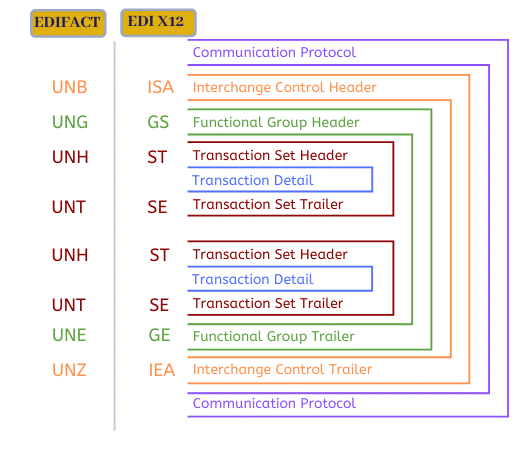
Message Envelop / Group:
• ISA Interchange Control Header
• GS Functional Group Header

Heading:
• ST Transaction Set Header
• W05 Shipping Order Identification (N = Original Order)
• N1 Name (‘SF’ – Ship-from, ‘SF’ – Ship-from)
• N3 Address Information
• N4 Geographic Location
• G62 Date/Time (‘02’ – Requested Arrival ‘10’ – Pick-Up Date)
• NTE – Notes/Special Instructions (‘WHI’ Warehouse Instruction)
• W66 Warehouse Carrier Information

Detail (Begins detail loop):
• LX – Assigned Number
• W01 – Line Item Detail – Warehouse
• G69 Line Item Detail – Description
• N9 Reference Identification
• W20 – Line-Item Detail (Miscellaneous)
• AMT – Monetary Amount

Summary:
• W76 Total Shipping Order
• SE Transaction Set Trailer (the last segment of each transaction set)

Message Envelop / Group Footer:
• GE Functional Group Trailer
• IEA Interchange Control Trailer

Workflow to Exchange EDI 940 Warehouse Shipping Order

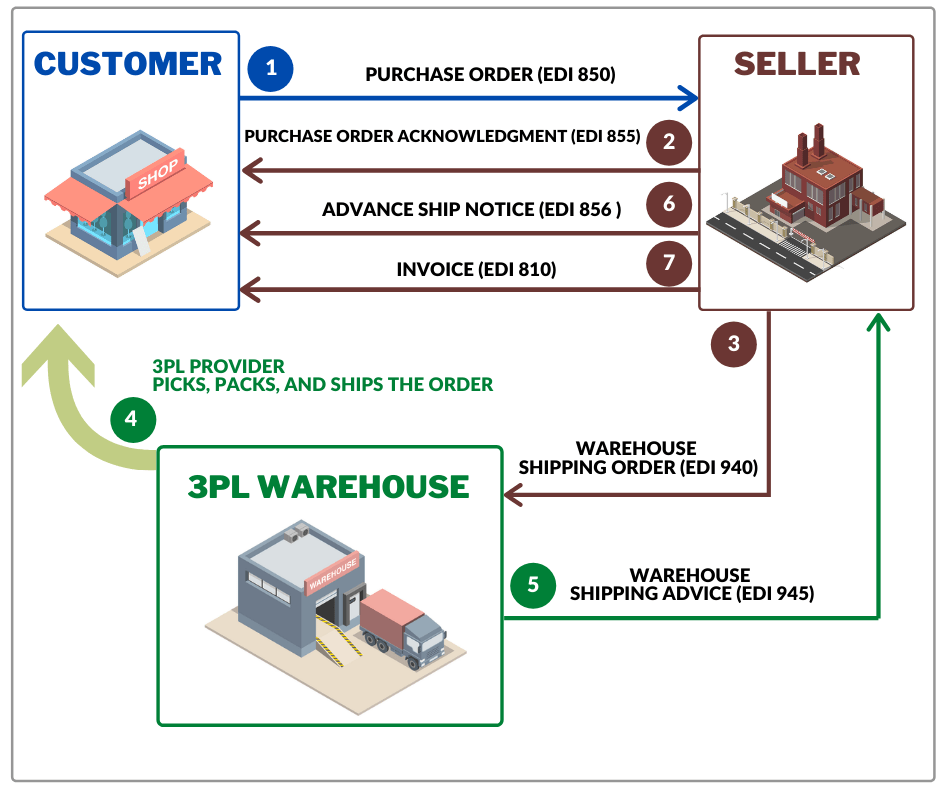
Let’s look at one of the possible and simplest scenarios in which the exchange of an EDI 940 document is involved. It should be considered that the manufactured or ordered products, are delivered in advance to the 3PL warehouse (your fulfillment partner) and the inventory of your store in your CRM is synchronized with the inventory of the 3PL warehouse. The standard workflow for exchanging a warehouse shipping order can be described as follows:

1. The customer (or buyer) sends a Purchase Order (EDI 850) to the supplying company (or seller).

2. The seller responds to the customer by EDI, transmitting an 855 Purchase Order Acknowledgment to accept / reject / modify the Purchase Order.

3. Based on the EDI 850 order, the supplier than sends the warehouse shipping order (EDI 940) to the 3PL warehouse, describing the order details.

4. The warehouse picks, packs, and ship the order

5. The warehouse sends back a warehouse shipment notification (EDI 945) to the vendor to confirm the shipment that was transmitted to the buyer.

6. Upon receipt of the EDI 945 transaction, the supplier (or seller) generates an EDI 856 – Advance Ship Notice to notify the buyer of an upcoming delivery.

7. The supplier than sends an Invoice (EDI 810) to the buyer upon receipt of the goods; sometimes the invoice is sent just about the same time when the merchandise is dispatched to the buyer.

Workflow to Exchange EDI 940 Warehouse Shipping Order

The above workflow is for a general understanding of the process, so keep in mind that there can be a much more complex relationship between buyer, seller, and third-party warehouse. In addition to the transactions mentioned above, the 3PL provider and supplier can exchange other documents such as:

• Warehouse Stock Transfer Shipment Advice ( EDI 943)
• Warehouse Stock Transfer Receipt Advice (EDI 944)
• Inventory Inquiry/Advice (EDI 846)
• Warehouse Inventory Adjustment Advice (EDI 947)

EDI 940 and EDI 945

The Warehouse Shipping Advice (EDI 945) is playing a special role in the partnership between the 3PL provider and supplier. The function of Warehouse Shipping Advice is like an EDI 856 (Advance Ship Notice).
Using the EDI 945 warehouse notifies the seller of the shipment. Moreover, by EDI 945, the 3PL provider notifies the seller whether a full order has been shipped or has been shipped with exceptions.
EDI 945 usually contains the following information:
• buyer’s order number
• the actual date of shipment
• used carrier
• bill of lading number
• Item and quantity
The warehouse can also explain why the shipment date was changed, why the products were excluded from the batch and information about the replacement of the product.

Benefits of using an EDI 940 Warehouse Shipping Order

The advantages of using EDI in general and EDI 940 transaction, over traditional methods of communications such as e-mail, paper or fax, are undeniable:

1. Reduced time of order processing.

2. Reduced expenses related to office supplies and delivery of documents, as well as for staff salaries.

3. Reduced manual data entry, making it easier for both sellers and warehouses

4. Elimination of loss of documents and human errors.

5. Instant delivery and receipt of documents.

6. Speed up payments

3PL Warehouse EDI Integration

You can start exchanging EDI 940 messages in less than an hour using our EDI2XML REST web service. You do not need to commit to any contracts; We provide a free 15-days trial period.

You can also take advantage of our over 21 years of EDI integration experience by choosing a fully managed EDI service.

Contact us for a free consultation with one of our EDI experts to choose what works best for your business.


You may also be interested in reading about:
– Electronic Data Interchange (EDI) in the Supply Chain
– How EDI can speed the receiving of goods in a warehouse
– EDI for Third-Party Logistics providers (3PL)
– DELFOR, DELJIT, DESADV – key EDI messages in supply chain management for manufacturing


Our EDI2XML Blog was selected by Feedspot as one of the Top 10 EDI (Electronic Data Interchange) Blogs on the web.

August 19, 2020
https://www.edi2xml.com/wp-content/uploads/2020/08/EDI-940.png 350 1024 Tatyana Vandich https://www.edi2xml.com/wp-content/uploads/2024/08/edi2xml.com-EDI2XML-company-logo.png Tatyana Vandich2020-08-19 16:22:082024-07-24 15:30:18What is EDI 940 Warehouse Shipping Order?

Electronic Data Interchange (EDI) in the Supply Chain

Blog

This post was updated to reflect current trends and information.


What is EDI?

EDI or Electronic data interchange is a technology for exchanging information in real-time between business partners, based on standard and structured electronic messages.

EDI has particularly gained popularity in logistics and retail. This is a recognized standard in business because this protocol helps accelerate the entire supply chain – from procurement to payment.

With a large volume of transactions, large stocks, and numerous suppliers, retailers have a high return on investment when adopting EDI for business documents exchange.


Complete List of EDI Codes


Why use EDI in the supply chain?

Disadvantages of paper workflow faxing or email:

  • Considerable labor cos for working with orders and shipments.
  • The slowness of the processes.
  • Frequently occurring human errors.
  • Difficulties in relations with large buyers-clients.
  • Delays and disruptions of supplies.
  • Discrepancies between order and delivery.
  • Repeated manual entry of all data into various systems (accounting, CRM, ERP, etc.)

EDI avoids problems by providing complete control over supplies and accelerating the flow of funds.

Thanks to EDI, trading partners can send and receive messages instantly. Each party (retailer, supplier, logistics company) onboarded on EDI once, will immediately get the opportunity to exchange information with their business partners without thinking about the features and capabilities of partner accounting systems, their workflow, or the required document format.

How does EDI work?

EDI for logistics

EDI exchange protocol is based on standards (i.e. X12, EDIFACT…) that govern the formats of messages transmitted between business partners electronically.
The necessary data from one company is extracted, formatted, checked, and sent to the necessary business partners, either directly or via EDI service providers…

During the transfer, the EDI service provider translates and maps the information into the required EDI standard, preserving its content.

The receiving party immediately receives the message in a convenient and understandable format. It can be X12, EDIFACT, Json, XML, etc.

Without an EDI service provider, electronic data exchange is very difficult to manage internally with the company’s workforce. It will take many IT professionals who have experience in EDI, the company will need to deploy a large-scale infrastructure to ensure the smooth operation of the EDI service. In addition, many business partners can have a huge variety of IT systems and formats, so you must be able to adapt to each of partner requirements individually. Such financial, labor, and time costs are irrational. That is why, more companies are outsourcing their Integration especially EDI mapping and integration, to outside service providers, to reduce the burden from their internal staff.


Do you need the right advice on how to choose the right EDI service provider or you are thinking about changing the current EDI provider?

Read this article: How to change your EDI Service Provider


Typical EDI workflow process

Purchase Order – ORDERS (EDI 850 Document)

The buyer company sends the supplier a message with the list of goods that she plans to purchase. PO contains date and time of delivery, address, reference to the contract, prices, quantity of goods, and other necessary information.


Useful reading: All you need to know about EDI ANSI X12 Transaction Set 850 Purchase Order


Purchase Order Response – ORDRSP (EDI 855 Purchase Order Acknowledgement)

The supplier sends the buyer a response to his order, noting his consent to the transaction and indicating how accurately the order can be executed. It may also indicate the change in prices for the product selected by the buyer. The buyer receives advance confirmation of prices and quantity of goods from the supplier, can plan the state of their inventory. The supplier at this time reserves goods in his warehouse for delivery.

Despatch advice – DESADV (EDI 856 Advanced Ship Notice in the X12 standard).

At the same time as shipment, the supplier sends a notice to the buyer. It helps simplify and speed up the process of goods acceptance, as EDI 856 (DESADV) contains detailed information about the cargo. For example, container numbers, the hierarchy of packages indicating their types, barcodes, and contents, as well as the physical characteristics of the goods, etc. The purchasing company can use RFID scanners and the Serial Shipping Container Code (SSCC) when receiving. This helps speed up the receipt and get rid of mistakes.

Receiving advice RECADV (EDI 861 – Receiving Advice/Acceptance Certificate)

When the buyer accepts the goods from the supplier, he sends him a RECADV message on the actually received and delivered goods. Thus, the Receiving advice is a report from the buyer to the shipper to indicate that the order arrived intact at its final destination. Moreover, rapid notification of the supplier allows him to generate invoices quickly.

Additional and specific types of EDI messages

UN/EDIFACT Price/sales catalog message (PRICAT)

PRICAT is also known as EDI 832 Price/Sales Catalog in ANSI X12 standard. Companies use the Price/sales catalog message to transmit commercial information to business partners about products, especially about current prices.

EDIFACT RETANN – Announcement for returns message | EDI 180 – Return Merchandise Authorization and Notification

RETANN or EDI 180 in X12 standard sent by the buyer when returning the goods to the supplier for any reason. The message contains the characteristics of the goods planned for return, as well as the terms and reasons – defective, non-standard, expiration, re-grading, etc.

EDIFACT COACSU Commercial Account Summary

Exchange EDI messages between the accounting departments of the supplier and the buyer, which contain the calculations of companies for a certain period.

EDIFACT INVRPT Inventory Report Message | EDI 846 Inventory Inquiry/Advice

INVRPT or EDI 846 transaction set reports the quantity of goods available. Often used to report on the availability and movement of goods.


Useful reading:
What is UN/EDIFACT INVRPT Inventory report message?

What is EDI 846 document?

How EDI can speed the receiving of goods in a warehouse


Benefits of EDI for Supply Chain Management

EDI has the following advantages:

– Reducing Cost: Automation of processes that were previously performed by employees manually using paper documents and / or email, will certainly reduce costs.

– Improving efficiency and productivity: Processing more business documents in less time.

– Reducing errors: The standardization of EDI ensures that the transmitted data is formed into a standard document before it is transmitted.

– Optimization of tracking and reporting: EDI can be integrated with a variety of business systems (ERP, CRM, Warehouse Management, accounting, etc.) This allows enterprises to improve business processes and provide data collection and analysis.

– Building loyalty with business partners: EDI provides the instant transfer of necessary documents, which makes the delivery of goods faster and more reliable.

Effective EDI Solution for Supply Chain

For over 21 years, EDI2XML has been helping companies solve complex integration issues and providing complete EDI communication between business partners.

Improve your business process and maximize your supply chain performance with our EDI solutions. Contact us for a free consultation.


You may also be interested in reading about:

  • DELFOR, DELJIT, DESADV – key EDI messages in supply chain management for manufacturing
  • ORDERS and ORDRSP: The main EDIFACT messages in the supply chain management
  • What Are the Differences Between ANSI X12 and UN/EDIFACT
July 13, 2020
https://www.edi2xml.com/wp-content/uploads/2020/07/EDI-for-supply-chain.png 350 1024 Tatyana Vandich https://www.edi2xml.com/wp-content/uploads/2024/08/edi2xml.com-EDI2XML-company-logo.png Tatyana Vandich2020-07-13 09:00:022021-09-09 15:35:07Electronic Data Interchange (EDI) in the Supply Chain

All You Need to Know About EDI ANSI X12 Transaction Set 850 Purchase Order

Blog

What Does EDI Stand For?

Electronic Data Interchange (EDI) is one of the fundamental protocols of business documents exchange, for companies collaborating in today’s business world.

Electronic Data Interchange (EDI) is an electronic exchange of business information between companies in a standardized format. This technology is used by businesses around the world as their main method to exchange business documents. Thus, EDI is a modern and effective document exchange standard and sometimes the only way to exchange documents between trading partners.

What is an EDI Purchase Order?

ANSI X12 EDI 850 Purchase Order Transaction Set simply named EDI 850 or EDI X12 850 or just PO is a fundamental document in EDI. EDI 850 is a formal request sent by the buyer (purchasing company) to the supplier (seller) for the demand of delivery of goods and/or services at an agreed price.

What Information an EDI Purchase Order Contains?

A typical EDI 850 Purchase Order includes the following information:

  • Purchase order date
  • Purchase order number
  • Item description
  • Item price and quantities
  • Payment terms
  • Discounts
  • Shipping details
  • Requested delivery date
  • Location(s) where the goods should be delivered to

How Does an EDI Service Provider Manage the EDI 850?

Typically, the buyer creates a Purchase Order in his internal ERP system (i.e. SAP, Microsoft Dynamics, JD Edwards, etc.). The Purchase Order can be created in the ERP system automatically or manually, depending on the business process of the company. Then, the generated Purchase Order is transferred to the EDI provider, or the provider will pick it up directly from the ERP system of the company. The EDI service provider than converts the purchase order document to the ANSI X12 EDI 850 transaction set. After conversion, the EDI 850 is sent to the supplier (or the destination).


Useful information:

If you are looking for an EDI Service provider or you are not satisfied with your current provider and want to get the best EDI services, find out here how to choose the right EDI Service Provider.


What is the Difference Between EDI 875 and 850?

EDI 875 and EDI 850 are two different transaction sets that are used in electronic data interchange (EDI) to exchange business documents between trading partners.

The EDI 850 transaction set is used for purchase orders, while the EDI 875 transaction set is used for grocery products purchase orders. The main difference between the two is the specific industry or business sector they are designed for.

The EDI 850 Purchase Order transaction set is used across various industries to communicate the request for goods or services from a buyer to a supplier. The 850 typically includes information such as item description, quantity, price, delivery date, and payment terms.

On the other hand, the EDI 875 Grocery Products Purchase Order transaction set is used specifically in the grocery industry for the purchase of perishable and non-perishable goods, and includes additional information such as weight, temperature requirements, and other special handling instructions.

In summary, while both EDI 850 and EDI 875 are used for purchase orders, they are designed for different industries and have different data requirements.

EDI Communication Protocols to Transfer EDI 850

For the exchange of EDI documents, including EDI 850, there are various communication Protocols:

VAN (Value-Added-Network)

VAN is a private, hosted service and a secure way to exchange EDI data between trading partners.

AS2 (Applicability Statement 2)

AS2 (Applicability Statement 2) is secure messaging over the Internet using digital certificates and encryption.

FTP (File Transfer Protocol)

FTP (File Transfer Protocol) is a standard network protocol built on a client-server architecture.

sFTP (Secure File Transfer Protocol)

sFTP (Secure File Transfer Protocol) secure version of FTP for data transfer over the Internet.

HTTPS (Hypertext Transfer Protocol Secure)

HTTPS (Hypertext Transfer Protocol Secure) is an extension of the HTTP and a secure way for communication over the Internet.

Moreover, one company may use different protocols to exchange EDI documents with its various trading partners. This usually happens because suppliers have to meet the requirements of their trading partners.


A Typical Set of EDI Documents Involved in EDI X12 850 Workflow

For a trading relationship between business partners, a single EDI 850 transaction is not enough. Although a purchase order is a basic document, business partners generally would exchange the additional following documents:

  • EDI 997 Functional Acknowledgement – sent by the receiver of the transaction as a response to confirm receipt of EDI 850 or any other EDI document
  • EDI 855 Purchase Order Acknowledgment used by sellers to accept, reject, or modify a Purchase Order.
  • EDI 860 Purchase Order Change Request – used by buyer if necessary to make changes to a previously submitted Purchase Order; or to accept change initiated by the seller.
  • EDI 856 Advance Ship Notice –send by a seller to a buyer to describe the shipped items and type of packaging. ASN is sent immediately after the goods left the seller’s location.
  • EDI 810 Invoice –request for payment of goods or services

EDI X12 850 Transaction Set Structure

An EDI X12 850 (Purchase Order), as well as all other EDI X12 documents, consists of different segments where the initial segments are called Header, and the final segment is called Trailer:

Interchange Control Header (ISA) /Trailer (IEA)

Functional Group Header (GS) / Trailer (GE)

Transaction Set Header (ST) / Trailer (SE)

edi and EDIFACT structure

For more information about EDI structure, data elements and terminology learn our article:

EDI ANSI ASC X12 Standards – Technical Overview


EDI X12 850 Purchase Order Sample

The ISA, GS, and ST elements contain a Functional ID code, the sender’s and receiver’s ID code, date, time, etc.

The transaction set envelope contains transaction detail, with information about a product, weight, size, color, volume, etc.

ISA*00*          *00*          *ZZ*A1STORES    *12*5142645505     *190510*0728*|*00403*100000013*0*P*}

GS*PO*A1STORES*5142645505*20200510*0728*1013*X*004030

ST*850*1013

BEG*00*SA*2332233**20200510

REF*IA*66910

PER*BD*Contact Name*TE*123-455-7880

FOB*DF

DTM*010*20200517

DTM*001*20200525

TD5*****Carrier Routing*******CG

N1*ST*Towner Square Schooms*92*006

N3*Williston Towner Square*2100 11th St SW

N4*Williston*ND*58701

PO1*1*4*EA*4.15**UP*066810348563*IT*WACT750SP16-BLK

CTP**RTL*7.99

PID*F*08***Nike Boy Short Black sz M

PO1*2*6*EA*5.00**UP*066810349983*IT*WACT170SP16-AMP

CTP**RTL*7.99

PID*F*08*** Reebok Boy Short Abstract Print sz M

PO1*3*4*EA*5.25**UP*066810349747*IT*WACT790SP16-BLK

CTP**RTL*9.99

PID*F*08*** Puma Boy Short Red sz M

CTT*3

SE*22*1013

GE*1*1013

IEA*1*100000013

Although EDI 850 must comply with ANSI ASC X12 standard, a Purchase Order can vary greatly depending on industry and trading partners. Even in the same industry, EDI 850 may vary, as it is customized to the specific needs of the company.

EDI 850 Benefits and Opportunities

Profitability

  • speeds up the supply chain
  • saves on printing and document delivery
  • increases the speed of payment
  • saves resources for duplication, sorting, and storage of documents

Efficiency

  • instantly notifies partners of new orders
  • eliminates manual input errors
  • reduces the number of adjustments
  • allows a rational use of human resources

Integration

  • Integrates with any business system (ERP, CRM, Warehouse Management, accounting, etc.)
  • allows companies to build analytical reports
  • connects business partners from anywhere in the world

Security

  • electronic documents in encrypted and unchanged form
  • eliminates the risk of losing orders

About EDI Provider EDI2XML

Our knowledge, expertise, and experience in EDI integration and automation allow us to provide our customers with solutions that take the business to a new level.

We cooperate with leading technology companies to develop cutting-edge solutions that can change your business. We use innovative solutions for various industries and help our customers solve the most complex EDI integration issues.

edi 850

RELATED POSTS:

  • DELFOR, DELJIT, DESADV – key EDI messages in supply chain management for manufacturing
  • ORDERS and ORDRSP: The main EDIFACT messages in the supply chain management
  • What is Advanced Ship Notice (ASN) 856 transaction set?
  • What Are the Differences Between ANSI X12 and UN/EDIFACT
June 15, 2020/0 Comments
https://www.edi2xml.com/wp-content/uploads/2020/06/edi2xml-850.png 350 1024 Tatyana Vandich https://www.edi2xml.com/wp-content/uploads/2024/08/edi2xml.com-EDI2XML-company-logo.png Tatyana Vandich2020-06-15 16:51:482026-06-04 15:12:43All You Need to Know About EDI ANSI X12 Transaction Set 850 Purchase Order
Page 13 of 24«‹1112131415›»
Recent
  • EDi Integration for SMB - Complete Guide
    Electronic Data Interchange (EDI): The Complete Guide for...July 17, 2026 - 4:46 pm
  • EDI Process Guide from EDI EDI Provider
    How EDI Documents Work Together: A Complete Guide to the...July 9, 2026 - 1:22 pm
  • Wayfair EDI & API Integration Guide
    Wayfair EDI & API Integration Guide for SuppliersJune 30, 2026 - 3:24 pm
  • Promotional banner about whether EDI is required for small businesses and a supplier’s guide to retail onboarding. Women at a desk inside a circular cutout image on the right.
    Is EDI Required for Small Businesses? A Supplier’s Guide...June 17, 2026 - 7:02 pm
  • EDI compliance with Loblaw
    How to Meet Loblaw EDI Requirements as a Small BusinessJune 4, 2026 - 2:05 pm
Popular
  • How to Quickly Connect to a Large Retailer's EDI Requirements
    How to Get EDI-Compliant Quickly For A Large RetailerNovember 21, 2025 - 4:29 pm
  • EDI-as-a-services
    EDI Translation Software “On-premises” or “As...January 21, 2014 - 1:28 pm
  • order-automation in e-commerce
    Why Is It Crucial to Automate the E-Commerce Order Fulfillment...May 10, 2022 - 1:58 pm
  • EDI for Logistics and transportation
    EDI Integration for Efficient Transportation ManagementOctober 6, 2023 - 1:33 pm
  • information technology definitions
    Business Tech Terms DefinitionsMay 24, 2018 - 1:32 pm

Browse by tag

Amazon Amazon Integration ANSI ASC x12 ASC X12 EDI B2B EDI integration e-commerce e-commerce business e-commerce integration eCommerce eCommerce integration EDI EDI2XML EDI 850 EDI as a Service EDI Communication EDI converter EDIFACT EDI for supply chain EDI for Third-Party Logistics EDI for transportation EDI implementation EDI Integration EDI Integration Project EDI project EDI Translation EDI Web Service EDI x12 ERP Integration integration platform integration project JDE Magic xpi Magic xpi Integration platform NetSuite online store Salesforce Shopify Shopify eCommerce integration Shopify integration Supply Chain Supply Chain Management Translation Software X12 EDI XML

Subscribe to our Blog

Menu

  • Home
  • About the EDI2XML Company
  • About EDI2XML EDI Converter
  • Blog
  • Book A Free Consultation
  • Privacy Policy EDI2XML Company

Our Services

Fully Managed Integration

E-Commerce Integration

Business Systems Integration

Fully Managed EDI

EDI Web Service 

On Premises EDI 

Managed Cloud Service


Latest Blog Posts

  • EDi Integration for SMB - Complete Guide
    Electronic Data Interchange (EDI): The Complete Guide for Modern BusinessesJuly 17, 2026 - 4:46 pm
  • EDI Process Guide from EDI EDI Provider
    How EDI Documents Work Together: A Complete Guide to the EDI Transaction ProcessJuly 9, 2026 - 1:22 pm
  • Wayfair EDI & API Integration Guide
    Wayfair EDI & API Integration Guide for SuppliersJune 30, 2026 - 3:24 pm

Contact Us

400 Blvd Curé-Labelle, #304 Laval QC H7V 2S7 Canada

Contact EDI2XML Team
Phone: +1 450-681-3009
Website: https://www.edi2xml.com/

© 2000-2026 EDI2XML (by Namtek Consulting Services). All rights reserved.
  • Link to Facebook
  • Link to LinkedIn
  • Link to X
  • Link to Youtube
  • Blog
Scroll to top Scroll to top Scroll to top