EDI2XML
  • About
    • The Company
    • EDI2XML
    • Advantages
    • Partnership with EDI2XML
    • Testimonials
  • Services
    • Enterprise AI
    • Fully Managed Integration
    • Fully Managed EDI Services
    • EDI Web Portal
    • EDI Web Service
    • EDI On Premises
    • Managed Cloud Services
    • Amazon Integration
    • Shopify Integration
    • BigCommerce Integration
    • NetSuite Integration
    • JD Edwards Integration
    • Dynamics 365 Integration
    • SAP B1 Integration
    • Salesforce Integration
    • Industry 4.0 Integration
  • Pricing
    • EDI Managed Services
    • EDI Web Service
    • EDI On-Premises
    • Managed Cloud Services
    • Shopify Integration
    • JD Edwards Integration
    • E-commerce Integration
    • All other Integrations
  • Blog
  • Resources
    • Downloadable Guides
    • List of EDI Codes
    • List of EDIFACT Messages
    • EDI Documents Library
    • Trading Partners
    • Customer Case Studies
  • Contact us
  • Book a Consultation
  • Click to open the search input field Click to open the search input field Search
  • Menu Menu
  • Link to Facebook
  • Link to LinkedIn
  • Link to X
  • Link to Youtube

Why You Should Automate Inventory Updates for Your Shopify Store?

Blog

This post was updated to reflect current trends and information.

One of Shopify‘s main challenges is managing your inventory. Without well-organized inventory management, you can lose a lot in sales. A bad situation is when you sell products that you no longer have in stock, which can lead to additional costs for refunding money, irritating customers, and losing loyalty to your store.

Manually updating your inventory level in the Shopify Admin Center can be impractical and you also lose a lot of time and you have no guarantee that you will avoid errors. Thus, how to avoid these problems?

Let’s first look at what Shopify is and how the ordering process takes place.

What is Shopify and How Does it Work?

Shopify perhaps is one of the most popular brands in the world of e-commerce, but not everyone knows how it works. Simply put, Shopify is the software you pay its usage, based on a monthly subscription, under the SaaS model. It allows you to create an eCommerce site and use the solution payment gateway to sell both digital and physical products, to customers around the world.

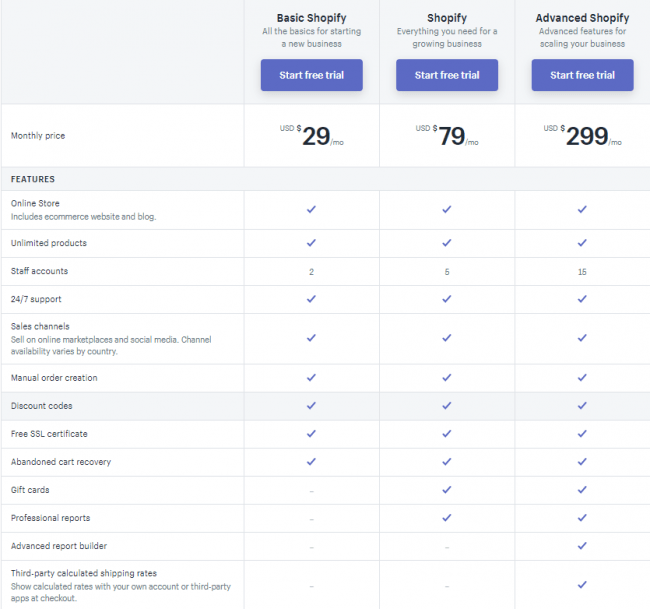
When you setup your Shopify store, you can choose one of 3 available plans:

  • Basic Shopify – $29 monthly
  • Shopify – $79 monthly
  • Advanced Shopify – $299 monthly

Shopify in no way limits the number of products that you can have in your store. You can sell an unlimited number of items on every Shopify plan.


Many experts recognize Shopify as the best solution in the e-commerce market for investing in the growth of their online store.


Typical Workflow for Online Orders

Understanding Shopify order processing is a fundamental part of your e-commerce business. Let’s briefly review the main stages of Shopify order processing when your Shopify store is not synchronized with your business systems.

Every Shopify online order goes through certain stages. Each of these stages requires a different action in your Shopify store. You can configure Shopify to automatically perform these actions or process them manually.

Capture Payment of a Placed Order

When a client makes a payment by credit card, payment information must be received and sent to his bank for processing. You can receive payments manually or automatically. If you set a manual capture, you will need to capture funds for each order from the Shopify orders area. In this way, (if you configured your settings for manual capture funds), you will not automatically receive payment from orders. And attention, you won’t be able to collect any money for an order after the authorization period ends.

Thus, manual payment management requires a lot of time and effort, especially if you have many orders.

But if you just automate the capture payment, without automating inventory updates, there is a high risk of getting money for goods that are no longer in stock.

Fulfill the Paid Order

When a client buys something from your online store, this information appears as a new order in the Orders page of Shopify. Simultaneously you receive a new order notification by email. The customer receives an order confirmation by email. The fulfillment procedure typically includes the following stage:

1. You log into your ERP/accounting system to create an order record from the Shopify store.

2. Search for customer records in your ERP/accounting system. If you do not find customer information in your system, you must manually enter all the information about the new customer.

3. To account for purchases, you need to manually adjust your inventory levels. This is more complicated than it seems at first glance, because your product identifiers (Shopify creates a unique product ID for every item you sell) in your online store may not exactly match the SKUs (Stock Keeping Unit- the code that identifies the product within your business).

4. After entering and adjusting all the related order information, you can proceed with the order, namely: picking and packaging items, labeling the order for shipment, shipping the package with a mail carrier. The steps for fulfillments may be different depending on the fulfillment method used:

  • Fulfill own orders. You execute orders yourself, packing and sending your goods.
  • Dropshipping (fulfillment services). Dropshipping partners stores, packs, and ships the goods for you to your customers. The typical dropshipping services that integrate with Shopify are Oberlo Dropshipping and Fulfillment by Amazon but it could be other services.
  • Custom dropshipping Customs dropshipping services realize your orders when they receive a request by e-mail. This request is generated when you mark an item as fulfilled in your Shopify store.

5. After completing the order, you must take note of the shipping information and return to your Shopify store to send this information to the customer for tracking.

6. If you use CRM you need to manually update the information to reflect the sale you just completed.

Shopify Refund, Return, or Canceling Orders

If the process described above seems familiar to you, most likely you are tired of manually entering data between business systems and your store. Either you must incur large salary costs for employees who are responsible for data entry. But the worst part is that you often find errors as a result of re-entering data. Thus, part of the orders ends with a return.

Did you know that according to e-commerce returns statistics 65% of all returns are the merchant’s fault (whether it’s an incorrect size, color, etc.) But for sure, your goal is to minimize returns in your store and increase customer satisfaction.


Our recommendation: to better manage your business we highly recommended automating all your order processing at each stage.


Inventory Updates Issues

Another big common problem in online shops is inventory updates. Inventory levels in the online store and business system are never synchronized; as a result, it is typical in such case to find companies issuing lots of refunds to offset ordered goods that are not available for shipping.

Shopify inventory updates

It’s no secret when returning the goods and reimbursing their payment, not only profitability is reduced, but unexpected order processing work is added.

Shopify takes its share from each transaction that occurs in your online store. Fees are: 30¢ for every online transaction, plus 2.9% to 2.4% depending on your plan. Even if you activate Shopify Payments (that available only to stores in certain countries) you still have to pay for each transaction.

Although the fees for Shopify Transactions are not so bad, but if the company has problems with inventory synchronization and often must make refunds, they are not happy to pay the transaction fee.

Some e-commerce owners recommend put in the financial plan “fund returns”. They say start by depositing 10% of the income into the “return fund”. And if experience shows that more or less is needed, change the percentage.

This may seem reasonable, but we recommend that you invest better in automating your business, which will improve the performance of your store at every stage and increase customer satisfaction and profitability.

Save Time and Money with Fully Managed Shopify Integration Service

Do you need an effective integration solution to automate your order processing, update an inventory and help you sell more on Shopify?

Our goal is to save the time of entrepreneurs so that they take care of the e-commerce routine problems as little as possible. We take this job on ourselves. We reduce the processing and delivery time of a Shopify order and make it faster by integrating your Shopify store with another system that you use to run your business.

Contact us today for a free consultation!


RELATED POSTS:

Must-Have Integration between E-Commerce and Business Systems

9 Major E-Commerce Trends That Will Help Grow Your Online Business

PRICING PACKAGES: Shopify Integration

Shopify and Microsoft Dynamics Nav Integration: Things you should know

Secrets and rules of Shopify integration with your ERP or CRM

February 19, 2020
https://www.edi2xml.com/wp-content/uploads/2020/02/Shopify-inventory-update.png 350 1024 Tatyana Vandich https://www.edi2xml.com/wp-content/uploads/2024/08/edi2xml.com-EDI2XML-company-logo.png Tatyana Vandich2020-02-19 14:45:562024-05-24 11:34:06Why You Should Automate Inventory Updates for Your Shopify Store?

Secrets and rules of Shopify integration with your ERP or CRM

Blog

This post was updated to reflect current trends and information.


As you know, an online store or eCommerce site, always becomes an additional source of revenue for a company, and sometimes even it might become the main source of sales and revenues.

Great design, information blocks and a clear structure are just some of the many good advantages if you decide to create an online store using an e-commerce platform based on Shopify.

Understand what Shopify integration is

Shopify integration

First, your Shopify store needs an inventory management strategy. Keeping track of your inventory should be a top priority. This means that you need real-time automation for all your stock, as manual stock inventory can be an overwhelming task.

Thus, the integration of the online store with the company’s internal business system allows you to synchronize the inventory in your Shopify store with the inventory status of your ERP database system, based on pre-defined schedule.

Automatic updates of Shopify variants, inventory quantities and prices will be useful for online stores that have a considerable range of products, especially when inventory status of those products/items is constantly fluctuating…

With Shopify integration, there is no need to monitor and adjust, manually the stock of your products on the eCommerce site or store; you sell only what is available, and all new products are automatically fed to the site.

Thus, your visitors have the most complete and reliable information on a product or service. At the same time, you can significantly reduce the cost of processing the price lists and catalogs of your products.

Why do you need to exchange data?

Automatic integration between a Shopify store and the business management system (ERP, CRM, accounting, etc.) helps to solve several issues:

– Get rid of problems related to human factor.
– Reduce the number of possible errors during data exchange.
– Reduce the workload of employees and focus their activity on sales and customer service.
– Ensure the relevance of the information for both: store visitors and company sellers. Especially relevant for large turnover.

Useful reading: Challenges of selling on Shopify


The main stages of data exchange

The process of implementing data exchange between Shopify and a company’s business software system, consists of three main phases:

1. Project analysis and initiation.
2. Configuration of the data Upload from ERP/CRM to the eCommerce site.
3. Configuration of the data Download from the eCommerce site to ERP/CRM.

The first phase is a step that happens only once during the lifecycle of the integration project. During this phase, our team at EDI2XML will work with the client and identify the business rules, the entities to synchronize between the ERP/CRM and their Shopify Stores, the frequency and other aspects.

This initiation phase is crucial to initiating a continuous automatic process that will have one single mission: run indefinitely and do what it is configured to do.

The automation process will be executing the upload of data from ERP/CRM to Shopify and the download of data from Shopify to the ERP/CRM system, when needed, without any human intervention.

Which information is usually sent from ERP to the online store?

The following is a list of information and data objects that can be extracted from a company’s management system, and uploaded / synchronized to the Shopify store:

  • Update Variant Inventory/Price
  • Customer Information, Bill To, Ship To
  • Update Shopify Customer (Customer Information, Bill To, Ship To)
  • Update Shopify Orders (Complete, Cancel)
  • Create Shopify Order Fulfillment
  • Update/Cancel Shopify Order Fulfillment
  • Create Shopify Product(s)
  • Update Shopify Product(s)
  • Delete Shopify Product(s)
  • Create Shopify Product Image
  • Modify Shopify Product Image
  • Delete Shopify Product Image
  • Create Shopify Variant(s)
  • Update Shopify Variant(s)
  • Delete Shopify Variant(s)

Which information is sent the online store to ERP?

The following is a list of information and data objects that can be extracted from a Shopify store and downloaded / synchronized to the company’s management system:

B2B Integration
  • Shopify Orders (Ship To, Bill to and Order details) Update
  • Shopify Customers (Customer Information, Bill To, Ship To)
  • Shopify Orders Fulfillment
  • Abandoned Checkouts
  • Inventory Level by Location


Integrate Shopify with Leading ERP Systems

As mentioned above, Shopify integration with your internal system makes it easy to manage your sales, inventory, and reports. We at EDI2XML eliminate the need for manual data entry using the Magic xpi Integration Platform, we automate the most important business processes, ensuring data exchange between Shopify and leading ERP and accounting systems.

Shopify integration

Following is a list of the most commonly used ERP systems to integrate to Shopify:

  • Microsoft Dynamics
  • Oracle JD Edwards
  • Salesforce
  • ServiceMax
  • SAP Business One / SAP ERP
  • and many others

What to consider when organizing the integration of Shopify.

Prior to kicking off a Shopify integration project between your company’s business system and the eCommerce store, it is necessary to define the business flow. Think through all the stages of working with customers, this help determine what information you need to transfer and in which direction.

What points are important to consider for integration:

1. What data should be uploaded to each side;

2. How often will the exchange take place;

3. Prepare your data for Integration based on the appropriate data format (i.e. csv, xml, json ….).

4. For the integration to be efficient and smooth, it’s important that you sanitize and clean your data; Clean all duplicate fields and customers, correct incomplete or contravening data, Product/SKU IDs on your online store, must match the Product/SKU IDs used to represent items in your accounting/ERP system. ..

5. Anticipate possible issues: lack of the right product, the possibility of doubling data and other difficulties.

The technical complexities of your integration project depend on how to decide to integrate with your software business system (i.e. accounting software, ERP or CRM system); Connecting directly with certified connectors to branded systems such as SAP, Oracle, Salesforce, is possible, but will need additional time and effort to build, test and deploy. Still integration using messages of type XML, Json or CSV are the most standard and efficient to date, and do not require any additional fees or efforts.

Shopify Integration Experts

Need an efficient Shopify ERP integration solution that automates orders and inventory between your Shopify store and your ERP system? We can help you! The e-commerce integration with ERP, CRM and EDI is our specialty and one of the strongest offerings. We setup fast and efficient synchronization bridge that works very efficiently to add value to your business.

We specialize in integrating Shopify with ERP, CRM, and other third-party systems and applications. It doesn’t matter if you are a Shopify user or just want to open a new store, or switch to Shopify from another eCom platform, we have experts who can solve all your integration challenges.

Contact our Shopify integration experts today for a free consultation!

Shopify integration price list

The following is a list of additional helpful information:

Must-Have Integration between E-Commerce and Business Systems

9 Major E-Commerce Trends That Will Help Grow Your Online Business

The main reasons why you need Microsoft Dynamics Integration with your Business Systems

Shopify and Microsoft Dynamics Nav Integration: Things you should know

Free Shopify Integration Whitepaper

February 18, 2020/0 Comments
https://www.edi2xml.com/wp-content/uploads/2020/02/EDI2XML-_-Shopify-integration-.png 350 1024 Tatyana Vandich https://www.edi2xml.com/wp-content/uploads/2024/08/edi2xml.com-EDI2XML-company-logo.png Tatyana Vandich2020-02-18 11:30:052024-05-24 11:42:53Secrets and rules of Shopify integration with your ERP or CRM
Fully Managed Shopify Integration with EDI2XML

Blog

Ecommerce (or online retail) has been a growing trend over the last few years. Due to this, online retailers are always on the lookout for efficient processes in order to better serve today’s well-connected, tech-savvy and wise online consumer. Successful brands are those that are able to find a balance between affordable prices, fast & low-cost shipping, and availability of products.

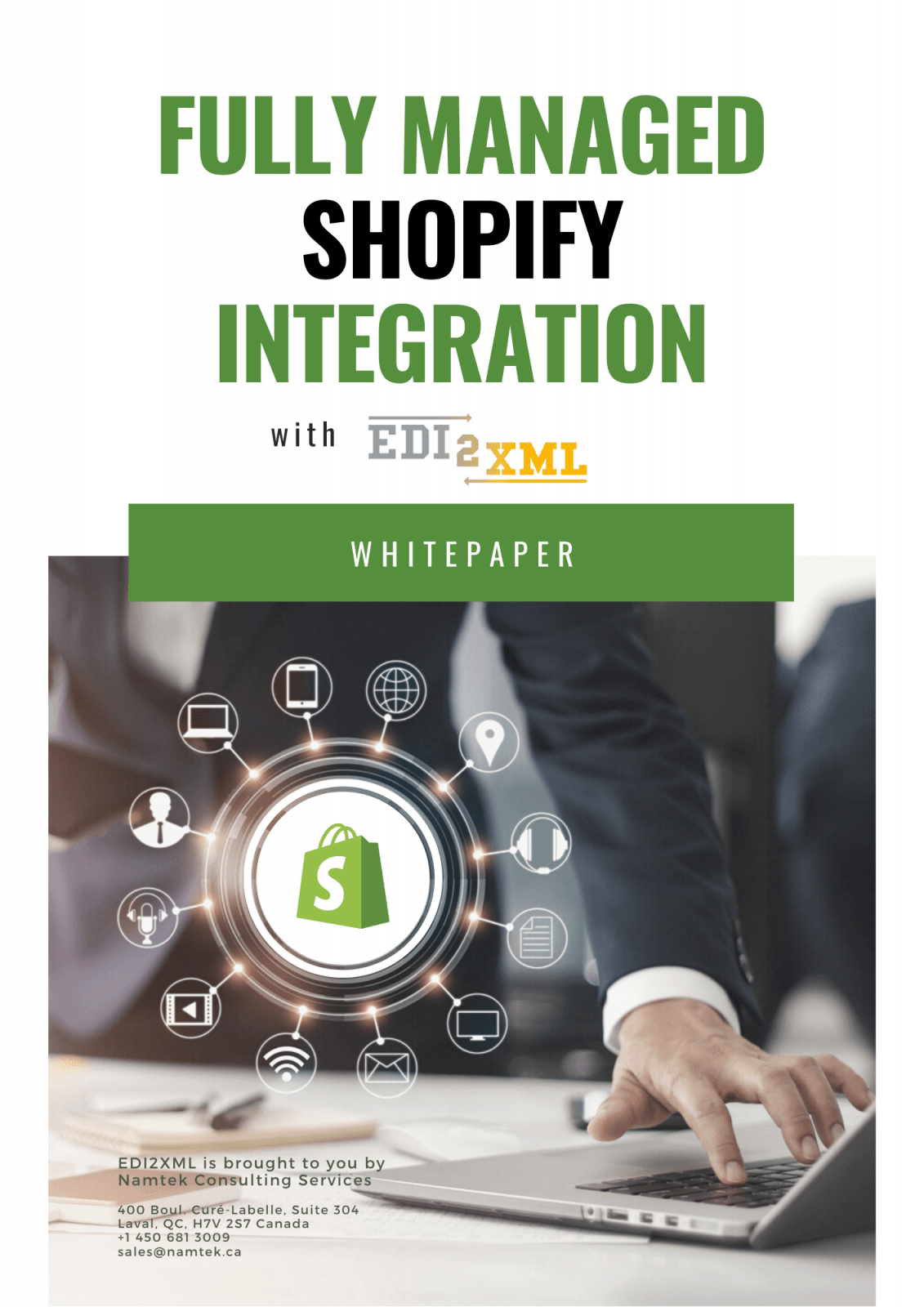
Download our Shopify Whitepaper to learn more about:

– Shopify & the e-commerce trend
– When you should integrate your Shopify store with EDI
– Integration between Shopify and an internal software management system (like ERP, CRM…)

Interested in fully managed Shopify Integration service?  Take the next step to request our Shopify Integration pricing plans


Related posts:

– Must-Have Integration between E-Commerce and Business Systems

– 9 Major E-Commerce Trends That Will Help Grow Your Online Business

– PRICING PACKAGES: Shopify Integration

– Shopify and Microsoft Dynamics Nav Integration: Things you should know

– Best Practices for Improving E-Commerce Supply Chain Management

January 27, 2020
https://www.edi2xml.com/wp-content/uploads/2020/01/EDI2XML-_-Shopify-integration-_-Whitepaper.png 350 1024 Tatyana Vandich https://www.edi2xml.com/wp-content/uploads/2024/08/edi2xml.com-EDI2XML-company-logo.png Tatyana Vandich2020-01-27 14:57:512022-05-27 16:47:23Fully Managed Shopify Integration with EDI2XML

Industry 4.0: How to Manage Digital Transformation in Manufacturing Enterprises?

Blog

This post was updated to reflect current trends and information.


What is Industry 4.0?

Industry 4.0 is the leading trend of the fourth industrial revolution taking place before our eyes.

The main focus of Industry 4.0 is to fully automate production facilities where all processes are controlled in real-time while considering the ever-changing external conditions.

In Industry 4.0, Internet-based technologies play a crucial role in facilitating communication between personnel and machines.

Industry 4.0

The “Industry 4.0” program was discussed for the first time, in 2011 at an industrial exhibition in Hanover, where the German government set a goal to expand the use of information technology in manufacturing. A highly professional team made up of business and government representatives worked on the creation of a program to modernize the country’s industrial enterprises in this direction. The objective of the program is to preserve and increase the competitive advantages of the country’s enterprises.

Active interest over the past years in Industry 4.0 for both government and business in Germany is easily explained.

Back in 2015, Roland Berger, a global strategy consulting firm in its Digital Industry Transformation report, predicted that the EU economy could lose 605 billion euros in the coming years if it ignores the development of Industry 4.0. But if they are fulfilled, the potential profit can reach 1.25 trillion euros.

Not surprisingly, other countries follow the example of Germany, for example, in Japan, the “Japan Institute for Promotion of Digital Economy and Community (JIPDEC)” was created.

In 2014 the largest US companies – AT&T, Cisco, GE, IBM, and Intel – created an open non-profit group – the Industrial Internet Consortium (IIC). The main objective of the Consortium is the creation of an ecosystem of companies, research centers and government agencies favorable for the implementation of the industrial Internet.

Internet of Things (IoT) – The key Technology of Industry 4.0

A key technology in Industry 4.0 is the Internet of Things (IoT). The Internet of things is a network of physical objects that have built-in technologies that allow them to interact with the external environment, transmit information about their condition and receive data from the outside.

In other words, in this technology, the Internet is used to exchange information not only between people but also between all kinds of “things”, i.e. machines, devices, sensors, etc. On one hand, objects equipped with sensors can exchange data and process them without human intervention. On the other hand, a person can actively participate in this process.

What is the Industrial Internet of Things (IIoT)?

An integral part of the Internet of Things and its main driving force at this stage of technology development is the Industrial Internet of Things (IIoT).

The IIoT opens the direct way to the creation of fully automated industries or as we call it now– the Smart Factory.

In the IIoT approach, the key components of an equipment are: sensors, actuators, and controllers; The collected data is processed and sent to the appropriate services of the company, which allows staff to quickly make informed and prudent decisions. But the goal of IIoT is to achieve a level of automation of the enterprise, in which machines dispersed in multiple sites, work without the participation of people. The role of personnel, in this case, comes down to monitoring the operation of the machines and responding only to emergencies.

Challenges Faced by Industrial Enterprises to Adopt Industry 4.0

As discussed above, Industry 4.0 is about connecting people with machines, devices, and data to allow humans to act upon data in a proactive manner, to improve decision making and optimize business processes.

Here are the main challenges that many manufacturers face when considering new Industry 4.0 business models:

  • Budget – expensive solutions that often involve investing in (expensive) new systems and processes.
  • Long implementations – management time burden and reduced efficiencies before an eventual improvement.
  • Finding the right people with the appropriate level of expertise
  • Not knowing where or how to start

Book a FREE one-on-one consultation session with our in-house experts.


Steps Towards Industry 4.0

Managing digital transformation in manufacturing enterprises, often referred to as Industry 4.0, involves integrating digital technologies into all aspects of the manufacturing process to create a more connected, efficient, and data-driven operation.

To efficiently adopt a new technology 4.0 and transform your production into a smart factory you should follow the following steps:

Connect and Integrate

To achieve operational excellence and ensure your competitive advantage, you need real-time connectivity of all company departments into a unique business system. Automate business processes and orchestrate workflows to synchronize and streamline data from multiple sources.

Implement Internet of Things (IoT) devices and sensors to gather real-time data from machines and processes.

Collect and Manage

You must be able to collect and manage all your company’s critical information about operations, order fulfillment, sales, marketing, accounting, etc. in one place with no data gaps.

Visualize and Analyze

Stay on top of errors and inefficiencies by receiving alerts before they affect your business. This can be done with FactoryEye, a smart solution designed specifically for manufacturers. FactoryEye visually displays your processes, demonstrates all the results, and helps you better understand data, trends, and forecasts in real-time, allowing you to act efficiently.

Identify and Optimize

Proactively identify process intervention points, enabling live, informed decision-making to optimize business results.

Cybersecurity Measures

Implement robust cybersecurity measures to protect sensitive data and intellectual property. Regularly update and audit security protocols to stay ahead of evolving cyber threats.

Collaboration and Partnerships

Collaborate with technology vendors, industry partners, and research institutions. Foster an ecosystem of innovation and knowledge-sharing to stay updated on emerging technologies.

Digital Transformation in Manufacturing with FactoryEye

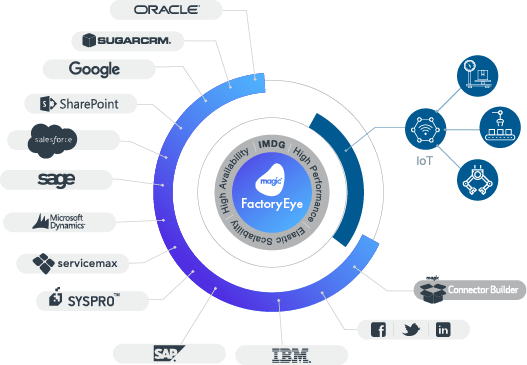
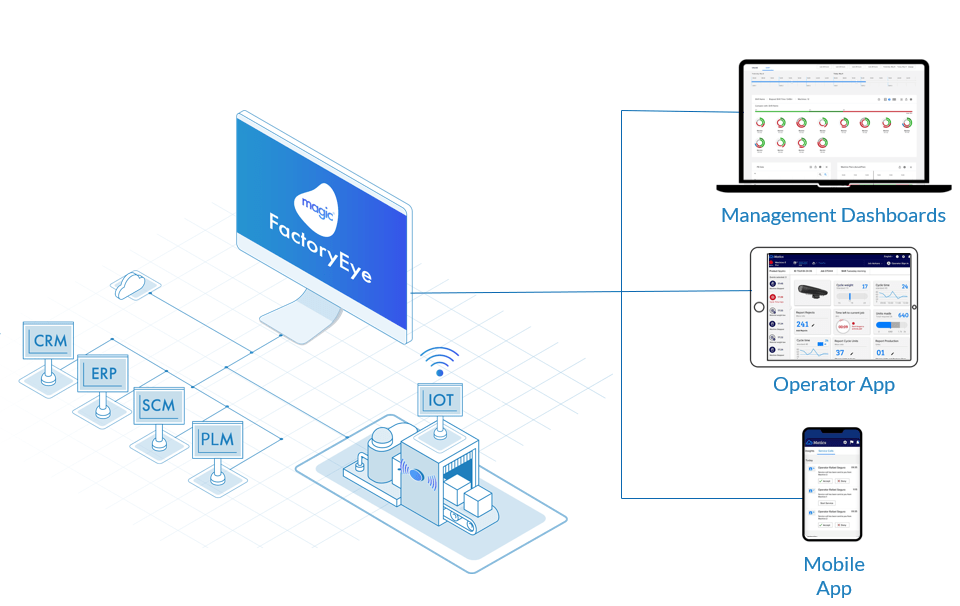
FactoryEye is a highly productive, flexible, low-code and hybrid platform that seamlessly integrates between manufacturer’s legacy core IT systems, cloud systems, and factory machines, collecting and analyzing large data from multiple repositories.

Smart Factory and Industry 4.0

FactoryEye provides production managers and operators (using IoT technology) real-time data about “what’s goes on” on the shop floor. It does that by presenting the information on desktops, tablets or smartphones, enabling a fast reaction to irregularities. The effect is an increase in the OEE (Overall Equipment Effectiveness), thus a reduction in production costs. FactoryEye is fully integrated into the customer’s ERP enabling the automatic transfer of work orders to the shop floor and delivering real-time data from the shop floor to the ERP system for further usage.

Smart Factory IIoT

This smart solution, made for manufacturers, lets you focus on improving your business. Real-time visualization of all production data and predictive alerts that prevent problems before they occur.

Industry 4.0 – Call on the Experts

We implement FactoryEye according to the priorities identified together with our client. Our holistic approach draws on best practices and a strategic alliance with Magic Software, a global company that empowers manufacturers with smarter technology to make the smooth transition to Industry 4.0 and maximize business opportunities.

If you want to learn more about how FactoryEye can help save on costs and improve your factory’s efficiency, contact us today

Industry 4.0 whitepaper
January 17, 2020
https://www.edi2xml.com/wp-content/uploads/2020/01/Industry-4.0_-How-to-Manage-Digital-Transformation.png 350 1024 Tatyana Vandich https://www.edi2xml.com/wp-content/uploads/2024/08/edi2xml.com-EDI2XML-company-logo.png Tatyana Vandich2020-01-17 11:44:132024-04-05 16:03:15Industry 4.0: How to Manage Digital Transformation in Manufacturing Enterprises?

What is EDI (Electronic Data Interchange)?

Blog

What is EDI? (Electronic Data Interchange)

Electronic Data Interchange (EDI) is a technology that allows the exchange of commercial information between organizations in a structured digital form based on regulated message formats and standards. Any standard business document exchanged between companies (for example, purchase order, invoice, shipment plan, request for goods availability) can be transferred using the EDI standard and, when both parties have completed the necessary preparations, called the testing and certification phase.

What is ANSI X12, EDIFACT, HIPAA, HL7, RosettaNet

ANSI X12, EDIFACT, HIPAA, HL7, RosettaNet, – these are all different standards to exchange electronic business documents. Some of these standards have been developed for use in a specific industry, according to its special needs. Other standards are developed and widely used, based on geography. For example, the EDI ANSI X12 standard is developed by the American National Standards Institute (ANSI) and commonly used in North America. The EDIFACT is widely and commonly used in Europe. HIPAA (Health Insurance Portability and Accountability Act) is designed specifically to comply with healthcare law. HL7 standard (Health Level 7) is the standard to exchange medical information. RosettaNet is mostly used in the high technology industry.


Useful reading: What are the differences between RosettaNet, EDI ANSI X12 and EDIFACT


Why EDI?

Exchanging EDI (electronic data interchange) documents between trading partners, improved a lot the supply chain management, by increasing efficiency, simplifying transactions and importantly, increase the speed with which a transaction is processed.

EDI is significantly different from regular email, in which information is transmitted in an unstructured format. What is the difference? For example, you need to submit a purchase order via e-mail, you will probably type the document first, and send it as an attached file. You do not have a 100 % guarantee that your e-mail will be received, correctly understood and processed promptly. Moreover, you need to re-enter the same information in another business system (accounting, ERP or warehouse management).

EDI guarantees the delivery of your business information and, thanks to its structured format, the understanding of electronic documents by all participants in the exchange process. EDI software first processes the information, then translates it into a “readable format”, and then data can be imported directly and automatically into your business system. The result – no manual input, a quick exchange of business information, and a full understanding between trading partners.


If you want to know more how our EDI as a Service and EDI Web Service work, download EDI2XML Brochure: The EDI to XML Service for your Business Needs


Which EDI Communication Protocol to Choose?

One of the most important aspects of exchanging EDI documents is the way information is transferred from one business partner to another. In most cases, trading partners themselves determine which transmission method (communication protocol) they will use. Here are some of the most commonly used communication protocols in the EDI world:


What is EDI VAN (Value Added Network)

VAN is the third party in the process that transmits and stores information in an electronic mailbox until it is received by one of the parties. Since the EDI message contains the destination’s address, the VAN routes the message to the recipient’s box.

Despite its advantages, VAN EDI was not widely distributed due to the high price. Thus, many suppliers communicated with their customers via fax, telephone, and mail, as could not afford the significant costs that VAN required.

As a result, there were failures, such as lost or unread orders and invoices, late deliveries of goods, etc.

With data exchange via the Internet, large and small companies have the opportunity to communicate with their trading partners electronically.

Direct Connection

Direct connection allows you to transfer data directly to a business partner. Types of direct connections include VPN (Virtual Private Network), FTP (File Transfer Protocol) sFTP (Secure File Transfer Protocol), and AS2, which encrypts data before sending it over the Internet.

AS2 Standard

The AS2 standard is used to securely transfer EDI and XML documents over the Internet via HTTP. The primary principles behind the AS2 standard are security and secure data transmission over the Internet.

The AS2 standard provides the possibility of almost continuous data transfer since direct HTTP transfers are used. In the AS2 standard – data security is provided by S/MIME via HTTP (Hypertext Transfer Protocol) or HTTP/S (HTTP secure), also using MDN. The AS2 standard provides real-time synchronous data transfer with instant delivery messages. Today, leading retail chains and manufacturers use the AS2 standard. The list of companies includes Wal-Mart, Target, Lowe`s, Wegmans, Procter & Gamble, Hershey Foods, Campbell`s and many others.

What are the Advantages of EDI?

  • Eliminates the need to use email, fax, or telephone to transfer documents.
  • Significantly reduce the processing time of documents (enterprises that have implemented EDI, reduce the document processing time by an average of 80%)
  • Eliminate/reduce the number of errors in the document flow due to the almost complete elimination of manual data entry.
  • Fully control the “order-delivery” process.
  • Monitoring the status of documents (sent, accepted, etc.) allows you to control the execution of the order.
  • Elimination of document loss incident – ensures that all documents (Orders, etc.) will be delivered to the supplier on time.
  • Reduction of costs associated with paper workflow: man-hour spending, office supplies, and equipment.

The Most Used UN/EDIFACT Messages

ORDERS – Purchase order (order for delivery of goods or services) – an electronic message that is analogous to an order for the supply of products. It is formed and sent by the buyer to the supplier.

ORDRSP – Purchase Order Response (order confirmation) – an electronic message in which the supplier confirms, corrects or rejects the delivery for each commodity item. Dispatched by the supplier to the buyer.

DESADV – Despatch advice (notice of shipment) – an electronic message that is analogous to the consignment note. This message is generated at the time (or before) the supplier sends the goods. This message indicates the actual (shipped) quantity and range of goods delivered to the buyer.

RECADV – Receiving advice (delivery notice) – an electronic message that contains information about the actually accepted product, as well as it may contain information about the reasons for not accepting the goods. This message is generated at the time (or after) the physical acceptance of the goods by the buyer.

INVOIC Invoice – an electronic message that is similar to a paper invoice.

PRICAT – Price/sales catalog message (product catalog) – an electronic message that contains information about the goods and their price characteristics. This message is generated by the supplier when the price, assortment changes.

PROINQ – Product inquiry (price list request) – an electronic message containing a list of products for which price information is required. Sent by the buyer as necessary to obtain product information.

COACSU – Commercial account summary (the act of review of mutual accounts) – an electronic message that is an analog of the accounting document “Act of reconciliation of mutual settlements”

COMDIS – Commercial dispute message (commercial discussion) – an electronic message that contains information about the discrepancy between the quantity, prices, and VAT rates. Dispatched by the buyer upon detection of an inconsistency in the invoice (INVOIC).

What are the Types of EDI?

We provide various types of EDI:

1. EDI Web Service. EDI2XML Web Service, is an HTTP service running over the internet, on EDI2XML own platform that is capable of receiving HTTP requests to translate EDI messages to XML, and XML messages (based on EDI2XML’s proprietary format) to EDI.

2. EDI Managed Services. EDI2XML Managed Services is our popular “fully managed EDI service”, including translation and communication service offering to businesses of all sizes, from various industries. All conversions of EDI files are done on our end, leaving customers with no on-site installation of software or hardware and an EDI project that is on time and within budget.

3. On-Premises EDI Services. We offer EDI2XML services with “on-Premises” deployment at the customer servers. Basically, there will be few components that will be deployed “on-premises”:

  • The necessary “binary” engines to process and translate from X12/EDIFACT messages to XML and vice versa.
  • Our proprietary “binary” REST API

EDI2XML – the Best EDI Provider

EDI2XML is one of the leaders in the development and implementation of electronic data interchange (EDI) solutions.

Operating in the IT services market for over 20 years, EDI2XML offers the most effective and advanced EDI solutions.

Free EDI consultation

RELATED POSTS:

What is EDIFACT? | UN / EDIFACT standard overview

Electronic Data Interchange: Key Information You Need to Know

ANSI ASC X12 Standards Overview

What Are the Differences Between ANSI X12 and UN/EDIFACT

A technical introduction to EDI

January 13, 2020
https://www.edi2xml.com/wp-content/uploads/2020/01/What-is-EDI-.png 350 1024 Tatyana Vandich https://www.edi2xml.com/wp-content/uploads/2024/08/edi2xml.com-EDI2XML-company-logo.png Tatyana Vandich2020-01-13 13:08:302024-04-12 15:49:21What is EDI (Electronic Data Interchange)?

Best Practices for Improving E-Commerce Supply Chain Management

Blog

This post was updated to reflect current trends and information.


Currently, many businesses are operating their own eCommerce stores on Shopify or Amazon to sell their products and services over the Internet to clients and consumers, all over the world. This is a great way to increase sales and brand awareness.

United States: top 10 online stores

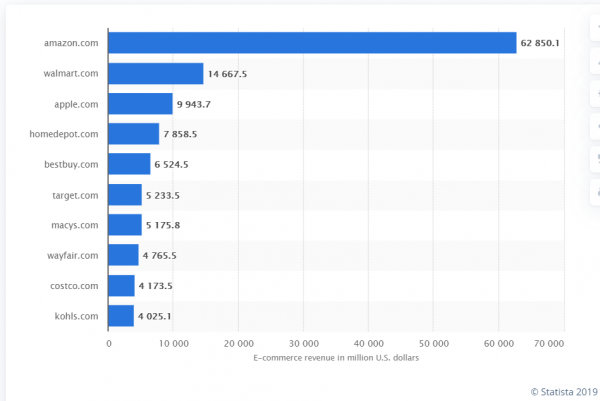
The e-commerce market in the United States is constantly evolving. According to Statista’s forecasts, in the coming years, retail sales of B2C e-commerce in the US will grow rapidly: from 315.6 billion US dollars in 2018 to more than 565.7 billion US dollars in 2023. The most popular online store in the United States is, of course, Amazon.com, the second most popular is Walmart.com

United States: top 10 online stores

As you can see in the graph above, at the top of the e-commerce rating are the 2 largest retailers:

Amazon.com, Inc. is a global e-commerce corporation that provides online retail, consumer electronics, digital content and other services such as daily deals and local groceries. The greatest part of the company’s revenue is generated from third-party seller revenues, subscription services, and AWS activities. Due to quality standards and global reach, Amazon is considered one of the most valuable brands in the world.

Walmart, Inc. is one of the biggest retail chains offering low prices and immensely varied products, giving Walmart a competitive edge.

Challenge of efficient e-commerce transaction

Whatever you choose, open your own online store on one of the most popular e-commerce platforms such as Shopify, WooCommerce, BigCommerce, Magento or sell on Amazon, or deal with Walmart, Home Depot, Target, etc. it is very beneficial for companies of all size and various industries to expand their online business.

However, many executives still do not consider a full integration between there online store, and their business management system (ERP, CRM), as a must and important option to adopt.

Efficient supply chain management and prompt exchange of the necessary information between trading partners is the key to the success of your electronic business and the high satisfaction of your customers.


Download our whitepaper for more information about Shopify integration.


The main problems that online store owners may encounter when they omit a full integration between their store and their ERP are as follows:

  • They must hire more staff to manage their supply chain, in order to respond to growing customer demands.
  • It is difficult to balance incoming demand and production (in case the company is a manufacturer)
  • Problematic transfer of inquiries and information between several business partners involved in the supply chain channel.

The challenge with supply chain management is to synchronize the supply chain with consumer demand and measure the productivity and success rate. Therefore, below are 3 useful tips to overcome these challenges:

Integrated ERP Solutions

Having one platform to manage and run a business can make all the difference. A fully integrated software system will be able to efficiently manage an eCommerce and retail business and eliminate the need to key-in information from the online store to the management system manually.


Useful reading: Must-Have Integration between E-Commerce and Business Systems


EDI Integration

As mentioned previously, the ability to balance product demands from an eCommerce store and supply chain demands is very important. Therefore, to do this would be to empower the eCommerce platform with EDI capabilities, to exchange data in real-time with suppliers and partners.


Useful reading: The most used EDI messages in the supply chain management


Modern Business Solutions

A scalable integrated IT solution, such as the one suggested by EDI2XML, is needed to be able to electronically exchange information by parsing data of different formats, like X12/EDIFACT, XML, CSV or Json, and translate EDI from one format to another. On top of that, the solution should be able to easily integrate with different systems and communicate with different partners using modern and secured communication protocols such as AS2, sFTP or API (Web services).

Improve your eCommerce management and supply chain by implementing and integrating with the best tools and solutions.

Free EDI Consultation

RELATED POSTS:

Must-Have Integration between E-Commerce and Business Systems

9 Major E-Commerce Trends That Will Help Grow Your Online Business

The main reasons why you need Microsoft Dynamics Integration with your Business Systems

PRICING PACKAGES: Shopify Integration

Shopify and Microsoft Dynamics Nav Integration: Things you should know

January 13, 2020
https://www.edi2xml.com/wp-content/uploads/2020/01/Best-practice-e-commerce.png 350 1024 Tatyana Vandich https://www.edi2xml.com/wp-content/uploads/2024/08/edi2xml.com-EDI2XML-company-logo.png Tatyana Vandich2020-01-13 10:55:542024-05-24 11:47:24Best Practices for Improving E-Commerce Supply Chain Management

ORDERS and ORDRSP: The main EDIFACT messages in the supply chain management

Blog

This post was updated to reflect current trends and information.


Receiving and processing EDI purchase orders is the most common transaction faced by small businesses. This electronic business document is used to place a commercial order for goods or services by a buyer or business partner.

EDIFACT ORDERS

It’s still possible to use phone, email, or fax between two small businesses, but if you want to collaborate with a large retailer, distributor, or manufacturer, there is a high probability that you must be EDI compatible to receive orders from your B2B partners, in addition to other potential EDI documents or transactions.

What is EDIFACT ORDERS?

ORDERS (Purchase Order) is a type of EDIFACT message that contains requests for the supply of goods or services.

In EDI ANSI ASC X12 standard which is widely used in North America, the ORDERS is referred to as EDI 850 Purchase Order.

Large companies, working with small contractors demand mandatory use of EDI. Requirements for EDI compatibility is specified in contracts or in partners selection criteria.

High competition forces the business to comply, and start exchanging electronic data quickly and accurately, spending minimal time and resources on this business process. Thus, small enterprises must comply with the imposed conditions, in order not to lose a source of profitable purchases.

EDIFACT ORDERS message content

The most important main information contained in an EDIFACT ORDERS message:

  • Order number
  • Required date
  • Delivery date
  • Reference to supply contract number
  • Price and qualifier (including VAT and other taxes)
  • Identifiers of the consignee and sender, delivery location, customer, carrier, recipient
  • Information about the contents of the order (barcodes, quantity, item name, etc.).

EDIFACT ORDERS Processing

After signing the contract, the buyer uses ORDERS to send the seller a list and quantity of goods ordered.

Typically, a buyer creates the order in his ERP system (the most popular are SAP ERP, Microsoft Dynamics, Oracle JD Edwards EnterpriseOne). The created Purchase Order is instantly converted into an EDIFACT ORDERS message which is immediately sent to the seller. The seller must receive the EDIFACT message and quickly process it. He should transmit a Purchase Order Response (ORDRSP) in response to the Purchase Order received.

EDIFACT and ERP/CRM integration

To save time and money by processing the vast amount of information received from business partners, most companies (both retailers and suppliers) choose to integrate their EDI / EDIFACT messages into their ERP systems. Basically, with integration, they connect the received EDI messages and push it directly to their ERP software, through Integration Connectors designed specifically to synchronize and integrate into their ERP systems.

For example, using Magic xpi Integration Platform a company can connect a variety of heterogenous business systems such as ERP, CRM, finance, etc. by implementing out-of-the-box certified and optimized connectors.


You can find useful information on EDI integration with ERP Systems in the following articles:

  • How To Successfully Complete SAP/R3 EDI Integration Projects Using iDoc
  • The main reasons why you need Microsoft Dynamics Integration with your business Systems
  • Oracle JD Edwards and B2B eCommerce Integration for efficient online sales

How to make EDIFACT ordering even easier

EDIFACT ERP integration

As the number of outgoing or incoming orders increase, companies try to optimize the exchange of orders. In case the number of your orders exceeds a couple of hundreds per month, it’s worth thinking about integrating the flow of orders directly into your business software solution and save your company the time and money associated with human errors, delays to deliver, and increase efficiency.

The process of Order creation can be fully automated; it will not require human intervention. To do this first it is necessary to integrate your business system with EDI.


Related article:

  • Magic xpi and EDI2XML HTTP web service: the best EDI software option
  • How to Choose the Right Integration Platform?

Usually, after starting to use ORDERS message, the buyer will most likely request to receive replies to his orders, which means connecting another type of EDI message – ORDRSP. In addition, he can ask you for the dispatch advice (DESADV), and he can send you the delivery advice message. (RECADV).

What is ORDRSP and what are the benefits of using this EDIFACT message

ORDRSP (Order Response) is a type of EDIFACT message in which the supplier confirms or rejects the delivery of goods to the buyer. Using ORDRSP, the supplier can propose amendments, notify of a complete or partial delivery or confirm the entire delivery, before even processing the delivery.

Using UN/EDIFACT ORDRSP improves the logistics chain: the parties save on transportation, reduce returns due to incorrect deliveries of merchandise, increase the accuracy of delivery of the right products.

Through ORDRSP, the supplier can notify the buyer of the lack of certain products, thus avoiding disruption of supplies and maintaining a loyal business relationship. Customer, having this information, can order a similar product from the presented assortment or place an order from another supplier.

The buyer can always understand whether the supplier will deliver the goods on time, or not. He sees preliminary price confirmation and quantity of products, predicts the state of stock based on ORDRSP, and the supplier can automatically book goods for delivery in his warehouse when processing a Purchase Order Response.

What does ORDRSP contain?

ORDRSP has a direct relationship with ORDERS and are complimentary to each other. ORDRSP consists of:

  • Order number
  • GLN numbers of the buyer and seller
  • Order confirmation number
  • Date of planned delivery of goods
  • Scheduled time
  • Item No
  • Quantity approved (To Ship)
  • Price approved
  • Reason of rejection (when parameters are not matching between Order and supplier)

EDI/EDIFACT integration

In EDI/EDIFACT documents exchange, the EDI provider plays a key role. He is the one who ensures the conversion and integrity of message formats and tracking data transfers. For over 21 years now, our company EDI2XML has been successfully helping companies of all sizes switch to Electronic Data Interchange. We help speed up working with orders, shipments, acceptance, inventory of goods and reduce the risks of human errors. We have no hidden fees or confusing rates.

Contact us today for more information and a free EDI consultation.

December 2, 2019
https://www.edi2xml.com/wp-content/uploads/2019/12/Orders-and-Ordship-EDIFACT.png 350 1024 Tatyana Vandich https://www.edi2xml.com/wp-content/uploads/2024/08/edi2xml.com-EDI2XML-company-logo.png Tatyana Vandich2019-12-02 11:40:092022-07-26 09:38:48ORDERS and ORDRSP: The main EDIFACT messages in the supply chain management

What Are the Differences Between ANSI X12 and UN/EDIFACT

Blog

X12 vs. EDIFACT

Doing business and interacting with trading partners is associated with the need to prepare, send, receive and process a large number of documents. Today, around the world, almost all enterprises, from small businesses to large corporations, use EDI (Electronic Data Interchange) to communicate with business partners.

The most common standards that are used in all Industries are ANSI ASC X12 (X12) and UN/EDIFACT (EDIFACT). Both standards serve to exchange documents electronically and execute business processes between trading partners. The two standards are quite similar; however, there are numerous ways in which ANSI X12 and EDIFACT are different. In this article, we will compare the two most popular standards.

EDIFACT:

  • EDIFACT (Electronic Data Interchange for Administration, Commerce, and Transport) is an international standard for electronic data interchange that was developed by the United Nations.
  • It uses UN/EDIFACT syntax and is widely used in Europe and other regions.
  • EDIFACT allows for flexible message definition and supports a wide range of business processes, including e-commerce, procurement, transportation, and healthcare.

EDI X12:

  • X12 (also known as ANSI X12) is a standard for electronic data interchange in the United States.
  • X12 was developed by the Accredited Standards Committee X12 and is maintained by the ASC X12 Standards Development Organization.
  • X12 is used in a variety of industries, including healthcare, finance, and logistics, and is considered a robust and reliable format for data interchange.

EDI Standards in Europe and North America

The first difference between the two EDI standards is the geographic location of users.

– X12 is mainly used in the United States and North America in general.

– EDIFACT is mostly used by companies based in Europe and Asia.

ANSI X12 and EDIFACT Standards Developers

ANSI ASC X12 Standard is developed and maintained by the Accredited Standards Committee X12 (also known as ASC X12) chartered by the American National Standards Institute (ANSI) in 1979.

EDIFACT – Electronic Data Interchange for Administration, Commerce and Transport. This standard is developed and supported by two international organizations: The United Nations Economic Commission for Europe (UNECE) and the International Organization for Standardization (ISO).

ANSI X12 and EDIFACT Document Structure

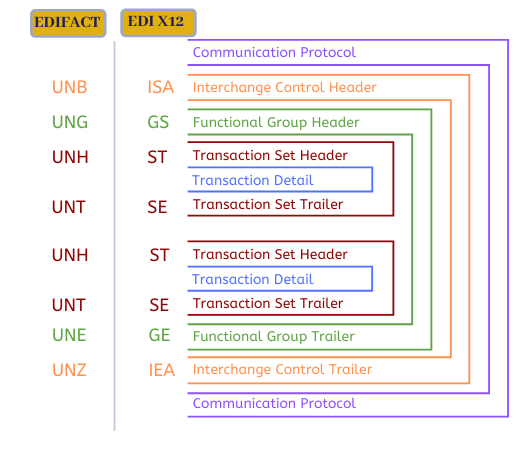
Basically, the structures of X12 and EDIFACT are similar. Both standards have principally the same structure but use different terminologies.

The figure below shows the structure of X12 and EDIFACT documents that contain Interchange, Functional Group, Transaction set.

x12 vs EDIFACT

For more information on the structure of EDI documents, please read these articles:


– EDI ANSI ASC X12 Standards – Technical Overview

– What is EDIFACT? | UN / EDIFACT standard overview


 EDI Terminologies

Understanding the terminology used in EDI is essential to successfully implementing and utilizing this technology. Some of the key EDI terminologies include EDI standards such as ANSI X12 and EDIFACT, which define the structure and content of EDI messages.

As was mentioned above, ANSI X12 and EDIFACT have different terminologies. The table below demonstrates the difference between both standards.


Terminologies Equivalence EDI X12 EDIFACT
………………………………………………………………………………………………………………… ………………… ……………….
An electronic business document, such as an Invoice, Purchase Order, etc. Transaction Set Message
…………………………………………………………………………………………………………………. ………………… ……………….
The blocks of multiple segments of the same type grouped together. Loops Groups
…………………………………………………………………………………………………………………. ………………… ……………….
Special characters to differentiate segments and elements Terminator Separators
…………………………………………………………………………………………………………………. ………………… ……………….
Interchange Control. Header/Trailer ISA/IEA UNB/UNZ
…………………………………………………………………………………………………………………. ………………… ……………….
Functional Group. Header/Trailer GS/GE UNG/UNE (optional)
…………………………………………………………………………………………………………………. ………………… ……………….
Transaction Set, (Message). Header/Trailer ST/SE UNH/UNT

Terminators/Separators

X12 and EDIFACT use special characters to separate segments and elements in the document.

– ANSI X12 to separate segments generally uses a tilde ( ~ ) and to terminate elements with an asterisk ( * )
– EDIFACT normally uses a period ( . ) between segments and a plus ( + ) within elements.

However, both EDI standards allow customization, and different characters can be used, depending on the implementation.

Composite

A Composite Element is a group (two or more) of simple elements separated by a Composite Separator symbol. Composite Element is used in both standards; however, Composite Element is very commonly used in EDIFACT.

– X12 uses a symbol Greater Than ( > )

– EDIFACT separates composite elements with a colon symbol ( : )

Acknowledgments

Both EDI standards use Acknowledgments.

– X12 uses a Functional Acknowledgment or 997 transaction set. An EDI 997 serves as a response to acknowledge that an EDI transaction was received. TA1 served for describes errors at the ISA level.

– EDIFACT uses CONTRL acknowledgments, which are like the X12 997 Acknowledgments.

X12 Transaction Number and EDIFACT ID

In the ANSI X12 standard, all documents have 3-digit numbers, for example, 810 for an Invoice, 846 for an Inventory Inquiry and Advice, 856 for an Advanced Ship Notice.

According to the EDIFACT rule, the name of the document must be limited to 6 letters, for example, INVOIC derived from the word Invoice, INVRPT for Inventory report, and DESADV is the abbreviation for Despatch Advice.

  • Syntax: EDIFACT uses UN/EDIFACT syntax while X12 uses an ASCII-based syntax.
  • Message structure: EDIFACT messages have a more flexible structure than X12 messages, which have a more rigid structure.

Different Types of EDI Documents: ANSI X12 vs EDIFACT

The following table lists some of the key EDI X12 Transaction Sets with the corresponding EDIFACT messages.


X12 No EDIFACT ID Name Usage
……….. ………………… ……………………………………………………….. ………………………………………………………………………………….
 810 INVOIC Invoice. Used to receive payment for goods or services provided
……….. ………………… ……………………………………………………….. ………………………………………………………………………………….
820 REMADV Payment Order/Remittance Advice. Used to transmit information relating to payments
……….. ………………… ……………………………………………………….. ………………………………………………………………………………….
830 DELFOR Planning Schedule. Used to share with the supplier’s forecast purchase plans
……….. ………………… ……………………………………………………….. ………………………………………………………………………………….
832 PRICAT Price/Sales Catalog. Used to request or provide prices and product information.
……….. ………………… ……………………………………………………….. ………………………………………………………………………………….
846 INVRPT Inventory Inquiry/Advice. Used to communicate inventory levels.
……….. ………………… ……………………………………………………….. ………………………………………………………………………………….
850 ORDERS Purchase Order. Used to place an order for goods or services. 
……….. ………………… ……………………………………………………….. ………………………………………………………………………………….
852 SLSRPT Product Activity Data. Used to provide inventory, sales, and other product activity information.
……….. ………………… ……………………………………………………….. ………………………………………………………………………………….
855 ORDRSP PO Acknowledgement Used as an acknowledgment of the purchase order
……….. ………………… ……………………………………………………….. ………………………………………………………………………………….
856 DESADV Advance Ship Notice (or Dispatch Advice in EDIFACT) Used to inform the recipient in advance about the contents of the shipment.
……….. ………………… ……………………………………………………….. ………………………………………………………………………………….
860 ORDCHG PO Change (Customer triggered) Used to communicate order changes to the supplier.
……….. ………………… ……………………………………………………….. ………………………………………………………………………………….
865 ORDRSP PO Change (Supplier triggered) Used for acceptance or rejection of changes to a previously submitted purchase order
……….. ………………… ……………………………………………………….. ………………………………………………………………………………….
997 CONTRL Functional Acknowledgment Used to acknowledge that an EDI transaction was received.

EDI Standards for Special Industry

In addition to EDIFACT and X12 discussed above, there are many other EDI standards that were developed as a result of specialized business requirements in various industries. For example:

RosettaNet is used mostly in the electronics and technology Industry.

HIPAA and HL7 for Healthcare and Health Insurance.

ODETTE for the automotive industry in Europe.

SWIFT for exchanging messages between banks and financial institutions.

EDI Integration

For clients who do not have the resources to do X12 or EDIFACT in-house, we, at EDI2XML, offer fully managed EDI Services.

For companies who got their own technical resources to work with the REST API, we offer them to use the EDI REST Web Service.

EDI2XML is an EDI service provider with 20+ years of expertise in EDI and integration projects. We have clients located in North America, Europe, and the Middle East, and we work with all EDI standards, including ANSI X12 and EDIFACT. Contact us if you have any questions or EDI integration needs.

Free EDI consultation
November 21, 2019/0 Comments
https://www.edi2xml.com/wp-content/uploads/2019/11/X12-vs-EDIFACT.png 350 1024 Tatyana Vandich https://www.edi2xml.com/wp-content/uploads/2024/08/edi2xml.com-EDI2XML-company-logo.png Tatyana Vandich2019-11-21 16:26:482026-02-24 11:20:42What Are the Differences Between ANSI X12 and UN/EDIFACT

Understanding ANSI ASC X12 EDI 810 Invoice: Definition, Key Data Elements, and Workflow

Blog

This post was updated to reflect current trends and information.


In the world of business-to-business (B2B) transactions, efficiency is paramount. The EDI 810 Invoice stands as a crucial electronic document that streamlines the billing process, ensuring accurate and timely payments. But what exactly is an EDI 810 invoice, and how does it revolutionize the way companies handle financial exchanges? This comprehensive article delves into the intricacies of the EDI 810 standard, exploring its key components, workflow, benefits, and implementation strategies. We’ll answer the common questions businesses have, such as how to interpret an EDI 810 sample, what are the mandatory data elements, and how to integrate EDI 810 into existing systems.

What is EDI 810? 

EDI 810 Invoice – in international business practices, the 810 (Invoice) is an electronic document sent by the seller to the buyer to receive payment for goods or services provided.

The EDI X12 810 Transaction Set contains information about the goods and /or services, their quantity, and the price at which they were delivered to the buyer, the characteristics of the goods (color, weight, etc.), delivery terms and information about the sender and the recipient.

An electronic invoice can be generated in various standards, it all depends on which standard the partners agreed to use in order to exchange EDI. For example, in ANSI ASC X12, which is prevailing in North America, this document is called ANSI X12 Transaction Set 810 Invoice. You can also see various names for this document, for example, X12 810, EDI Invoice, EDI Invoice 810, ANSI X12 810, EDI X12 810, EDI 810, EDI 810 Document, 810 Transaction Set, etc.


“INVOIC” is an analog of the EDI 810 Invoice in the international UN / EDIFACT standard, which ispredominant outside of North America. INVOIC document (derived from the word “Invoice”, but limited to 6 letters, according to the EDIFACT rule).

EDI 810 Invoice Data Elements: What Information is Included?

Understanding the key data elements within an EDI 810 Invoice is essential for accurate processing. What specific information does an EDI 810 contain, and how is it structured? Typically, an EDI 810 document includes:

  • Invoice Number and Date: Unique identifiers for tracking and referencing invoices.
  • Purchase Order Number: Linking the invoice to the original purchase order for reconciliation.
  • Delivery Date: The date goods or services were provided.
  • List of Items or Services: Detailed description of products or services rendered.
  • Item Price and Identifier: Pricing details and unique product/service codes.
  • Payment Terms: Agreed-upon payment conditions, including due dates and discounts.
  • Shipping Information: Addresses, carrier details, and tracking numbers.
  • Tax and Discount Calculations: Detailed breakdown of applicable taxes and discounts.

How do these elements ensure accuracy and efficiency in billing? Each element plays a crucial role in providing a clear and comprehensive record of the transaction, minimizing discrepancies and accelerating payment processing. Depending on the goods or services the company provides, additional information may also be included in the EDI 810 invoice.

EDI 810 Transmission Explained: AS2, FTP/SFTP, and Web Services

Previously, many EDI transactions (including EDI 810), were carried out through a Value Added Network (VAN). But the transmission of EDI 810 invoices has evolved significantly. 

Currently, in order to provide an affordable and cost-efficient EDI exchange, most companies have switched to a point-to-point communication such as:

  •  AS2 (Applicability Statement 2) exchanges documents over the Internet by using digital certificates and encryption of the EDI data.
  • FTP/SFTP (File Transfer Protocol/Secure File Transfer Protocol) –  These file transfer protocols allow businesses to connect with their partners via the Internet in order to exchange EDI documents.
  •  HTTP EDI Web Service (REST API) This EDI Web Service gains more and more popularity because is much more cost-effective and you can be up and running in less than an hour. EDI web Service meant for companies who got their technical resources to work with REST API (call and consume HTTP Rest Web services). The EDI2XML offers a free 15 days trial.

Which transmission method is best for your business, and what factors should you consider when choosing? The choice depends on factors like security requirements, technical capabilities, and cost considerations. For example, REST APIs are often preferred for their speed and ease of integration, while AS2 provides robust security for sensitive data.


Learn more about EDI Web Service

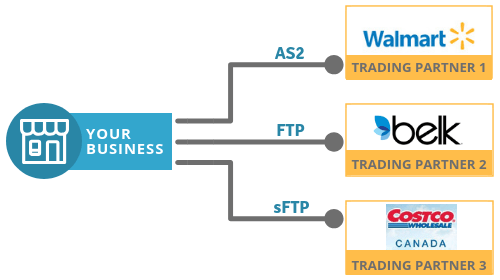
One company can use different means or protocols to exchange EDI documents with its multiple trading Partners. (see picture below) Usually, this happens because each big company has its own requirements to exchange electronic messages or EDI.

EDI communication

A Detailed Look at the EDI 810 Transaction Process

In typical and common business practice, the basic documents exchanged between trading partners are EDI 850 (Purchase Order) and EDI 810 (Invoice); this statement is partially true in the EDI world. Based on our more than 25 years of successful EDI Integration experience, we can tell you for sure that usually, the EDI process is much more complex. Between EDI 850 Purchase Order (or even before it) and Invoice 810, partners exchange a number of different documents. This is especially true for retail companies.

Below you can find a possible EDI scenario in the retail industry.

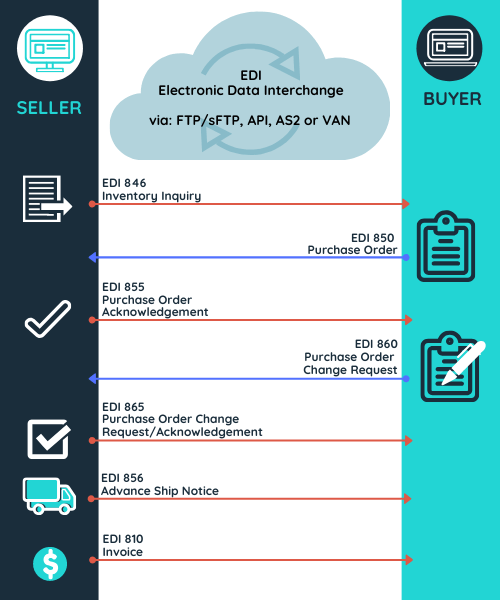
Seller sends to the buyer an EDI 846 Inventory Inquiry message to advise about stock level status and availability. EDI846 can include also pricing information.


Thus, The EDI 810 invoice is often part of a larger EDI workflow. What is the typical sequence of EDI transactions in a B2B exchange, and how does the EDI 810 fit into this process? A common scenario involves:

  1. EDI 846 (Inventory Inquiry/Advice): Primarily used by suppliers to provide real-time inventory data to their trading partners
  2. EDI 850 (Purchase Order): The buyer initiates the order.
  3. EDI 855 (Purchase Order Acknowledgement): The seller confirms the order.
  4. EDI 860 (Purchase Order Change Request – Buyer Initiated): allows a buyer to request modifications to an existing purchase order they’ve already sent to a supplier
  5. EDI 865 (Purchase Order Change Acknowledgment/Request – Seller Initiated): transaction set used to confirm or request changes to a previously submitted purchase order. 
  6. EDI 856 (Advance Ship Notice): The seller provides shipping details.
  7. EDI 810 (Invoice): The seller requests payment. 

NOTE: EDI 846 is more often used in B2B e-commerce for more information about this transaction set please read the blog: What is EDI 846 document?

  • Based on the information received in EDI 846 the buyer generates a Purchase Order (EDI 850) which contains a list of goods that he wants to purchase from the supplier, including information about the quantities, shipping directives, and other details.
  • Upon receiving the Purchase Order seller send a Purchase Order Acknowledgement (EDI 855) to confirm goods are available to be sold.
  • In the next step, the buyer could send a seller a Purchase Order Change Request (EDI 860) to request a change to a previously submitted purchase order.
  • The seller responds with a Purchase Order Change Request/Acknowledgement (EDI 865) to notify of the acceptance or rejection of the change to the purchase order previously submitted by the buyer.
  • To send the contents of the shipment, the seller sends an EDI 856 Advance Ship Notice or EDI ASN. This EDI document must be transmitted before the arrival of the goods.
  • An invoice (EDI 810) can be transferred to the buyer after filling out and delivering the order or along with.
EDI 810 Invoice
 

Thus, it can be observed that although the EDI X12 810 invoice is the most commonly exchanged electronic document, multiple EDI transaction sets can be used in relation to the EDI 810.


Book a FREE one-on-one EDI consultation session with our in-house experts


EDI X12 810 Invoice Sample

The following example details the format of an EDI 810 invoice.

ISA*00*          *00*          *12*5141231234     *12*5034564567     
*181122*1220*U*00501*000000001*0*T*> GS*IN*5141231234*504564567*20181122*122047*1*X*005010
ST*810*0001
BIG*20181122*I-0042537
N1*RI**92*10055500
N1*ST**92*00262
ITD*05*1*****100
DTM*011*20190120
IT1**2*EA*5.45**UP*888077648572
SDQ*EA*92*00682*1*70674*1
IT1**2*EA*5.45**UP*888077650123
SDQ*EA*92*00111*1*11356*1
IT1**3*EA*4.85**UP*888077648954
SDQ*EA*92*00682*1*11356*1*70674*1
IT1**3*EA*5.15**UP*888077649105
SDQ*EA*92*00011*2*00111*1
IT1**1*EA*5.9**UP*888077648867
SDQ*EA*92*00682*1
TDS*5770
CAD*A***FDEG
CTT*5
SE*20*0001
GE*1*1
IEA*1*000000001

Invoice EDI 810 Invoice Specifications: Decoding the Segment Structure

Here is the specification of the EDI 810 transaction set given as an example above. You should note that like any other EDI document, 810 contains mandatory and optional data. Optional data depends of the business areas and the requirements of the trading partner.

  Segment name Purpose
ISA Interchange Control Header Marks the beginning of the transmission and provides the sender/receiver identification.
GS Functional Group Header Marks the beginning of the functional group and provides the sender/receiver identification.
ST Transaction Set Header To indicate the start of a transaction set and to assign a control number. There must be only one instance per transaction.
BIG Beginning Segment for Invoice To indicate the beginning of an invoice transaction set and transmit identifying numbers and dates.
N1 Name To identify a party by type of organization, name, and code ST- Ship To RI – Remit To The N1 is sent in conjunction with the SDQ when the N1 indicates the ship to location and the SDQ indicates the bill to locations.
ITD Terms of Sale/Deferred Terms of Sale To indicate a discount terms. Code 05 – Discount Not Applicable  
DTM Date/Time Reference To specify pertinent dates and times Code 011 Shipped
IT1 Baseline Item Data To specify the basic and most frequently used line item data for the invoice and related transactions
SDQ Destination Quantity To specify multiple locations and quantity detail.
TDS Total Monetary Value Summary To provide the total invoice amount
CAD Carrier Detail To specify transportation details for the transaction Code: FDEG  – FedEx (Ground Only)
CTT Transaction Totals Number of line items To transmit hash totals for a specific element in the transaction set. 5 – Total number of IT1 Items segments.
SE Transaction Set Trailer To indicate the end of the transaction set and provide the count of the transmitted segments (including the beginning (ST) and ending (SE) segment).
GE Functional GroupTrailer Marks the ending of the functional group and provides the sender/ receiver identification
IEA Interchange Control Trailer To define the end of an interchange of zero or more functional groups and interchange-related control segments

To learn more about the structure of ANSI ASC X12 read our Blogs:

  • EDI ANSI ASC X12 Standards – Technical Overview
  • What is EDI ANSI ASC X12 Standards?

What are the Benefits of Using EDI 810 Invoices?

Like any EDI document, the EDI 810 provides faster communication between seller and buyer and reduces the risk of errors. Using EDI is much easier than traditional paper documents.

Thanks to EDI, the exchange of documents between trading partners is error-free.

Major benefits of EDI:

  • Reduce paper flow and increase business efficiency by reducing the time it takes for both parties to complete transactions.
  • Reduce administrative time spent manually submitting invoices and other essential documents.
  • Resolve manual data entry errors
  • Customer satisfaction is growing due to the rapid completion and delivery of your orders.
  • Faster payment from your customers

EDI 810 Integration Options: Managed Services vs. Web Service, Which is right for you?

EDI2XML propose 2 options for EDI 810 transaction exchange with your business partners:

Option 1: Fully Managed EDI Service including translation and communication service offering to businesses of all sizes, from various industries. All processing of EDI files are done at our end, leaving customers with no on-site installation of software or hardware and an EDI project that is on time and within budget.

Option 2: EDI2XML web services is an HTTP service running over the internet, on EDI2XML own platform that is capable of receiving HTTP requests to translate EDI messages to XML, and XML messages (based on EDI2XML’s proprietary format) to EDI.

Contact us today for more information about EDI Integration and we will more than happy to assist you!

November 12, 2019
https://www.edi2xml.com/wp-content/uploads/2019/11/EDI810.png 350 1024 Tatyana Vandich https://www.edi2xml.com/wp-content/uploads/2024/08/edi2xml.com-EDI2XML-company-logo.png Tatyana Vandich2019-11-12 16:00:392026-05-13 16:07:53Understanding ANSI ASC X12 EDI 810 Invoice: Definition, Key Data Elements, and Workflow

All you need to know about HIPAA EDI compliance in Healthcare

Blog

This post was updated to reflect current trends and information.


What is HIPAA? (Health Insurance Portability and Accountability Act)

HIPAA EDI HIPAA acronym of “Health Insurance Portability and Accountability Act 1996”, is a U.S. law that provides data confidentiality and security provisions to protect patient information. In recent years, the law has become very important with the cyberattacks and ransomware attacks on healthcare insurers and providers. HIPAA contains five titles:


Title I: Health Care Access, Portability, and Renewability

Title I protect health insurance for people who have lost or changed jobs. Besides, the HIPAA first Section prohibits collective health insurance plans from denying coverage to people with specific or existing illnesses or setting lifelong coverage restrictions.

Title II:  Preventing Health Care Fraud and Abuse; Administrative Simplification; Medical Liability Reform

This title covers a wide range of topics, but all its parts are aimed at preventing fraud and misuse of information. It’s also enforced by the United States Department of Health and Human Services (HHS) to set standards for the handling of electronic healthcare documentation and requires that healthcare providers implement secure electronic access to medical data and comply with HHS privacy rules.

Title III: Tax-related health provisions governing medical savings accounts

This title includes tax regulations and health care guidelines

Title IV: Application and enforcement of group health insurance requirements

A guide to group health plans. It provides modifications for health insurance.

Title V: Revenue offset governing tax deductions for employers

This title provides requirements on company-owned life insurance and the treatment of those who lose their U.S. citizenship for income tax purposes.

What kind of health information does HIPAA protect?

HIPAA EDI


According to HIPAA, certain information is considered protected health information (PHI) or Electronic Protected Health Information (ePHI). This cover data created, received, maintained and transmitted electronically and include the following patient’s information:

– Physical and mental health (diagnoses)
– Provision of medical care to the patient
– Payments for medical services
– Biometric identifiers including finger and voice prints
– Photographic images
– Personal identification information such as name, address, date of birth or date of service, phone numbers, social security, account, medical card number, and any other unique information by which a patient can be traced.

HIPAA requests to manage ePHI in accordance with the following rules:

– Confidentiality – preventing unauthorized access.
– Integrity – Prevention of unauthorized destruction or alteration.
– Accessibility – providing quick access for authorized users.

What is HIPAA EDI (Electronic Data Interchange)?


HIPAA EDI is the standard for the exchange of medical electronic documents between healthcare providers, using Electronic Data Interchange (EDI) communication method.

EDI HIPAA standard is used only in the medical and healthcare industry, such as hospitals, private practice, health insurance, and any other organization related to medical records or patient care.

For exchanging any sensitive medical or administrative information such as claim forms, patient medical records, etc. healthcare providers are required to use only EDI HIPAA. Even Medicare accepts administrative documents submitted in electronic format with EDI HIPAA.

HIPAA EDI Documents Standard


When a medical document is converted to a HIPAA EDI transaction set, it acquires a standard code and name. The most commonly used EDI HIPAA transaction in medical practice are:

X12 837 Healthcare Medical Claims

EDI 837 transaction set is used by a health care provider to submit an insurance payer healthcare medical claims, billing information.

X12 270 and 271 Healthcare Eligibility, Coverage and Benefit Inquiry (270) and Response (271)

EDI 270 is used to request information from a health insurance provider about covered patient services. EDI 271 is a response to a requested (EDI 270); it provides information about healthcare policy coverages.

X12 276 and 277 Healthcare Claim Status Request (276) and Response (277)

Healthcare providers use EDI 276 to check the status of a claim submitted already to a payer it could be an insurance company or government organization. EDI 277 response, this EDI document contains response data about payments.

X12 278 Health Care Services Review Information

EDI 278 transaction set is used by a healthcare provider to request authorization from a payer (insurance company in most cases) to provide healthcare service to a given patient.

X12 835 Health Care Claim Payment/Advice

EDI 835 is used to make payments to healthcare providers, or to provide Explanations of Benefits.

X12 275 Patient Information

EDI 275 transaction set contains patient Information such as demographic, clinical, and other supporting data.

What types of communication protocols can be used for HIPAA EDI transactions?


HIPAA EDI transaction sets are X12-based therefore can be transmitted using various communication protocols, which are the same as for ACS X12

We, at EDI2XML work with all types of protocols! Depending on what your healthcare partner or medical provider requires, we offer Point-to-Point EDI connectivity, such as:

– FTP/sFTP
– AS2
– API
or through VAN (Value Added Network)

To learn more about EDI data transmission, download our eBook “EDI – Key Information You Need to Know” here


Benefits of EDI in Healthcare


EDI and HIPAA have dramatically changed healthcare information management and medical data exchange. According to Mordor Intelligence, the healthcare EDI market is expected to register a CAGR of 8% during the forecast period (2014 – 2024).

The use of electronic data interchange such as HIPAA, EDI X12, EDIFACT, HL7 or FHIR provides huge benefits for the healthcare industry namely:

– reduce the costs of transaction data.
– Increase the security of sensitive data.
– Increase productivity.
– Improve data collection and reporting.
– Higher patient satisfaction.

Get HIPAA compliance by EDI2XML


EDI2XML is an expert in the world of Electronic Data Interchange and has more than 18 years of successful EDI integration including HIPAA compliance with clients all over the world. For more information about HIPPA compliance and how we can help your organization to become HIPAA compliant, speak to one of our EDI experts today.

FREE EDI HIPAA consultation

November 4, 2019/0 Comments
https://www.edi2xml.com/wp-content/uploads/2019/11/HIPAA-EDI-e1572884400956.png 349 1022 Tatyana Vandich https://www.edi2xml.com/wp-content/uploads/2024/08/edi2xml.com-EDI2XML-company-logo.png Tatyana Vandich2019-11-04 12:03:012024-05-15 09:24:25All you need to know about HIPAA EDI compliance in Healthcare
Page 15 of 24«‹1314151617›»
Recent
  • EDi Integration for SMB - Complete Guide
    Electronic Data Interchange (EDI): The Complete Guide for...July 17, 2026 - 4:46 pm
  • EDI Process Guide from EDI EDI Provider
    How EDI Documents Work Together: A Complete Guide to the...July 9, 2026 - 1:22 pm
  • Wayfair EDI & API Integration Guide
    Wayfair EDI & API Integration Guide for SuppliersJune 30, 2026 - 3:24 pm
  • Promotional banner about whether EDI is required for small businesses and a supplier’s guide to retail onboarding. Women at a desk inside a circular cutout image on the right.
    Is EDI Required for Small Businesses? A Supplier’s Guide...June 17, 2026 - 7:02 pm
  • EDI compliance with Loblaw
    How to Meet Loblaw EDI Requirements as a Small BusinessJune 4, 2026 - 2:05 pm
Popular
  • How to Quickly Connect to a Large Retailer's EDI Requirements
    How to Get EDI-Compliant Quickly For A Large RetailerNovember 21, 2025 - 4:29 pm
  • EDI-as-a-services
    EDI Translation Software “On-premises” or “As...January 21, 2014 - 1:28 pm
  • order-automation in e-commerce
    Why Is It Crucial to Automate the E-Commerce Order Fulfillment...May 10, 2022 - 1:58 pm
  • EDI for Logistics and transportation
    EDI Integration for Efficient Transportation ManagementOctober 6, 2023 - 1:33 pm
  • information technology definitions
    Business Tech Terms DefinitionsMay 24, 2018 - 1:32 pm

Browse by tag

Amazon Amazon Integration ANSI ASC x12 ASC X12 EDI B2B EDI integration e-commerce e-commerce business e-commerce integration eCommerce eCommerce integration EDI EDI2XML EDI 850 EDI as a Service EDI Communication EDI converter EDIFACT EDI for supply chain EDI for Third-Party Logistics EDI for transportation EDI implementation EDI Integration EDI Integration Project EDI project EDI Translation EDI Web Service EDI x12 ERP Integration integration platform integration project JDE Magic xpi Magic xpi Integration platform NetSuite online store Salesforce Shopify Shopify eCommerce integration Shopify integration Supply Chain Supply Chain Management Translation Software X12 EDI XML

Subscribe to our Blog

Menu

  • Home
  • About the EDI2XML Company
  • About EDI2XML EDI Converter
  • Blog
  • Book A Free Consultation
  • Privacy Policy EDI2XML Company

Our Services

Fully Managed Integration

E-Commerce Integration

Business Systems Integration

Fully Managed EDI

EDI Web Service 

On Premises EDI 

Managed Cloud Service


Latest Blog Posts

  • EDi Integration for SMB - Complete Guide
    Electronic Data Interchange (EDI): The Complete Guide for Modern BusinessesJuly 17, 2026 - 4:46 pm
  • EDI Process Guide from EDI EDI Provider
    How EDI Documents Work Together: A Complete Guide to the EDI Transaction ProcessJuly 9, 2026 - 1:22 pm
  • Wayfair EDI & API Integration Guide
    Wayfair EDI & API Integration Guide for SuppliersJune 30, 2026 - 3:24 pm

Contact Us

400 Blvd Curé-Labelle, #304 Laval QC H7V 2S7 Canada

Contact EDI2XML Team
Phone: +1 450-681-3009
Website: https://www.edi2xml.com/

© 2000-2026 EDI2XML (by Namtek Consulting Services). All rights reserved.
  • Link to Facebook
  • Link to LinkedIn
  • Link to X
  • Link to Youtube
  • Blog
Scroll to top Scroll to top Scroll to top