EDI2XML
  • About
    • The Company
    • EDI2XML
    • Advantages
    • Partnership with EDI2XML
    • Testimonials
  • Services
    • Enterprise AI
    • Fully Managed Integration
    • Fully Managed EDI Services
    • EDI Web Portal
    • EDI Web Service
    • EDI On Premises
    • Managed Cloud Services
    • Amazon Integration
    • Shopify Integration
    • BigCommerce Integration
    • NetSuite Integration
    • JD Edwards Integration
    • Dynamics 365 Integration
    • SAP B1 Integration
    • Salesforce Integration
    • Industry 4.0 Integration
  • Pricing
    • EDI Managed Services
    • EDI Web Service
    • EDI On-Premises
    • Managed Cloud Services
    • Shopify Integration
    • JD Edwards Integration
    • E-commerce Integration
    • All other Integrations
  • Blog
  • Resources
    • Downloadable Guides
    • List of EDI Codes
    • List of EDIFACT Messages
    • EDI Documents Library
    • Trading Partners
    • Customer Case Studies
  • Contact us
  • Book a Consultation
  • Click to open the search input field Click to open the search input field Search
  • Menu Menu
  • Link to Facebook
  • Link to LinkedIn
  • Link to X
  • Link to Youtube

The most used EDI messages in the supply chain management

Blog

This post was updated to reflect current trends and information.


In this article, we want to talk about the top EDI messages commonly used by trading partners in supply chain management. We will explain the purpose of the EDI messages and their benefits.

What is EDI?

The acronym of EDI is Electronic Data Interchange. The main objective of EDI is to replace the exchange of paper-based business documents.

EDI is the exchange of structured business documents used in B2B. The implementation of EDI is almost limitless. EDI is present in every commercial activity:
– supply chain management
– e-commerce
– Warehousing
– Insurance
– Banking and finance
Electronic data interchange (EDI) is helping businesses to automate specific business processes, as well as to cover an entire cycle of logistics.

What does EDI mean in logistics?

In short terms, an EDI is a flow where one business partner can create digital and electronic “business documents”, compliant to a specific standard (i.e. X12, EDIFACT, Tradacom, RosettaNet,) and transfer to the second party in a secured telecommunication channel.


Useful: eBook:  EDI – Key Information You Need to Know


The most commonly used set of EDI messages

Top EDI messages
 

Following is the list of o the most commonly used EDI transaction sets used in today’s business space, from supply chain management to e-commerce, you will find the following documents as the basics for EDI exchange:

– EDI 846 Inventory status
– EDI 850 Purchase Order
– EDI 855 Purchase Order Acknowledgement
– EDI 856 Ship Notice/manifest (ASN)
– EDI 860 P/O Change
– EDI 810 Invoice

The above EDI messages, called “must-have” because they are necessary to automate the most important trading cycle in the supply chain management, eCommerce, and Drop-ship space.

Many companies do not limit themselves only on the above EDI messages, they can decide to leverage other transactions and business documents to improve their supply chain effectiveness; as an example, they can request to add the 753, 754, and other documents related to pickup and delivery…


Useful: EDI Transaction Types – Complete List of EDI Transactions


EDI messages types

EDI 846 Inventory status

Most trading partners in the supply chain and eCommerce space, request that their suppliers update them with their inventory status by sending the EDI 846 document. You can check the details about this document in this article.

EDI 850 Purchase Order

Often, this is the first type of EDI message that companies such as retail chains, manufacturers, warehouses, or 3PL-providers to exchange when they switch to EDI.

EDI 850 contains:

  • Order number
  • Required date and time of delivery
  • Reference to the contract or contract number
  • Price
  • Sender and customer information, the place of delivery
  • Information on the contents of the order (bar codes, quantity, the name of the goods, multiplicity of packaging).

With the EDI 850, the product ordering process goes faster and becomes cheaper as the number of people involved in the process is reduced. Thanks to the fast and guaranteed transfer of information about the order, the supplier improves the reliability of the deliveries.

EDI 855 Purchase Order Acknowledgement

EDI 855 response to the Purchase Order is a “couple” message for EDI 850. The supplier sends EDI 855 to the buyer in accordance with the order value or suggesting to make changes regarding order quantities. This helps to avoid disruption in the supply chain.


Useful reading: What is EDI 855 Purchase Order Acknowledgment?


EDI 856 Ship Notice/manifest or ASN

ASN is a pair of EDI 861 Receiving Advice.

These notifications are exchanged between the business partners at the stage of shipment and receipt of the goods.

The supplier sends ASN immediately after the shipment. This EDI message helps to simplify and speed up the process of acceptance of goods. EDI 856 Ship Notice/manifest contains detail shipment information:

  • Shipment information (bill of lading number, ship to, ship from, etc.)
  • Unit load information about a physical shipping item.
  • Order information such as purchase order number, buying place, division number, etc.
  • Tare information about the pallets.
  • Pack information about the shipping package (cartons, racks, bags, etc.,)
  • Item information about the shipped goods, such as SKU identification, quantity shipped, etc.

Companies that have implemented ASN significantly increase the speed of receiving goods and entering data into the business system – with EDI 856 you do not need to drive numbers manually from the invoices. ASN information can go directly to the business system.

For the big trading retailers, this type of EDI message is a vital necessity. Advance notification of the goods delivery helps to prepare for its acceptance. Even before the supplier’s truck arrives, the retailers already have a list of the goods sent.

EDI 860 Buyer triggered P/O change

EDI 860 is a transaction sent to the supplier advising him about a change in the Purchase order sent earlier. The change can be to increase/decrease/delete quantities on an order or to change dates.

EDI 810 Invoice

EDI 810 Invoice is an electronic invoice transaction sent by the supplier to the buyer.

Learn more about  x12 810 Invoice in this article: What is an ANSI ASC X12 EDI 810 invoice?

Becoming EDI Compliant

We will help you save on EDI, quickly perform the integration, configure the connection with any trading partner or supplier.

Contact us today for more information and for pricing.

Free Consultation

Related Posts:

What is EDI 846 document?

What is EDIFACT? | UN / EDIFACT standard overview

Electronic Data Interchange: Key Information You Need to Know

What Are the Differences Between ANSI X12 and UN/EDIFACT

August 2, 2018
https://www.edi2xml.com/wp-content/uploads/2018/08/the-most-used-EDI.png 350 1024 Tatyana Vandich https://www.edi2xml.com/wp-content/uploads/2024/08/edi2xml.com-EDI2XML-company-logo.png Tatyana Vandich2018-08-02 09:00:312024-10-11 10:05:47The most used EDI messages in the supply chain management

Oracle JD Edwards and B2B eCommerce Integration for efficient online sales

Blog

This post was updated to reflect current trends and information


The Synergy of JD Edwards and B2B E-commerce

Oracle’s JD Edwards software (also JD Edwards EnterpriseOne or World) is an excellent software solution for mid and large size enterprises. This ERP (or enterprise resource planning) system is a central tool to help companies run their business. Usually, most organizations using JDE ERP software, are somehow engaged in B2B activities, such as doing business with wholesalers, retailers, or distributors…

Wikipedia’s definition of B2B E-commerce is “B2B e-commerce (also written as e-Commerce, eCommerce or similar variants), short for business-to-business, electronic commerce, is selling products or services between businesses through the internet via an online sales portal”.

In other words, it is B2B transactions that are happening online, over a B2B portal. The difference from an online B2C store that it addresses a company, and not an individual consumer.

According to Statista.com, the global B2B eCommerce market valuing US$12.2 trillion in 2019 is over 6 times that of the B2C market.

JDE e-commerce integration

The data of e-commerce market is impressive, but B2B e-commerce isn’t just for big companies. Many small and mid-size businesses also thrive in B2B e-commerce sales. Despite the size of the company, there is one common thing between all successful B2B e-commerce organizations – the Systems Integration.

B2B eCommerce customer loyalty

B2B eCommerce market is becoming hypercompetitive. Online customers today have high expectations, similar to the B2C (business-to-consumer e-commerce) market.

Business customers are demanding increasing levels of service and convenience. They are pressuring to quickly find the right products and faster way to process orders to support their workloads.

The e-commerce site or B2B portal, is becoming an extension of the business; therefore, for a better customer interaction and user experience, the B2B portal should be integrated without failure into the ERP system. As it is well known already, companies today adopt different kinds ERP, inventory management and supply chain systems… This makes it hard to manage data flow between those heterogenous systems. It influences negatively the shopping experience of a B2B customer.

Based on the above, and in order to overcome such challenges, companies have no choice other than adopting the seamless and real-time Systems Integration.

Benefits of B2B eCommerce Integration with JDE

Following are some of the benefits integration may bring to the company:

  • Allows everyone in a company to have the consistent information and immediate access to data such order history for example, in a real-time mode
  • Helps e-commerce companies to better serve their customers and grow online sales.
  • Helps companies increase their profits
  • Reduces company’s cost per transaction.
  • Better performance in year-over-year growth for revenue and product sales as well as increased growth of new customers.

Oracle JD Edwards Integration with Magic xpi

You’ve probably heard that integrating an eCommerce system with Oracle JD Edwards can be complicated, but it’s not the case if you use Magic xpi integration platform.

Organizations adopting Magic xpi for its Integration projects, can fully leverage the features provided in this API driven platform with certified connectors, to optimize the benefits from their eCommerce and JDE ERP software.

Magic xpi integration platform has more than 50 adapters, wizards, services, and methods enable companies to create continuous business processes based on JD Edwards business functions and helps enhance communication between e-commerce company and their online customers.

Driving innovation in your B2B eCommerce with Magic xpi

Magic xpi has an excellent JD Edwards connector, certified by Oracle themselves. It is able to discover JDE pre-built business functions or work directly with the Z-files of JDE.

It is API driven middleware that enables integration and orchestration of flows, business processes based on events and other multitude types of triggers. Adopting Magic xpi for integration projects, allows a company to benefit from the following advantages:

• Improve the quality of customer service. You can connect eCommerce, CRM, support, shipping, social media and more from the same integration platform, without any coding or programming requirements

• Speed processes and increase the productivity due to automatically synchronizing Work Orders, Bills of Materials, Return Merchandise authorizations and more across systems.

• Synchronize data, such as names, locations and product catalogs, between JD Edwards EnterpriseOne or JD Edwards World and other systems.

• Permit mobile workforce solutions for Order Entry, Proof-of-Delivery, Field Service apps, and more.

Oracle JD Edwards Connector Capabilities

  • Visual mapping between source and destination for business functions
  • Drag and drop: no coding required
  • Handles exceptions and errors, reliably and seamlessly
  • Integrates financial data in real time, near real time, and at optimal intervals
  • Integrates non-JDE applications with your JDE simply
  • Integrates with new and existing e-commerce websites
  • Integrates order tracking and logistics management over the Web
  • Integrates CRM and sales force management
  • Handles service calls and tracks orders over the Web
  • Runs natively on IBM I systems
  • Consolidates your charts of accounts with other systems and companies

 Oracle JD Edwards Connector Benefits

  • Creates services easily
  • Implements SOA with existing JD Edwards Enterprise One or JD Edwards World
  • Leverages investment in and knowledge of JD Edwards systems
  • Simplifies integration when upgrading or installing new versions
  • Overcomes integration barriers with existing systems
  • Modernizes the perception of JD Edwards applications
  • Integrates JD Edwards company-wide across all business processes, according to business process definitions
  • Empowers end users and technical staff
  • Increases efficiency through reliable and seamless handling of exceptions and errors
  • Allows access to information when you need it

Leave e-commerce integration to the experts

You don’t need to be an Integration expert in order to improve your business. By choosing EDI2XML and Magic xpi, you’ll have complete systems integration, enjoy ease of maintenance, and benefit from a high return on investment.

Free consultation ecommerce JDE integration


For more helpful information about JDE read our posts:

Oracle JD Edwards Integration: the key to Digital Transformation

The Definitive Checklist for Oracle JDE and EDI Integration Projects

EDI or E-commerce Integration with Oracle JD Edwards Enterprise

Download JD Edwards Integration brochure

July 26, 2018
https://www.edi2xml.com/wp-content/uploads/2018/07/Oracle-JD-Edwards-and-B2B-eCommerce-Integration-.png 350 1024 Tatyana Vandich https://www.edi2xml.com/wp-content/uploads/2024/08/edi2xml.com-EDI2XML-company-logo.png Tatyana Vandich2018-07-26 09:00:352023-09-11 11:35:26Oracle JD Edwards and B2B eCommerce Integration for efficient online sales

Shopify and Microsoft Dynamics Nav Integration: Things You Should Know

Blog, Magic xpi

This post was updated to reflect current trends and information.


Shopify is one of the most popular eCommerce platforms that allows you to set up an online store to sell your products. With Shopify, you can easily organize your merchandise, customize your storefront, accept credit card payments, track and respond to orders. In addition, Shopify can cover not only online selling, but also your sales on social media, or in-store.

Shopify integration with ERP
 

Challenges of Selling on Shopify

Many businesses with online commerce on Shopify, use also Microsoft Dynamics NAV. Most of these companies are facing great challenges when it comes to managing their online Shopify store and synchronizing data between their in-house Microsoft Navision ERP on-premises and Shopify.

The major challenge is synchronizing data back and forth between both platforms, on a near real-time basis. Having the synchronization in place will help avoid major logistics and supply chain issues such as:

– Adding and removing SKUs to Shopify platform,
– Updating SKUs pricing
– Enabling and disabling SKUs to sell on Shopify,
– Updating the status of orders that came in through Shopify,
– Synchronizing orders between Navision and Shopify,
– Over ordering of discontinued or out-of-stock items,
– Synchronizing shipment information
– Synchronizing payment information
– And the list goes on…

All these challenges will only create a bottleneck for the enterprise, where inefficiencies will prevail and companies will have to hire more people to manage their online store on Shopify, in addition to the maintenance of their NAV ERP.

As a result, companies won’t be able to improve their online business and run efficiently, if they still manually extracting information from Shopify, and transferring it into Microsoft Dynamics NAV, also manually by keying it in.

This process of manually keying information in both platforms (Shopify and Navision) is a time-consuming open door for human errors, and in a sense, it is an avoidable expense for an enterprise.

Do you want to know more about what Microsoft Dynamics is? Read this article “What is Microsoft Dynamics?”

Magic xpi: the API Driven Integration Platform

Magic xpi, is one of the leading integration and orchestration technologies in the IT market. In fact, it is one of the oldest in this space. Magic xpi helps companies in their digital transformation journey, and empowers them to integrate heterogeneous systems, databases, and business processes using certified connectors by the manufacturer. It is a reliable SOA, API-driven integration platform for all connectivity needs. I have described Magic xpi in a more detailed post: Systems integration platform to improve business performance

Magic xpi integration platform
 

Integrating Microsoft Dynamics NAV with Shopify will help overcome all the above challenges, by automating the flow of information between different business systems, and eliminating expensive “manual” order management and fulfillment processes.

Magic xpi Integration platform can do the integration job and save companies time and money, allowing human resources to focus on important business tasks. Magic xpi can automatically synchronize Shopify and Microsoft Dynamics NAV, in a non-stop mode, 365 days a year.

Shopify Automation Benefits

Here are the benefits of implementing and deploying an integration platform like Magic xpi to automate Shopify by integrating with Microsoft Dynamics NAV:

Saving of Time and Effort: Avoid repetitive manual data entry and associated errors and inefficiencies

Improvement of productivity: Use the company’s human resources in more important business tasks, rather than redundant data entry. Your company will reduce the risks of human errors.

Improve fulfillment time: Considerably cut down the order fulfillment delay; a Shopify order will be integrated seamlessly into NAV and processed on-time.

Click here to download our free White Paper on Magic xpi Integration Platform

Microsoft Dynamics NAV & Shopify Integration Endpoints

The following are a few basic endpoints, most commonly used to integrate Shopify and MS Dynamics Navision. Certainly, there are more end-points ready for integration, however, most businesses start their Shopify integration projects with the following endpoints:

Clients: Synchronize information about the online customer from Shopify to Microsoft Dynamics NAV.

Contacts: Synchronize Contact information, billing & shipping address, etc. synchronized from Shopify to Microsoft Dynamics NAV.

SKUs:  Synchronize SKUs and items information (i.e. Stock level, pricing, active, discontinued…) from Microsoft Dynamics to Shopify. online store.

Orders: Synchronize Shopify sales orders placed by the online customer, to Microsoft Dynamics NAV Sales Orders.

Payments: Synchronize payment Information and Payment Method from Shopify to Microsoft Dynamics NAV in Sales.

Delivery: Synchronize Delivery information (i.e. tracking No, shipping company…) from Dynamics NAV to Shopify

EDI2XML & Magic xpi are Your Digital Transformation Partners

Magic xpi proved to be a leading, cost-effective solution to integrate easily and quickly Microsoft Dynamics with Shopify.

Shopify Integration
 

Magic xpi is a cost-effective, code-free, drag-and-drop with pre-built generic connector able to connect to Microsoft Dynamics. Integrating with Magic xpi, companies are capable of reducing their deployment lead time from months to a few days, which creates a great ROI.

We at EDI2XML have been a partner of a global enterprise software company Magic Software Enterprises Ltd. for over 20 years, and we are ready to take your integration challenges.

Looking for an Integration solution? Contact Us Today

Free Shopify Integration whitepaper

RELATED POSTS:

Must-Have Integration between E-Commerce and Business Systems

9 Major E-Commerce Trends That Will Help Grow Your Online Business

The main reasons why you need Microsoft Dynamics Integration with your Business Systems

PRICING PACKAGES: Shopify Integration


July 18, 2018
https://www.edi2xml.com/wp-content/uploads/2018/07/Shopify-and-NAV.png 350 1024 Tatyana Vandich https://www.edi2xml.com/wp-content/uploads/2024/08/edi2xml.com-EDI2XML-company-logo.png Tatyana Vandich2018-07-18 14:38:192025-03-13 13:37:46Shopify and Microsoft Dynamics Nav Integration: Things You Should Know

The Main Reasons Why You Need Microsoft Dynamics Integration with your Business Systems

Blog

This post was updated to reflect current trends and information


Microsoft Dynamics is an enterprise resource Planning (ERP) and Customer Relationship Management (CRM) software applications. Microsoft has several product lines within Dynamics:

  • Microsoft Dynamics GP – Great Plains
  • Microsoft Dynamics SL – Solomon
  • Microsoft Dynamics AX – Axapta
  • Microsoft Dynamics NAV – Navision (Dynamics 365 Business Central now) 

Today I want to talk about the most popular of the Dynamics product line – Microsoft Dynamics NAV (Navision)

What is Microsoft Dynamics NAV?

Microsoft Dynamics NAV is an Integrated Business Management Solution (ERP) for midsize and small businesses, delivered by Microsoft in the Microsoft Dynamics product line. Microsoft Navision combines ERP and CRM business solutions.

Besides being known as Microsoft Dynamics Navision, this robust Enterprise Resource Planning (ERP) solution has also been referred to by a few other names over the years. Here are some of the alternative names for Dynamics Navision:

1. Navision: This is the most common and concise way to refer to the ERP system. Many users and professionals in the field simply use “Navision” to discuss it.

2. Microsoft Dynamics 365 Business Central: In recent years, Microsoft has integrated Navision into its broader suite of business applications under the umbrella of Dynamics 365. As a result, Dynamics Navision is now often called Dynamics 365 Business Central. This name emphasizes its central role in managing various business processes.

3. Microsoft Business Central: Some users shorten the name even further and refer to it as Business Central. This streamlined version highlights its core purpose as a central hub for business operations.

Regardless of the name, Dynamics Navision (or its modern counterpart, Dynamics 365 Business Central) remains a powerful tool for managing finances, supply chain, inventory, and customer relationships. If you’re exploring ERP options, it’s worth diving deeper into its capabilities!

Book your Free Consultation with Integration expert

Microsoft Dynamics NAV is designed to manage customer relationships, finances, production supply chains, analytics, and e-commerce. Microsoft Dynamics NAV — the development of the Danish company Navision Software A/S, which Microsoft acquired in 2002.

Microsoft Dynamics NAV Technology

The Microsoft Dynamics NAV is a three-tier client-server application. It consists of three main components:

  • The Database Server
  • The application server
  • The Client(s) who connects using Windows or the web interface.

As a database management system, Microsoft SQL Server is used. SQL Server Analysis Services and Reporting Services are used to analyze and process operational data. Microsoft Dynamics NAV’s adaptability is provided by the object-oriented development environment of C/SIDE (Client/Server Integrated Development Environment). This allows to freely change the application code: modify the standard functionality, create individual reporting, etc.

According to Statista  22 percent of respondents said that they used Microsoft Dynamics for the purpose of CRM.

Microsoft Dynamics NAV Modules

Microsoft Dynamics NAV, has several modules delivering multiple functions for an enterprise. The main modules of Navision from Microsoft are:

  • Financial Management
  • Distribution Management
  • Customer Relationship Management
  • Products management
  • Projects management
  • Human resources management

There are more of the core modules by now, but I wanted to give an idea about Dynamics ERP.

Microsoft Dynamics NAV Integration

Companies using Microsoft Dynamics NAV, often need to integrate it with third-party systems. It is a rare exception to find a company that uses only Navision without any other system on-premises (or in the cloud). For example, lots of companies doing eCommerce use either Shopify or Magento (or any other eCom platform), and they use Microsoft Navision as their ERP backbone. Another example, is a company might be using some point of sale (POS) software, exchanging data with a 3PL, or even exchanging EDI with its partners; To avoid redundant data entry and data processing, companies decide mainly to go with full integration and automation of their flows and processes.

Integrating Microsoft NAV with other business systems is a big challenge and it’s possible to realize in-house, considering a company has enough qualified IT personnel and resources. Most companies outsource such a job in order to optimize the time of their internal IT staff, already stretched thin…

The Main Signs that You Need Microsoft Dynamics NAV Integration

There are many common factors that indicate the necessity of Dynamics NAV integration. But I would like to draw your attention to the following three main points:

You and your staff spend a lot of time on manual data entry in different systems

Entering the same information into different business systems takes a lot of time. If employees spend aт hours to moving data manually, this is a sure sign that you need to think about automation and integration. You can free up your employee’s time to perform more important tasks.

Mismatch information in your business systems

You can’t avoid the human mistakes when you manually enter information into the system. Typo errors such as invalid addresses or inaccurate numbers can be transferred from one software business system to another and lead to a wrong delivery address or inaccurate inventory (for example). As a result, such errors can create a great loss for any enterprise if it is happening frequently.

Unproductive Processes

Can you quickly get new items up on your eCommerce store? How much time does it take to update your inventory? When these processes are not smoothly running and it takes a lot of human intervention and time it negatively influences your business performance.

So, Integrating Microsoft Dynamics NAV permits to automatically synchronize information between your ERP and other software business systems.

Third-Party Integration Platform

You don’t need to have the capabilities in-house, for realizing an integration Dynamics NAV with the other systems. You can use a third-party integration provider that has a platform for integrating NAV with other business systems, from the cloud and without any installation on your premises. The best solution in the integration market is Magic xpi Integration Platform. Magic xpi delivers code-free, enterprise-grade integration, business process automation, and data synchronization solutions. This integration Platform uses pre-built certified connectors for automatic, real-time integration of CRM and ERP data with other enterprise applications such as email, calendar, and database systems.

Seamless integration with EDI2XML and Magic xpi

Find the Right Partner for your integration project. Contact us if you want to improve and change the way you do your Business. Click the image below to get a Free consultation about automating your processes.

Free IT Consultation
July 3, 2018/0 Comments
https://www.edi2xml.com/wp-content/uploads/2018/07/MS-Dynamics-integration.png 350 1024 Tatyana Vandich https://www.edi2xml.com/wp-content/uploads/2024/08/edi2xml.com-EDI2XML-company-logo.png Tatyana Vandich2018-07-03 10:48:552024-05-02 13:22:09The Main Reasons Why You Need Microsoft Dynamics Integration with your Business Systems

EDI as a Service, a winning model in the digital transformation of your business

Blog, EDI, EDI2XML

This post was updated to reflect current trends and information.


One major advantage of the digital transformation and the massive adoption of the cloud, is the initiation of a serious discussion between business owners and executives from one side and their IT service providers from another side, for an outsourced IT services based on the best technology available today, at a reasonable price.

IT-outsourcing in the Digital Transformation era

Companies are more and more outsourcing their IT services to service providers. This process was motivated by customers’ desire to optimize their IT costs. There are different outsourcing models: hardware, software, data warehousing and storage, …

EDI2XML as a serviceFor many years we have seen the growing interest of the market towards a model called Software as a Service (SaaS). Although the term SaaS means only “software”, in fact, it is the most developed (to date) model of IT outsourcing, combining all the components listed above

What is Software as a Service?

Software as a service (SaaS) is one of the forms of cloud computing, a service model in which subscribers are provided with ready-made application software fully serviced by the provider. The vendor in this model manages the application, giving customers access to functions from client devices, usually through a mobile application or web browser.

The advantage of the SaaS model

The main advantage of the SaaS model for the consumer is the absence of costs associated with the installation, updating, and maintenance of the equipment and software that is being used by the company.

In the SaaS model:

  • The application is adapted for remote use
  • One application is used by several clients (the application is communal)
  • Payment is charged either in the form of a monthly subscription fee or on the basis of the volume of transactions
  • Technical support of the application is included in the payment
  • Updating and upgrading the application is quick and transparent for customers.

As with all forms of cloud computing, customers do not pay for ownership of the software, but for renting it (i.e. using it through a mobile application or Web interface).

Thus, as opposed to the classic software licensing scheme, the customer has relatively small recurring costs and does not need to invest heavily in the acquisition of the application program and the necessary Software and hardware for its deployment, and then maintain its performance, for the years to come.

EDI translation software in the Digital Transformation

Many entrepreneurs realize that using Electronic Data Interchange (EDI) is a necessary condition to do successful business. Even in some cases, there is no choice, it is mandatory to be EDI compliant in order to trade with big channels like Walmart, Costco, Canadian Tire or Target. Businesses are looking for the most profitable and cost effective EDI solution to implement.

Read: EDI X12, EDIFACT, CSV, XML – Why is a conversion necessary?


EDI benefits are obvious in business. One of the major advantages of EDI, is that it can quickly improve and develop an enterprise bottom line.

If the company is EDI compliant, it will be able to expand its turnover without a significant influx of new employees. Certainly, another advantage of EDI is that it reduces human errors, increases efficiency and the quality of information.

Read: EDI converter: Benefits of converting between EDI and XML


What are the advantages of using EDI as a Service?

EDI2XML as a Service is an ideal solution for companies of all sizes and from various industries who seek to implement an edi solution to comply with their trading partners and want to simplify the entire integration of their EDI in their Systems and processes.

With EDI2XML as a service, edi is converted to xml and from there, it can be transformed to any format that our client is capable of working with and integrate into his own CRM/ERP.

There is no need for our clients to install any software or hardware. We manage the entire workflow of integration, from setting up new partner, configuring and testing EDI documents and certification with the trading partner. We can even go farther by integrating directly into our clients’ ERP or CRNM systems using certified connectors from the Manufacturer (i.e. SAP, JDE, Microsoft AX…). As a result, our clients have a quick and painless fully integrated solution, and continuous streamlined EDI and data flow between all partners.

Choose to outsource your digital transformation projects

Whatever EDI converter you are looking for: edifact to xml, convert edi to xml online, convert x12 to xml online, etc. We have the best EDI Solution for your business. So, do you want to exchange electronic documents with customers, suppliers, and business partners, with a cost effective and optimal way? Then you have to check EDI2XML as a Services live.

Contact us today for more information and free EDI Consultation.

Free EDI consultation

June 19, 2018/0 Comments
https://www.edi2xml.com/wp-content/uploads/2018/06/EDI-as-a-service.png 350 1024 Tatyana Vandich https://www.edi2xml.com/wp-content/uploads/2024/08/edi2xml.com-EDI2XML-company-logo.png Tatyana Vandich2018-06-19 13:09:542019-10-17 10:52:27EDI as a Service, a winning model in the digital transformation of your business

What is Advanced Ship Notice (ASN) 856 Transaction Set?

Blog

This post was updated to reflect current trends and information.


Are you looking to streamline your supply chain and improve shipping efficiency? Look no further than EDI 856, the ultimate electronic document for advanced shipping notifications (ASN). In this comprehensive article, we will walk you through everything you need to know about EDI 856 and how it can optimize your logistics operations.

What is EDI 856 (ASN)?

The Advanced Ship Notice (ASN 856) is a critical Electronic Data Interchange EDI  transaction used to inform trading partners about the details of pending shipments before the goods arrive. Also known as EDI 856, the ASN provides granular information on packing hierarchy, item quantities, carrier details, and expected delivery times, enabling better planning and accuracy in warehouse and distribution operations.

In different EDI standards, this electronic document can have different names, for example, in ANSI standard this electronic document is called ASN or “Advanced Ship Notice” or 856 transaction. In EDIFACT the same document is DESADV “Dispatch Advice”. Nevertheless, no matter how this document is called: Dispatch Advice, 856 Ship Notice, Advanced Ship Notice, Advance Shipping Notice, 856 transaction set, 856 Ship Notice/Manifest, ASN, ASN message, EDI 856, ANSI x12 856,  it has the same mission and has the same business meaning.

The EDI 856 document is essential for streamlining the supply chain process because it provides real-time visibility and transparency throughout the entire logistics journey. An 856 Ship Notice message is intended to simplify and speed up the process of receiving goods, detailed information about the cargo, transfer of information about the shipment, and tracking the delivery. This information is used for receiving and inventory control purposes.

By sharing this information electronically, suppliers and retailers can plan and track shipments more efficiently, reducing the risk of delays, errors, and unnecessary costs.

EDI 856 – Definition and Purpose

Definition: The ASN 856 is an EDI X12 transaction set that transmits shipment details after goods have been shipped but before delivery. It is mandated by many large retailers (e.g., Walmart, Costco) to guarantee visibility and compliance.

Purpose:

  • Notify the receiver of item-level details (UPC, SKU, quantity).

  • Facilitate warehouse pre‑staging by providing pallet and carton hierarchies.

  • Integrate with ASN processing in SAP or other ERP systems to trigger inbound routing and scheduling


856 Ship Notice/Manifest does not physically accompany a shipment but is used to inform the recipient in advance, about the contents of the shipment.

Who Uses The Advanced Shipping Notice (ASN)?

The EDI 856 Advanced Shipping Notice is widely used in the supply chain by retailers, manufacturers, wholesalers, third-party logistics providers (3PLs), and even in Drop-ship fulfillment and e-commerce. It is a key document for tracking and managing shipments, providing detailed information about the contents and expected delivery of goods.

EDI 856 is especially important in traditional retail replenishment and drop-ship fulfillment scenarios, where it helps streamline inventory management and order processing. 

By delivering advance shipment details, the ASN helps businesses optimize their operations, improve warehouse management, and reduce delays in receiving goods.


For more information about Drop-Ship, you can read our blog: 4 Challenges of EDI and Drop-Ship in eCommerce


Basically, the sender of Advanced Ship Notice is the warehouse, raw materials supplier, and carriers who are responsible for specifying and communicating the contents of a shipment.

The 856 Ship Notice/Manifest may be the most complicated document to implement because different trading partners can customize their requirements for EDI 856. In addition, ASN has a multitudes level of information and a great volume of data.

EDI 856 Hierarchical Levels of Information in the Ship Notice/Manifest

A key feature of the Ship Notice/Manifest is the hierarchical level of data. The supplier can describe the details of a shipment due to a multitude of levels of data. Each level in the Ship Notice/Manifest describes the related details about a physical shipment. Usually, in the retail industry there are six defined levels in an EDI 856 (ASN):

  • Shipment – Information about shipment moving from a supplier (origin place) to a receiving location (Client), such as a bill of lading number, ship to, ship from, etc. There is only one shipment level in each transaction set.
  • Unit load – Information about a physical shipping item marked with a Serial Shipping Container Code and, consists of transport packages marked for multiple final destinations.
  • Order – Information related to the client’s original Purchase Order (EDI 850) such as purchase order number, buying place, division number, etc.
  • Tare – Information about the pallets. This level may be skipped if there are no identifiable pallets.
  • Pack – Information about the shipping package (cartons, racks, bags, etc.,) such as carton serial number. If there are no identifiable packs, this level may be skipped.
  • Item – Information about the shipped goods, such as SKU identification, quantity shipped, etc.

Book a FREE one-on-one EDI consultation session with our in-house experts


EDI 856: Understanding the Components of a Document

An EDI 856 document, also known as the Advanced Shipping Notice (ASN), is a detailed electronic record that conveys essential information about a shipment. Key components typically include:

  • Header Information: This section provides general shipment details, including the purchase order number, ship-to address, and expected delivery date. It sets the context for the entire shipment.
  • Line Item Details: This section includes specific information about each item being shipped, such as the product code, description, quantity, and unit of measure. It helps recipients identify and verify the contents of the shipment.
  • Packaging Information: Here, you’ll find details about the shipment’s packaging, including the number of pallets, cases, or individual units. This information is crucial for efficient handling and storage.
  • Carrier and Tracking Information: This part provides details about the carrier responsible for the shipment, including tracking numbers and shipping labels. It allows for tracking and monitoring the shipment’s progress.
  • Additional Details: Depending on industry requirements or business needs, the EDI 856 document may include additional information such as special handling instructions, lot numbers, or expiration dates. This ensures that all relevant details are communicated.

Understanding these components is crucial for businesses to ensure accurate and efficient data exchange with supply chain partners. Familiarity with the various fields helps streamline shipping processes, reduce errors, and enhance overall supply chain visibility.

Ship Notice/Manifest Business Flow

Below we give you a simple example of Business processes that cause the Ship Notice/Manifest.

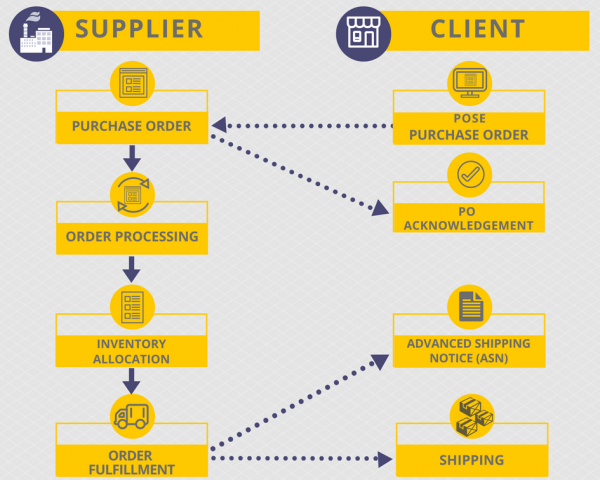
  1. The order process begins with an EDI 850 Purchase Order from the client.
  2. To confirm the receipt of a purchase order, the supplier generates a Purchase Order Acknowledgement (EDI 855). Then, the supplier has to start the order processing procedure.
  3. When the order is ready for delivery, the supplier collects all pertinent data relative to the shipment. Using this information, the supplier creates a Ship Notice/Manifest. The supplier must generate the Ship Notice, and transmit it to the client immediately upon closing the truck.
  4. The client needs to receive and integrate the data of ASN 856 into his business systems prior to the physical arrival of the merchandise.
EDI- 850 example

Integration with SAP and E-Commerce Platforms

ASN in SAP: SAP uses IDocs (Inbound Delivery IDoc – DESADV) to ingest ASN 856 data. The mapping from EDI segments (e.g., BSN, HL, LIN) to SAP fields enables automatic inbound delivery creation and advanced shipping notifications.

E-Commerce Integration: Platforms like Shopify or Amazon Vendor Central leverage ASNs for order fulfillment automation. Implementing EDI ASN 856 mapping ensures inventory accuracy and faster customer notifications.

Advanced Shipping Notice (ASN) Example

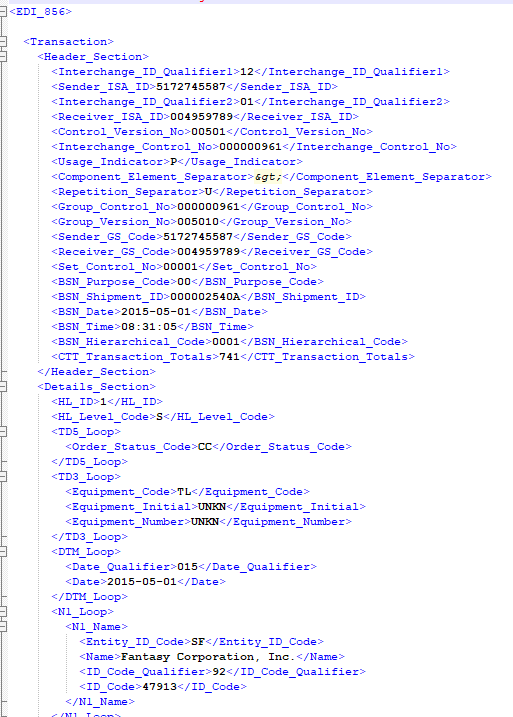
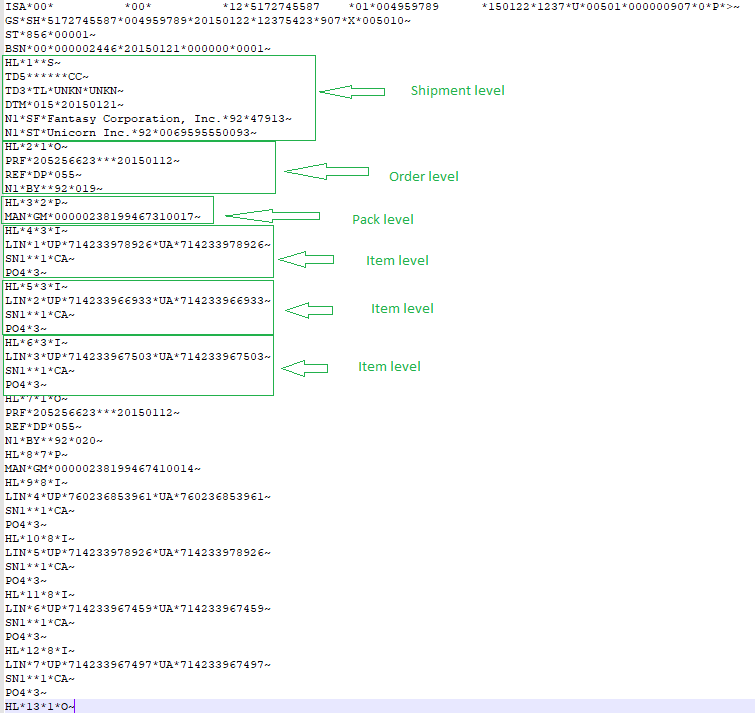
These two examples of Advanced Shipping Notice (ASN) 856 below show the XML file and the same file that was converted to EDI.

These two examples below describe how an Advanced Shipping Notice (ASN) 856 transaction set looks like in xml format, and then displays the same information in X12 format after it has been converted to EDI by our EDI2XML translation and communication service.

EDI 856 ASN (xml) Example:

EDI 856 example
 

EDI 856 X12 Example File:

EDI-656- example-levels
 

The shipment level in the 856 EDI document refers to the level of detail provided about the shipment. This can include information such as the number of cartons or pallets in the shipment, the item numbers and quantities of the products being shipped, and other details about the shipment. The shipment level in the 856 EDI document may also include information about the carrier and transportation details associated with the shipment.

The order level in the 856 EDI document refers to the level of detail provided about the order that the shipment is fulfilling. This can include information such as the purchase order number, the customer’s order number, the date the order was placed, and other details about the order. The order level in the 856 EDI document may also include information about the items being shipped, including item numbers, quantities, and unit of measure. It also may include information about the shipping and delivery details, such as the requested delivery date, shipping address and shipping instructions.

The pack level in the 856 EDI document refers to the level of detail provided about the packaging of the items within the shipment. This can include information such as the number of items within each package, the type of packaging used, and the weight and dimensions of each package. The pack level in the 856 EDI document may also include information about the labeling of each package and any special instructions related to the packaging of the items. This level of information is important for the logistics and warehouse operations of the recipient of the shipment.

The item level in the 856 EDI document refers to the level of detail provided about the individual items within the shipment. This can include information such as the item number, the item description, the quantity being shipped, and the unit of measure. The item level in the 856 EDI document may also include information such as the item’s weight, dimensions, and packaging information. This level of information is critical for the logistics and warehouse operations of the recipient of the shipment. It also allows the recipient to match the received items with the purchase order and track inventory levels. This level of detail is important for the recipient to be able to process and receive the shipment accurately and efficiently.

EDI consultation

What Are the Benefits of Implementing the Ship Notice/Manifest for the Supply Chain?

Implementing EDI 856 in your supply chain can unlock a wide range of benefits that can significantly improve your business operations and overall competitiveness. Some of the key advantages of adopting EDI 856 include:

  • Improved Inventory Management: With the detailed information provided in an EDI 856 document, businesses can better plan and manage their inventory levels, reducing the risk of stockouts or excess inventory.
  • Enhanced Shipping Efficiency: By automating the shipping process and eliminating manual data entry, EDI 856 can help businesses streamline their logistics operations, leading to faster delivery times and reduced shipping costs. Reduce off-loading time at receiving dock. Acceleration of goods acceptance, due to previously received information on the composition and structure (as packed) of the supply.
  • Increased Accuracy and Reliability: EDI 856 documents are transmitted electronically, which minimizes the risk of errors and inaccuracies that can occur with manual processes. This improved data accuracy helps to build trust and strengthen relationships with supply chain partners.
  • Better Visibility and Collaboration: The real-time information provided by EDI 856 documents allows businesses to track shipments more effectively and collaborate more closely with their suppliers and customers, enhancing overall supply chain visibility. The EDI 856 (ASN) connects with bar code labels on transported pallets, boxes, or cartons, so there is the possibility of using the RFID scanner and transport package sequence number (SSCC) when accepting goods.
  • Cost Savings: By automating the shipping process and reducing the need for manual intervention, EDI 856 can help businesses save on labor costs, paper expenses, and other administrative overhead associated with traditional shipping methods.
  • Improved Customer Satisfaction: With faster delivery times, better inventory management, and more reliable shipping information, businesses can improve their customer service and satisfaction levels, ultimately leading to increased loyalty and repeat business.

Implementing EDI 856 in your supply chain can be a transformative step, enabling your business to streamline operations, enhance collaboration, and gain a competitive edge in the market. By embracing this powerful EDI document, you can unlock new opportunities for growth and success in your supply chain management efforts.

Frequently Asked Questions (FAQ): EDI 856 / Advance Ship Notice 

What is an EDI 856?

The EDI 856, also known as the Advance Ship Notice (ASN), is an electronic document sent by suppliers to inform their trading partners that an order has shipped. It includes key details such as shipment date, packaging structure, tracking numbers, item quantities, and carrier information.

What information does an EDI 856 ASN include?

An ASN typically contains shipment details (ship date, carrier, tracking), order information (PO number, ship-to location), packaging hierarchy (pallets, cartons), item-level data (SKU, UPC, quantities), and SSCC / GS1-128 barcode numbers.

How do I create or generate an EDI 856?

The 856 is usually generated automatically by an ERP, WMS, or EDI integration platform based on shipment data. Providers like EDI2XML send the ASN on behalf of the supplier as part of a fully managed EDI service.

Can you show an example of an EDI 856 file?

An EDI 856 example typically includes segments such as BSN (beginning), HL loops (shipment, order, pack, item), LIN (item identification), SN1 (quantities), and MAN (labels). If needed, your EDI provider can supply test files for mapping and validation.

What are the HL levels in an EDI 856?

The HL structure represents the shipment hierarchy:

  • Shipment level

  • Order level

  • Pack level (pallets, cartons)

  • Item level
    These levels show how items are packaged and shipped.

What is the difference between Order/Pack/Item hierarchy?

The hierarchy describes how the shipment is structured. “Order” refers to the PO, “Pack” indicates cartons or pallets, and “Item” lists the products inside each package. Retailers rely on this structure for accurate receiving.

When should I send the EDI 856?

Most retailers require the ASN to be sent before the shipment arrives at the distribution center—often immediately after the carrier picks up the goods. Some require it before the truck leaves your dock.

Why was my EDI 856 rejected?

Common errors include incorrect HL hierarchy, missing PO numbers, wrong quantities, invalid SSCC codes, mismatched packaging, and incorrect ship-to locations. Each retailer has strict validation rules that must be followed.

What are the benefits of using an EDI 856?

An ASN helps retailers automate receiving, reduce errors, speed up warehouse operations, improve inventory accuracy, and ensure on-time processing. It also helps suppliers avoid chargebacks.

Can I combine multiple purchase orders in one EDI 856?

Some retailers allow consolidation of multiple POs in a single ASN, while others strictly require one ASN per PO. Always check specific trading partner guidelines.

How do GS1-128 / SSCC labels connect to the EDI 856?

Each carton or pallet receives a unique SSCC number, which is included in the MAN segments of the ASN. Warehouse teams scan the GS1-128 labels to match the physical shipment with the electronic ASN data.

How do I generate an EDI 856 from SAP, NetSuite, or another ERP?

ERPs do not usually generate fully compliant ASNs on their own. Most companies use an EDI service such as EDI2XML to extract shipment data from the ERP, map it to 856 standards, and send it to retailers.

How do I test and validate my EDI 856?

Testing includes validating the HL structure, verifying SSCCs, checking quantities, ensuring labels match the ASN, and sending test documents to the trading partner. Managed EDI providers handle testing and certification.

What happens if the ASN is late or contains errors?

Late or incorrect ASNs often result in chargebacks, delays in receiving, inventory issues, and compliance violations. Large retailers like Walmart, Amazon, and Target strictly monitor ASN accuracy.

Why do retailers require the EDI 856?

Retailers need real-time shipment visibility. The ASN allows them to prepare receiving teams, schedule labor, match shipments to orders, and speed up processing at distribution centers.

Advantages of the Implementation of the Advanced Ship Notice (EDI 856)

The implementation of EDI 856, or the Advanced Shipping Notice, can significantly improve visibility and collaboration throughout the supply chain. By providing detailed, real-time information about shipments, this powerful EDI document enables better coordination and cooperation among all supply chain stakeholders.

  • Eliminates the need for paper-based communications
  • Optimization of the process of goods acceptance.
  • No data entry errors.
  • Reduce administrative costs by increasing the accuracy of forecasting orders.

Integrating EDI 856 with Other EDI Documents for Seamless Operations

To maximize the benefits of EDI 856 in your supply chain, it’s essential to integrate this Advanced Shipping Notice (ASN) with other key EDI documents. By enabling a seamless flow of data, businesses can increase operational efficiency, minimize manual intervention, and make more informed decisions.

EDI 810 (Invoice)

Integrating the EDI 856 with the EDI 810 Invoice allows for a more streamlined invoicing process. By automatically matching the shipment details in the EDI 856 with the corresponding invoice, companies can reduce discrepancies, accelerate payment processing, and improve financial management. This integration ensures that the details of what was shipped align with what is being billed.

EDI 940 (Warehouse Shipping Order)

Linking the EDI 856 with the EDI 940 Warehouse Shipping Order improves warehouse operations and inventory control. The EDI 856 provides the warehouse with specific details about the contents, quantities, and packaging of the shipment. This enables warehouses to better plan for receiving, allocate space, and expedite the fulfillment process.

EDI 945 (Warehouse Shipping Advice)

Integrating the EDI 856 with the EDI 945 Warehouse Shipping Advice improves coordination between suppliers, warehouses, and customers. The EDI 945 confirms the shipment details sent in the EDI 856, helping the receiving party prepare for incoming goods, facilitating smoother receiving processes, and reducing misunderstandings or delays.

EDI 997 (Functional Acknowledgment)

By linking EDI 856 with the EDI 997 Functional Acknowledgment, businesses can track and confirm the successful transmission of their ASNs. The EDI 997 serves as a receipt confirmation, ensuring that the EDI 856 has been successfully received by trading partners. This validation helps businesses monitor and improve the reliability of their EDI processes.

EDI 753 (Request for Routing Instructions)

Although EDI 753 (Request for Routing Instructions) is less commonly mentioned in ASN integration, it can be valuable in ensuring accurate shipping details. This document is used to request specific routing instructions from the buyer or consignee, often in transportation and logistics planning. When integrated with EDI 856, it can help ensure that the shipment follows the correct delivery path, aligning transportation and delivery instructions.

By integrating EDI 856 with these key EDI documents, businesses can create a more cohesive and efficient supply chain. This integration reduces errors, increases visibility into shipments, and strengthens collaboration with trading partners. A holistic approach to EDI integration is vital for staying competitive in today’s dynamic business environment.

Choosing the Right EDI Provider for Your Organization’s Needs

Selecting the right EDI provider is a crucial step in successfully implementing and leveraging EDI 856 in your supply chain. The right partner can make all the difference in ensuring a smooth transition, reliable data exchange, and ongoing support for your organization’s evolving needs.
When choosing an EDI provider, consider the following key factors:

1. Expertise and Experience:
Look for an EDI provider with a proven track record of successfully implementing and supporting EDI 856 and other supply chain-related EDI documents. Their industry knowledge and understanding of best practices can be invaluable in navigating the complexities of EDI integration.
2. Scalability and Flexibility:
As your business grows and your supply chain needs evolve, your EDI provider should be able to scale their services and adapt to your changing requirements. Ensure that the provider can accommodate increased transaction volumes, new trading partner integrations, and any industry-specific compliance needs.
3. Integration Capabilities:
Assess the provider’s ability to seamlessly integrate EDI 856 with your existing enterprise systems, such as your ERP, warehouse management, or logistics software. A smooth integration process can significantly streamline your supply chain operations and reduce the risk of manual errors.
4. Customer Support and Responsiveness:
Reliable and responsive customer support is essential when implementing and maintaining an EDI solution. Look for a provider that offers comprehensive training, ongoing technical assistance.

How to Get Started with Ship Notice/Manifest Transaction Set (856)?

Simplify your business processes with the implementation of EDI. We offer up-to-date integrated solutions at an affordable price to enterprises of all sizes. Whether you are a supplier or retailer contact us for cost-effective EDI Implementation.

Get A Free EDI Consultation
June 19, 2018/4 Comments
https://www.edi2xml.com/wp-content/uploads/2018/06/ASN-856.png 350 1024 Tatyana Vandich https://www.edi2xml.com/wp-content/uploads/2024/08/edi2xml.com-EDI2XML-company-logo.png Tatyana Vandich2018-06-19 11:45:182026-02-13 15:22:37What is Advanced Ship Notice (ASN) 856 Transaction Set?

Oracle JD Edwards Integration: the key to Digital Transformation

Blog, EDI, Magic xpi

This post was updated to reflect current trends and information.


Oracle’s quality and reputation in the industry has made Oracle one of the most popular software vendor on the market. According to Statista, it is one of the largest companies in the world in terms of market value and one of the world’s leading providers of enterprise resource planning (ERP) software.

What is Oracle JD Edwards?

JD Edwards EnterpriseOne is an integrated applications suite of comprehensive enterprise resource planning software (ERP) that that is developed and sold by Oracle. EnterpriseOne is the first ERP solution to run all applications on Apple iPad. JD Edwards EnterpriseOne also delivers mobile applications.

JD Edwards World is a unique platform solution that allows better collaboration both within and outside your business network. The Oracle JD Edwards ERP system is a popular solution for managing mid-size and large enterprises.


To learn more about the JDE Edwards world and EDI integration, you can read this article “What you need to know about EDI integration in JD Edwards World”


Integration is the engine behind “Digital Transformation”

During the past few years, due to the important role of integration in information technology, there has been a modernization of information technology, especially in Big Data and Analytics, Cloud Computing, and mobile IT.

Businesses using Oracle JD Edwards are not exceptions. Companies often need to integrate other applications and systems such as EDI System, CRM, SCM, PLM, and eCommerce.

EDI2XML offers a complete integrated solution on both JD Edwards EnterpriseOne and JD Edwards World, using certified connectors from Oracle themselves. Thanks to the Magic xpi Integration Platform and the partnership of Magic Software with Oracle for the connectors certification!

When Integration with JDE is essential?

There are several scenarios when a company would consider automation and integration, and it is beneficial:

a) Processes improvement

Companies are in a constant search for better ways to do business; integrating the company’s systems and process will benefit the company with the following:

  • Improvement of employees’ efficiency and their performance
  •  Reduction in human errors
  • Increase in the speed of data collection
  • Improvement of the quality of information within a company’s system
  • Obviously, at the end of the day, all of the above will have a positive impact on the company’s bottom line.

b) External trends

The development and the business need to accommodate “External trends” is another driving factor for integration:

  • Cloud-based systems and technology
  • Mobile applications
  • IoT (Internet of Things) projects

c) Answering to Clients’ or suppliers’ requirements and expectations

Often companies dealing with several important clients, cannot reject a request from a client to exchange information and integrate data electronically.

d) Companies merger, acquisition, and growth

It has been very common in today’s business reality, to see lots of mergers and acquisitions of companies. This kind of business operation will create an urgent need to consolidate data and perhaps centralize data from different sources.

The same need can arise due to the company’s growth and expansion, where data needs to be centralized, activities need to be orchestrated at the system level.

e) Heterogeneous systems

Another typical scenario where integration becomes crucial for a company is when it is overgrown with various systems and applications that are not interconnected. (i.e. CRM, ERP, e-Comm, PLM, WMS, etc.)

Magic xpi Integration Platform operates as middleware to allow data to be shared seamlessly between all systems of a company such as eCommerce, CRM, ERP, including backend financial and manufacturing systems in order to help companies in their digital transformation journey.

Your Digital Transformation Partner

Magic xpi Integration Platform is a code-free, enterprise-grade integration, business process automation, and data synchronization solutions.

Magic xpi for JDE extends the capabilities and usage of Oracle’s JD Edwards EnterpriseOne and JD Edwards World ERP systems, integrating them with your company’s whole range of business processes.

Integration with Oracle JD Edwards

Magic xpi unites the disparate components of your business in different systems and applications, allowing you to better manage financial flows, employees, products, and information in your company.

Magic xpi has a code-free visual design studio, with more than 50 adapters, wizards, services, and methods, that enable to create and orchestrate business processes and integrate natively with JD Edwards, using its Oracle certified connectors.

Magic xpi features

JD Edwards EnterpriseOne and JD Edwards World connectors of Magic xpi, let you extend the value of your ERP by connecting data and business processes across CRM and other Business Systems.

Below are some of the main features of Magic xpi:

  • Out-of-the-box certified Oracle JDE adaptor
  • A wide library of pre-built components
  • Drag-and-drop functionality for easy configuration
  • Visual Data Mapper transforms information, regardless of the format
  • Step-by-step wizards simplify complex integration
  • Intuitive graphical user interface
  • Online monitoring capabilities

 Oracle JD Edwards Connector Capabilities

  • Discover all the “native” Oracle business objects automatically
  • Handles exceptions and errors, reliably and seamlessly
  • Integrates financial data in real-time, near real-time, and at optimal intervals
  • Integrates non-JDE applications with your General Ledger
  • Integrates with new and existing e-commerce websites
  • Integrates order tracking and logistics management over the Web
  • Integrates CRM and sales force management
  • Handles service calls and tracks orders over the Web
  • Runs natively on IBM I systems
  • Consolidates your charts of accounts with other systems and companies

Participating in Digital Transformation

If you don’t have the expertise in-house to lead a JD Edwards integration, then talk to us. We have been providing integration and expert consulting for Oracle including JD Edwards EnterpriseOne and JD Edwards World.

 We understand complex integration challenges – this is what we built our business on!

Free consultation ecommerce JDE integration

RELATED POSTS:

The Definitive Checklist For Oracle JDE and EDI Integration Projects

What you need to know about EDI integration in JD Edwards World

June 12, 2018/0 Comments
https://www.edi2xml.com/wp-content/uploads/2018/06/Oracle-JD-Edwards-Integration.png 350 1024 Tatyana Vandich https://www.edi2xml.com/wp-content/uploads/2024/08/edi2xml.com-EDI2XML-company-logo.png Tatyana Vandich2018-06-12 14:53:222021-04-28 14:45:54Oracle JD Edwards Integration: the key to Digital Transformation

Business Tech Terms Definitions

Blog, EDI, EDI2XML

This post was updated to reflect current trends and information.


We compiled a shortlist of business technology terms that are useful to keep on hand when looking for software solutions for your business or when speaking with an IT Service Provider. Because, sometimes a short and simple definition is all you need, and that’s exactly what we have here.

“SOFTWARE” Terms

Software EDI

• ERP: Enterprise Resource Planning; a fully integrated business process management software suite. It allows users to view, manage and track core business processes and resources using one single database.

• CRM: Customer Relationship Management is a software system that allows your business to manage contacts, collaborate effectively, increase productivity & grow your business. It is based on the preservation and analysis of information to improve the marketing, service and business relations with your customers.

• BI: Business Intelligence; a performance optimization software that aims to produce detailed analyses with the help of customized drillable dashboards. BI provides immediate access to relevant and timely business information (through visualizations & reports)

• WMS: Warehouse Management System; a software application to manage warehouse operations (track inventory, shipping, receiving, stock locations, picking, etc.)

• eCommerce: Website used to make commercial transactions electronically over the Internet; in other words, an online store to sell products and services.

• eCommerce integration: is the synchronization of a company’s eCommerce website with its back-end accounting or ERP system.

• API: An application programming interface (API) is a set of subroutine definitions, protocols, and tools for building application software. In general terms, it is a set of clearly defined methods of communication between various software components.

• Implementation: The process of installing and configuring software; this phase includes many steps such as business process re-assessment, system testing, user-training and support.

• Integrated Software: A collection of computer programs (modules like accounting, purchases, sales, inventory management, sales forecasting, EDI & more) which share one database.

• IT Consulting: Consulting services provided by an outside organization/consultant to advise business executives or IT managers on appropriate strategies and solutions to bring efficiency into the company through technologies.

• Digital transformation (DT): Digital Transformation (DT) is the transformation of business by remodeling the business strategy or digital strategy, models, operations, products, marketing approach, objectives etc., by adopting digital technologies. This accelerate sales and growth of the business from end to end.

• Office automation: Office automation refers to the varied computer machinery and software used to digitally create, collect, store, manipulate, and relay office information needed for accomplishing basic tasks. Raw data storage, electronic transfer, and the management of electronic business information comprise the basic activities of an office automation system. Office automation helps in optimizing or automating existing office procedures.

• Artificial Intelligence (AI) Artificial intelligence (AI) is an area of computer science that emphasizes the creation of intelligent machines that work and react like humans. Some of the activities computers with artificial intelligence are designed for include speech recognition, learning, planning, and problem solving.

• Internet of Things (IoT) The Internet of Things (IoT) is the network of physical devices, vehicles, home appliances and other items connected to the internet, collecting and sharing data. An example of an Internet of Things device a lightbulb that can be switched on using a smartphone app is an IoT device.

• Industrial Internet of Things (IoT) The Industrial Internet of Things is a unified system of computer networks and production equipment with built-in sensors and software for collecting and exchanging data. This system has remote monitoring and control in automatic mode, without human intervention. Industrial Internet of Things allows creating industries that are more economical, flexible and efficient than existing ones.

“EDI” Terms

• EDI: Electronic Data Interchange; the secure process of electronically exchanging business documents, like Purchase Orders, Invoices, ASNs, (in a pre-defined format) between Trading Partners

• EDI Standard: EDI documents are sent using standard-specific formats, describing what each piece of information is; these standards avoid trading partners sending documents back and forth using company-specific formats. Common standards include: ANSI ASC X12 (North American Standard), EDIFACT (International standard)

• EDI Translation System: Software application used to translate the EDI format (into a format readable by humans and systems) so the data can be read and used by business people and processed by a company’s internal management system.

• Communication Protocol: Communication method used to transmit data to and from Trading Partners; FTP, sFTP, AS2, VAN, Https

• Point-to-Point: Direct Connectivity; rather than having documents pass through a VAN, Trading Partners can exchange documents directly through secured communication protocols like FTP, sFTP, AS2, Https, etc.

• VAN: Value Added Network; a private network provider to facilitate electronic data interchange for Trading Partners; considered the “EDI post office” for incoming & outgoing documents.

• AS2: Applicability Statement 2; A point-to-point connectivity method that sends messages across the internet using the HTTP or HTTPS protocol, with increased verification and security.

• Trading Partner: Participant in an ongoing business relationship

• XML Extensible Markup Language; a markup language used to describe data. This is typically the go-to in EDI translation, since it is a format that is human and system-readable

• Data Mapping: The method by which information in one format is restructured into a different format.

May 24, 2018/4 Comments
https://www.edi2xml.com/wp-content/uploads/2018/05/Business-Tech-Terms-Defined.png 350 1024 Tatyana Vandich https://www.edi2xml.com/wp-content/uploads/2024/08/edi2xml.com-EDI2XML-company-logo.png Tatyana Vandich2018-05-24 13:32:492020-03-18 14:41:45Business Tech Terms Definitions

Integration with Amazon Web Services (MWS): Things you should know

Blog

This post was updated to reflect current trends and information.


This article explains high level details about integration with Amazon Marketplace Web Service (MWS); it covers key Amazon MWS features and process of Amazon order.

What is Amazon MWS?


As per the definition on Amazon’s developer’s website: “Amazon Marketplace Web Service (or Amazon MWS) is an integrated web service API that helps Amazon sellers to programmatically exchange data on listings, orders, payments, reports and more.”

In different words, Amazon MWS, is an integration API, based on XML files exchange, provided by Amazon, and can be leveraged and used by Sellers subscribed to sell their products and services on Amazon eCommerce platform, directly while having “Amazon professional account”.

Let’s deep dive into the more details about MWS of Amazon, little about its architecture, its capabilities and its use

What is XML?

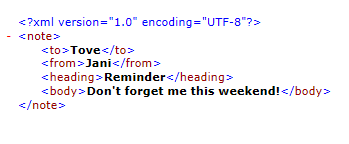
XML (Extensible Markup Language) is a standard defined by the World Wide Web Consortium (W3C).  XML uses tags (identifiers enclosed in parentheses, for example, <note>) to mark content in text documents. These tags called “markup”, can be read by people and computers.  This is a simple XML example:

Simple-XML-exampleThe XML language has no predefined tags. In an XML document, the markup is very similar to the HTML markup (Hypertext Markup Language), but there are some important differences because XML and HTML were designed with different goals:

  • XML was designed to transfer data – with an emphasis on what data is
  • HTML was designed to display data – with focus on how data looks
  • XML tags are not predefined as opposed to HTML.

The tags in the example above (like <to> and <from>) are not defined in any XML standard. These tags are “created” by the writer of the XML document. While HTML works with predefined tags like <p>, <h1>, <table>, etc.

 Why Use XML?

Most API gateways, use some sort of XML data exchange. This is not different for Amazon’s API, since it permits to integrate a company’s business systems with Amazon’s eCommerce platform. The integration with Amazon happens through predefined API calls (application programming interfaces), whether to send documents or retrieve documents from Amazon systems. It is much more efficient and convenient exchange data using XML, especially, in a case when we have a large amount of data.

Using Amazon Marketplace Web Service (Amazon MWS)

As previously stated, MWS is a web service API provided by Amazon, to help Amazon sellers to programmatically and automatically, exchange data on listings, orders, payments, reports, and more. Such an automatic integration with Amazon, can certainly help sellers to improve their business.

Amazon MWS provides the following features:

  • Inventory management
  • Order management
  • Reports management

There are no fees to use Amazon MWS, but to use it you have to be a Professional Seller.

MWS XML feeds

Data exchanged with Amazon MWS, is sent through what is called “Feeds”, or “XML feeds” since it is sent systematically to the API for processing. “XML feeds” are based on pre-defined XML schemas or xsd (XML Schema Definitions).

Each XML feed (or message), contains data about different key information required by the Amazon MWS API to be able to process it.

XML feed to send catalog information

There are six feeds to upload and manage products on Amazon:

1. Product – this is the first feed to build, in order to register new products on Amazon’s eCommerce platform. This feed, contains descriptive information about the items in your catalog. This feed, will help establish the mapping between the unique identifier (SKU) of the seller and Amazon’s unique identifier of the same SKU (the ASIN: Amazon Standard Identification Number).

2. Inventory – this feed, is to report the current stock levels of the products you have on Amazon.

3. Pricing – to populate and refresh prices of your products, whether the regular prices or temporary (sale) prices.

4. Image – to provide the URLs from where Amazon can associate the image to the SKU or item.

5. Relationship – Defines relationships between different items in your catalog. There are two types of relationships:

     a) Variation – this is the most common type of relationship. Allows customers to select from a list of variations of the same product. For example, a t-shirt can be in a       different sizes and different colors. The main item (parent SKU) is the type of t-shirt in general. Parent SKU is not buyable and there is no size, color, quantity or price. The   variations (child SKUs) have different combinations of size and color, therefore can be sold. (See the diagram below.)

Amazon-parent SKU

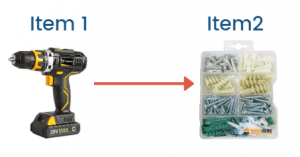
     b) Accessory – It means that customers can choose products classified as accessories to the main item. For example, a drill can have screws, listed as accessories.

Amazon-feed-Accessory

6. Overrides – Allows you to override the account-level shipping settings with SKU-level shipping settings. This is a good option for a weighty or oversized product such as a bicycle or kayak.

Amazon’s Order Management Process

In addition to the feed to create products on Amazon, a significant importance goes to another important XML feed: “order management”.

When a buyer places an order on Amazon, the quantity ordered decreases the quantity available in stock, in the seller account.

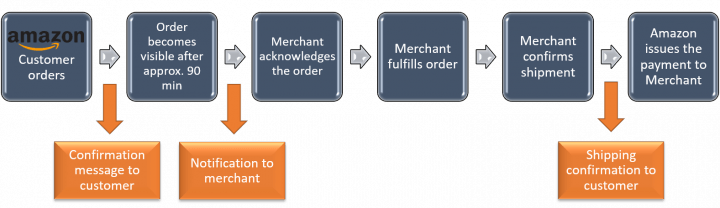
To confirm the transaction, Amazon puts the order in a 90-minute waiting period. During this time, the client receives an Amazon payment authorization and an email confirming the order. During this time the customer can change or cancel the order from his Amazon account. If the customer cancels the order or the payment has been rejected, Amazon will add the quantity back to the quantity available in your account. Amazon also sends an order cancellation email to the customer.

So, the process of orders has the following stages:

  • Customer places the Order
  • Merchant acknowledges the order
  • Customer can modify the order
  • Merchant ships the order and confirms the shipment
  • Amazon issues the payment to merchant

Here is an overview of the general order management process:Amazon-general-order-management-process

Validating XML Feeds

It is important to validate XML feeds before sending them to Amazon. If a specific feed does not validate successfully by Amazon MWS, the MWS will return a parsing error.

Where to go from here?

If you have gone into this article, it means you are either planning a project to sell your goods and services on Amazon, or you are already selling on Amazon directly.

In both cases, you have to think about efficiency and accuracy and how to reduce human errors and chargebacks.

In case you have a handful number of items you are selling; this article is not meant for you; you can simply manage your products and orders from within Amazon’s portal.

However, in case your company is to sell hundreds or thousands of products and their corresponding variations on Amazon, then, you have to consider automated integration between your current software management system (i.e. Salesforce, SAP, JDE, Microsoft ERP…) and your Amazon Seller account.

Amazon integration projects through MWS are time sensitive and requires expertise and the right integration tools.

Talk to us and entrust our team for your integration projects; I invite you to contact us for a FREE consultation.


Amazon Integration
May 11, 2018/0 Comments
https://www.edi2xml.com/wp-content/uploads/2024/08/edi2xml.com-EDI2XML-company-logo.png 0 0 Tatyana Vandich https://www.edi2xml.com/wp-content/uploads/2024/08/edi2xml.com-EDI2XML-company-logo.png Tatyana Vandich2018-05-11 12:19:052023-04-10 14:52:54Integration with Amazon Web Services (MWS): Things you should know

Integration with Amazon Seller or Vendor account: Things you should know

Blog

This post was updated to reflect current trends and information

Founded in 1994 in the USA, Amazon.com is the largest online retailer of books, clothing, electronics, music and many other products. Currently, he became one of the leading and largest eCommerce platforms in the world. Amazon keeps pace with technology, by leveraging it to minimize human errors factor and improve efficiency. Amazon was one of the early adopters of process automation and electronic data interchange for his eCommerce platform.

Read: Free Guide – Introduction to EDI

Amazon Vendor Central or Amazon Seller Central?

We have been hearing so much these terms: “Amazon Vendor central” and “Amazon Seller Central”. So, what are these terms? what do they mean? Let’s explore both, one at a time.

Any company that wants to sell its products or services on Amazon’s platform, will be setup on that platform either in the “Amazon Vendor Central” or in “Amazon Seller Central” portal. What is the difference?

Amazon Vendor Central

First, the Vendor Central, is a web-based portal used mainly by manufacturers and distributors. Access to Vendor Central, is by invitation only.

A company selling its products/services directly to Amazon, who in turns sells it to the end consumer, will be setup in the Vendor Central portal of Amazon. In a similar case, Amazon is the buyer of the company’s products. Amazon will sell the products under his own brand name to the end consumer. Usually, when a package is shipped from Amazon to the end consumer, packages are marked as: “Ships from and sold by Amazon.”

Companies setup to use Amazon Vendor Central are considered 1P (or first party seller).

Amazon Seller Central

Again, the Seller Central, is a web-based portal used mainly by the Seller (or store owner on Amazon). Amazon offers his eCommerce platform for companies who want to manage their own stores on his platform and give them the opportunity the Amazon Marketplace. This service is offered against a monthly fee for the usage, and other fees at the transaction level.

In this case, the manufacturer or distribution will be selling his own products directly to consumers on the Amazon marketplace by using Seller Central account.

As a marketplace seller, a subscriber will be able to handle fulfillment and logistics for his “seller account” based on (2) different options:

  • “Fulfillment by Merchant (FBM)”: The seller can handle the shipping, customer service, and returns for each individual order himself. Fulfillment by Merchant orders, will be shipped out of the merchant’s warehouse. Seller can also use drop-shipping method, subject to compliance with the Amazon Drop Shipping Policy.
  • “Fulfilled by Amazon program. (FBA):The seller will have the option to allow Amazon to handle fulfillment of his orders, through inventory sent to Amazon warehouses. Obviously, seller has to enroll his products on Amazon under the FBA program, and Amazon will have additional fees towards using his fulfillment resources.

Amazon Data Integration

Integration with Amazon, is the process of implementing one or multiple flows to extract relevant data from a company’s own system and send to its Amazon account/store (i.e. product and pricing information, inventory data…). At the same time, extract the information related to sales orders, clients and payment information from Amazon’s account/store and send to a company’s internal software system.

Read: Integration with Amazon Web Services (MWS): Things you should know

Automating Data Integration with Amazon

As described above, the integration with Amazon is very important and crucial for a company successful online commerce. The integration process does not happen once. It is a continuous process of keeping the “synchronization” as close to “real-time” as much as possible.

To be able to keep a persistent ongoing integration between a company’s Amazon account and its internal Software system, companies have no choice other than embracing “automated integration”.

Benefits of integration with Amazon

Here are the top 5 benefits of integration with Amazon, which will be also detailed in another post in the future:

1. Ability to deliver your products quickly to your consumer in a very competitive marketplace

2. Avoid chargebacks, credits and penalties related to poor or no accurate inventory and stock status on your Amazon account

3. Avoid unnecessary none-productive human errors when manipulating manually orders received from your Amazon account

4. Win on visibility and credibility of your Amazon account and products.

5. Comply with Amazon terms of agreements in relation to product delivery.

Amazon Integration

Options on Amazon for efficient integration?

Depending on the type of account your company is setup, Amazon offers (2) methods of integration:

  1. EDI (X12) integration (in North America) for Vendor Central account customers
  2. Amazon Marketplace Web Service (Amazon MWS) for Seller Central account customers.

Messages to exchange with Amazon

Whether using EDI X12 or Amazon MWS to exchange messages, he following documents are the mandatory ones for a successful integration:

Amazon works with various providers and types of EDI software:

EDI X12 documents

  1. EDI 846 – Inventory Status
  2. EDI810 – Invoice
  3. EDI 850 – Purchase Order message (Customer triggered)
  4. EDI 855 – Purchase Order Acknowledgment
  5. EDI 856 – ASN (Advance Ship Notice)
  6. EDI 860 – Order Change Notification

Amazon MWS messages

  1. Products
  2. Orders
  3. Order Acknowledgment
  4. Order Payment

Why integration with Amazon is crucial

As one of the largest online retailers in the world, Amazon is a powerhouse when it comes to e-commerce. Integrating your business with Amazon can provide you with unparalleled access to a massive customer base, improved visibility, and increased sales. By utilizing Amazon’s platform, you can tap into their extensive resources and take advantage of their advanced tools for product listings, inventory management, and shipping.

In addition, Amazon’s sophisticated algorithms can help you to target specific customer segments and increase your visibility within your niche market. With Amazon’s robust analytics and reporting tools, you can track your performance and identify areas where you can improve your sales strategy.

Moreover, integrating your business with Amazon can also enhance your brand credibility and customer trust. By aligning your brand with Amazon’s reputation for quality and reliability, you can build a strong customer base that is willing to invest in your products and services.

– The average number of monthly visits to Amazon, according to Similarweb is 2.6 billion.

– Amazon has over 2.5 million active sellers on its platform, with more than half of its sales coming from third-party sellers.

– Amazon’s global logistics network includes over 400 fulfillment centers and 75 sorting centers.

In 2022, Amazon achieved a net sales revenue of almost 514 billion U.S. dollars globally, with its headquarters located in the United States.

Amazon Integration for your business

Don’t miss the great opportunity for your business to trade on Amazon. We provide Integration and Automation for Amazon Seller Central Users as well EDI Integration for Vendor Central Users. Contact us today to get more information, request a quote or schedule a demo.

Amazon Integration

April 23, 2018
https://www.edi2xml.com/wp-content/uploads/2018/04/EDI2XML-Amazon-Selle-or-Vendor-Integration.jpg 675 1200 Tatyana Vandich https://www.edi2xml.com/wp-content/uploads/2024/08/edi2xml.com-EDI2XML-company-logo.png Tatyana Vandich2018-04-23 14:16:232023-04-10 15:17:44Integration with Amazon Seller or Vendor account: Things you should know
Page 19 of 24«‹1718192021›»
Recent
  • EDi Integration for SMB - Complete Guide
    Electronic Data Interchange (EDI): The Complete Guide for...July 17, 2026 - 4:46 pm
  • EDI Process Guide from EDI EDI Provider
    How EDI Documents Work Together: A Complete Guide to the...July 9, 2026 - 1:22 pm
  • Wayfair EDI & API Integration Guide
    Wayfair EDI & API Integration Guide for SuppliersJune 30, 2026 - 3:24 pm
  • Promotional banner about whether EDI is required for small businesses and a supplier’s guide to retail onboarding. Women at a desk inside a circular cutout image on the right.
    Is EDI Required for Small Businesses? A Supplier’s Guide...June 17, 2026 - 7:02 pm
  • EDI compliance with Loblaw
    How to Meet Loblaw EDI Requirements as a Small BusinessJune 4, 2026 - 2:05 pm
Popular
  • How to Quickly Connect to a Large Retailer's EDI Requirements
    How to Get EDI-Compliant Quickly For A Large RetailerNovember 21, 2025 - 4:29 pm
  • EDI-as-a-services
    EDI Translation Software “On-premises” or “As...January 21, 2014 - 1:28 pm
  • order-automation in e-commerce
    Why Is It Crucial to Automate the E-Commerce Order Fulfillment...May 10, 2022 - 1:58 pm
  • EDI for Logistics and transportation
    EDI Integration for Efficient Transportation ManagementOctober 6, 2023 - 1:33 pm
  • information technology definitions
    Business Tech Terms DefinitionsMay 24, 2018 - 1:32 pm

Browse by tag

Amazon Amazon Integration ANSI ASC x12 ASC X12 EDI B2B EDI integration e-commerce e-commerce business e-commerce integration eCommerce eCommerce integration EDI EDI2XML EDI 850 EDI as a Service EDI Communication EDI converter EDIFACT EDI for supply chain EDI for Third-Party Logistics EDI for transportation EDI implementation EDI Integration EDI Integration Project EDI project EDI Translation EDI Web Service EDI x12 ERP Integration integration platform integration project JDE Magic xpi Magic xpi Integration platform NetSuite online store Salesforce Shopify Shopify eCommerce integration Shopify integration Supply Chain Supply Chain Management Translation Software X12 EDI XML

Subscribe to our Blog

Menu

  • Home
  • About the EDI2XML Company
  • About EDI2XML EDI Converter
  • Blog
  • Book A Free Consultation
  • Privacy Policy EDI2XML Company

Our Services

Fully Managed Integration

E-Commerce Integration

Business Systems Integration

Fully Managed EDI

EDI Web Service 

On Premises EDI 

Managed Cloud Service


Latest Blog Posts

  • EDi Integration for SMB - Complete Guide
    Electronic Data Interchange (EDI): The Complete Guide for Modern BusinessesJuly 17, 2026 - 4:46 pm
  • EDI Process Guide from EDI EDI Provider
    How EDI Documents Work Together: A Complete Guide to the EDI Transaction ProcessJuly 9, 2026 - 1:22 pm
  • Wayfair EDI & API Integration Guide
    Wayfair EDI & API Integration Guide for SuppliersJune 30, 2026 - 3:24 pm

Contact Us

400 Blvd Curé-Labelle, #304 Laval QC H7V 2S7 Canada

Contact EDI2XML Team
Phone: +1 450-681-3009
Website: https://www.edi2xml.com/

© 2000-2026 EDI2XML (by Namtek Consulting Services). All rights reserved.
  • Link to Facebook
  • Link to LinkedIn
  • Link to X
  • Link to Youtube
  • Blog
Scroll to top Scroll to top Scroll to top