EDI2XML
  • About
    • The Company
    • EDI2XML
    • Advantages
    • Partnership with EDI2XML
    • Testimonials
  • Services
    • Enterprise AI
    • Fully Managed Integration
    • Fully Managed EDI Services
    • EDI Web Portal
    • EDI Web Service
    • EDI On Premises
    • Managed Cloud Services
    • Amazon Integration
    • Shopify Integration
    • BigCommerce Integration
    • NetSuite Integration
    • JD Edwards Integration
    • Dynamics 365 Integration
    • SAP B1 Integration
    • Salesforce Integration
    • Industry 4.0 Integration
  • Pricing
    • EDI Managed Services
    • EDI Web Service
    • EDI On-Premises
    • Managed Cloud Services
    • Shopify Integration
    • JD Edwards Integration
    • E-commerce Integration
    • All other Integrations
  • Blog
  • Resources
    • Downloadable Guides
    • List of EDI Codes
    • List of EDIFACT Messages
    • EDI Documents Library
    • Trading Partners
    • Customer Case Studies
  • Contact us
  • Book a Consultation
  • Click to open the search input field Click to open the search input field Search
  • Menu Menu
  • Link to Facebook
  • Link to LinkedIn
  • Link to X
  • Link to Youtube

Intégration SAP Business One

Blog

C’est quoi SAP Business One (SAP B1)?

SAP Business One est un logiciel de planification des ressources d’entreprise (en anglais : Enterprise Resource Planning ou ERP) parfois appelé un progiciel de gestion intégré ou PGI en français, spécialement conçu pour les petites et moyennes entreprises; il est développé par SAP SE (Allemagne). SAP Business One est un outil efficace pour la gestion des petites entreprises.

Fonctionnalités de SAP Business One

SAP Business One dispose de divers modules suffisants pour résoudre la plupart des problèmes commerciaux, quel que soit le secteur dans lequel œuvre l’entreprise. Chaque module SAP B1 peut effectuer indépendamment une tâche bien spécifique. Mais en même temps, différents modules peuvent être liés entre eux.

Les principales fonctionnalités de SAP B1 sont :

Gestion financière

  • Comptabilité
  • Contrôle de gestion
  • Gestion des immobilisations
  • Banque et rapprochement
  • Analyse et rapports financiers

Gestion des ventes et de la clientèle

  • Gestion des ventes et des opportunités
  • Gestion des services
  • Gestion des campagnes marketing
  • Rapports et analyse des données
  • Gestion des clients
  • Ventes sur mobile

Achats et gestion des stocks

  • Gestion des achats
  • Gestion des données de base
  • Intégration de la logistique et de la comptabilité
  • Comptabilité fournisseurs
  • Rapports

Business Intelligence

  • Création et personnalisation des rapports
  • Analyse interactive
  • Outils intuitifs
  • Outils d’analyse avec métriques prédéfinies
  • Puissantes visualisations de données

Analyse et rapports

  • Tableaux de bord et rapports
  • Outils d’analyse en temps réel

Architecture SAP Business One

SAP Business One a une architecture client-serveur et peut s’exécuter sur site ou dans le cloud.

Il existe différentes options pour installer SAP Business One pour une entreprise:

  • SAP Business One sur une base de données SQL Server.
  • SAP Business One sur Analytiques dans SAP HANA (si vous avez besoin de plus de capacités analytiques).
  • SAP Business One Cloud – la plate-forme cloud de SAP pour SAP Business One.

Pourquoi les PME ont-elles besoin d’intégrer SAP Business One?

L’intégration peut aider à réduire les erreurs et à améliorer l’efficacité globale d’une entreprise.

L’intégration de SAP Business One est essentielle pour maximiser les performances de chaque système d’informatique d’une entreprise, y compris le commerce électronique sur Amazon, Shopify ou BigCommerce.

Lorsque SAP B1 et d’autres systèmes d’entreprise ou commerce électronique dans une entreprise fonctionnent séparément, ils deviennent des systèmes informatiques isolés. Les informations contenues dans différents systèmes se chevauchent souvent et il existe une grande quantité de données en double qui doivent être mises à jour manuellement pour assurer la cohérence de tous les systèmes.

En conséquence, les entreprises sont confrontées à la nécessité de saisir ou de transférer manuellement des données, avec cette approche le risque d’erreur humaine est très élevé. Tout cela ralentit les processus de travail et augmente les coûts d’exploitation.

Les employés qui ont besoin de travailler sur plusieurs systèmes d’entreprise déconnectés connaîtront une frustration accrue et une efficacité réduite car ils doivent basculer entre différents systèmes.


Pour en apprendre davantage: Intégration efficace de Salesforce et SAP avec la plateforme d’intégration Magic xpi (en anglais seulement)


Intégration simple et rationalisée avec SAP B1 – est-ce possible?

La réponse courte est OUI, c’est tout à fait possible avec la plateforme d’intégration Magic xpi.

Le connecteur SAP Business One de la plate-forme d’intégration Magic xpi vous permet d’effectuer un une intégration entre votre application SAP Business One et d’autres systèmes d’entreprise.

Les projets d’intégration critiques peuvent être réalisés rapidement et facilement avec Magic xpi, grâce aux connecteurs certifiés, et à une approche sans code, glisser-déposer.
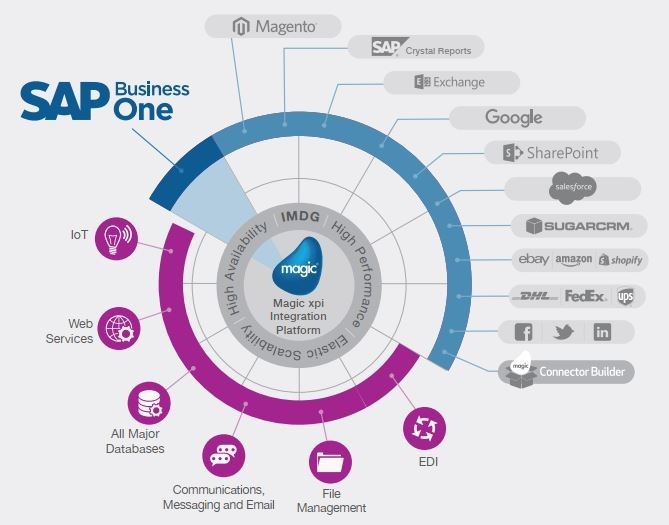
Intégration SAP

Intégrez et automatisez les processus avec Magic xpi pour bénéficier d’une facilité de maintenance et d’un retour sur investissement rapide.


Réservez une séance de consultation individuelle GRATUITE avec nos experts internes


Intégration de SAP B1 avec d’autres systèmes d’entreprise

Jetons un coup d’œil à quelques exemples sur la façon dont SAP B1 peut être intégré à divers systèmes d’entreprise à l’aide de la plate-forme d’intégration Magic xpi.

1. Intégration du commerce électronique avec SAP Business One

Transmission rapide et sans erreur vers et depuis de nombreuses plates-formes de commerce électronique telles que Shopify, Amazon, BigCommerce, Magento, eBay, etc.

2. Intégration de FedEx / DHL / UPS avec SAP Business One

L’intégration avec les entreprises de transport, vous permet de transférer rapidement et précisément les informations de commande.

3. Gestion des achats à l’aide de SAP Business One

En intégrant votre SAP Business One avec système de vos fournisseurs, vous pouvez importer et maintenir à jour les données fournisseurs dans SAP Business One sans erreur.

4. Commerce inter-entreprises

Augmentez l’efficacité et la précision en automatisant les processus entre les systèmes informatique des entreprises.

5. Mobilité d’entreprise

Mobiliser rapidement et de manière fiable les données et les processus SAP pour les utiliser dans les applications de saisie de commande, de confirmation de livraison, de service sur site, etc.

Avantages de l’intégration SAP Business One

Les avantages de l’intégration SAP à divers systèmes d’entreprise sont énormes et affectent presque toutes les fonctions d’une entreprise.

Augmentation de la productivité

L’intégration rend les employés plus efficaces car le cycle de travail devient plus court et les employés passent moins de temps à passer d’un système à l’autre ou à échanger des données. De plus, ça va libérer des tâches non productives et peuvent se concentrer sur des tâches importantes.

Réduction des coûts

L’augmentation des économies en réduisant considérablement les erreurs dans tous les processus, y compris le temps pour corriger les données mal saisies. De plus, il n’est pas nécessaire d’impliquer les employés pour transférer des informations entre différents systèmes.

Augmentation des revenus

Plus de possibilités de conclure des transactions, car les informations sur l’acheteur et le stock sont disponibles à tout moment. L’accès direct au profil complet du client, à l’historique des achats et aux expéditions de nouveaux produits augmente les possibilités de ventes supplémentaires.

Augmentation de la satisfaction client

Au fur et à mesure que le cycle de commande se raccourcit et s’accélère, l’expérience client s’améliore. Les clients reçoivent des réponses rapides et précises à leurs demandes, ils sont donc plus satisfaits du service. Ainsi, l’entreprise bénéficiera d’une fidélisation accrue de la clientèle et d’achats répétés.

Intégration efficace et simple

Notre principale priorité est de trouver des solutions qui augmentent l’efficacité de l’entreprise.

Depuis plus de 20 ans, en utilisant la plate-forme d’intégration Magic xpi, nous avons intégré avec succès SAP avec divers systèmes électroniques pour des clients en Europe, ainsi qu’aux États-Unis et au Canada.

Notre compréhension approfondie du contexte des affaires, ainsi que notre compréhension des caractéristiques régionales du Québec, nous permettent de créer des solutions qui rendent toute activité commerciale la plus efficace possible.

Contactez-nous pour une consultation gratuite.
May 19, 2021
https://www.edi2xml.com/wp-content/uploads/2021/05/EDI2XML-SAP.png 675 1200 Tatyana Vandich https://www.edi2xml.com/wp-content/uploads/2024/08/edi2xml.com-EDI2XML-company-logo.png Tatyana Vandich2021-05-19 11:37:212024-01-24 14:44:54Intégration SAP Business One

E-commerce integration: How to integrate Shopify, BigCommerce, Magento, with ERP/CRM

Blog

What is eCommerce Integration?

E-commerce Integration is the action of synchronizing operations of an e-commerce website (online store) with an ERP / CRM or other business systems of a company.

Thus, the goal of e-commerce integration with Salesforce, JDE, SAP, or any other ERP / CRM is to create a unified information space, which is basically within the ERP/CRM in place at the company.

This means that both the ERP and the online store must contain consistent information (that is, the data of one system must not conflict with the data of another).

Therefore, the very first step in any integration project, is to define what data objects should be synchronized and what will remain outside the integration.

Best eCommerce Platforms to Build Your Store

It is not that difficult to start an online business. First, you need to select an e-commerce platform on which you will build an e-commerce website.

There are many e-commerce platforms to choose from, but whether you need an enterprise-level solution or a simple e-commerce website, here are the most popular e-commerce platforms that can meet all your needs:

  • Shopify
  • Magento
  • BigCommers
  • WooCommerce
  • Volusion
  • Wix

If you want to learn more about eCommerce platform, read our popular article: E-commerce Integration with business systems – outperform the competition


What are The Most Popular ERP Systems?

ERP (Enterprise Resource Planning) is software for complete and efficient enterprise management.

According to research, companies from the Fortune 1000 and Global 2000 such as Walmart, Exxon Mobil, McKesson, General Motors, Costco Wholesale use SAP S/4 HANA. It is an ERP solution for large enterprises.


SAP S/4HANA is an ERP system that combines the functionality of on-premises software with cloud computing. It is often integrated with e-commerce platforms such as Magento to help companies run their online business more efficiently and profitably.

It should be noted that other SAP ERP solutions are no less popular, for example, SAP Business One designed for small and medium-sized enterprises.

The other popular ERP systems and leading vendors are:

  • Oracle (Oracle JD Edwards EnterpriseOne, Oracle NetSuite ERP)
  • Microsoft (Dynamics NAV, Dynamics AX, Dynamics 365)
  • Sage Group (Sage X3, Sage 300)

Recognize warning signals: How urgent it is to integrate eCommerce with ERP?


The Best CRM Systems for Business

Customer relationship management (CRM) is software for managing interactions with customers and prospects.

As best practices show, CRM (Customer Relationship Management) systems are always among the key IT systems of companies.

The most popular CRM systems are:

  • Salesforce
  • Oracle (Oracle CX Cloud)
  • SugarCRM
  • HubSpot CRM
 

As for the integration of e-commerce and business systems, today the most popular in terms of the number of requests is Salesforce Shopify integration. Of course, this is not surprising given the incredible popularity and availability of these two solutions for medium-sized businesses.


Integrating CRM with business software using Magic xpi


What Data Should Be Integrated With ERP/CRM?

To get the most out of e-commerce integration with ERP or CRM, you need to sync all important data.

Some of the information in your ERP/CRM and the online store is the same, however, they could be in different formats and structure in each system.

Typically, when integrating an e-commerce store with a business system, work is carried out with the following data:

– Product information (Item ID, description, dimensions (weight, length, height…))  
– Inventory and price information
– Customer Information and history Sales Order Information

Thus, typically, through e-commerce integration companies seek to solve the following issues:

Synchronization of Stock Status

Typically this is one-way synchronization from CRM system (i.e. Salesforce) to e-commerce.

Below is our typical synchronization flow for the “stock status”.

  • The Integration process starts runs every 6 hours.
  • The integration flow connects to the CRM/ERP instance to read “stock status”.
  • CRM/ERP should return the list of items, including their Stock available to sell.
  • Once the data is extracted from CRM/ERP, it must be filtered, and the flow will update the necessary items in e-commerce.

Synchronization of Sales Orders

This is one-way synchronization from e-commerce to the business system (ERP/CRM)

Here are the steps for the Sales Orders synchronization flow:

  • The integration process runs every 15 minutes.
  • The integration process connects to the e-commerce instance to read and retrieve the list of orders created since the last call and not yet migrated to CRM / ERP.
  • It brings those orders with their appropriate details
  • Our flow converts these orders into a format ready for transfer to the CRM / ERP system.
  • Orders will be submitted to the CRM/ERP system.
  • An email will be triggered for a mailing list to advise about a new order(s) sent to the CRM/ERP.

Synchronization of Order Fulfillment

One way synchronization from ERP/CRM systems to e-commerce

Here are the steps of this flow:

  • Upon fulfilling the order and shipping the order in CRM/ERP, the status of the order will change.
  • Our integration process runs every 15 minutes.
  • When it wakes up, it will do the following:

1. Extract the list of Orders that are originating from CRM/ERP that are not yet fulfilled

2. For each not fulfilled Order, it will check its status in CRM/ERP

3. If the order status in CRM/ERP is now fulfilled, it will extract the fulfillment necessary information and it will update the e-commerce instance.

4. It will also send an email to a mailing list, to advise about the fulfillment of the order in question.

Looking For the Best E-commerce Integration Solution?

If you need to integrate your online store, contact us, and get a free consultation with our integration expert.

Using advanced integration solutions and having more than 21 years of experience in the field of system integrations, we will quickly and reliably carry out an integration project of any complexity.

Synchronizing Accounts in Salesforce with Customers in NetSuite using Magic xpi


Free Consultation

The following is a list of additional helpful information:

Must-Have Integration between E-Commerce and Business Systems

9 Major E-Commerce Trends That Will Help Grow Your Online Business

The main reasons why you need Microsoft Dynamics Integration with your Business Systems

Shopify and Microsoft Dynamics Nav Integration: Things you should know

Free Shopify Integration Whitepaper

May 17, 2021
https://www.edi2xml.com/wp-content/uploads/2021/05/e-commerce-integration.png 350 1024 Tatyana Vandich https://www.edi2xml.com/wp-content/uploads/2024/08/edi2xml.com-EDI2XML-company-logo.png Tatyana Vandich2021-05-17 15:13:152024-10-09 14:48:17E-commerce integration: How to integrate Shopify, BigCommerce, Magento, with ERP/CRM

Intégration Oracle JD Edwards: la clé de la transformation numérique

Blog

La qualité et la réputation d’Oracle dans l’industrie ont fait d’Oracle l’un des fournisseurs de logiciels ERP d’entreprise, les plus populaires du marché. Selon Statista, c’est l’une des plus grandes entreprises au monde en termes de valeur marchande et l’un des principaux fournisseurs mondiaux de logiciels de planification des ressources d’entreprise (ERP).

C’est quoi Oracle JD Edwards?

JD Edwards EnterpriseOne est une suite d’applications intégrées de logiciels ERP pour planification des ressources d’entreprise, qui est développé et vendu par Oracle.

Intégration avec Oracle JD Edwards

EnterpriseOne est la première solution ERP à exécuter toutes les applications sur l’iPad d’Apple. JD Edwards EnterpriseOne fournit également des applications mobiles.

JD Edwards World est une solution de plate-forme unique qui permet une meilleure collaboration à l’intérieur et à l’extérieur de votre réseau d’entreprise. Le système ERP Oracle JD Edwards est une solution populaire pour la gestion des moyennes et grandes entreprises.


Pour en savoir plus sur le JDE Edwards World et l’intégration EDI, vous pouvez lire cet article « Ce que vous devez savoir sur l’intégration EDI dans JD Edwards World » (en anglais seulement)


L’intégration est le moteur de la «transformation numérique»

Au cours des dernières années, en raison du rôle important de l’intégration, la technologie de l’information s’est modernisée, en particulier dans les domaines du big data, de l’analyse, du « cloud computing » et de l’informatique mobile.

Les entreprises utilisant Oracle JD Edwards ne font pas exception. Les entreprises doivent souvent intégrer d’autres applications et systèmes tels que l’EDI, le CRM, le SCM, le PLM et le commerce électronique.

EDI2XML offre une solution-service qui permet une intégration complète pour JD Edwards EnterpriseOne et JD Edwards World en utilisant des connecteurs certifiés d’Oracle lui-même. Merci à la plateforme d’intégration Magic xpi et au partenariat Oracle avec Magic Software pour la certification des connecteurs!

Quand l’intégration avec JDE est-elle essentielle?

Il existe plusieurs scénarios dans lesquels une entreprise envisagerait l’automatisation et l’intégration, et cela est bénéfique:

a) Amélioration des processus

Les entreprises sont constamment à la recherche de meilleures façons de faire les affaires; l’intégration des systèmes et des processus de l’entreprise bénéficiera à l’entreprise des éléments suivants:

  • Amélioration de l’efficacité des employés et de leurs performances
  • Réduction des erreurs humaines
  • Augmentation de la vitesse de collecte des données
  • Amélioration de la qualité des informations dans le système de l’entreprise.
  • Évidemment, en fin de compte, tout ce qui précède aura un impact positif sur les résultats de l’entreprise.

b) Tendances externes

Le développement et la nécessité pour l’entreprise de s’adapter aux « tendances externes » est un autre facteur d’intégration:

  • Systèmes et technologies basés sur le cloud
  • Applications mobiles
  • Projets IoT (Internet des objets)

c) Répondre aux exigences et aux attentes des clients ou des fournisseurs

Souvent, les entreprises qui font des affaires avec plusieurs clients importants, ne peuvent pas rejeter une demande d’un client pour échanger des informations et intégrer des données par voie électronique.

d) Fusion, acquisition et croissance des entreprises

Dans la réalité des affaires d’aujourd’hui, il y a très souvent de nombreuses fusions et acquisitions d’entreprises.

Ce type de transaction commerciale créera un besoin urgent de consolider les données et éventuellement de centraliser les données provenant de différentes sources.

Le même besoin peut survenir en raison de la croissance et de l’expansion de l’entreprise, où les données doivent être centralisées, les activités doivent être orchestrées au niveau du système.

e) Systèmes hétérogènes

Un autre scénario typique où l’intégration devient cruciale pour une entreprise est lorsqu’elle est envahie par divers systèmes et applications qui ne sont pas interconnectés. (par exemple, CRM, ERP, e-Comm, PLM, WMS, etc.)

La plate-forme d’intégration Magic xpi fonctionne comme un middleware permettant un échange de données transparent entre tous les systèmes de l’entreprise tels que le commerce électronique, le CRM, l’ERP, y compris les systèmes financiers et de production internes, pour aider les entreprises dans leur parcours de transformation numérique.

Votre partenaire en transformation numérique

La plate-forme d’intégration Magic xpi est une solution d’intégration, d’automatisation des processus et de synchronisation de données sans code et de calibre entreprise. 

Magic xpi pour JDE, étend les capacités et l’utilisation du système ERP, Oracle JD Edwards EnterpriseOne et JD Edwards World en les intégrant à l’ensemble des processus d’affaire de votre entreprise.

Intégration avec Oracle JD Edwards

Magic xpi connecte les composants dispersés de votre entreprise à travers plusieurs systèmes et applications, vous permettant de mieux gérer les flux financiers, les employés, les produits et les informations de votre entreprise.

Magic xpi dispose d’un studio de conception visuelle sans code, avec plus de 50 adaptateurs, assistants, services et méthodes, qui permettent de créer et d’orchestrer des processus d’affaire et de s’intégrer nativement à JD Edwards, en utilisant ses connecteurs certifiés Oracle.

Fonctionnalités Magic XPI

Les connecteurs JD Edwards EnterpriseOne et JD Edwards World de Magic xpi ajoutent de la valeur à votre ERP en connectant les données et les processus d’affaire à travers le CRM et d’autres systèmes d’entreprise.

Voici quelques-unes des principales fonctionnalités de Magic xpi:

  • Adaptateur Oracle JDE certifié prêt à l’emploi
  • Une large bibliothèque de composants préconstruits
  • Fonctionnalité glisser-déposer pour une configuration facile
  • Visual Data Mapper transforme les informations, quel que soit le format
  • Des assistants pas à pas simplifient l’intégration complexe
  • Interface utilisateur graphique intuitive
  • Capacités de surveillance en ligne

Fonctionnalités du connecteur Oracle JD Edwards

  • Découverte automatique de tous les « business functions » Oracle
  • Gère les exceptions et les erreurs de manière fiable et transparente.
  • Intègre les données financières en temps réel, quasiment en temps réel et à des intervalles optimaux.
  • Intègre les applications non-JDE avec votre grand livre.
  • S’intègre aux sites Web de commerce électronique nouveaux et existants.
  • Intègre le suivi des commandes et la gestion de la logistique en ligne.
  • Intègre le CRM et la gestion des ventes.
  • Gère les appels de soutien et suit les commandes en ligne.
  • Fonctionne nativement sur les systèmes IBM I.
  • Combine vos plans de comptes avec d’autres systèmes et entreprises.

Participer à la transformation numérique

Si vous n’avez pas votre propre expérience pour diriger l’intégration JD Edwards, contactez-nous.

Nous fournissons des services d’intégration et des conseils d’experts pour Oracle, notamment JD Edwards EnterpriseOne et JD Edwards World.

Nous comprenons les défis d’intégration complexes – c’est ce sur quoi nous avons bâti notre entreprise!

April 30, 2021
https://www.edi2xml.com/wp-content/uploads/2021/04/JDE_Integration.png 350 1024 Tatyana Vandich https://www.edi2xml.com/wp-content/uploads/2024/08/edi2xml.com-EDI2XML-company-logo.png Tatyana Vandich2021-04-30 15:23:382023-09-13 10:23:02Intégration Oracle JD Edwards: la clé de la transformation numérique

What is CRM and ERP integration and why it is essential?

Blog

This post was updated to reflect current trends and information.


Integration of CRM and ERP systems: Definition

CRM and ERP integration is the synchronization of data from ERP and CRM systems. The purpose of CRM and ERP integration is to provide automatic exchange of information between the enterprise systems.


Nowadays, many enterprises use numerous different business systems and applications for enterprise management, in other words, a combination of ERP, CRM, home grown applications, and many other applications for different business needs.

All these business systems have the same goal – to optimize business processes. However, their tasks are different. So how is CRM different from ERP? Do you need to integrate data from these different systems? How to perform such integration at its best? Let’s take a look at these questions in this article.


What is CRM?

CRM Customer relationship management – the name speaks for itself. It is a business software designed to automate interactions with customers (clients), to increase sales, optimize marketing and improve customer service.


What does a CRM software do?

CRM allows you to store and organize data about clients (prospects) as well as all their orders and transactions.

Information about customers can be built according to convenient parameters: names, contacts, purchases, contracts, invoices, and payments.

In most CRM systems you can follow in chronological order the entire history of communication with the client, emails, orders, and call records.

Most importantly, the CRM system automates processes and helps at every stage of the sale: automatically generates documents (according to a template), reminds of calls, issues invoices, and creates analytical reports, sends SMS notifications, and many more.

What are the Top 10 CRM Software Vendors?

According to the leading technology market-research company APPS RUN THE WORLD, Salesforce is the leader in the CRM software market. The other biggest providers of standalone or embedded CRM systems are:

  • Salesforce.com
  • Adobe
  • Oracle
  • SAP
  • Microsoft
  • Genesys Telecommunications Laboratories
  • Zendesk
  • Pegasystems
  • HubSpot
  • Nice Systems

What Is ERP?

ERP stands for Enterprise Resource Planning. The ERP software is designed for storing, processing, and maintaining a single database for all divisions of the company: orders, production, warehouses, logistics department, accounting, etc. ERP creates a single information space for all employees of the company.

The main goal of an ERP system is to unite the disparate processes of the company into a single well-functioning mechanism.

What is the main component of an ERP system?

Typically, ERP systems are designed based on a modular principle to cover all the key processes of the company’s activities.

The main modules in the ERP system are:

  • Planning
  • Budgeting / Financial Management.
  • Logistics/ Supply Chain Management
  • Human Resources
  • Production Management / Manufacturing
  • Order Management
  • Warehouse / Inventory Management

The ERP allows the management to get a comprehensive picture of the company’s activities, which makes the ERP system an indispensable tool for making current and strategic management decisions.

ERP software examples

According to Statista, the global enterprise resource planning (ERP) software market is forecast to grow to around 97 billion U.S. dollars by 2024. SAP and Oracle are two of the leading ERP vendors in this market.

The most popular ERP systems on the market are:

SAP Business One
It is an ERP solution for small businesses designed to automate key business functions. Can be deployed On-premises or cloud.

SAP S/4HANA
It is an ERP solution for large enterprises. SAP S/4HANA has built-in intelligent technologies, machine learning, and advanced analytics. Could be deployed in public/private cloud, hybrid, and on-premises.

SAP Business ByDesign
It is a Cloud ERP for small and medium-sized enterprises. SAP Business ByDesign is sold and operated by software as a service model.

NetSuite
It is Oracle’s Cloud ERP solution for Small and Mid-sized Enterprises. NetSuite offers modular systems ranging from finance to supply chain management, invoicing, and more.

Sage Intacct
This cloud-based ERP software solution with high ROI was designed by an American provider of cloud-based Financial management Sage Intacct, Inc. Sage Intacct includes core financial modules with possibility to add additional modules.

Acumatica
It is a complete Cloud ERP solution for all your business management needs, created for flexible workplace such as mobile, and remote work.

Tally
It is an enterprise ERP software provided by an Indian multinational company Tally Solutions Pvt. Ltd.

Is CRM and ERP integration possible?

As you might have noticed, CRM and ERP systems are not competing systems, but one complements the other. In fact, some big ERP systems, they offer their own CRM modules, to keep the whole process under one umbrella. Both software systems help for efficient and cost-effective enterprise management.

An ERP system helps control production, planning, and logistic processes; a CRM helps track and follow up and increase sales and customer loyalty. However, to get the most out of these two important business systems, it is necessary that the ERP and CRM “communicate” with each other.

“Is it possible to do an integration between two heterogenous systems from two different vendors?” – This is one of the most frequent questions that companies care about. Of course, it is possible! With Magic xpi integration platform, the integration between CRM and ERP can be done easily, quickly, and reliably.

What is Magic XPI integration platform?

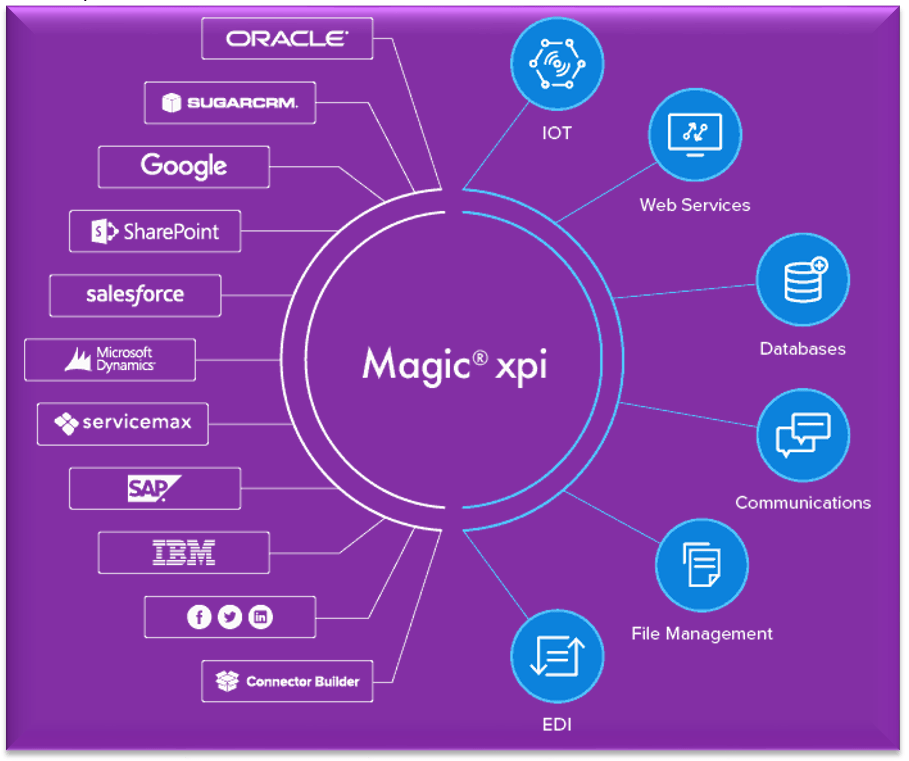
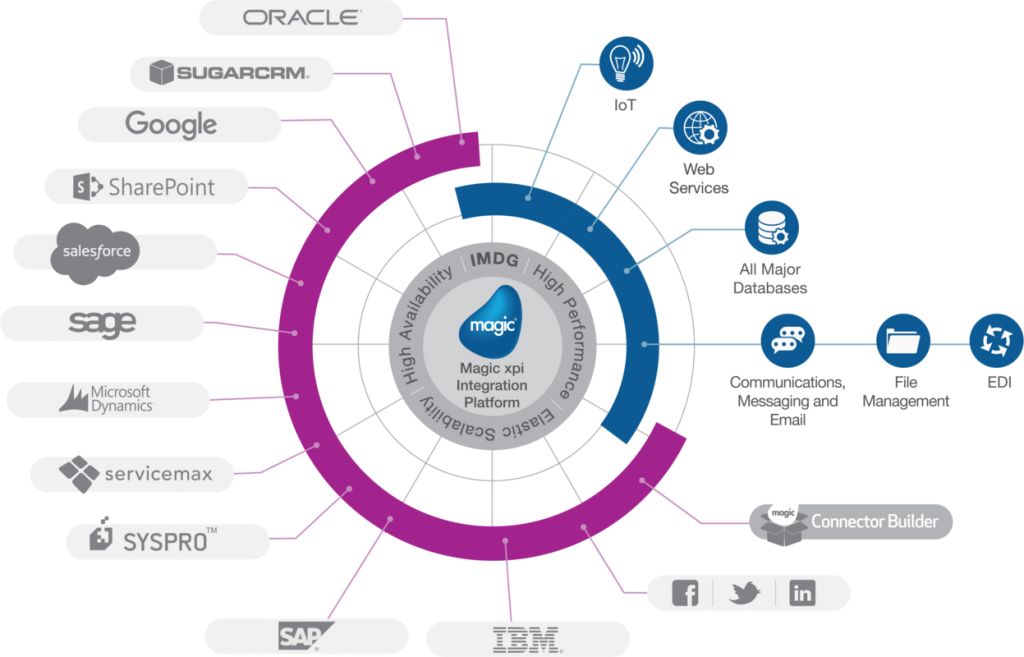
Magic xpi is an integration platform, offering a complete solution to automate the flow of data between business systems and applications such as (ERP) enterprise resource planning, (CRM) customer relationship management, (HRM) human resources management, (SCM) supply chain management, EDI, database, and e-commerce.

Why Magic xpi is the best choice for CRM and ERP Integration?

Out of the box, Magic xpi includes over 100 ready-to-use connectors to all popular IT systems, in addition there is a considerable number of certified connectors to connect to branded ERP/CRM systems such as JDE, SAP, Dynamics AX, Oracle, SharePoint, IBM, Google, and more.

These connectors allow to perform integration of applications, databases, APIs, platforms quickly and reliably.

Having an intuitive and easy-to-use drag-and-drop interface, it is suitable for both professional integrators and ordinary business users.

Magic xpi fits any IT infrastructure and can integrate all your business systems on-premises, on the cloud, or in a hybrid environment.

Magic xpi provides a stable front-end platform and the ability to integrate data and deliver the most relevant information to your employees, management, or customers.


Key benefits of data integration between CRM and ERP systems

The main benefits of CRM and ERP integration include but are not limited to:

1. No need to re-enter the same data and keep duplicates.

ERP and CRM systems have contact and accounting information used in both systems for different purposes. For example, in an ERP system, addresses are used for invoicing and product delivery, while in CRM, customer and prospect addresses are used to support sales / marketing.

Integration of CRM and ERP systems eliminates the need for double data entry. Thus, any change made in the CRM database will affect the ERP system and vice versa.

2. Easier and faster data exchange.

Integration of CRM and ERP data increases sales, since sales managers have full access to data from ERP having complete information on the product, they can place an order faster and more accurately.

3. Efficient order management

By integrating data between CRM and ERP, quotations created in CRM can be automatically converted into actual orders in the ERP system. This significantly reduces order processing times and increases the efficiency of the company.

Thus, the main advantages that companies receive from the integration of CRM and ERP are increased information availability, reduced order processing time, and improved interaction processes within the organization.


Suggested Readings: The main reasons why you need Microsoft Dynamics Integration with your business Systems


Integrate your CRM and ERP – quickly and efficiently

Optimize your company’s business processes and increase productivity by connecting CRM and ERP systems.

Benefit from our over 21 years of experience in integrations and cutting-edge technology.

Contact us for a free consultation and a Free Live Demo of the Magic xpi Integration Platform. In a screen-sharing format, we’ll show you how Magic xpi can solve your business needs.

April 26, 2021
https://www.edi2xml.com/wp-content/uploads/2021/04/CRM-ERP-Integration.png 350 1024 Tatyana Vandich https://www.edi2xml.com/wp-content/uploads/2024/08/edi2xml.com-EDI2XML-company-logo.png Tatyana Vandich2021-04-26 15:15:312024-10-11 13:39:25What is CRM and ERP integration and why it is essential?

All you need to know about Amazon Seller Central Integration

Blog

When talking about online shopping, most consumers think right away “Amazon”. Polls have shown that most Americans, when they decide to buy a product, first they look for it on Amazon.

According to Business of Apps, in 2020, Amazon has become the most popular mobile shopping app in most countries, with 169 million downloads. Can you imagine, all these users are your potential buyers!

Therefore, many companies, from startups to big brands, strive to make sales of their products on Amazon.

Amazon Marketplace Integration

A well-organized sale on Amazon marketplace attracts new customers, increases revenue, grows awareness of your products and brands, and ensures customer loyalty. However, what does a well-organized sale mean?

Basically, it is to manage Amazon orders and automated inventory synchronization efficiently and quickly with Amazon marketplace.

Integration of your Amazon Seller Central account with your business system (ERP or CRM) allows you to automatically synchronize Amazon orders, as well as your  inventory in real time. The order management process becomes simple, does not require manual input, and eliminates the most common problem – costly mistakes and inaccuracies in orders due to manual input.

Amazon Seller Central integration – everything you need to know

To help you understand such a complex topic like an integration of Amazon Seller Central account, we have developed an Amazon integration whitepaper. It concisely and clearly presents very important information about data automation and integration of Amazon Seller account.

Our Amazon whitepaper covers a variety of topics, ranging from the most basic ones such as:

  • What is Amazon marketplace?
  • What is Amazon seller account?
  • What is Amazon vendor central?
  • Who needs amazon integration?

It also reveals important questions such as:

  • What is the most important amazon integration?
  • Amazon seller account inventory and fulfillment
  • Integration with amazon seller account: amazon options for data integration
  • MWS (marketplace web service) VS SP-API  (seller partner API)

We will analyze one of the most important questions that companies think about when deciding to integrate Amazon Seller Account: “Should we integrate to Amazon on our own or outsourcing the service?” Such a simple question has so many answers. In our white paper, we’ll tell you about this so that it’s clear and there is no doubt about what to choose. Moreover, you will find a lot of other useful information in this whitepaper.

Download your free Amazon Integration whitepaper

It doesn’t matter what industry you work in, whether you are already a registered seller on Amazon, or just planning to start selling on Amazon. The information in this document will be very helpful to you.

Download your free copy to learn how to make your Amazon sales as profitable as possible and easy to manage.


You may also be interested in reading about:

  • EDI2XML integration for Amazon Seller Partners
  • Amazon Business: How to increase B2B sales on Amazon?
  • What is Dropshipping on Amazon?

April 16, 2021
https://www.edi2xml.com/wp-content/uploads/2021/04/EDI2XML-Amazon-Seller-Central-Integration.jpg 350 1024 Tatyana Vandich https://www.edi2xml.com/wp-content/uploads/2024/08/edi2xml.com-EDI2XML-company-logo.png Tatyana Vandich2021-04-16 16:36:192023-04-10 13:58:54All you need to know about Amazon Seller Central Integration

How Integration Can Improve Your Supply Chain Management

Blog

The efficient management of logistics processes involving multiple business partners is one of the main challenges faced by companies in the supply chain vertical.

There are many systems involved in the supply chain such as warehouse management systems (WMS), transportation management systems (TMS), enterprise resource planning (ERP), and much more.

However, the use of multiples of business systems and applications does not yet guarantee success.

The most important thing in the supply chain is the flow of information between the different systems, in a timely and efficient manner; this is called “data integration” which is necessary so different heterogenous systems can “communicate” with each other in a close to “real-time” fashion.

What is Supply Chain Management (SCM)?

Wikipedia gives the most accurate definition: “In commerce, supply chain management (SCM), the management of the flow of goods and services, money and information, involves the movement and storage of raw materials, of work-in-process inventory, and of finished goods as well as end to end order fulfilment from point of origin to point of consumption”.

In other words, the supply chain is the delivery of a product to a consumer. Which includes all stages from the transformation of raw materials into a finished product to delivery to the final consumer.

The main goal of the supply chain management is to coordinate all stages of the process to minimize overall costs and obtain the greatest efficiency.

What is “Integration” in the Supply Chain?

In information technology, integration is the connection of data, systems, applications, or devices to improve efficiency, productivity, and flexibility.

The purpose of integration in supply chain management is to combine different business systems responsible for different functions (warehouse, resource planning, accounting, electronic data interchange, etc.) that belong to different business partners to create a single efficient logistics system.

Internal and External Supply Chain Integration

There are two concepts in supply chain integration. Internal and external integration.

Internal integration is the interconnection of various business systems within one company.

External integration is the interaction between business partners through the interconnection of their numerous business systems responsible for various functions in logistics.

Typical examples of companies involved in the supply chain that require integration:

  • suppliers of raw materials and supplies
  • manufacturers of finished products
  • warehouses, 3 pl warehouses
  • transport companies and carriers
  • buyers (retailers, various companies, and organizations)
  • various intermediaries

Platform for full data integration across the entire supply chain

To improve efficiency, all companies involved in the supply chain need to simultaneously exchange data from different business systems. In other words, as previously mentioned, they need external integration.

Why is external integration so important? Integration in the supply chain is important because usually, any transaction goes through multiple systems such as ERP, CRM, financial, or warehouse systems. Normally, data for the same transaction must be transferred to the business partner (customer, supplier, 3pl warehouse, etc.). After receiving the data, the business partner must enter it into their business systems.

If companies have no integrated systems, data is transferred and processed manually or by downloading spreadsheets or files. Those processes are not efficient, they require a lot of resources and time, and there is a high risk of errors and data loss.

With the integration platform, companies can quickly and easily automate the exchange of information.


Useful reading: How to Choose the Right Integration Platform?


Integration platform for automating data entry

The goal of systems integration is to reduce costs and efforts for all participants in the supply chain process.

Manually entering duplicate information into several business systems takes a lot of time. Sometimes it requires hiring additional employees just to perform some of these mechanical functions. Furthermore, multiple manual entries into various systems are prone to human errors and less quality of information.

With the help of an integration platform like Magic xpi, you can quickly automate the data entry process, by reducing the time for entering data and ensuring their accuracy.

Besides, the use of modern gadgets, such as tablets and smartphones, allows data entry directly in the field (for example, when receiving goods at a warehouse), which speeds up information flows and improves customer service.

Magic xpi integration platform for efficient supply chain demand forecasting

Demand forecasting is the process of estimating future consumer demand over a given period using historical sales data and other information.

It is no secret that demand forecasting is very important for effective Supply Chain Management. Demand forecasting affects important business operations such as financial planning, raw material planning, production planning, marketing, and sales plans, as well as risk assessment.


Download Magic xpi product overview


Magic xpi can help you achieve more accurate forecasts by ensuring perfect coordination between your enterprise resource planning (ERP) and Customer relationship management (CRM) systems.

This will lead to increased profits and higher competitive advantage.

Magic xpi integration platform to improve transportation process

ERP integration with EDI, warehouse management system, and yard management software will help to improve transportation processes.

Magic xpi B2B Integration

The integration of these business systems provides instant information exchange and can significantly reduce downtime.

Thus, you or your transport companies will have more time to deliver the goods.

The best integration solution for Supply chain management

Supply chain management is a broad topic in which the integration of business systems plays a key role. Data integration can help manage all the necessary processes to ensure a smooth flow at all stages of the supply chain. It can significantly improve all the processes in the supply chain, ensure fast order fulfillment, reduce cost, and improve customer service.

Being a business partner with Magic Software Enterprises for over 20 years now, we provide powerful integration solutions. We have been helping our clients make their business profitable by integrating systems.

Contact us for a free consultation.


You may also be interested in reading about:

  • DELFOR, DELJIT, DESADV – key EDI messages in supply chain management for manufacturing
  • ORDERS and ORDRSP: The main EDIFACT messages in the supply chain management
  • Electronic Data Interchange (EDI) in the Supply Chain

March 29, 2021
https://www.edi2xml.com/wp-content/uploads/2021/03/EDI2XML-_integration-supply-chain.png 350 1024 Tatyana Vandich https://www.edi2xml.com/wp-content/uploads/2024/08/edi2xml.com-EDI2XML-company-logo.png Tatyana Vandich2021-03-29 10:20:162024-03-14 16:13:03How Integration Can Improve Your Supply Chain Management

The Top 6 EDI Documents for Retail Suppliers

Blog

In this post, I’ll give a brief overview of the top 6 EDI transactions used in the Retail industry, the main differences between documents exchange via EDI and email, and how you can quickly satisfy the request of a large retailer (such as Walmart, Target, Costco) about EDI compatibility and start exchanging EDI documents fairly quickly.

What is Electronic Data Interchange (EDI)?

EDI is a protocol to exchange business information between two organizations electronically based on a predefined standard. EDI has replaced the use of paper documents or the exchange of business information by email.

EDI in the Retail Industry

Electronic Data Interchange (EDI) has been widely adopted in the retail industry to facilitate efficient and accurate communication between trading partners. EDI is the electronic exchange of business documents between two or more organizations in a standardized format.

The retail industry has been using EDI for over 30 years. Can you imagine the volume of business documents flow at large retailers? They have thousands of transactions every month with hundreds of suppliers and tens of thousands of products.

For such large trading companies, it is simply impossible to do business without exchanging EDI. That is why they force their suppliers to exchange documents through EDI.

What is a Retail Supplier?

Supplier is any legal entity (organization, enterprise) or individual that provides goods to another entity. Retail suppliers are business-to-business (or B2B); they sell products to other companies, and not directly to the consumer.

Suppliers can be manufacturers, as well as various resellers (including wholesalers).

The supplier carries out business activities by the terms of the concluded supply agreement.

Giant retailers such as Best Buy, Wal-Mart, Costco, and Target have supply agreements with many different suppliers from whom they buy goods in bulk and then sell them to the final consumer in their stores or online stores.

What is the Difference Between EDI and Email?

email and EDI

Let us make a comparison between sending a purchase order from a Retailer to a supplier by email and another one by EDI. Here are some major differences:

1. Transfer or exchange of business information

Both methods have secure communication channels, however, EDI communication channels use higher security standards.


2. Standards and structure

The content of the email is not structured at all. There is no standardization when placing a purchase order via email. Thus, the supplier needs to check many elements such as subject, message body, attachments, because the information about the purchase order can be either in the body or in one or multiple attachments.

The content of an EDI Purchase Order (EDI 850) is very well structured, and it conforms to a specific standard (i.e. X12, EDIFACT, …). Each element and loop have a pre-defined purpose.

3. The ability to integrate with business systems (ERP/CRM)

Extracting the data “automatically” from an order coming by email is very difficult (not to say extremely difficult), while extracting the purchase order information from an EDI X12 850 for example, or a UN/EDIFACT ORDER is much more standard.

As a conclusion: exchanging business documents complying with EDI standards, enables companies and business partners in the retail to automatically integrate data into their internal business systems, efficiently and with great accuracy without human intervention.

Commonly used EDI Documents in Retail

e-commerce Integration

Large retailers using EDI can standardize the process with their trading partners, thereby improving all business processes, increasing profits and customer satisfaction. For all size suppliers, the use of EDI gives access to large retailers and therefore a stable volume of orders. Let us look at the main EDI transactions used in B2B trading between retailers and suppliers.


1 – EDI 846 – Inventory Inquiry/ Advice | EDIFACT INVRPT

EDI 846 (EDIFACT/INVRPT – Inventory Report) is a notification that the supplier usually sends to the retailer, which contains information about the availability of goods. This EDI transaction is used to inform your trading partners (retailers) about stock levels but does not oblige them to make a purchase. Usually, EDI 846 also includes pricing information.

For more information about EDI 846 read our article: What is EDI 846 document?


2 – EDI 850 – Purchase Order | EDIFACT ORDERS

EDI 850 (EDIFACT/ORDERS) is an electronic document that is used to place an order for goods.

EDI 850 is usually sent by retailers to their supplier of goods. This document indicates the quantity of the required goods as well as all the details regarding the order (Item description, price, and quantities, shipping details, requested delivery date, and location(s) of delivery).

If you want to know more about EDI 850 read the article: All you need to know about EDI ANSI X12 Transaction Set 850 Purchase Order


3 – EDI 855 – Purchase Order Acknowledgement | EDIFACT ORDRSP

The EDI 855 (EDIFACT/ORDRSP – purchase Order Response) is a reply to the message (EDI 850). It is sent by the supplier after receiving the order from the retailer.

By returning the 855 messages, a supplier agrees to fulfill the order or proposes to amend. In other words, using EDI 855, the supplier either notifies the full, partial, or refusal to fulfill the order. This message helps the retailer avoid supply disruptions.

You will find detailed information about EDI 855 in this article: What is EDI 855 Purchase Order Acknowledgment?


4 – EDI 856 – Advance Shipment Notice | EDIFACT DESADV

EDI 856 (EDIFACT/DESADV – Despatch Advice)  is a notification sent by the supplier immediately after the shipment of the goods leaves its warehouse.

The idea behind this message is that the retailer may know in advance about the fact that the products have been loaded, its quantity, and the expected delivery date. This way, he can efficiently plan the receipt and scanning of the goods at his warehouse.

You will find detailed information about EDI 856 in this article: What is Advanced Ship Notice (ASN) 856 transaction set?


5 – EDI 861 -Receiving Advice/Acceptance Certificate | EDIFACT RECADV

The EDI 861 (EDIFACT RECADV – Receiving Advice) acts as a response message to EDI 856 which confirms the acceptance of the goods.

Acceptance is communicated from the retailer to the supplier. It indicates there is a discrepancy between what was sent by the supplier and what was received by the retailer and details the list of goods received.

Besides, the retailer can provide additional information such as information about damaged items during transportation, etc.

Complete List of EDI Transactions, Sets & Codes for ANSI ASC X12 Standard


6 – EDI 810 – Invoice | EDIFACT INVOIC

EDI 810 (EDIFACT INVOIC – Invoice) is an electronic document provided by the supplier to the retailer to bill for the goods delivered. EDI 810 contains a list and description of goods, their quantity, and price, as well as information about the sender and recipient.

For complete information on EDI 810 read this article: What is an ANSI ASC X12 EDI 810 invoice?


These are some of the most commonly used EDI documents in the retail industry, facilitating efficient communication and transaction processing between trading partners.

EDI flow in the retail industry

Let us look at a typical EDI flow between trading partners (where the retailer acts as a buyer) in which the top 6 EDI transactions described above are involved.

1. The supplier sends or feeds the retailer his inventory status, to inform about the availability of goods – Inventory Inquiry/ Advice (EDI 846).

2. The retailer sends the Purchase Order to the supplier (EDI 850).

3. The supplier checks the availability of the goods in the warehouse and sends the Purchase Order Acknowledgment (EDI 855), in response to the Purchase Order.

4. The supplier immediately after shipment of the goods, generates and sends to the retailer an Advanced Ship Notice (EDI 856).

5. The retailer, after acceptance of the ASN received from the previous step, generates and sends the supplier a Receiving Advice/Acceptance Certificate (EDI 861).

6. The supplier, based on the above acceptance notifications, generates an Invoice (EDI 810).

This EDI flow is considered for the case when the trade agreement between the retailer and the supplier has already been concluded, and the retailer has a list of goods from each supplier in its business system.

Benefits of using EDI

EDI has long been an integral part of B2B especially in the retail vertical. Using EDI to exchange business information provides many business benefits to both large and small businesses. Here is a short list of those benefits:

Speeds up workflows

You can send any document in seconds.

Prompt exchange of documents speeds up the process of ordering and delivery of goods. The main benefit for the retailer is the uninterrupted replenishment of goods. For the supplier, a quick payment for the delivered goods.

Saving resources and time

No need to use operators for manual processing of business documents, duplicate on paper, store, send by mail, or courier.

One standard for everyone

EDI makes it easy to start selling to large retailers. Exchange EDI documents without worrying about format differences and compliance with business systems (ERP /CRM) of your trading partner.

Accelerate the acceptance of goods

When EDI is integrated into the retailer’s business system, data from suppliers goes directly to the accounting system. Thanks to automatic item matching, goods are accepted very quickly. The process of accepting the goods is quick and easy.

Reduces risks

EDI eliminates errors associated with manual data input, as well as the loss of documents.

Secured data transmission

EDI documents are transmitted over secured channels in encrypted form, or through private value added network, no concern about data breach.

About EDI2XML services

EDI2XML offers a wide range of EDI services to automate the exchange of documents between all parties in the retail and transportation industry, whoever they are: retailers, suppliers, shippers, consignees, and transport companies.

We help your company get started on exchanging EDI with your partners in a fairly and relatively short period of time, and on budget. Whether adopting our Fully EDI managed EDI Service or our EDI2XML self-service Web service, we can empower your company with the ability to send and receive any type of electronic documents such as Purchase Order (EDI 850) PO Acknowledgment (EDI 855), Invoices (EDI 810), ASN (EDI 856) and many more.


Useful Reading: Fully managed EDI service VS HTTP Web Service: Which is Better for Your Business ?


Contact us for more information and a free consultation.

Free EDI consultation
March 17, 2021
https://www.edi2xml.com/wp-content/uploads/2021/03/edi-for-retail-suppliers.png 350 1024 Tatyana Vandich https://www.edi2xml.com/wp-content/uploads/2024/08/edi2xml.com-EDI2XML-company-logo.png Tatyana Vandich2021-03-17 12:15:282024-09-27 08:57:06The Top 6 EDI Documents for Retail Suppliers

What is EDI 855 Purchase Order Acknowledgment?

Blog

This post was updated to reflect current trends and information.

Changing a Purchase Order (PO) is an undesirable business practice because it could lead to delays in delivery. Therefore, using EDI 855 becomes key to efficiently managing the ordering process.

EDI 855 Definition

The EDI 855 Purchase Order Acknowledgment is an EDI document that sellers send to a buyer as a response to an order 850, to confirm or reject the delivery of products.

Like all EDI (Electronic Data Interchange) transactions, EDI 855 is used in business-to-business (B2B) communication. Namely, when two business partners exchange electronically the business information in a pre-defined standardized format over a secure connection (VAN, AS2, sFTP).

EDI 855 is the answer to EDI 850 Purchase Order. In the retail business, these two EDI transaction sets (EDI 850 and EDI 855) are usually implemented together to provide high efficiency in the ordering process and provide more efficient logistics.

EDI ANSI ASC X12 855 Purchase Order Acknowledgment Transaction Set

You may have seen the various names and acronyms of EDI 855 transaction such as: X12 855, 855 EDI, EDI 855 document, 855 acknowledgment, EDI acknowledgment 855, EDI 855 message, EDI 855 transaction, EDI PO Acknowledgment, EDI 855 Ack, 855 PO Ack, Order Acknowledgment and so on… but this should not confuse you, all this means one thing: an EDI transaction formally known as EDI ANSI ASC X12 855 Purchase Order Acknowledgment Transaction Set.

The abbreviations in the formal name of this document mean the following:

  • ASC X12 – Accredited Standards Committee X12 (is a standards organization chartered by the American National Standards Institute, it develops and maintains the X12 standard).
  • ANSI -American National Standards Institute
  • X12 – EDI standard
  • Transaction Set – EDI document
  • 855 – code of the transaction

In EDIFACT (Electronic Data Interchange For Administration, Commerce and Transport) standard which is widely used in Europe, and in international trade, the EDI 855 is referred to as ORDRSP (Order Response) message.

How EDI 855 is Used to Manage Purchase Orders and Improve Efficiency?

Using Purchase Order Acknowledgment the seller informs the buyer whether the purchase order was:

  • accepted
  • rejected, or
  • accepted with changes (it means that changes were made to the accepted EDI 850 Order)

EDI 855 is based on the Purchase Order (EDI 850) and has various functions:

  • Confirms receipt of a Purchase Order (EDI 850).
  • Informs about the seller’s intention to fulfill the entire order without changes.
  • Informs about the refusal to fulfill the order.
  • Inform about errors and inaccuracies for example wrong prices, incorrect product numbers, etc.
  • Informs about change in the PO such as:
  1. article cancellation
  2. schedule change
  3. replace items on the order
  4. changes item quantity
  5. price change

Components of EDI 855 Purchase Order Acknowledgment:

What is 855 made of? EDI 855 is paired with EDI 850 and is formed on its basis. PO Acknowledgment contains the following information:

  • Information from PO 850 (Order numbers, date, product details, etc.)
  • buyer and seller information
  • order confirmation numbers
  • Dates of the planned delivery of goods
  • Scheduled time
  • Delivery address
  • Information about ordered products (barcodes, names, quantities, etc.)

855 Purchase Order Acknowledgment Structure

Typically, the EDI 855 structure consists of the following elements:

  • ISA Interchange Control Header. (Mandatory)
  • GS Functional Group Header. (Mandatory)
  • ST Transaction Set Header. (Mandatory)
  • BAK Beginning Segment for Purchase Order Acknowledgment. (Mandatory)
  • REF Reference Identification. (Optional)
  • PO1 Baseline Item Data. (Optional)
  • ACK Line Item Acknowledgment. (Optional)
  • DTM Date/Time Reference. (Optional)
  • CTT Transaction Totals. (Mandatory)
  • SE Transaction Set Trailer. (Mandatory)
  • GE Functional Group Trailer. (Mandatory)
  • IEA Interchange Control Trailer. (Mandatory)

However, it must be remembered that depending on the requirements of the business, optional elements may arise or be removed from the EDI 855 document.

Difference Between EDI 855 and EDI 997

It is sometimes mistakenly believed that EDI 997 (Functional Acknowledgment) can replace EDI 855. These two EDI messages should not be confused, as they have completely different functions.

EDI 997 is just a notification that Purchase Order (EDI 850) has been delivered and does not contain any validation to the Order. The EDI 855 transaction has many functions and informs the buyer whether his order will be fulfilled, and under which basis.

Why EDI 855 is an Important Link Between EDI 850 and EDI 856

Purchase Order Acknowledgment represents an important part of the order fulfillment. When a retailer receives confirmation of order quantities from EDI 856, restocking issues may occur.

Since the supplier sends the EDI 856 immediately after shipment, the retailer can realize that the order is not fully completed too late, when the goods are in transit.

Thus, he does not have time to order a similar product from the same or other suppliers to replenish the necessary stock on time.

EDI 855 for Retail Suppliers

EDI 855 is not implemented by all companies, although practice shows that this EDI document is one of the most important in retail B2B relationships between seller and buyer.

Therefore most of the major retailers such as Walmart and Costco have listed EDI 855 as mandatory EDI transaction for their suppliers.


Here is a Typical Business Flow Using EDI:

There are many scenarios of EDI workflow in the business relationship between the trading partners, thus many different types of EDI transactions may be involved in this process. All depending on the specifics of the company’s activities or the requirements of the business partner.

Below we will look at the simplest and most common business process in which the 855 is used.

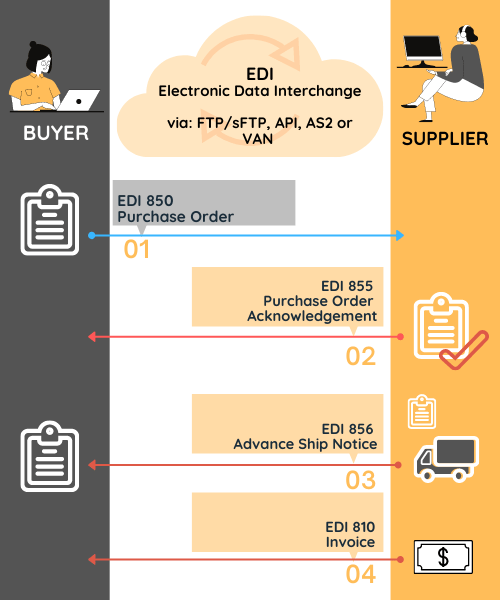
  • Step 1: The buyer sends the Purchase Order (EDI 850) to the supplier.
  • Step 2: To confirm readiness to fulfill the order, the supplier sends the buyer a Purchase Order Acknowledgment (EDI 855).
  • Step 3: As soon as the merchandise is shipped, the vendor sends an EDI 856 Ship Notice (ASN) to the buyer.
  • Step 4: An invoice 810 will follow so to get paid by the buyer.
 

What are the Benefits of EDI 855?

Summarizing the benefits of using EDI 855 for both trading partners that have already been described in this article, the following points can be highlighted:

  • Simplifies interaction with suppliers and increases work efficiency by reducing routine and inefficient operations (making control calls or writing e-mails to confirm or adjust a Purchase order).
  • Using EDI 855, the supplier can promptly notify the buyer if any of the ordered products are not available.
  • When generating EDI 855, the supplier can automatically book the goods for delivery at his warehouse.
  • The buyer, having quickly received information about the unavailability of some ordered product, can promptly place an order from another supplier.
  • Based on EDI 855, the buyer can predict the state of the inventory.
  • Use PO Acknowledgment can significantly improve Advanced Ship Notice (EDI 856) accuracy.

The Most Widely-Used EDI Document in Retail

As you can see from the above business flow, other important EDI documents are involved in the retails ordering process. The most common EDI Transaction sets are:

EDI for retail
  • EDI 846 Inventory Inquiry
  • EDI 850 Purchase Order
  • EDI 855 Purchase Order Acknowledgment
  • EDI 856 Advanced Ship Notice (ASN)
  • EDI 810 Invoice

How to Exchange EDI 855

There are several ways to exchange EDI messages with your business partner. During our more than 20 years of EDI integration practice, we have many clients who use our fully managed EDI services. So, let’s take a look at how does Fully Managed EDI Service works?

Fully Managed EDI Service to Exchange EDI 855

Our Fully managed EDI Solution allows you to create, send, receive, of EDI documents, as well as automatically integrate them into a company’s software system (ERP, CRM…). Following is a description of incoming and outgoing EDI flows, based on our EDI2XML fully Managed EDI Service

For Incoming EDI documents:

We connect to:

  • the Trading Partner’s mailbox, OR
  • a mailbox on our clients’ platform, OR
  • a mailbox on our EDI2XML platform we provide
  • We collect the incoming EDI message (i.e. 850) from the mailbox
  • We turn the received EDI document(s), into a format agreed upon with the client IT team (i.e. XML, TXT…)
  • We drop the final file into the mailbox, waiting for the client IT team to pick up and automatically process into their own software system, OR,
  • We integrate directly into the client’s ERP system, be it on-premises or in another cloud, using certified connectors of Magic xpi.

For Outgoing EDI documents:

  • We receive necessary files from our client, based on a format agreed upon with his IT team
  • We build the outgoing X12 EDI document (i.e. 855) based on the Trading Partner’s provided X12 format and specifications.
  • We connect to the destination’s mailbox & drop the X12 file(s)

EDI Web Services to Exchange EDI 855

However, not all companies can benefit from Fully Managed EDI Services due to implementation fees and monthly services fees. For small companies that need to use EDI with their business partners, we recommend EDI Web Services. It is a cost-effective solution that allows you to start exchange EDI messages in less than an hour and best of all, you don’t need to have any special EDI knowledge.

This is a much more profitable EDI solution for small companies, with no contract, and pay as you go concept. Moreover, you can get started with a free 15 days trial period! If you want to know more about the EDI web service click here.

Get a free consultation on how to streamline your B2B communication with EDI 855 and other essential EDI documents.


Looking for more Info? Download our free informative EDI Guides and Whitepaper here

March 2, 2021
https://www.edi2xml.com/wp-content/uploads/2021/03/edi855.png 350 1024 Tatyana Vandich https://www.edi2xml.com/wp-content/uploads/2024/08/edi2xml.com-EDI2XML-company-logo.png Tatyana Vandich2021-03-02 15:05:532024-09-20 12:24:08What is EDI 855 Purchase Order Acknowledgment?

EDI for Transportation – EDI 214 Transportation Carrier Shipment Status Message

Blog

Transportation and logistics companies rely heavily on EDI to exchange information with their trading partners, including shippers, carriers, and freight forwarders. EDI provides a standardized, automated method of exchanging documents, reducing the need for manual processing and improving the speed and accuracy of information exchange.

By adopting EDI, transportation companies have been able to streamline their processes and significantly reduce the time and costs associated with manual tasks. In this article, we will take a closer look at EDI 214 – Transportation Carrier Shipment Status Message and its importance in the transportation industry.

What is EDI 214?

EDI 214 is an electronic document used in the context of EDI (Electronic Data Interchange) to provide detailed shipment status information. The formal name of this EDI document is ANSI X12 214 Transportation Carrier Shipment Status Message Transaction Set.

EDI 214 Definition

EDI 214 is a delivery status message sent from the transportation company to the shipper, as well as the consignee and their agents, as an update on the status of delivery. The document provides real-time updates on the status of a shipment, from pickup to delivery, and includes details such as the carrier name, equipment type, pickup and delivery dates and times, and any exceptions or delays that may have occurred during transit.

Where Is EDI 214 Transportation Carrier Shipment Status Message Used?

EDI 214 is used in transportation, logistics, supply chain, and international trade. As mentioned above, transport companies use EDI 214 to inform shippers and consignees about the status of their cargo.

Here are some examples of the largest transportation companies in the world using EDI. It can be based on either the X12 or EDIFACT standard (which is typical for European companies).

  • DHL Supply Chain & Global Forwarding
  • Kuehne + Nagel
  • DSV
  • Sinotrans
  • UPS Supply Chain Solutions

Some examples of the biggest Less-Than-Truckload (LTL) Carriers in North America using EDI 214 document:

  • FedEx Freight
  • Old Dominion Freight Line
  • XPO Logistics
  • YRC Freight

Why is EDI 214 Important In The Transportation Industry?

In the transportation industry, timely and accurate information about the status of a shipment is crucial. EDI 214 allows carriers and their trading partners to exchange information quickly and efficiently, enabling them to make informed decisions about the shipment and take appropriate action if necessary.

What Does EDI 214 Include?

EDI 214 transaction set may include various information related to shipments made by transport service providers. Thus, as a status document, EDI 214 provides information about the physical location of cargo at any given time and can contain information on more than twenty “events”.

However, depending on the business model of the company or its specifics, business partners determine the exact list of necessary information to be transmitted in an EDI 214 document. Typically, the Transportation Carrier Shipment Status Message contains the following information:

  • Sent from – name and address
  • Place of delivery – address or coordinates
  • Shippers Purchase Order Number
  • Estimated Time of Arrival
  • Route Information
  • Delivery confirmation – location, signature
  • Information about the status of the shipment
  • Description of shipment – weight, packaging, and quantity.

Depending on the requirements of the company, EDI 214 can be produced 4 to 6 times per day up to a once per week; all depends on the business use case.

How Does EDI 214 Work?

EDI 214 works by using a standard format for exchanging information between trading partners. The document is transmitted electronically between the carrier and their trading partner, using a secure and reliable EDI network.

The information contained in the EDI 214 document is structured using a set of data elements and segments, which are defined by the ANSI X12 standard. The data elements and segments provide a standardized way to communicate information about the shipment, ensuring that all parties understand the information being shared.

EDI 214 Business Workflow

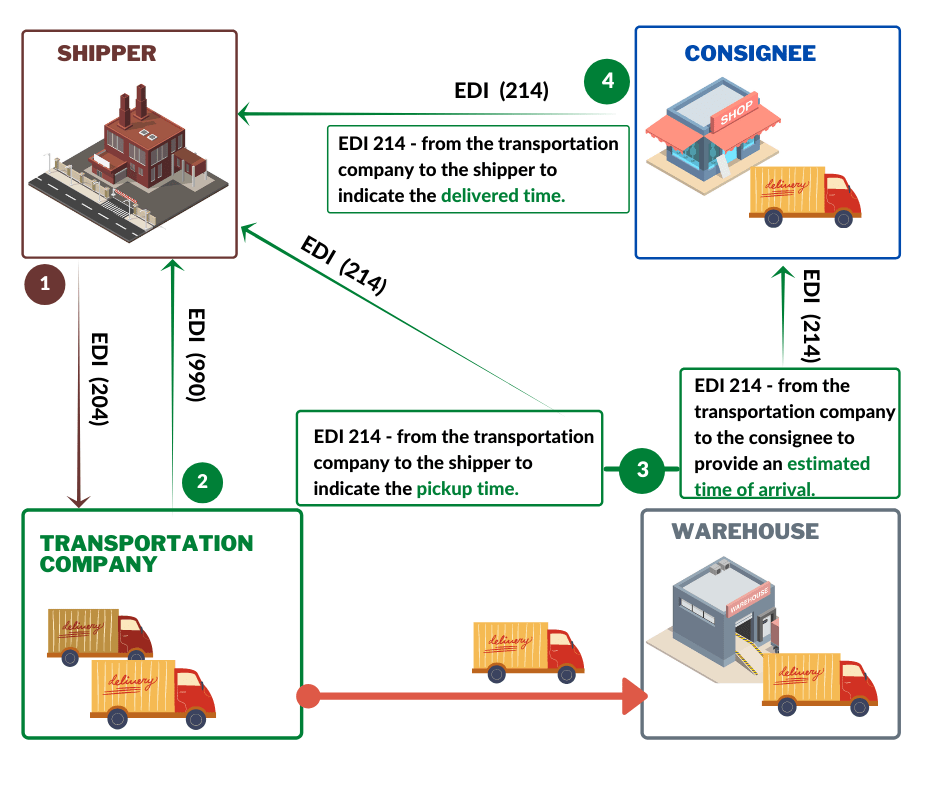
Usually, the EDI 214 Transportation Carrier Shipment Status Message can be partnered with additional EDI transactions, such as EDI 204 Load Tender and EDI 990 – Response to a Load Tender.

Below is one of the possible workflows involving EDI 214.

To accept the EDI 204 Load Tender transportation company must send to shipper EDI 990 – Response to a Load Tender. Then, the carrier starts feeding the shipper with EDI 214 Transportation Carrier Shipment Status Message.

EDI 214 contains information about pickup and delivery times. Moreover, EDI 214 transaction set can be sent multiple times. First EDI 214 to indicate loading time; next 214 transaction set, can be sent to indicate delivered time.

Benefits of Using EDI 214

For retailers, EDI 214 transaction serves as an important source of information when scheduling and/or adjusting the schedule of goods receipt, as well as for the efficient allocation of resources and personnel.

Besides, by receiving status updates via EDI 214 messages from carriers, retailers do not need to make verification calls to clarify delivery times.

Some of the key benefits of using EDI 214 in the transportation industry include:

Improved visibility: EDI 214 provides real-time updates on the status of a shipment, enabling carriers and their trading partners to track the shipment’s progress from pickup to delivery. This visibility allows them to proactively identify and resolve any issues that may arise during transit.

Increased efficiency: By automating the process of sharing shipment status information, EDI 214 eliminates the need for manual data entry and reduces the risk of errors. This leads to increased efficiency and reduces the time and costs associated with manual tasks.

Better collaboration: EDI 214 enables carriers and their trading partners to collaborate more effectively by sharing information in real-time. This collaboration improves communication and helps to ensure that all parties are on the same page when it comes to the shipment.

Many shippers and consignees use the Transportation Carrier Shipment Status Message as a tool to control the carrier’s transit time. To determine if the carrier has met the time schedules for transportation, they note the date and time of shipment and receipt of the goods.

EDI 214 Status Code List

The EDI 214 Transportation Carrier Shipment Status Message uses a standardized set of status codes to indicate the status of a shipment. Here are some commonly used status codes:

AF: ACTUAL PICKUP. The shipment has been picked up

AG: ESTIMATED DELIVERY. An estimated delivery date is calculated at the time the shipment is picked up.

AB: APPOINTMENT DATE. A delivery appointment has been set up.

AI: RECONSIGNED. The consignee has changed.

A3: RETURNED TO SHIPPER. The final status for this type of shipment.

AJ: TENDERED FOR DELIVERY. The tendered date for the shipment.

CA: CANCELED. The shipment has been canceled/voided for one of numerous reasons.

D1: DELIVERED.

A7: REFUSED BY CONSIGNEE.

K1: PROCESSING THROUGH CUSTOMS.

R1: RECEIVED FROM PRIOR CARRIER.

X9: DELIVERY APPOINTMENT REQUESTED

Note that this is not an exhaustive list and some EDI trading partners may use additional status codes or custom codes. It’s important to verify the specific status codes used by your trading partners to ensure accurate communication and avoid any delays or errors in your transportation operations.

EDI For The Transportation Services Sector and Logistics

Nowadays, almost every company, whether it is a shipper, consignee or carrier, exchange information through EDI.

Below is a list of the most popular EDI transactions in the transportation industry.

  • 204 Motor Carrier Load Tender
  • 990 Response to a Load Tender
  • 210 Motor Carrier Freight Details and Invoice
  • 211 Motor Carrier Bill of Lading
  • 212 Motor Carrier Delivery Trailer Manifest
  • 214 Transportation Carrier Shipment Status Message
  • 215 Motor Carrier Pickup Manifest
  • 216 Motor Carrier Shipment Pickup Notification
  • 820 Payment Order/Remittance Advice
  • 997 Functional Acknowledgment

Find the Perfect EDI Service For Your Business

Do you need to use the EDI 214 transaction with your business partner? Therefore, you are looking for an efficient fully managed, EDI service. You are at the right place. We can help you.

We offer our clients fully managed EDI Services including various communication protocols such as:

  • VAN
  • AS2
  • FTP, or sFTP.

Connect EDI With Your ERP, CRM, TMS, or e-Commerce

To ensure complete automation of your logistic processes, we integrate your EDI process with almost any business system in the market such as:

  • Microsoft Dynamics
  • Salesforce
  • Sage
  • Oracle NetSuite
  • JD Edwards
  • SAP

We also integrate EDI with e-commerce.

  • Amazon (Vendor Central)
  • Shopify
  • BigCommerce
  • Magento and many more

Start Exchanging EDI In An Hour or Less Using our EDI Web Service

EDI web service is the easiest and fastest way to get started with EDI.

To connect to our EDI REST web service and be able to exchange EDI documents, all you need to do is have access to the Internet and know your API Token and password for access.

In less than an hour, you can start exchanging EDI messages. EDI2XML REST web service provides great benefits for your business. You do not need to have experience with EDI. There is no need to sign a contract, pay as you go by very simple and dynamic pricing.


Useful: Request EDI2XML Web Service Price List


Regardless of whether you are a large freight forwarding company with numerous trading partners or a small transport company, you can exchange EDI 214 or any other EDI messages using our EDI REST service.

You can rely on our over 20 years of experience with EDI and integration projects, whether it is consulting, technical support, or project planning: we provide your company with everything you need.

Contact us for more information and a free consultation.


You may also be interested in reading about:

  • Electronic Data Interchange (EDI) in the Supply Chain
  • EDI Integration for Warehouse
  • EDI for Third-Party Logistics providers (3PL)
  • What is EDI 940 Warehouse Shipping Order?
February 17, 2021
https://www.edi2xml.com/wp-content/uploads/2021/02/EDI-214-1.png 350 1024 Tatyana Vandich https://www.edi2xml.com/wp-content/uploads/2024/08/edi2xml.com-EDI2XML-company-logo.png Tatyana Vandich2021-02-17 10:40:012023-05-09 15:20:40EDI for Transportation – EDI 214 Transportation Carrier Shipment Status Message

Amazon Seller Data Automation and Integration: Tips and Tricks

Blog

This post was updated to reflect current trends and information.


Today, I would like to address a few of the most important aspects of Amazon Seller integration and automation, and why companies selling on Amazon Marketplace have no choice other than adopting the path of “Automation and integration” to their internal software business systems (ERP / CRM), to stay competitive and profitable on Amazon.

Before I start addressing my points, let me start with some definitions for terms that are often used in this article, even though, I already detailed those definitions in previous articles.

What is Amazon Marketplace?

Amazon Marketplace is a Web-based platform owned by Amazon, where buyers and sellers can engage into commercial transactions.

Amazon Integration

Amazon offers access to Sellers and buyers globally, which is why there are different “Amazon Marketplaces”; Clients from different parts of the world can buy directly from that platform. Each marketplace refers to a region or country.

As an example, in North America, there are 3 Amazon Marketplaces:

1. Amazon.com: primarily to service the US market.

2. Amazon.ca: To service the Canadian market.

3. Amazon.mx: To service the Mexican market.

The same thing in Europe where you can find an Amazon Marketplace for the UK, another one for Germany, and so on…

Amazon Seller Account

Amazon allows any entity (being a person or an enterprise), to sell their products and services in Amazon one on multiple Amazon Marketplaces; in return for the service, Amazon bills a monthly subscription fee, in addition to some other fees paid per transaction, obviously depending on the subscription plan.

An entity or person who owns an Account on Amazon Marketplace to sell its products or services, is considered an “Amazon Seller”, or owns an “Amazon Seller Account”.

Amazon Vendor Central

In contrast to Amazon Seller Accounts, Amazon Vendor Central is the total opposite of the “Seller Account”. In this case, Amazon themselves buy from the Company, and they sell the products in Amazon Marketplaces.

Managing Amazon Seller Account

Managing a store for Amazon Seller Account – is the responsibility of the “Account owner” on Amazon (or the subscriber). It is the responsibility of the account owner, to feed the Amazon Store with the products catalog, pricing, specs, images… and all aspects of the store management.

Amazon Seller Account Inventory and Fulfillment

In terms of Inventory and fulfillment, there are few options offered by Amazon for shipping and fulfillment. I will expand on this topic in a separate article. But for now, let’s keep it simple; an Amazon Seller account owner has the option to manage the inventory and fulfillment of his Seller account, or pay amazon for such a service, under the FBA (Fulfilled by Amazon) program.


Useful Reading: What Is Amazon Integration & How Does It Work?


Integration with Amazon Seller Account

Amazon offers several ways to read and write data into a Seller Partner account. while all the offers are publicly documented, they require a certain level of expertise to implement, quickly and efficiently.

Amazon Options for Data Integration

In addition to the Amazon portal to manually manage the store, Amazon offers two options for an Amazon Seller Account owner, to build integrations and automation:

1. MWS (Marketplace Web Service): which is the first legacy integration door with the Amazon seller store.

2. SP-API (Seller Partner API): which is a new REST API service launched in September 2020 to replace the MWS.

Amazon MWS vs SP-API

In this paragraph, I will address some technical differences between both services.

Although MWS and SP-API of Amazon are both web services that enable programmatic access to seller data, there are major differences; following are some of those differences, extracted from Amazon website:

  • SP-API treats data as REST-compliant resources that can be accessed and modified via standard HTTP methods. At the opposite, Amazon MWS exposes data using operations that are very proprietary to Amazon MWS.
  • SP-API authorization leverages LWA and OAuth 2.0. This model eliminates the need for the manual exchange of auth tokens, as required by MWS.
  • The authorization process of Developers is much different between both; With Amazon MWS, sellers authorize developers. With SP-API, sellers authorize applications. This makes it safer for the Seller to Authorize an application of a developer, that was revised and approved by Amazon.
  • SP-API provides finer grain data access control than Amazon MWS. Developers can request access to only the data they need, and sellers can grant permissions at the API section, operation, or data resource level.
  • SP-API uses AWS Signature Version 4 for authentication. Amazon MWS uses Signature Version 2

To learn more about Amazon SP-API read our blog: Why You Should Migrate Amazon MWS to Amazon Selling API (SP-API)

Data Automation and Integration: Why Integration and Automation Are a Must

When operating eCommerce transactions on Amazon, and selling on multiple Marketplaces, companies find themselves in a situation where they cannot avoid such automation and integration with their own ERP or CRM, and this is for multiple reasons; I will list a few of the important ones:

1. Amazon is by far one of the biggest eCommerce platforms in the world, with the most items sold; Selling on Amazon, will certainly increase the sales of any company with the right product. This creates the first urgent reason automate and integrate the sales on Amazon Seller Account, into the Company’s ERP/CRM system. Companies would like to keep their books up to date, with less human interaction, and near real-time.

2. Companies who are successfully selling on more than one Amazon marketplace, see the need for automation faster. It is not an option for any company to manage multiple systems for orders and fulfillment.

e-commerce Integration


3. To compete in this tight eCommerce marketplace, faster fulfillment and shipping is expected from consumers. The fastest they get the goods the better it for the seller. To meet those fulfillment expectations, automation and integration should be in place.

4. The new reality created by COVID-19 disturbance of the economy worldwide, forced companies to adjust to the new reality if they want to stay the course, and remain competitive. Hiring more employees to produce the same result that can be achieved efficiently and quickly by machines is not an option today. Investing on automation and integration is the only way companies can achieve quick results and a quick measurable ROI.

“Do It Yourself” vs Outsourcing the Service?

Someone might say, well, cannot we do it ourselves? it is not that difficult, we have enough IT resources in-house, that can certainly handle such projects and get off the ground quickly.

My answer to this point is, of course, any company with sufficient time, resources and expertise can go into the project, and certainly deliver. However, there are some aspects of this approach should be highlighted and taken into consideration:

1. When doing it yourself, without enough internal resources, such projects can fall of the crack quickly.

2. At the technical level, although it seems straight forward to build such integration and automation projects, it requires lots of expertise and lots of learning. MWS is scheduled to be phased out by Amazon, we do not know when, and SP-API is taking over, but it is new, lots of security elements added and things can take time to learn and build.

3. Since a company is going to build it itself, it will be one and only one time to do the implementation; it does not pay off for this company, especially when it takes lots of time and effort.

4. Maintaining and managing the automation of Amazon Seller account data, at long term takes a lot of time and resources to keep it up and running; it certainly takes out of the staff’s internal efforts and would stretch them thin.


Useful Reading: EDI2XML integration for Amazon Seller Partners


The above points are the most important points and challenges I have noted from previous Amazon integration projects, where customers were frustrated and lost lots of time prior to decide to outsource their Amazon integration to our team at EDI2XML. Some of them they lost a valuable resources and money prior to seeing the light at the end of the tunnel.

Trust Our Experts For a Fully Managed Amazon Integration

To find out more about our Amazon integration expertise, and evaluate how we can help you, you can reach us by phone: (450) 681-3009 or use the form below to speak to our integration specialist!


The Following is a List of Additional Helpful Information:

What is Dropshipping on Amazon?

Amazon Business: How to increase B2B sales on Amazon?

Integration with Amazon Web Services (MWS): Things you should know

Integration with Amazon Seller or Vendor account: Things you should know

Free Amazon Integration Whitepaper

February 4, 2021
https://www.edi2xml.com/wp-content/uploads/2021/02/EDI2XML-Amazon-Seller-Data-Automation.jpg 350 1024 Pierre Namroud https://www.edi2xml.com/wp-content/uploads/2024/08/edi2xml.com-EDI2XML-company-logo.png Pierre Namroud2021-02-04 12:08:322024-04-05 14:20:37Amazon Seller Data Automation and Integration: Tips and Tricks
Page 12 of 24«‹1011121314›»
Recent
  • EDi Integration for SMB - Complete Guide
    Electronic Data Interchange (EDI): The Complete Guide for...July 17, 2026 - 4:46 pm
  • EDI Process Guide from EDI EDI Provider
    How EDI Documents Work Together: A Complete Guide to the...July 9, 2026 - 1:22 pm
  • Wayfair EDI & API Integration Guide
    Wayfair EDI & API Integration Guide for SuppliersJune 30, 2026 - 3:24 pm
  • Promotional banner about whether EDI is required for small businesses and a supplier’s guide to retail onboarding. Women at a desk inside a circular cutout image on the right.
    Is EDI Required for Small Businesses? A Supplier’s Guide...June 17, 2026 - 7:02 pm
  • EDI compliance with Loblaw
    How to Meet Loblaw EDI Requirements as a Small BusinessJune 4, 2026 - 2:05 pm
Popular
  • How to Quickly Connect to a Large Retailer's EDI Requirements
    How to Get EDI-Compliant Quickly For A Large RetailerNovember 21, 2025 - 4:29 pm
  • EDI-as-a-services
    EDI Translation Software “On-premises” or “As...January 21, 2014 - 1:28 pm
  • order-automation in e-commerce
    Why Is It Crucial to Automate the E-Commerce Order Fulfillment...May 10, 2022 - 1:58 pm
  • EDI for Logistics and transportation
    EDI Integration for Efficient Transportation ManagementOctober 6, 2023 - 1:33 pm
  • information technology definitions
    Business Tech Terms DefinitionsMay 24, 2018 - 1:32 pm

Browse by tag

Amazon Amazon Integration ANSI ASC x12 ASC X12 EDI B2B EDI integration e-commerce e-commerce business e-commerce integration eCommerce eCommerce integration EDI EDI2XML EDI 850 EDI as a Service EDI Communication EDI converter EDIFACT EDI for supply chain EDI for Third-Party Logistics EDI for transportation EDI implementation EDI Integration EDI Integration Project EDI project EDI Translation EDI Web Service EDI x12 ERP Integration integration platform integration project JDE Magic xpi Magic xpi Integration platform NetSuite online store Salesforce Shopify Shopify eCommerce integration Shopify integration Supply Chain Supply Chain Management Translation Software X12 EDI XML

Subscribe to our Blog

Menu

  • Home
  • About the EDI2XML Company
  • About EDI2XML EDI Converter
  • Blog
  • Book A Free Consultation
  • Privacy Policy EDI2XML Company

Our Services

Fully Managed Integration

E-Commerce Integration

Business Systems Integration

Fully Managed EDI

EDI Web Service 

On Premises EDI 

Managed Cloud Service


Latest Blog Posts

  • EDi Integration for SMB - Complete Guide
    Electronic Data Interchange (EDI): The Complete Guide for Modern BusinessesJuly 17, 2026 - 4:46 pm
  • EDI Process Guide from EDI EDI Provider
    How EDI Documents Work Together: A Complete Guide to the EDI Transaction ProcessJuly 9, 2026 - 1:22 pm
  • Wayfair EDI & API Integration Guide
    Wayfair EDI & API Integration Guide for SuppliersJune 30, 2026 - 3:24 pm

Contact Us

400 Blvd Curé-Labelle, #304 Laval QC H7V 2S7 Canada

Contact EDI2XML Team
Phone: +1 450-681-3009
Website: https://www.edi2xml.com/

© 2000-2026 EDI2XML (by Namtek Consulting Services). All rights reserved.
  • Link to Facebook
  • Link to LinkedIn
  • Link to X
  • Link to Youtube
  • Blog
Scroll to top Scroll to top Scroll to top